
springboot系列三、springboot 单元测试、配置访问路径、多个配置文件和多环境配置,项目打包发布
一、单元测试
生成的demo里面包含spring-boot-starter-test :测试模块,包括JUnit、Hamcrest、Mockito,没有的手动加上。
<dependency>

    <groupId>org.springframework.boot</groupId>

    <artifactId>spring-boot-starter-test
</artifactId> </dependency>
添加测试类:
@RunWith(SpringRunner.class)

@SpringBootTest

public class DemoApplicationTests {

    private MockMvc mvc;

    @Before

    public void setUp(){

        mvc = MockMvcBuilders.standaloneSetup(new HelloWorldController()).build();

    }

    @Test

    public void getHello() throws Exception {

        mvc.perform(MockMvcRequestBuilders.get("/hello").accept(MediaType.APPLICATION_JSON))

                .andExpect(status().isOk())

                .andExpect(content().string(equalTo("Hello World")));

    }

}
二、修改访问端口和路径
1、修改端口号
- 使用properties文件方式:
在src/main/resoutces目录下创建:application.properties,添加如下配置即可修改端口号:
server.port=8088
- 使用yml文件方式:
在src/main/resoutces目录下创建:application.yml,添加如下配置即可修改端口号:
server:

  port:8088
2、修改项目访问路径
使用properties文件方式:
在application.properties,添加如下配置即可修改项目访问路径:
server.servlet.context-path=/springboot-demo
- 使用yml文件方式:
在application.yml,追加如下配置即可修改项目访问路径:
server:

  port:8088
  servlet:
   context-path: /springboot-demo
3、修改默认容器
在之前默认使用的 WEB 容器是 Tomcat 容器,实际上在 SpringBoot 里面如果用户有需要也可以将容器更换为 jetty 容器,如果 现在要想使用这个容器,则只需要追加一些依赖即可:
1、移除默认容器
<dependency>

  <groupId>org.springframework.boot</groupId>

  <artifactId>spring-boot-starter-web</artifactId>

  <exclusions>

    <exclusion>

      <groupId>org.springframework.boot</groupId>

               <artifactId>spring-boot-starter-tomcat</artifactId>

          </exclusion>

  </exclusions>

</dependency>
2、添加jetty
<dependency>

  <groupId>org.springframework.boot</groupId>

  <artifactId>spring-boot-starter-jetty</artifactId>

</dependency>
三、加载读取多个配置文件
1、application.properties 和 application.yml的优先级
那么这个时候将优先进行application.properties配置文件的加载,如果现在两个配置项的作用冲突了,则以 properties 为主,如果不冲突,则以存在的为主。
2、多配置文件支持(yml和property)
格式必须是application-xxx.properties或者是application-xxx.yml命
在application.properties或application.yml中引入,有两个用法:
1、直接引入
创建application-message.properties,内容如下:
code=-message

content=消息不存在
在application.properties或application.yml中引入,多个文件用逗号隔开
spring.profiles.include=message
注入到bean中
@Component

public class Message{

    @Value("${code}")

    private String code;

    @Value("${content}")

    private String content;

    public String getCode() {

        return code;

    }

    public void setCode(String code) {

        this.code = code;

    }

    public String getContent() {

        return content;

    }

    public void setContent(String content) {

        this.content = content;

    }

}
使用:
package com.example.demo.controller;

import com.example.demo.Property.BaseMsg;

import com.example.demo.Property.Message;

import org.springframework.beans.factory.annotation.Autowired;

import org.springframework.web.bind.annotation.RequestMapping;

import org.springframework.web.bind.annotation.RestController;

import java.util.Properties;

@RestController

public class HelloWorldController {

    @Autowired

    private Message message;

    @RequestMapping("/message")

    public String message() {

        System.out.println(message.getCode());

        return "message:"+message.getCode();

    }

}
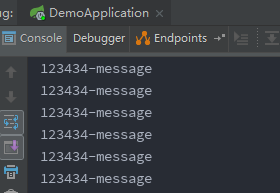
测试,访问:http://localhost:8082/message
2、特定环境激活
spring.profiles.active=devMsg
或通过启动参数激活,在启动命令中添加
-Dspring.profiles.active="devMsg"
@Profile表示只有当spring.profiles.active激活配置一致时才会注入,用法示例:
@Component

@Profile("testMsg")

public class TestMsg extends BaseMsg{

    @Value("${msg.code}")

    private String msgCode;

    public String getMsgCode() {

        return msgCode;

    }

    public void setMsgCode(String msgCode) {

        this.msgCode = msgCode;

    }

}
四、springboot多环境配置
多环境配置有两种方式,一种配置在同一个文件中,另一种时时配置在多个文件中。
1、配置在多个文件中
在Spring Boot中多环境配置文件名需要满足application-{profile}.properties的格式,其中{profile}对应你的环境标识,比如:
application-dev.properties:开发环境
application-test.properties:测试环境
application-prod.properties:生产环境
至于哪个具体的配置文件会被加载,需要在application.properties文件中通过spring.profiles.active属性来设置,其值对应{profile}值。
如:spring.profiles.active=test就会加载application-test.properties配置文件内容
或
执行java -jar xxx.jar --spring.profiles.active=test,也就是测试环境的配置(test)
2、配置同一个文件中
spring:

  profiles:

    active: pro
server:

  servlet:

    context-path: /springboot-demo

---

#开发环境配置

spring:

  profiles: dev

server:

  port:

---

#测试环境配置

spring:

  profiles: test

server:

  port:

---

#生产环境配置

spring:

  profiles: pro

server:

  port:
通过spring.profiles.active: pro或者java -jar xxx.jar --spring.profiles.active=pro动态切换环境,---分隔符,分开后相当于单独一个文件,---前是公共配置。System.getProperty()方法获取系统变量和启动参数。
五、打包发布
1、打包
- 运行maven package,如果项目有改动需要先运行maven clean
- 打包完,target下面会有项目jar包,demo-0.0.1-SNAPSHOT.jar
2、运行
拷贝demo-0.0.1-SNAPSHOT.jar到指定目录,运行
java -jar demo-0.0.-SNAPSHOT.jar
访问:http://192.168.1.100:8081/hello
springboot系列三、springboot 单元测试、配置访问路径、多个配置文件和多环境配置,项目打包发布的更多相关文章
- Servlet3.0注解配置访问路径和urlParttern配置
一.Servlet用注解配置访问路径 二.IDEA的tomcat相关配置 其中,第一点的配置文件,直接在IDEA的可视化操作界面修改就可以改掉配置文件中内容: 三.urlParttern配置 其中,* ...
- SpringBoot系列三:SpringBoot基本概念(统一父 pom 管理、SpringBoot 代码测试、启动注解分析、配置访问路径、使用内置对象、项目打包发布)
声明:本文来源于MLDN培训视频的课堂笔记,写在这里只是为了方便查阅. 1.了解SpringBoot的基本概念 2.具体内容 在之前所建立的 SpringBoot 项目只是根据官方文档实现的一个基础程 ...
- Spring boot 默认静态资源路径与手动配置访问路径
在application.propertis中配置 ##端口号server.port=8081 ##默认前缀spring.mvc.view.prefix=/## 响应页面默认后缀spring.mvc. ...
- Spring boot 默认静态资源路径与手动配置访问路径的方法
这篇文章主要介绍了Spring boot 默认静态资源路径与手动配置访问路径的方法,非常不错,具有参考借鉴价值,需要的朋友可以参考下 在application.propertis中配置 ##端口号 ...
- spring:设置映射访问路径 或 xml配置访问路径 (spring mvc form表单)
项目hello, 在src/main/java下面建一个目录: charpter2 一.xml配置访问路径 web.xml <web-app> <display-name>Ar ...
- SpringCloud系列三:SpringSecurity 安全访问(配置安全验证、服务消费端处理、无状态 Session 配置、定义公共安全配置程序类)
1.概念:SpringSecurity 安全访问 2.具体内容 所有的 Rest 服务最终都是暴露在公网上的,也就是说如果你的 Rest 服务属于一些你自己公司的私人业务,这样的结果会直接 导致你信息 ...
- SpringBoot系列三:SpringBoot自定义Starter
在前面两章 SpringBoot入门 .SpringBoot自动配置原理 的学习后,我们对如何创建一个 SpringBoot 项目.SpringBoot 的运行原理以及自动配置等都有了一定的了解.如果 ...
- SPRING-BOOT系列之SpringBoot快速入门
今天 , 正式来介绍SpringBoot快速入门 : 可以去如类似 https://docs.spring.io/spring-boot/docs/2.1.0.BUILD-SNAPSHOT/refer ...
- SpringBoot系统列 2 - 配置文件,多环境配置(dev,qa,online)
实现项目的多环境配置的方法有很多,比如通过在Pom.xml中配置profiles(最常见) 然后在Install项目打War包的时候,根据需求打不同环境的包,如图: 这种配置多环境的方法在SSM框架中 ...
随机推荐
- bypy 用法
因为服务器上爬取到的40个G的数据采用http,ftp,scp传输到本地效果不太理想.找资料就看到了bypy,利用百度云存储解决这个问题,解决了服务器带宽有限的问题. pip install bypy ...
- 【codeforces 175D】 Plane of Tanks: Duel
http://codeforces.com/problemset/problem/175/D (题目链接) 题意 A,B两人玩坦克大战,坦克有生命值,射击间隔,伤害范围,未命中的概率.问A赢的概率是多 ...
- zookeeper安装和使用(Windows环境)
zookeeper安装和使用(Windows环境) 2017年11月27日 10:36:07 董昊炘的博客 阅读数:14785 标签: zookeeperwindows zookeeper 一.简 ...
- mac 中vim永久显示行号、开启语法高亮
步骤1: cp /usr/share/vim/vimrc ~/.vimrc 先复制一份vim配置模板到个人目录下 注:redhat 改成 cp /etc/vimrc ~/.vimrc 步骤2: vi ...
- (reverse)Palindromes hdu2163
Palindromes 链接:http://acm.hdu.edu.cn/showproblem.php?pid=2163 (此题是为了对于JAVA温故知新的) Problem Description ...
- [译]Golang中的优雅重启
原文 Graceful Restart in Golang 作者 grisha 声明:本文目的仅仅作为个人mark,所以在翻译的过程中参杂了自己的思想甚至改变了部分内容,其中有下划线的文字为译者添加. ...
- CentOS Linux release 7.3破解密码详解
CentOS Linux release 7.3破解密码详解 作者:尹正杰 版权声明:原创作品,谢绝转载!否则将追究法律责任. 公司最近接了一个项目,拿到客户现有的源代码,但是服务器用户密码并不知情, ...
- elasticsearch索引清理
只是记录两条简单的命令 查看所有的索引文件: curl -XGET http://localhost:9200/_cat/indices?v 删除索引文件以释放空间: curl -XDELETE ht ...
- JAVA记录-SpringMVC scope属性的两种模式
singleton作用域:当把一个Bean定义设置为singleton作用域是,Spring IoC容器中只会存在一个共享的Bean实例,并且所有对Bean的请求,只要id与该Bean定义相匹配,则只 ...
- POJ - 3279 Fliptile (枚举)
http://poj.org/problem?id=3279 题意 一个m*n的01矩阵,每次翻转(x,y),那么它上下左右以及本身就会0变1,1变0,问把矩阵变成全0的,最小需要点击多少步,并输出最 ...