
iOS 7 UI 过渡指南 - 開始之前(iOS 7 UI Transition Guide - Before You Start)
iOS 7 UI Transition Guide
- Preparing for Transition
- Updating the UI
Before You Start
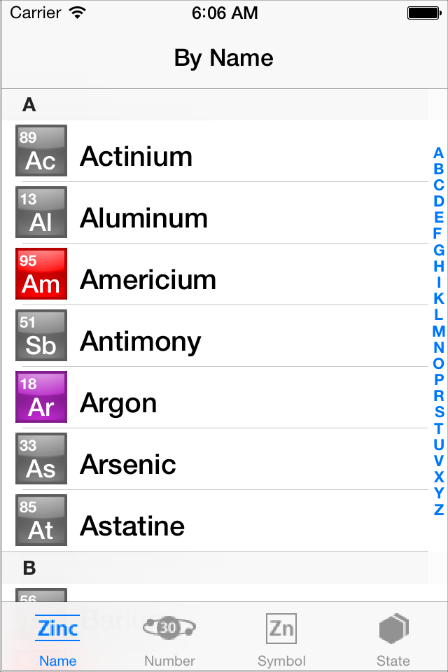
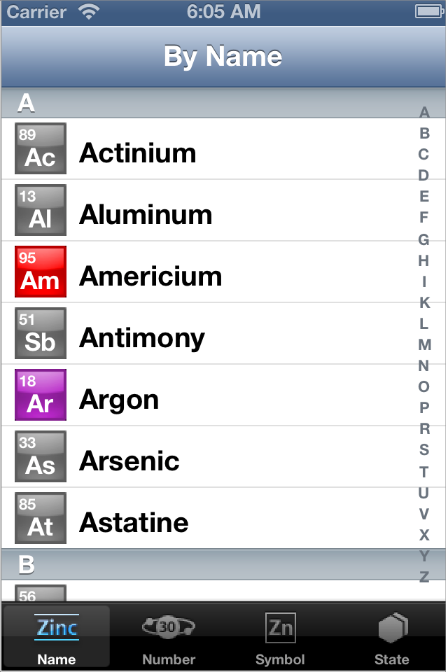
iOS 7 introduces many UI changes, such as borderless buttons, translucent bars, and full-screen layout for view controllers. Using Xcode 5, you can build a project for iOS 7 and run it in iOS 7 Simulator to get a first glimpse of the way the app looks with iOS 7 UI.
For example, the only differences between the two versions of TheElements sample project shown below are the deployment target and the simulator.
TheElements sample app in iOS 7 Simulator
TheElements sample app in iOS 6 Simulator
It’s tempting to dive straight into the work of updating your app, but there are a few things to think about before beginning the process.
As you interact with the built-in apps, it becomes clear that the changes in iOS 7 are both subtle and profound. Familiar UI elements are easily recognizable but look very different. Visual touches of physicality and realism are muted and refined, while realism in motion is enhanced.
As you continue to explore, you begin to discern the main themes of iOS 7:
Deference. The UI helps users understand and interact with the content, but never competes with it.
Clarity. Text is legible at every size, icons are precise and lucid, adornments are subtle and appropriate, and a sharpened focus on functionality motivates the design.
Depth. Visual layers and realistic motion heighten users’ delight and understanding.
By bringing fundamental and pervasive changes to the iOS experience, iOS 7 provides a rare opportunity to revisit the way apps communicate their core purpose and functionality to users. Although you might not be prepared to take full advantage of this opportunity today, keep it in mind as you update your app to run in iOS 7. (If you are ready to revisit your app design—or you’re beginning a new project—read Designing for iOS 7 in iOS Human Interface Guidelines for some guidance.)
Characterizing Your App
Whether you decide to redesign an app or update its current design, you need to know how the app’s characteristics can influence the process. First, use the following questions to help shape your strategy:
Did you use Auto Layout to design the app?
If your app uses Auto Layout, your job is easier. In Xcode 5, Auto Layout can help an app accommodate new UI element metrics and respond appropriately to dynamic changes in text size. Auto Layout is particularly helpful if you’re transitioning an iOS 6 app or you need to support both iOS 6 and iOS 7.
If you didn’t use Auto Layout, now may be the perfect time to start, especially if you need to support more than one version of an app. If you use manual or programmatic layout techniques, you're responsible for ensuring that the layout adjusts appropriately when text size changes.
Does the app need to support iOS 6?
Remember that iOS users tend to be very quick to update their devices, and they expect their favorite apps to follow suit.
If business reasons require you to support iOS 6, it’s still best to begin by updating the current app for iOS 7. Then, if appropriate, apply some of the design changes to the iOS 6 version of the app. For some details of this process, see Supporting iOS 6.
The next step in shaping a transition strategy is to examine the ways in which the app is customized. The amount of customization—and the specific customization techniques you use—impact the type of work you have to do.
Think of apps as being divided into the following three types:
Standard. The app contains only standard, uncustomized UI elements provided by UIKit.
Custom. The app presents a completely custom UI that doesn’t include any UIKit UI elements.
Hybrid. The app contains a mix of standard and custom elements, including standard elements that you customized using UIKit tinting and appearance-customization APIs.
For a standard app, you need to decide whether your visual and user experience designs still make sense in the iOS 7 environment. If you decide to keep the current layout and interaction model, most of the work involves making minor adjustments and ensuring that the app handles the new systemwide gestures correctly.
Custom apps—that is, apps that use no UIKit UI elements—require a more nuanced approach. For example, if you feel that the current UI and experience of the app is still appropriate, there may be very little to do. On the other hand, if you feel that the app’s personality and user experience should change in order to delight iOS 7 users, you have more work to do.
Hybrid apps vary in the amount of work required, depending on the customizations you did and how you combined custom and standard elements. In addition to revisiting the overall design of a hybrid app, you need to make sure that your customizations still work well and look good when they’re integrated with standard elements.
iOS 7 UI 过渡指南 - 開始之前(iOS 7 UI Transition Guide - Before You Start)的更多相关文章
- iOS 7用户界面过渡指南
iOS 7用户界面过渡指南 泽涛陈 | 交互设计 视觉设计 译译生辉 | 2013.06.26 本文最新PDF格式文档下载: http://vdisk.weibo.com/s/InBpB(2013年7 ...
- iOS 7 UI 过渡指南 - 支持续 iOS 6(iOS 7 UI Transition Guide - Supporting iOS 6)
iOS 7 UI Transition Guide Preparing for Transition Before You Start Scoping the Project Supporting i ...
- 从今天開始学习iOS开发(iOS 7版)--实现一款App之Foundation框架的使用
iOSFoundation框架 当你着手为你的应用编写代码的时候,你会发现有很多可供使用的Objective-C的框架类,当中尤其重要的就是基础框架类.它为平台全部的应用提供基础服务.基础框架类中包括 ...
- iOS runtime探究(三): 从runtime開始理解OC的属性property
你要知道的runtime都在这里 转载请注明出处 http://blog.csdn.net/u014205968/article/details/67639303 本文主要解说runtime相关知识, ...
- iOS runtime探究(二): 从runtime開始深入理解OC消息转发机制
你要知道的runtime都在这里 转载请注明出处 http://blog.csdn.net/u014205968/article/details/67639289 本文主要解说runtime相关知识, ...
- iOS中从零開始使用protobuf
让我们一起打开以下这个链接 https://github.com/alexeyxo/protobuf-objc 在github上有protobuf-objc,当中的readme能够教会我们安装prot ...
- 今天開始慢下脚步,開始ios技术知识的查漏补缺。
从2014.6.30 開始工作算起. 如今已经是第416天了.不止不觉.时间过的真快. 通过对之前工作的总结.发现,你的知识面.会决定你面对问题时的态度.过程和结果. 简单来讲.知识面拓展了,你才干有 ...
- iPhone开发【一】从HelloWorld開始
转载请注明出处,原文网址:http://blog.csdn.net/m_changgong/article/details/8013553 作者:张燕广 从经典的HelloWorld開始踏入iPhon ...
- 【React Native开发】React Native配置执行官方样例-刚開始学习的人的福音(8)
),React Native技术交流4群(458982758),请不要反复加群! 欢迎各位大牛,React Native技术爱好者加入交流!同一时候博客左側欢迎微信扫描关注订阅号,移动技术干货,精彩文 ...
随机推荐
- PYTHON-模块 json pickle shelve xml
""" pickle 和 shevle 序列化后得到的数据 只有python才能解析 通常企业开发不可能做一个单机程序 都需要联网进行计算机间的交互 我们必须保证这个数据 ...
- 最全的基于MFC的ActiveX控件开发教程
浏览器插件之ActiveX开发(一) 一般的Web应用对于浏览器插件能不使用的建议尽量不使用,因为其涉及到安全问题以及影响用户安装(或自动下载注册安装)体验问题.在有特殊需求(如涉及数据安全的金融业务 ...
- web性能监控与分析
注:原文为:andyguo: <web性能监控与分析> 性能测试需要使用不同的工具,结合系统日志,监控服务器.应用等方面的多项指标.以下阐述监控指标.监控工具.瓶颈分析. 服务端监控指标 ...
- VM 安装 linux Enterprise_R5_U4_Server_I386_DVD教程图解
ocp 学习笔记 20161126--------linux 笔记整理 一:安装linux系统环境: 1:linux 系统安装包下载路径:链接:链接: https://pan.baidu.com/s/ ...
- Ant+Jmeter自动化接口测试的部署 及 部署过程中的坑
一.环境准备: 1.Jdk1.6或以上:http://www.oracle.com/technetwork/java/javase/downloads/index.html 配置环境变量-系统变 ...
- python 全栈开发,Day140(RabbitMQ,基于scrapy-redis实现分布式爬虫)
一.RabbitMQ 队列 在生产者消费模型中,比如去餐馆吃饭的例子.生产者相当于厨师,队列相当于服务员,消费者就是你. 我们必须通过服务员,才能吃饭! 如果队列满了,队列会一直hold住.必须让消费 ...
- Kafka动态增加Topic的副本
一.kafka的副本机制 由于Producer和Consumer都只会与Leader角色的分区副本相连,所以kafka需要以集群的组织形式提供主题下的消息高可用.kafka支持主备复制,所以消息具备高 ...
- PAT 之 A+B和C
时间限制 1000 ms 内存限制 32768 KB 代码长度限制 100 KB 判断程序 Standard 题目描述 给定区间 [-2的31次方, 2的31次方] 内的3个整数 A.B 和 C,请判 ...
- SPFILEOPENBANKDB.ORA 手动编辑产生问题
因为最近启动后发现经常内存高占用,一个ORACLE实例占用超过7G内存,两个就15G,卡的让人坐立不安.于是百度了一下,使用下面的命令将sga_max_size从7G修改为200M show para ...
- 如何解决海量数据的Top K问题
1. 问题描述 在大规模数据处理中,常遇到的一类问题是,在海量数据中找出出现频率最高的前K个数,或者从海量数据中找出最大的前K个数,这类问题通常称为“top K”问题,如:在搜索引擎中,统计搜索最热门 ...