
iOS 7 UI 过渡指南 - 支持续 iOS 6(iOS 7 UI Transition Guide - Supporting iOS 6)
iOS 7 UI Transition Guide
- Preparing for Transition
- Updating the UI
Supporting iOS 6
If business reasons require you to continue supporting iOS 6 or earlier, you need to choose the most practical way to update the app for iOS 7. The techniques you choose can differ, but the overall advice remains the same: First, focus on redesigning the app for iOS 7. Then—if the redesign includes navigational or structural changes—bring these changes to the iOS 6 version as appropriate (don’t restyle the iOS 6 version of the app to use iOS 7 design elements, such as translucent bars or borderless bar buttons).
Using Interface Builder to Support Multiple App Versions
Interface Builder in Xcode 5 includes new features that help you transition an app to iOS 7 while continuing to support earlier versions.
Get a preview of how the UI updates you make affect an earlier version. Using the assistant editor, you can make changes to an iOS 7 storyboard or XIB file on the canvas and simultaneously see how those changes look in the iOS 6 version of the file.
Follow these steps to preview an earlier storyboard or XIB file:
While viewing the iOS 7 storyboard or XIB file on the canvas, open the assistant editor.
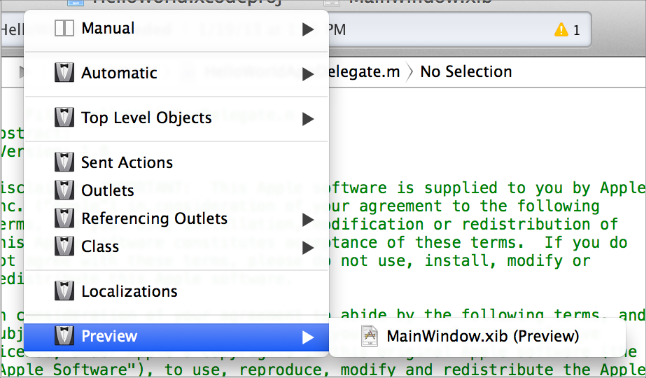
Open the Assistant pop-up menu. (The Assistant pop-up menu is the first item to the right of the back and forward arrows in the assistant editor jump bar.)
In the menu, scroll to the Preview item and choose the storyboard or XIB file.
Toggle between viewing app UI in iOS 7 and iOS 6.1 or earlier. If your app needs to support iOS 6.1 or earlier, use this feature to make sure the UI looks correct in all versions of the app.
Follow these steps to switch between two versions of the UI:
Open the File inspector in Interface Builder.
Open the “View as” menu.
Choose the version of the UI you want to view.
For more information about new Interface Builder features in Xcode 5, see What's New in Xcode.
Supporting Two Versions of a Standard App
If both versions of a standard app should have a similar layout, use Auto Layout to create a UI that works correctly in both versions of iOS. To support multiple versions of iOS, specify a single set of constraints that Auto Layout can use to adjust the views and controls in the storyboard or XIB files (to learn more about constraints, see Constraints Express Relationships Between Views).
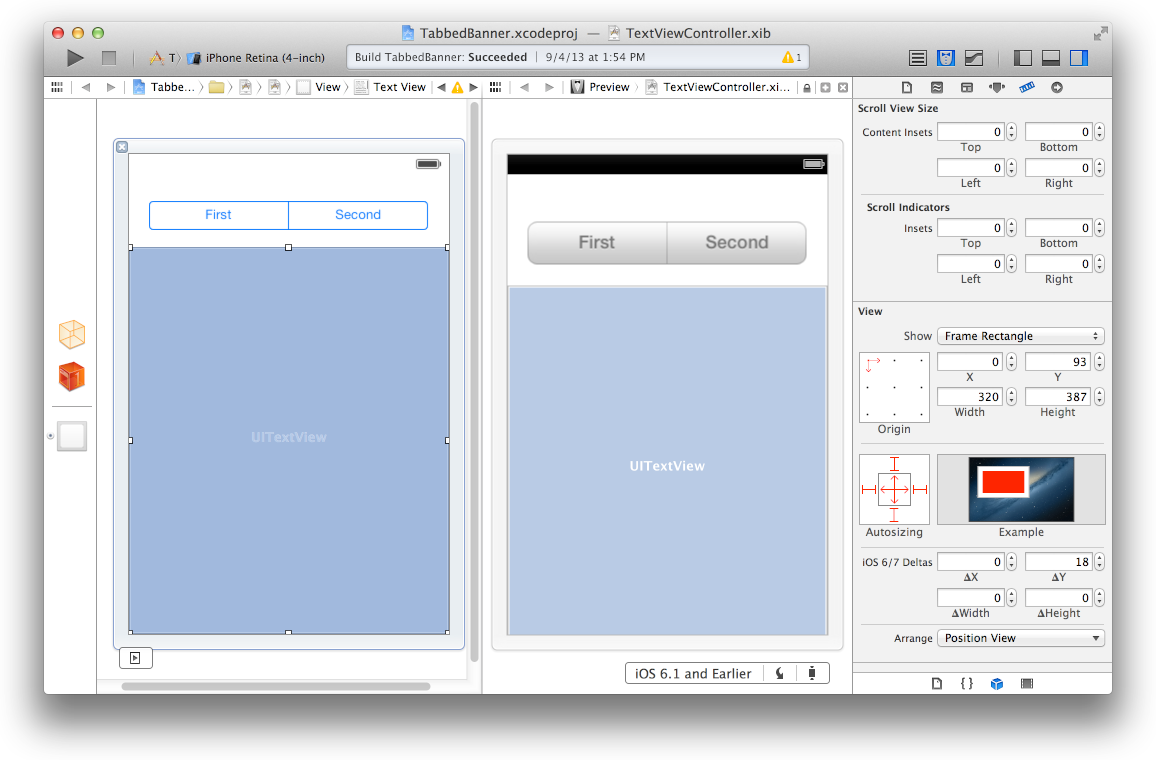
If both versions of a standard app should have a similar layout and you’re not using Auto Layout, use offsets. To use offsets, first update the UI for iOS 7. Next, use the assistant editor to get a preview of how the changes affect the earlier version (to open the preview, select the Preview item in the Assistant pop-up menu as described in Using Interface Builder to Support Multiple App Versions). Then, specify values that define the origin, height, and width of each element in the earlier UI as offsets from the element’s new position in the iOS 7 UI. For example, the y position of the text view shown below would have to change by 18 points in the earlier version of the UI to accommodate the greater height of the iOS 6 segmented control.
To learn more about Auto Layout, see Auto Layout Guide.
Managing Multiple Images in a Hybrid App
Hybrid apps often include custom image assets, such as bar button icons, and background views for bars or other controls. Apps can use one or more asset catalogs to manage these resources. (To learn more about asset catalogs, see Asset Catalog Help.)
In a hybrid app that must support multiple versions of iOS, you manage the images yourself. Images that differ depending on an app’s version should have unique names; otherwise, you can use the same image in both versions.
If your storyboard or XIB file contains an embedded image, consider creating an outlet to the image view and loading the appropriate resource as needed. To learn how to load different assets in code, see Loading Resources Conditionally.
Loading Resources Conditionally
In some cases, you need to determine the iOS version your app is currently running in so you can respond to version differences appropriately in code. For example, if different versions of an app use significantly different layouts, you can load different storyboard or XIB files for each version. You may also need to use different code paths to handle API differences, such using barTintColor instead of tintColor to tint a bar’s background.
If you need to load different resources for different app versions—and you currently identify a storyboard or XIB file in your Info.plist file—you can use the version of the Foundation framework to determine the current system version and load the appropriate resource in application:didFinishLaunchingWithOptions:. The code below shows how to check the Foundation framework version:
if (floor(NSFoundationVersionNumber) <= NSFoundationVersionNumber_iOS_6_1) {// Load resources for iOS 6.1 or earlier} else {// Load resources for iOS 7 or later}
iOS 7 UI 过渡指南 - 支持续 iOS 6(iOS 7 UI Transition Guide - Supporting iOS 6)的更多相关文章
- iOS 7用户界面过渡指南
iOS 7用户界面过渡指南 泽涛陈 | 交互设计 视觉设计 译译生辉 | 2013.06.26 本文最新PDF格式文档下载: http://vdisk.weibo.com/s/InBpB(2013年7 ...
- iOS 7 UI 过渡指南 - 開始之前(iOS 7 UI Transition Guide - Before You Start)
iOS 7 UI Transition Guide Preparing for Transition Before You Start Scoping the Project Supporting i ...
- 李洪强iOS开发之-入门指南
李洪强iOS开发之-入门指南 1零基础小白如何进行iOS系统学习 首先,学习目标要明确:其次,有了目标,要培养兴趣,经常给自己一些正面的反馈,比如对自己的进步进行鼓励,在前期小步快走:再次,学技术最重 ...
- View Programming Guide for iOS ---- iOS 视图编程指南(四)---Views
Views Because view objects are the main way your application interacts with the user, they have many ...
- iOS原生地图开发指南续——大头针与自定义标注
iOS原生地图开发指南续——大头针与自定义标注 出自:http://www.sxt.cn/info-6042-u-7372.html 在上一篇博客中http://my.oschina.net/u/23 ...
- iOS Password AutoFill开发指南
转载请标明来源:https://www.cnblogs.com/zhanggui/p/9431950.html 引言 在<iPhone User Guide for iOS 11.4>这本 ...
- iOS开发调试技巧总结(持续更新中)
作者:乞力马扎罗的雪 原文 对于软件开发而言,调试是必须学会的技能,重要性不言而喻.对于调试的技能,基本上是可以迁移的,也就是说你以前在其他平台上掌握的很多调试技巧,很多也是可以用在iOS开发中.不 ...
- View Programming Guide for iOS ---- iOS 视图编程指南(五)---Animations
Animations Animations provide fluid visual transitions between different states of your user inter ...
- View Programming Guide for iOS ---- iOS 视图编程指南(二)---View and Window Architecture
View and Window Architecture 视图和窗口架构 Views and windows present your application’s user interface and ...
随机推荐
- 洛谷P2617 Dynamic Rankings 主席树 单点修改 区间查询第 K 大
我们将线段树套在树状数组上,查询前预处理出所有要一起移动的节点编号,并在查询过程中一起将这些节点移到左右子树上. Code: #include<cstdio> #include<cs ...
- [Javascript] Improve Composition with the Compose Combinator
To make our composition more readable and easier to name we are going to ceate a compose function we ...
- Java数据结构-线性表之单链表LinkedList
线性表的链式存储结构,也称之为链式表,链表:链表的存储单元能够连续也能够不连续. 链表中的节点包括数据域和指针域.数据域为存储数据元素信息的域,指针域为存储直接后继位置(一般称为指针)的域. 注意一个 ...
- 利用 border 实现的图片选区效果,只需一层图一蒙层
<html> <style> #p { background: url("http://soso5.gtimg.cn/sosopic_j/0/436416703332 ...
- Cannot find the class file for javax.servlet.ServletContext.
当eclipse中新导入的Java Project的时候.往往会碰到各种各样的问题,以下是个典型的问题: Cannot find the class file for javax.servlet.Se ...
- hdu-2871
#include<iostream> #include<cstdio> #include<cstring> #include<algorithm> #i ...
- 可变对象 vs 不可变对象(Python)
Python 在 heap 中分配的对象分成两类:可变对象和不可变对象.所谓可变对象是指,对象的内容是可变的,例如 list.而不可变的对象则相反,表示其内容不可变. 不可变对象:int,string ...
- The python programing language
Python is an example of high-level language. As you might infer from the name “high-level language”, ...
- Metasploit的攻击实例讲解----ms10_046快捷方式图标漏洞
不多说,直接上干货! 准备工具 1.Kali linux 2016.2(Rolling)系统 IP: 192.168.1.103 2.受害者机子(windows XP系统) IP: 10.10 ...
- hbase伪分布安装配置
hbase1.2.4 伪分布式安装 注意:在安装hbase或者hadoop的时候,要注意hadoop和hbase的对应关系.如果版本不对应可能造成系统的不稳定和一些其他的问题.在hbase的lib ...