
iOS 7 UI 过渡指南 - 開始之前(iOS 7 UI Transition Guide - Before You Start)
iOS 7 UI Transition Guide
- Preparing for Transition
- Updating the UI
Before You Start
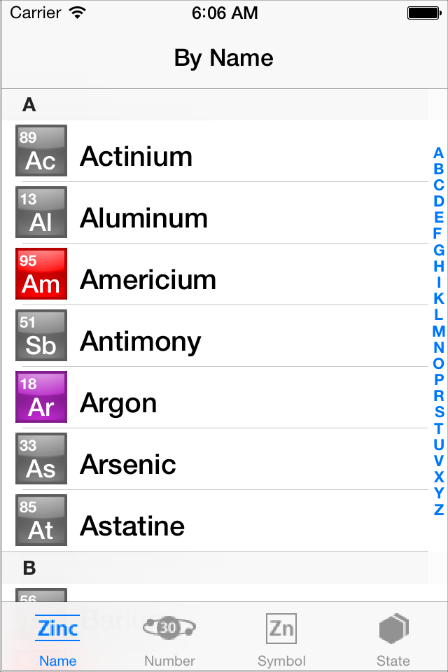
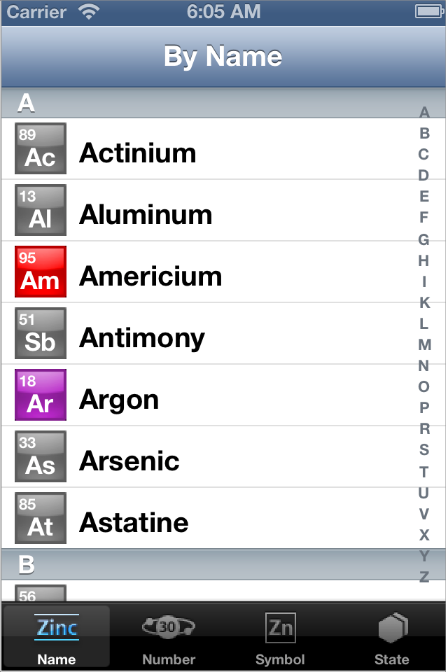
iOS 7 introduces many UI changes, such as borderless buttons, translucent bars, and full-screen layout for view controllers. Using Xcode 5, you can build a project for iOS 7 and run it in iOS 7 Simulator to get a first glimpse of the way the app looks with iOS 7 UI.
For example, the only differences between the two versions of TheElements sample project shown below are the deployment target and the simulator.
TheElements sample app in iOS 7 Simulator
TheElements sample app in iOS 6 Simulator
It’s tempting to dive straight into the work of updating your app, but there are a few things to think about before beginning the process.
As you interact with the built-in apps, it becomes clear that the changes in iOS 7 are both subtle and profound. Familiar UI elements are easily recognizable but look very different. Visual touches of physicality and realism are muted and refined, while realism in motion is enhanced.
As you continue to explore, you begin to discern the main themes of iOS 7:
Deference. The UI helps users understand and interact with the content, but never competes with it.
Clarity. Text is legible at every size, icons are precise and lucid, adornments are subtle and appropriate, and a sharpened focus on functionality motivates the design.
Depth. Visual layers and realistic motion heighten users’ delight and understanding.
By bringing fundamental and pervasive changes to the iOS experience, iOS 7 provides a rare opportunity to revisit the way apps communicate their core purpose and functionality to users. Although you might not be prepared to take full advantage of this opportunity today, keep it in mind as you update your app to run in iOS 7. (If you are ready to revisit your app design—or you’re beginning a new project—read Designing for iOS 7 in iOS Human Interface Guidelines for some guidance.)
Characterizing Your App
Whether you decide to redesign an app or update its current design, you need to know how the app’s characteristics can influence the process. First, use the following questions to help shape your strategy:
Did you use Auto Layout to design the app?
If your app uses Auto Layout, your job is easier. In Xcode 5, Auto Layout can help an app accommodate new UI element metrics and respond appropriately to dynamic changes in text size. Auto Layout is particularly helpful if you’re transitioning an iOS 6 app or you need to support both iOS 6 and iOS 7.
If you didn’t use Auto Layout, now may be the perfect time to start, especially if you need to support more than one version of an app. If you use manual or programmatic layout techniques, you're responsible for ensuring that the layout adjusts appropriately when text size changes.
Does the app need to support iOS 6?
Remember that iOS users tend to be very quick to update their devices, and they expect their favorite apps to follow suit.
If business reasons require you to support iOS 6, it’s still best to begin by updating the current app for iOS 7. Then, if appropriate, apply some of the design changes to the iOS 6 version of the app. For some details of this process, see Supporting iOS 6.
The next step in shaping a transition strategy is to examine the ways in which the app is customized. The amount of customization—and the specific customization techniques you use—impact the type of work you have to do.
Think of apps as being divided into the following three types:
Standard. The app contains only standard, uncustomized UI elements provided by UIKit.
Custom. The app presents a completely custom UI that doesn’t include any UIKit UI elements.
Hybrid. The app contains a mix of standard and custom elements, including standard elements that you customized using UIKit tinting and appearance-customization APIs.
For a standard app, you need to decide whether your visual and user experience designs still make sense in the iOS 7 environment. If you decide to keep the current layout and interaction model, most of the work involves making minor adjustments and ensuring that the app handles the new systemwide gestures correctly.
Custom apps—that is, apps that use no UIKit UI elements—require a more nuanced approach. For example, if you feel that the current UI and experience of the app is still appropriate, there may be very little to do. On the other hand, if you feel that the app’s personality and user experience should change in order to delight iOS 7 users, you have more work to do.
Hybrid apps vary in the amount of work required, depending on the customizations you did and how you combined custom and standard elements. In addition to revisiting the overall design of a hybrid app, you need to make sure that your customizations still work well and look good when they’re integrated with standard elements.
iOS 7 UI 过渡指南 - 開始之前(iOS 7 UI Transition Guide - Before You Start)的更多相关文章
- iOS 7用户界面过渡指南
iOS 7用户界面过渡指南 泽涛陈 | 交互设计 视觉设计 译译生辉 | 2013.06.26 本文最新PDF格式文档下载: http://vdisk.weibo.com/s/InBpB(2013年7 ...
- iOS 7 UI 过渡指南 - 支持续 iOS 6(iOS 7 UI Transition Guide - Supporting iOS 6)
iOS 7 UI Transition Guide Preparing for Transition Before You Start Scoping the Project Supporting i ...
- 从今天開始学习iOS开发(iOS 7版)--实现一款App之Foundation框架的使用
iOSFoundation框架 当你着手为你的应用编写代码的时候,你会发现有很多可供使用的Objective-C的框架类,当中尤其重要的就是基础框架类.它为平台全部的应用提供基础服务.基础框架类中包括 ...
- iOS runtime探究(三): 从runtime開始理解OC的属性property
你要知道的runtime都在这里 转载请注明出处 http://blog.csdn.net/u014205968/article/details/67639303 本文主要解说runtime相关知识, ...
- iOS runtime探究(二): 从runtime開始深入理解OC消息转发机制
你要知道的runtime都在这里 转载请注明出处 http://blog.csdn.net/u014205968/article/details/67639289 本文主要解说runtime相关知识, ...
- iOS中从零開始使用protobuf
让我们一起打开以下这个链接 https://github.com/alexeyxo/protobuf-objc 在github上有protobuf-objc,当中的readme能够教会我们安装prot ...
- 今天開始慢下脚步,開始ios技术知识的查漏补缺。
从2014.6.30 開始工作算起. 如今已经是第416天了.不止不觉.时间过的真快. 通过对之前工作的总结.发现,你的知识面.会决定你面对问题时的态度.过程和结果. 简单来讲.知识面拓展了,你才干有 ...
- iPhone开发【一】从HelloWorld開始
转载请注明出处,原文网址:http://blog.csdn.net/m_changgong/article/details/8013553 作者:张燕广 从经典的HelloWorld開始踏入iPhon ...
- 【React Native开发】React Native配置执行官方样例-刚開始学习的人的福音(8)
),React Native技术交流4群(458982758),请不要反复加群! 欢迎各位大牛,React Native技术爱好者加入交流!同一时候博客左側欢迎微信扫描关注订阅号,移动技术干货,精彩文 ...
随机推荐
- android getActivity.findViewById获取ListView 返回NULL
在控件ID正确的情况下,检查是否在实例化布局文件之后,获取LISTVIEW, 先inflate找layout下布局文件,并实例化后才能获得Listview的ID demo: public class ...
- passive 的事件监听器(转载)
passive 的事件监听器 很久以前,addEventListener() 的参数约定是这样的: addEventListener(type, listener, useCapture) 后来,最后 ...
- Java中加密算法介绍及其实现
1.Base64编码算法 Base64简介 Base64是网络上最常见的用于传输8Bit字节码的编码方式之一,Base64就是一种基于64个可打印字符来表示二进制数据的方法.可查看RFC2045-RF ...
- codeforce 139E
成段更新+离散化才能过,数据好强.. 单点更新挂在了test27,下次做到成段更新再来做! /* 期望=存活概率*点权值/100 ans=sum(期望) 离散化树木权值,数轴统计累加可能倒下的树木概率 ...
- Centos7.1 mini版安装后安装图形界面教程
[1]GNOME安装 1.执行下面命令安装GNOME Desktop Environment yum -y groups install "GNOME Desktop" 2.安装完 ...
- Java_myeclipse添加DTD约束(框架xml只能提示功能)
以struts2中的xml为例 struts-2.3.4-all\struts-2.3.4\src\core\src\main\resources
- GDIPlus非典型误用一例
// ** 初始化GDI+ Gdiplus::GdiplusStartupInput gdiplusStartupInput; // ** 该成员变量用来保存GDI+被初始化后在应用程序中的GDI+标 ...
- 浅谈Spring MVC知识
关于MVC框架,我相信大家都不陌生,都会说也就是模型-视图-控制器这三层的框架结构,如果你参加面试的时候考官会问:“MVC框架是什么?你说一说.”其实我们都知道这个问题还需要问的,只要你是一个开发人员 ...
- 乐观锁和悲观锁及CAS实现
乐观锁与悲观锁 悲观锁:总是假设最坏的情况,每次去拿数据的时候都认为别人会修改,所以每次在拿数据的时候都会上锁,这样别人想拿这个数据就会阻塞直到它拿到锁.传统的关系型数据库里边就用到了很多这种锁机制, ...
- NFS服务自动搭建及挂载脚本
一.写脚本的动机 由于最近老是搭建NFS,虽然不复杂,但是很繁琐.安装服务.修改配置文件.手动挂载.写入开机自动挂载等于是就写了一个脚本 二.脚本说明及审明 作用:该脚本主要实现NFS自动安装,客户端 ...