
Cisco VTP中继协议配置
VTP协议:
VLAN中继协议,VTP,VLAN TRUNKING PROTOCOL,是CISCO专用协议,大多数交换机都支持该协议。VTP负责在VTP域内同步VLAN信息,
这样就不必在每个交换上配置相同的VLAN信息。VTP还提供一种映射方案,以便通信流能跨越混合介质的骨干。VTP最重要的作用是,将进行
变动时可能会出现在的配置不一致性降至最低。不过,VTP也有一些缺点,这些缺点通常都与生成树协议有关.
知识点:
VLAN中继协议(VTP)利用第2层中继帧,在一组交换机之间进行VLAN通信.VTP从一个中心控制点开始,维护整个企业网上VLAN的添加和重命名工作,确保配置的一致性。
设计思路:
1、 Cisco C3560配置成为VTP server并设置VTP管理域名称CCTV
2、 Cisco C3560创建三个VLAN(VLAN10 VLAN20 VLAN 30)并配置每个VLAN动态获取IP
3、 Cisco C3650 分配三个端口fa 0/1-3 设置为trunk
4、 三台Cisco C2960配置成为 VTP client
5、 C2960_01 分配fa 0/1-5给VLAN 10 ,并设置fa0/24端口为trunk
6、 C2960_02 分配fa 0/1-5给VLAN 20 ,并设置fa0/24端口为trunk
7、 C2960_03 分配fa 0/1-5给VLAN 30 ,并设置fa0/24端口为trunk
网络拓扑图:
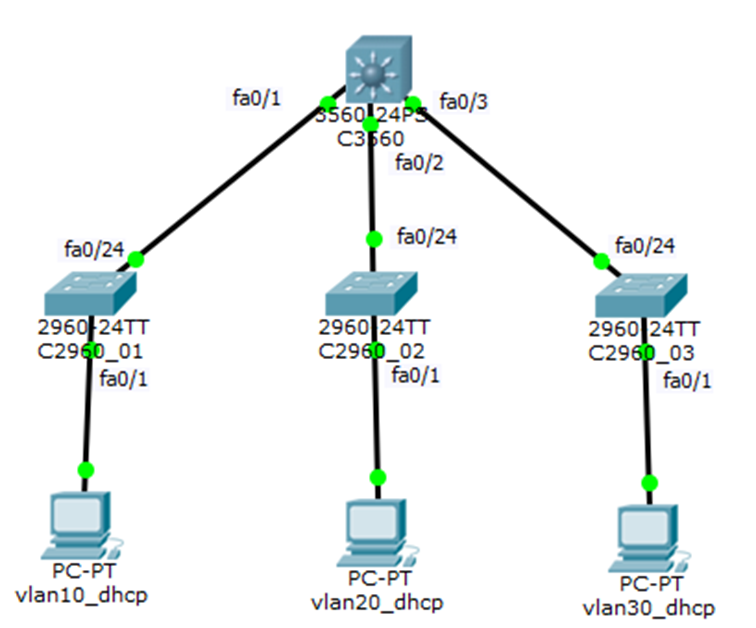
Cisco C3560配置如下:
##设置VTP 域名名称及VTP Server
C3560>enable
C3560#vlan database
C3560(vlan)#vtp domain CCTV
C3560(vlan)#vtp server
##创建VLAN 10 VLAN 20 VLAN 30
C3560(vlan)#vlan 10 name VLAN10
C3560(vlan)#vlan 20 name VLAN20
C3560(vlan)#vlan 30 name VLAN30
C3560(vlan)#exit
##VLAN配置IP地址
3560#configure terminal
C3560(config)#interface vlan 10
C3560(config-if)#ip address 192.168.10.1 255.255.255.0
C3560(config-if)#exit
C3560(config)#interface vlan 20
C3560(config-if)#ip address 192.168.20.1 255.255.255.0
C3560(config-if)#exit
C3560(config)#interface vlan 30
C3560(config-if)#ip address 192.168.30.1 255.255.255.0
C3560(config-if)#exit
##配置DCHP
C3560(config)#service dhcp
C3560(config)#ip dhcp pool vlan10_dhcp
C3560(dhcp-config)#network 192.168.10.0 255.255.255.0
C3560(dhcp-config)#default-router 192.168.10.1
C3560(dhcp-config)#dns-server 114.114.114.114
C3560(dhcp-config)#exit
C3560(config)#ip dhcp excluded-address 192.168.10.1 192.168.10.10
C3560(config)#ip dhcp pool vlan20_dhcp
C3560(dhcp-config)#network 192.168.20.0 255.255.255.0
C3560(dhcp-config)#default-router 192.168.20.1
C3560(dhcp-config)#dns-server 114.114.114.114
C3560(dhcp-config)#exit
C3560(config)#ip dhcp excluded-address 192.168.20.1 192.168.20.10
C3560(config)#ip dhcp pool vlan30_dhcp
C3560(dhcp-config)#network 192.168.30.0 255.255.255.0
C3560(dhcp-config)#default-router 192.168.30.1
C3560(dhcp-config)#dns-server 114.114.114.114
C3560(dhcp-config)#exit
C3560(config)#ip dhcp excluded-address 192.168.30.1 192.168.30.10
##设置三个端口fastEthernet 0/1-3为trunk
知识点:VLAN的封装类型,目前有ISL和802.1q(dot1q)两种协议,ISL是思科私有的VLAN封装协议,思科部分交换机支持ISL协议,使用该协议能提高VLAN传输性能。
C3560(config)#interface range fastEthernet 0/1-3
C3560(config-if-range)#switchport trunk encapsulation ?
dot1q Interface uses only 802.1q trunking encapsulation when trunking
C3560(config-if-range)#switchport trunk encapsulation dot1q
C3560(config-if-range)#switchport mode trunk
C3560(config-if-range)#exit
##开启三层路由功能
C3560>enable
C3560#configure terminal
C3560(config)#ip routing
##显示与维护
C3560#show running-config
C3560#show vtp status
Cisco C2960_01配置如下:
##设置VTP 域名名称及VTP Client
C2960_01>enable
C2960_01#vlan database
C2960_01(vlan)#vtp domain CCTV
C2960_01(vlan)#vtp client
C2960_01(vlan)#exit
##分配fa0/1-5端口给VLAN 10
C2960_01#configure terminal
C2960_01(config)#interface range fastEthernet 0/1-5
C2960_01(config-if-range)#switchport access vlan 10
C2960_01(config-if-range)#switchport mode access
C2960_01(config-if-range)#no shutdown
C2960_01(config-if-range)#exit
##设置fa0/24端口为trunk
C2960_01(config)#interface fastEthernet 0/24
C2960_01(config-if)#switchport mode trunk
C2960_01(config-if)#no shutdown
C2960_01(config-if)#exit
##显示与维护
C2960_01#show vlan
C2960_01#show running-config
C2960_01#show vtp status
Cisco C2960_02配置如下:
##设置VTP 域名名称及VTP Client
C2960_02>enable
C2960_02#vlan database
C2960_02(vlan)#vtp domain CCTV
C2960_02(vlan)#vtp client
C2960_02(vlan)#exit
##分配fa0/1-5端口给VLAN 10
C2960_02#configure terminal
C2960_02(config)#interface range fastEthernet 0/1-5
C2960_02(config-if-range)#switchport access vlan 10
C2960_02(config-if-range)#switchport mode access
C2960_02(config-if-range)#no shutdown
C2960_02(config-if-range)#exit
##设置fa0/24端口为trunk
C2960_02(config)#interface fastEthernet 0/24
C2960_02(config-if)#switchport mode trunk
C2960_02(config-if)#no shutdown
C2960_02(config-if)#exit
##显示与维护
C2960_02#show vlan
C2960_02#show running-config
C2960_01#show vtp status
Cisco C2960_03配置如下:
##设置VTP 域名名称及VTP Client
C2960_03>enable
C2960_03#vlan database
C2960_03(vlan)#vtp domain CCTV
C2960_03(vlan)#vtp client
C2960_03(vlan)#exit
##分配fa0/1-5端口给VLAN 10
C2960_03#configure terminal
C2960_03(config)#interface range fastEthernet 0/1-5
C2960_03(config-if-range)#switchport access vlan 10
C2960_03(config-if-range)#switchport mode access
C2960_03(config-if-range)#no shutdown
C2960_03(config-if-range)#exit
##设置fa0/24端口为trunk
C2960_03(config)#interface fastEthernet 0/24
C2960_03(config-if)#switchport mode trunk
C2960_03(config-if)#no shutdown
C2960_03(config-if)#exit
##显示与维护
C2960_03#show vlan
C2960_03#show running-config
C2960_03#show vtp status
Cisco VTP中继协议配置的更多相关文章
- VLAN中继协议
VTP(VLAN Trunking Protocol):是VLAN中继协议,也被称为虚拟局域网干道协议.作用是十几台交换机在企业网中,配置VLAN工作量大,使用VTP协议,把一台交换机配置成VTP S ...
- Cisco路由器交换机基础配置
交换机配置 交换机基本状态: switch: # ROM状态, 路由器是rommon> hostname> # 用户模式 hostname# # 特权模式 hostname(config) ...
- CISCO ASA 5505 经典配置案例
nterface Vlan2 nameif outside ----------------------------------------对端口命名外端口 security-level 0 -- ...
- 路由器配置——DHCP+DHCP中继服务配置
一.实验目的:掌握DHCP服务基本配置及DHCP中继服务配置,实现全网互通 二.拓扑图: 三.具体步骤配置: (1)R1路由器配置: Router>enable --进入特权模式 Router ...
- Linux内核中影响tcp三次握手的一些协议配置
在Linux的发行版本中,都存在一个/proc/目录,有的也称它为Proc文件系统.在 /proc 虚拟文件系统中存在一些可调节的内核参数.这个文件系统中的每个文件都表示一个或多个参数,它们可以通过 ...
- 配置Tomcat使用https协议(配置SSL协议)
配置Tomcat使用https协议(配置SSL协议) 2014-01-20 16:38 58915人阅读 评论(3) 收藏 举报 转载地址:http://ln-ydc.iteye.com/blog/1 ...
- dubbo报错Data length too large: 10710120处理,及服务提供者协议配置详细说明
工作中遇到以下报错信息 cause: java.io.IOException: Data length too large: 10710120, max payload: 8388608, chann ...
- 代码实现SQL SERVER TCP/IP协议配置
代码实现SQL SERVER TCP/IP协议配置 SET NOCOUNT ON ) ,) ,) SET @Root = 'HKEY_LOCAL_MACHINE' SET @Path = 'Softw ...
- scut协议配置工具初始化的一些问题
1.如果点击协议配置工具左上角的项目按钮没反应,说明数据库没有正确配置. 2.数据库创建脚本运行如果乱码,把utf-8改成ansi 3.如果ContractDB不存在就自行创建数据库. 4.使用sql ...
随机推荐
- SPOJ.Visible Lattice Points(莫比乌斯反演)
题目链接 /* http://www.spoj.com/problems/VLATTICE/ 题意:求一个n*n*n的晶体,有多少点可以在(0,0,0)处可以直接看到. 同BZOJ.2301 题目即要 ...
- Android添加全屏启动画面
有的Android软件需要在启动的时候显示一个启动画面,可以是一张图或者一些设置什么呢,还有一个好处就是,可以趁机在后台加载数据.创建启动画面一般有两种方式:1.建立一个activity,展示启动画面 ...
- docker安装hive笔记
前两篇文章介绍了docker的基本命令如何安装hadoop 那么大家会比较了解docker的基本语法的安装过程.那么咱们今天来一起安装一下hive. 安装 1.下载gitHub,地址:https:// ...
- flex bison
https://www.gnu.org/software/bison/manual/bison.html https://blog.csdn.net/sirouni2003/article/detai ...
- V8 下的垃圾回收机制
V8 实现了准确式 GC,GC 算法采用了分代式垃圾回收机制.因此,V8 将内存(堆)分为新生代和老生代两部分. 1.新生代算法 新生代中的对象一般存活时间较短,使用 Scavenge GC 算法. ...
- scala sortBy and sortWith
sortBy: sortBy[B](f: (A) ⇒ B)(implicit ord: math.Ordering[B]): List[A] 按照应用函数f之后产生的元素进行排序 sorted: so ...
- cmd adb批量安装与卸载
批量安装: SET dir=%~dp0echo dir is: %dir%cd /d %dir%for /R %dir% %%i in (*.apk) do adb install %%i 批量卸载: ...
- 从public void onPreviewFrame(byte[] data, Camera arg1)拿到Bitmap(收集)
private PreviewCallback pc = new PreviewCallback(){ public void onPreviewFrame(byte[] data, Camera a ...
- 11G新特性 -- flashback data archive(2)
创建Flashback Data Archive用户需要授予dba或flashback archive administer系统特权.flashback archive administer系统特权包 ...
- spring boot+ Intellj idea devtools 设置热部署
POM文件 <!--添加依赖--> <dependency> <groupId>org.springframework.boot</groupId> & ...