
Debian初始化配置
1、解决中文显示乱码
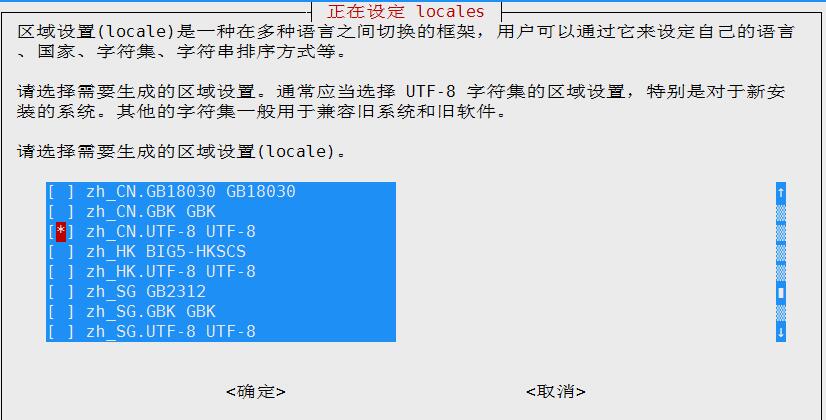
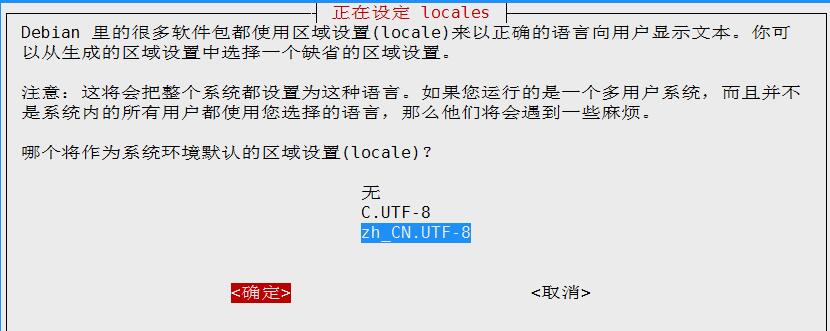
windows的宋体文件上传到debian的字体目录,并运行dpkg-reconfigure locales命令来设置系统的字体
root@debian:~# mv simsun.ttc /usr/share/fonts/truetype/
root@debian:~# dpkg-reconfigure locales
2、开启root用户登陆
root@debian:~# nano /etc/ssh/sshd_config
SyslogFacility AUTH
LogLevel INFO
# Authentication:
LoginGraceTime 120
#PermitRootLogin without-password #注消该行开启root用户ssh登陆
StrictModes yes
3、更换为163镜像源
root@debian:~# cp /etc/apt/sources.list{,.bak}
root@debian:~# echo >/etc/apt/sources.list
root@debian:~# nano /etc/apt/sources.list
deb http://mirrors.163.com/debian/ jessie main non-free contrib
deb http://mirrors.163.com/debian/ jessie-updates main non-free contrib
deb http://mirrors.163.com/debian-security/ jessie/updates main non-free contrib
root@debian:~# apt-get update #使更换的源生效
root@debian:~# apt-get upgrade #升级系统和软件
root@debian:~# cat /etc/debian_version #查看debian的版本
root@debian:~# apt-get -y install bash-completion lrzsz nmap tree net-tools curl wget vim tcpdump chkconfig
4、debian配置网桥
root@debian:~# apt-get install bridge-utils #安装依赖包
root@debian:~# nano /etc/network/interfaces
# The loopback network interface
auto lo
iface lo inet loopback
auto br0
# The primary network interface
allow-hotplug eth0
iface eth0 inet manual
iface br0 inet static
address 10.47.39.30
netmask 255.255.255.0
network 10.47.39.0
broadcast 10.47.39.255
gateway 10.47.39.254
# dns-* options are implemented by the resolvconf package, if installed
dns-nameservers 223.5.5.5
bridge_ports eth0
root@debian:~# reboot
Debian初始化配置的更多相关文章
- Kali Linux 初始化配置:Apache2 /SSH /FTP
Kali Linux是基于Debian的Linux发行版, 设计用于数字取证操作系统.Kali Linux预装了许多渗透测试软件,包括nmap .Wireshark .John the Ripper, ...
- ubuntu18.04初始化配置
目录 ubuntu18.04初始化配置 ifconfig sshd smb other vim 配置 最后 ubuntu18.04初始化配置 虚拟机挂了, 又得重新安装配置一遍, 这里记录了我几乎每次 ...
- 基于iSCSI的SQL Server 2012群集测试(二)--SQL群集安装后初始化配置测试
4.群集安装后初始化配置测试 4.1 禁用full-text 服务和Browser服务 Full-text服务:公司目前暂不使用,需在两个节点上分别禁用 Browser服务:为保证安全,建议将Brow ...
- 64.OV7725初始化配置
所有的结局都是好的,不好,是因为你还有坚持到最好. OV7725摄像头的初始化配置,需要SCCB总线即IIC接口配置.先发送配置数据到OV7725中,然后通过随机读取对应地址的数据来验证数据是否写进去 ...
- Linux - CentOS6.5服务器搭建与初始化配置详解(上)
1.新建一个虚拟机 选择典型 单机下一步 p.MsoNormal,li.MsoNormal,div.MsoNormal { margin: 0cm 0cm 0.0001pt; text-align: ...
- Git 初始化配置
先给大家推荐个很不错的GIT学习资料:廖雪峰 <Git简介> http://www.liaoxuefeng.com/wiki/0013739516305929606dd183612485 ...
- SecureCRT 安装及初始化配置
安装 SecureCRT 7.3.4 安装以及破解方法 SecureCRT 6.5.0 汉化解压版 初始化配置 这里配置以SecureCRT 6.5.0 汉化解压版为例 1.调整SecureCRT终端 ...
- Linux - CentOS6.5服务器搭建与初始化配置详解(下)
传送带:Linux - CentOS6.5服务器搭建与初始化配置详解(上) 继续接着上面的安装,安装完后会出现下面界面 点击reboot重启 重启后可以看到下面的tty终端界面 因为这就是最小化安装 ...
- github远程仓库初始化配置
github远程仓库的提交一般是通过shell进行,windows下有Git Bash工具(https://git-for-windows.github.io/) 由于本地Git仓库和GitHub仓库 ...
随机推荐
- 【python36--对象】
1.对象=属性+方法 2.实例化对象 #类名称首字母大写 class Turle: #属性 color = 'green' weight = 10 legs = 4 shell = True mout ...
- Python3 tkinter基础 Label imag显示图片
Python : 3.7.0 OS : Ubuntu 18.04.1 LTS IDE : PyCharm 2018.2.4 Conda ...
- [NOI1995]石子合并 四边形不等式优化
链接 https://www.luogu.org/problemnew/show/P1880 思路 总之就是很牛逼的四边形不等式优化 复杂度\(O(n^2)\) 代码 #include <ios ...
- CF767C 记录错误
链接 https://codeforces.com/contest/767/problem/C 思路 之所以把这个题放进来,是因为要记录错误 情况不止一种 所以答案存储就是>=2了 代码 #in ...
- kubeadm 生成的token过期后,集群增加节点
通过kubeadm初始化后,都会提供node加入的token: You should now deploy a pod network to the cluster. Run "kubect ...
- (转)renren-fast解读(一)
(二期)8.renren-fast项目解读(一) [课程八]预防xss...注入.xmind0.2MB [课程八预习]开...解读.xmind0.5MB 课程八_日志处理与...模块.xmind0.2 ...
- 【系列教程1】Gradle入门系列一:简介
Gradle是一种构建工具,它抛弃了基于XML的构建脚本,取而代之的是采用一种基于Groovy的内部领域特定语言.近期,Gradle获得了极大的关注. 这篇文章是Gradle教程的第一篇,我们有两个目 ...
- TCGA phenotype各列的含义
Property name Description kind The resource type. aliquots[] List of barcodes of aliquots taken from ...
- P3605 [USACO17JAN]Promotion Counting晋升者计数
思路 线段树合并的板子.. 和子节点合并之后在值域线段树上查询即可 代码 #include <cstdio> #include <algorithm> #include < ...
- Linux命令3——c
cal:calender,显示月历 -j:用凯撒历(dates of julius caesar)的形式来显示月历,不分月份.1-365/366 -m:显示月历时,把星期一定为一周的开始.默认星期日为 ...