
ubuntu18.04初始化配置
ubuntu18.04初始化配置
虚拟机挂了, 又得重新安装配置一遍, 这里记录了我几乎每次都要配置安装的那些软件.
ifconfig
apt install net-tools
sshd
sudo apt install ssh
ifconfig
xshell
smb
sudo apt install vim
sudo apt-get update
sudo apt-get install samba
vim /etc/samba/smb.conf (我的配置如下)
service smbd restart
sudo smbpasswd -a sola
[share]

comment = Public stuff

path = /home/sola/Coder

public = yes

writeable = yes

browseable = yes

guest ok = no

create mask = 0770

directory mode = 0770
#部分smb配置释义, 不可直接复制粘贴 ,格式不对,smb会起不来. 要复制请用上面那段.

[share]                                     #自定义共享名称

comment =  This is share software                       #共享描述

path  =  /home/                                                   #共享目录路径

browseable  =  yes                                    #设置共享是否可浏览,如果no就表示隐藏,需要通过IP+共享名称进行访问

writable  =  yes                            #设置共享是否具有可写权限

read only  =  no                             #设置共享是否具有只读权限

admin users  =  root                          #设置共享的管理员,如果security =share,引项无效,多用户中间使用逗号隔开,例如admin users = root,user1,user2

valid users  =  sola                             #设置允许访问共享的用户,例如valid users =

invalid users  =  sola                              #设置不允许访问共享的用户

write list  =  sola                               #设置在共享具有写入权限的用户,例如例如write list  =

public  =  no                                  #设置共享是否允许guest账户访问

create mask = 0770                                    #创建的文件权限为770

directory mode = 0770                                 #创建的文件目录为 770
other
sudo apt install git

sudo apt instal make

sudo apt install tree
vim 配置
vim ~/.vimrc
:set paste
" This line should not be removed as it ensures that various options are

    " properly set to work with the Vim-related packages available in Debian.

    " Uncomment the next line to make Vim more Vi-compatible

    " NOTE: debian.vim sets 'nocompatible'. Setting 'compatible' changes numerous

    " options, so any other options should be set AFTER setting 'compatible'.

    set nocompatible

    " Vim5 and later versions support syntax highlighting. Uncommenting the

    " following enables syntax highlighting by default.

    "设置字符编码

    :set encoding=utf-8

    :set fileencodings=ucs-bom,utf-8,cp936

    :set fileencoding=utf-8

    :set termencoding=utf-8

    if has("syntax")

      syntax on            " 语法高亮

    endif

    colorscheme ron        " elflord ron peachpuff default 设置配色方案,vim自带的配色方案保存在/usr/share/vim/vim72/colors目录下

    " detect file type

    filetype on

    filetype plugin on

    " If using a dark background within the editing area and syntax highlighting

    " turn on this option as well

    set background=dark

    " Uncomment the following to have Vim jump to the last position when

    " reopening a file

    if has("autocmd")

      au BufReadPost * if line("'\"") > 1 && line("'\"") <= line("$") | exe "normal! g'\"" | endif

      "have Vim load indentation rules and plugins according to the detected filetype

      filetype plugin indent on

    endif

    " The following are commented out as they cause vim to behave a lot

    " differently from regular Vi. They are highly recommended though.

    "set ignorecase        " 搜索模式里忽略大小写

    "set smartcase        " 如果搜索模式包含大写字符,不使用 'ignorecase' 选项。只有在输入搜索模式并且打开 'ignorecase' 选项时才会使用。

    set autowrite        " 自动把内容写回文件: 如果文件被修改过,在每个 :next、:rewind、:last、:first、:previous、:stop、:suspend、:tag、:!、:make、CTRL-] 和 CTRL-^命令时进行;用 :buffer、CTRL-O、CTRL-I、'{A-Z0-9} 或 `{A-Z0-9} 命令转到别的文件时亦然。

    set autoindent        " 设置自动对齐(缩进):即每行的缩进值与上一行相等;使用 noautoindent 取消设置

    set smartindent        " 智能对齐方式

    set tabstop=4        " 设置制表符(tab键)的宽度

    set softtabstop=4     " 设置软制表符的宽度

    set shiftwidth=4    " (自动) 缩进使用的4个空格

    set cindent            " 使用 C/C++ 语言的自动缩进方式

    set cinoptions={0,1s,t0,n-2,p2s,(03s,=.5s,>1s,=1s,:1s     "设置C/C++语言的具体缩进方式

    "set backspace=2    " 设置退格键可用

    set showmatch        " 设置匹配模式,显示匹配的括号

    set linebreak        " 整词换行

    set whichwrap=b,s,<,>,[,] " 光标从行首和行末时可以跳到另一行去

    "set hidden " Hide buffers when they are abandoned

    "set mouse=a             Enable mouse usage (all modes)    使用鼠标

    set number            " Enable line number    "显示行号

    "set previewwindow    " 标识预览窗口

    set history=50        " set command history to 50    "历史记录50条

    "--状态行设置--

    set laststatus=2 " 总显示最后一个窗口的状态行;设为1则窗口数多于一个的时候显示最后一个窗口的状态行;0不显示最后一个窗口的状态行

    set ruler            " 标尺,用于显示光标位置的行号和列号,逗号分隔。每个窗口都有自己的标尺。如果窗口有状态行,标尺在那里显示。否则,它显示在屏幕的最后一行上。

    "--命令行设置--

    set showcmd            " 命令行显示输入的命令

    set showmode        " 命令行显示vim当前模式

    "--find setting--

    set incsearch        " 输入字符串就显示匹配点

    set hlsearch

"设置一键编译

map <F5> :call CompileRunGcc()<CR>

imap <F5> <ESC>:call CompileRunGcc()<CR>

func! CompileRunGcc()

    exec "w"

    exec "cd %:p:h"

    if &filetype == 'c'

        exec "!g++ % -o %<"

        exec "! ./%<"

    elseif &filetype == 'cpp'

        exec "!g++ % -o %<"

        exec "! ./%<"

    elseif &filetype == 'java'

        exec "!javac %"

        exec "!java %<"

    elseif &filetype == 'sh'

        :!./%

    endif

endfunc

   "设置pathonen插件可用

    "execute pathogen#infect()"

" About NERDTree

noremap :<F2> NERDTreeToggle

autocmd vimenter * if !argc() | NERDTree | endif  "open a NERDTree automatically when vim starts up if no files were specified

autocmd bufenter * if (winnr("$") == 1 && exists("b:NERDTreeType") && b:NERDTreeType == "primary") | q | endif

" TagBar 自动生成参数和方法

" Then the F8 key will toggle the Tagbar window.

nmap :<F8> TagbarToggle

"syntastic 保存检查代码时候传入参数

let g:syntastic_java_javac_args="-cp ../../lib:../../bin -sourcepath ../../bin -Djava.ext.dirs=../../lib -d ../../bin"

" 关于Java自动文件补全插件
最后
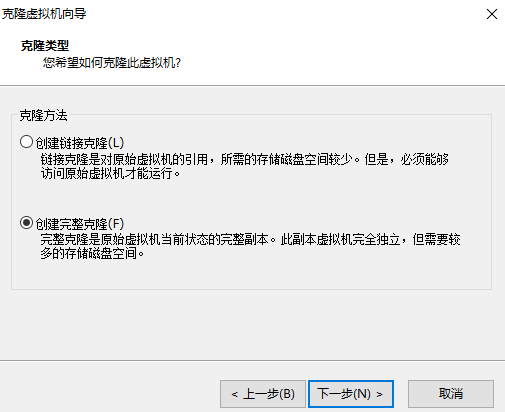
最好关机克隆一份, 免得以后挂了,又装一道。
ubuntu18.04初始化配置的更多相关文章
- Ubuntu18.04初始化
Ubuntu18.04初始化 更新源: sudo cp /etc/apt/sources.list /etc/apt/sources.list.bak sudo gedit /etc/apt/sour ...
- Ubuntu18.04下配置深度学习开发环境
在Ubuntu18.04下配置深度学习/机器学习开发环境 1.下载并安装Anaconda 下载地址:https://www.anaconda.com/distribution/#linux 安装步骤: ...
- 在Ubuntu18.04下配置hadoop集群
服务器准备 启动hadoop最小集群的典型配置是3台服务器, 一台作为Master, NameNode, 两台作为Slave, DataNode. 操作系统使用的Ubuntu18.04 Server, ...
- ubuntu18.04 server配置静态ip (转载)
原文地址: https://blog.csdn.net/mossan/article/details/80381679 最新发布的ubuntu18.04 server,启用了新的网络工具netplan ...
- ubuntu18.04错误配置变量环境导致无法进入系统
1.问题描述 错误配置环境变量(直接在/etc/profile文件末尾添加了export xxx),关机后一直在登录界面循环无法进入系统. ###环境变量的添加是在原有变量之后以冒号(:)分隔加入,并 ...
- ubuntu18.04 server配置静态ip
最新发布的ubuntu18.04 server,启用了新的网络工具netplan,对于命令行配置网络参数跟之前的版本有比较大的差别,现在介绍如下:1.其网络配置文件是放在/etc/netplan/50 ...
- ubuntu18.04 server配置静态ip,新的网络工具netplan的使用方法【转:http://forum.ubuntu.org.cn/viewtopic.php?t=487463】
最新发布的ubuntu18.04 server,启用了新的网络工具netplan,对于命令行配置网络参数跟之前的版本有比较大的差别,现在介绍如下:1.其网络配置文件是放在/etc/netplan/50 ...
- 虚拟机(Vmware)安装ubuntu18.04和配置调整(一)
一.虚拟机(Vmware)安装ubuntu18.04 1.下载ubuntu18.04桌面版镜像文件< ubuntu-18.04.3-desktop-amd64.iso> 2.使用VMwar ...
- Ubuntu18.04中配置QT5.11开发环境
准备工作 参考 https://wiki.qt.io/Install_Qt_5_on_Ubuntu . # 安装g++ sudo apt install build-essential # sudo ...
随机推荐
- vue 新增时清除表单验证注意事项
// 清除表单校验的提示 if (this.$refs['XXX']) { // 延时执行 this.$nextTick(function () { this.$refs['XXX'].clearVa ...
- LeetCode 7最长公共前缀
编写一个函数来查找字符串数组中的最长公共前缀. 如果不存在公共前缀,返回空字符串 "". 示例 1: 输入: ["flower","flow" ...
- 理解JVM GC
理解JVM GC对于我们把控Java应用有很大的帮助.下面我从运维角度,把网上的JVM相关的资料整理如下,以加深对JVM GC的理解.如有错误的地方,请看官指正. JVM内存使用分类 JVM的内存分区 ...
- 「Vue」JS方法学习
1.构造函数 大写开头的,能被NEW一个新实例,实例即执行回调函数 异步返回数据.then指定回调函数的时候,成功的回调函数必须传,失败的回调可以不传 var fs = require('fs') f ...
- MySQL简单查询详解-单表查询
MySQL简单查询详解-单表查询 作者:尹正杰 版权声明:原创作品,谢绝转载!否则将追究法律责任. 一.查询的执行路径 一条SQL查询语句的执行过程大致如下图所示: 1>.客户端和服务端通过my ...
- 用原生js对表格排序
阿里的模拟笔试题,当时时间有限没写出来,其实是因为自己对原生dom操作不熟悉,这里补一下. 题目的大意是有一个表格,如代码所示 <table> <tr> <th>N ...
- 灵活、可高度自定义的——Progress进度圈、弹窗、加载进度、小菊花
DDProgressHUD的介绍 提供了四种类型的展示: 显示无限旋转的加载图(比如小菊花,可以自定义),显示文字信息.网络刷新时经常用到. 显示加载进度的动画,也可以显示文字.网络下载时用的比较多, ...
- order by 字段自动填写脚本
新版 firefox 中的 hackbar 没有 order by 字段填写, 所以就有了这个: =begin pod sql注入中自动输出order by 的位数 =end pod sub MAIN ...
- mysql学习------MySQL慢查询日志
一.什么是慢查询日志 1.当查询超过一定时间没有返回结果的时候,才会记录进慢查询日志 2.慢查询日志可以帮助dba找出执行效率缓慢的sql语句,为数据库的优化工作提供帮助 3.慢查询日志默认是不开启的 ...
- 关于内核中spinlock的一些个人理解 【转】
由于2.6内核可以抢占,应该在驱动程序中使用 preempt_disable() 和 preempt_enable(),从而保护代码段不被抢占(禁止 IRQ 同时也就隐式地禁止了抢占).preempt ...