
Ubuntu更改源和搜狗输入法安装卸载
安装完Ubuntu 16.04后,要更换为国内的软件源:
sudo gedit /etc/apt/sources.list #用文本编辑器打开源列表
在文件开头添加下面的阿里云的软件源:
deb http://mirrors.aliyun.com/ubuntu/ quantal main restricted universe multiverse

deb http://mirrors.aliyun.com/ubuntu/ quantal-security main restricted universe multiverse

deb http://mirrors.aliyun.com/ubuntu/ quantal-updates main restricted universe multiverse

deb http://mirrors.aliyun.com/ubuntu/ quantal-proposed main restricted universe multiverse

deb http://mirrors.aliyun.com/ubuntu/ quantal-backports main restricted universe multiverse

deb-src http://mirrors.aliyun.com/ubuntu/ quantal main restricted universe multiverse

deb-src http://mirrors.aliyun.com/ubuntu/ quantal-security main restricted universe multiverse

deb-src http://mirrors.aliyun.com/ubuntu/ quantal-updates main restricted universe multiverse

deb-src http://mirrors.aliyun.com/ubuntu/ quantal-proposed main restricted universe multiverse

deb-src http://mirrors.aliyun.com/ubuntu/ quantal-backports main restricted universe multiverse
更新软件源:sudo apt-get update
更多软件源请自行百度,阿里云的软件源是Ubuntu官方推荐的国内软件源。,清华的软件源也可以。
Ubuntu 的键盘输入法系统包含iBus、fcitx等多种,因为sogou是基于fcitx的,而系统默认的是iBus,所以安装使用不同的输入法,相关的键盘输入法系统也要设置改变。
也可以打开System Settings系统设置里面的 Software & Updates
一、安装sogou输入法步骤:
1、首先到搜狗输入法官网下载搜狗输入法,下载的是个deb文件。
搜狗输入法Linux版下载地址:http://pinyin.sogou.com/linux/?r=pinyin
2、Ubuntu 16.04安装搜狗输入法命令如下:
      sudo apt-get install -f

      sudo dpkg -i sogoupinyin_2.2.0.0108_amd64.deb
deb文件名,要和自己下载的版本一致。
3、安装完毕,设置语言选项
到系统设置->语言支持(System->Language Support),将键盘输入法系统由默认的iBus设置为fcitx。如下图:

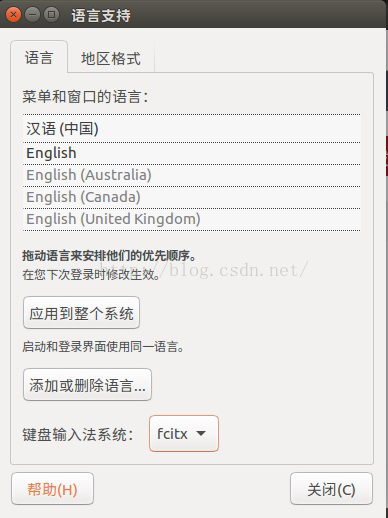
操作此步骤时,如果没有出现fcitx选项,说明你的机器还需要安装fcitx键盘输入法系统,直接看第二部分fcitx的安装。
4、注销,重新登陆。
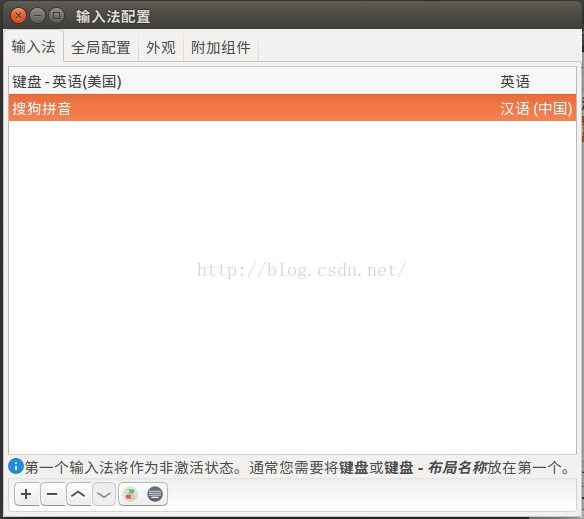
将键盘输入法系统改为fcitx后,一定要注销,而且操作顺序不能改。这时还不能马上使用,还要点击右上角的输入法图标,点击设置,进入设置界面,这个时候没有看到搜狗输入法,点击左下角的加号,然后注意先要去掉”只显示当前语言的输入法”前面那个勾,然后再搜索”sogo”,这个时候就看到sogo pinyin了,接着添加就可以了,然后就可以切换输入法了。
注意: 安装搜狗输入法之前请先更换为国内的软件源,否则无法解决依赖问题。
二、安装fcitx键盘输入法系统
sogou是基于fcitx的,而系统默认的键盘输入法系统是iBus。Ubuntu 16.04默认是带有fcitx的,正常安装,如果有的话,按上面步骤即可完成;但有些版本的Ubuntu,需要自己安装 fcitx,才能安装使用sogou。
1、添加以下源
sudo add-apt-repository ppa:fcitx-team/nightly
2、更新系统:sudo apt-get update
3、安装fcitx:sudo apt-get install fcitx
4、安装fcitx的配置工具:sudo apt-get install fcitx-config-gtk
5、安装fcitx的table-all软件包:sudo apt-get install fcitx-table-all
6、安装im-switch切换工具:sudo apt-get install im-switch
至此,fcitx键盘输入法系统就安装好了。第5,6步需要按键“Y”确认安装。简单测试的方法就是在终端键入“fcitx”,有各种提示就对了。
安装完fcitx后,再安装sogou即可。
ubuntu彻底卸载搜狗拼音输入法
ubuntu彻底卸载搜狗拼音输入法,ubuntu安装搜狗输入法后如果觉得搜狗不是很适合自己,那应该怎么样彻底的卸载搜狗输入法呢?下面我们就来一步步彻底卸载掉搜狗输入法...
方法/步骤
- 1
找到安装的搜狗输入法
$sudo dpkg -l so* 就可以找到sogoupinyin

- 2
卸载搜狗拼音输入法
$sudo dpkg -r sogoupinyin

- 3
桌面右上角 开关机按钮 进入 系统设置

- 4
重新设置ibus为系统默认输入方式
点击 语言支持 键盘输入方式系统 选择IBus


- 5
卸载fcitx
$sudo apt-get purge fcitx

- 6
彻底卸载fcitx及相关配置
$sudo apt-get autoremove

- 7
注销系统用户
不知道为什么,卸载搜狗后我这边的注销按钮不能使用了,只好通过命令注销
$sudo pkill Xorg

- 8
再次登陆进入系统,看看是不是已经回到了原来的熟悉的输入方式呢?

遇到的问题
1. 修复sogou输入法
好消息~ Ubuntu Kylin团队与搜狗公司合作开发了“搜狗输入法 for Linux”版本,支持Ubuntu 12.04 和 Ubuntu 14.04,在搜狗官网就可以下载到,附上地址:http://pinyin.sogou.com/linux/
以前在windows一直用搜狗输入法,所以Ubuntu的内置输入法用得不太习惯,现在终于有顺手的输入法了,开心~
但是经过一段时间的试用,遇到了输入法面板问题,ctrl+space 调出输入法就会弹出一个对话框提示要重启输入法面板,于是多方搜寻,终于找到解决方案,其实用一条命令就可以修复,方法如下:
1、ctrl+alt+T 打开终端
2、输入 sogou-qimpanel &
3、回车即可,可以看到终端里自动执行了一大段命令
现在再按ctrl+space看看,可爱的搜狗输入法是不是又回来啦?
2. 问题表现
sudo dpkg -i sogoupinyin_2.0.0.0078_amd64.deb
错误信息如下:
sogoupinyin : Depends: libopencc2 but it is not installable or
libopencc1 but it is not going to be installed
Depends: fcitx-libs (>= 4.2.7) but it is not going to be installed
Depends: fcitx-libs-qt (>= 4.2.7) but it is not going to be installed
Recommends: fonts-droid-fallback but it is not going to be installed or
fonts-droid but it is not installable
E: Unmet dependencies. Try 'apt-get -f install' with no packages (or specify a solution).一看就知道是依赖包存在问题
3. 问题分析之前在Ubuntu 15.10的版本之时,使用同样的sogou版本,不存在此类的问题。 但是在Ubuntu 16.04中,却存在此类问题,说明Ubuntu升级之后,sogou输入法并未做相应的系统兼容性测试, 故起最高的Ubuntu支持版本时15.10.
虽然我们知道了问题,但是该如何解决呢?
基于错误信息,我们发现起依赖包有以下几个: libopencc1 libopencc2, fcitx-libs, fcitx-libs-qt font-droid-fallback.
4. 试错分析
试错1:
bladestone@bladestone-laptop:~$ sudo apt install fcitx-libs
Reading package lists... Done
Building dependency tree
Reading state information... Done
You might want to run 'apt-get -f install' to correct these:
The following packages have unmet dependencies:
sogoupinyin : Depends: libopencc2 but it is not installable or
libopencc1 but it is not going to be installed
Depends: fcitx-libs-qt (>= 4.2.7) but it is not going to be installed
Recommends: fonts-droid-fallback but it is not going to be installed or
fonts-droid but it is not installable
E: Unmet dependencies. Try 'apt-get -f install' with no packages (or specify a solution).
试错2:
bladestone@bladestone-laptop:~$ sudo apt install fcitx-libs-qt
Reading package lists... Done
Building dependency tree
Reading state information... Done
You might want to run 'apt-get -f install' to correct these:
The following packages have unmet dependencies:
sogoupinyin : Depends: libopencc2 but it is not installable or
libopencc1 but it is not going to be installed
Depends: fcitx-libs (>= 4.2.7) but it is not going to be installed
Recommends: fonts-droid-fallback but it is not going to be installed or
fonts-droid but it is not installable
E: Unmet dependencies. Try 'apt-get -f install' with no packages (or specify a solution).
试错3:
bladestone@bladestone-laptop:~$ sudo apt install fcitx-libs-qt fcitx-libs
Reading package lists... Done
Building dependency tree
Reading state information... Done
You might want to run 'apt-get -f install' to correct these:
The following packages have unmet dependencies:
sogoupinyin : Depends: libopencc2 but it is not installable or
libopencc1 but it is not going to be installed
Recommends: fonts-droid-fallback but it is not going to be installed or
fonts-droid but it is not installable
E: Unmet dependencies. Try 'apt-get -f install' with no packages (or specify a solution).
试错4:
bladestone@bladestone-laptop:~$ sudo apt install fonts-droid-fallback
Reading package lists... Done
Building dependency tree
Reading state information... Done
You might want to run 'apt-get -f install' to correct these:
The following packages have unmet dependencies:
sogoupinyin : Depends: libopencc2 but it is not installable or
libopencc1 but it is not going to be installed
Depends: fcitx-libs (>= 4.2.7) but it is not going to be installed
Depends: fcitx-libs-qt (>= 4.2.7) but it is not going to be installed
E: Unmet dependencies. Try 'apt-get -f install' with no packages (or specify a solution).
试错5:
bladestone@bladestone-laptop:~$ sudo apt install libopencc1
Reading package lists... Done
Building dependency tree
Reading state information... Done
You might want to run 'apt-get -f install' to correct these:
The following packages have unmet dependencies:
sogoupinyin : Depends: fcitx-libs (>= 4.2.7) but it is not going to be installed
Depends: fcitx-libs-qt (>= 4.2.7) but it is not going to be installed
Recommends: fonts-droid-fallback but it is not going to be installed or
fonts-droid but it is not installable
E: Unmet dependencies. Try 'apt-get -f install' with no packages (or specify a solution).
分析: 经过各种尝试,发现依然无法正常解决问题,类库包之间的依赖关系还是非常复杂的。
5. 问题解决5.1 移除sogou输入法, 由于其安装不完整
sudo apt remove sogoupinyin
执行过程:
Reading package lists... Done
Building dependency tree
Reading state information... Done
The following packages will be REMOVED:
sogoupinyin
0 upgraded, 0 newly installed, 1 to remove and 43 not upgraded.
1 not fully installed or removed.
After this operation, 42.6 MB disk space will be freed.
Do you want to continue? [Y/n] y
(Reading database ... 214444 files and directories currently installed.)
Removing sogoupinyin (2.0.0.0078) ...
Processing triggers for libglib2.0-0:amd64 (2.48.1-1~ubuntu16.04.1) ...
Processing triggers for hicolor-icon-theme (0.15-0ubuntu1) ...
Processing triggers for shared-mime-info (1.5-2ubuntu0.1) ...
Processing triggers for bamfdaemon (0.5.3~bzr0+16.04.20160523-0ubuntu1) ...
Rebuilding /usr/share/applications/bamf-2.index...
Processing triggers for gnome-menus (3.13.3-6ubuntu3) ...
Processing triggers for desktop-file-utils (0.22-1ubuntu5) ...
Processing triggers for mime-support (3.59ubuntu1) ...
5.2 正确的包安装姿势
sudo apt install libopencc1 fcitx-libs fcitx-libs-qt fonts-droid-fallback
5.3 重新安装sogou输入法
sudo dpkg -i sogoupinyin_2.0.0.0078_amd64.deb
结果 一切顺利,没有报类似的错误信息
6. 总结安装依赖需要一次安装完成,切勿单个安装,主要是由于包之间彼此会有一定的依赖关系,这个是你无法准确定位的,故在 一次安装动作中做完。
另外, sogou输入法的Linux版本目前只兼容到Ubunut 15.10, 请大家彼此周知该情况。
Ubuntu更改源和搜狗输入法安装卸载的更多相关文章
- Ubuntu postgres 内网 安装 卸载
# 安装pg,(使用安装包, 不能连接外网) tar包下载地址 https://www.postgresql.org/ftp/source/v11.1/放在/home/sxy 目录(随便放)cd /h ...
- ubuntu lamnp 环境的安装/卸载 及 配置
安装mysql--------------------------------------sudo apt install mysql-server #5.7版本 安装php----------- ...
- 如何在Ubuntu 18.04上安装和卸载TeamViewer
卸载命令:sudo apt --purge remove teamviewer 安装:https://www.linuxidc.com/Linux/2018-05/152282.htm 如何在Ubun ...
- Ubuntu 中软件的安装、卸载以及查看的方法总结
Ubuntu 中软件的安装.卸载以及查看的方法总结 博客分类: Linux UbuntuDebian配置管理CacheF# 说明:由于图形化界面方法(如Add/Remove... 和Synaptic ...
- Ubuntu 16.04及以上 安装/卸载 Docker-CE
前言 本文仅针对Ubuntu 18.10.18.04.16.04的x86_64的OS与架构下的Docker-CE的安装 卸载老板本 如果已安装,请卸载它们: sudo apt-get remove d ...
- ubuntu一些基本软件安装方法
ubuntu一些基本软件安装方法 首先说明一下 ubuntu 的软件安装大概有几种方式:1. deb 包的安装方式deb 是 debian 系 Linux 的包管理方式, ubuntu 是属于 deb ...
- Ubuntu 16.04 LTS安装好需要设置的15件事(喜欢新版本)
看到这篇文章说明你已经从老版本升级到 Ubuntu 16.04 或进行了全新安装,在安装好 Ubuntu 16.04 LTS 之后建议大家先做如下 15 件事.无论你是刚加入 Ubuntu 行列的新用 ...
- Ubuntu 17.10.1安装, 定制
p { margin-bottom: 0.25cm; line-height: 120% } a:link { } 2018.4.7 Ubuntu 17.10.1安装, 定制, 后续搭建LAMP环境 ...
- Ubuntu_搜狗输入法安装
前言 由于很少使用Linux系统,所以闲下来打算看一看,在安装完成后,遇到无法输入中文的问题.我使用的是小鹤双拼,所以习惯使用搜狗输入法,本文记录一下如何在ubuntu系统下安装小鹤双拼 由于前两次并 ...
随机推荐
- Kali系列之ettercap欺骗
ettercap在局域网中使用欺骗, 捕获对象浏览器中的图片. 环境 攻击方:kali linux, ip:192.168.137.129 目标方ip:192.168.137.130 路由器:192. ...
- Django文件存储(二)定制存储系统
要自己写一个存储系统,可以依照以下步骤: 1.写一个继承自django.core.files.storage.Storage的子类. from django.core.files.storage im ...
- Python3基础 filter+lambda 筛选出1-20之间的奇数
Python : 3.7.0 OS : Ubuntu 18.04.1 LTS IDE : PyCharm 2018.2.4 Conda ...
- Windows使用(类)Unix环境那些事
之前的博文中有不少涉及到win下使用unix环境的一些东西,但都是为了做别的事情,还是写一个专门讲这个主题的文章吧. 主角:Cygwin.mingw-W64.MSYS2. 注:mingw已经停止更新很 ...
- Vistual Studio Code配置
目录 查看版本,帮助: 修改vscode的扩展目录: 用户和工作区设置 用户设置的文件保存在如下目录: 所以有三种方式更改默认的设置: vscode同步配置: vscode启动launch.json配 ...
- Docker 编排工具Rancher 2.0
下载镜像: [root@localhost hongdada]# docker pull rancher/server:preview 运行容器: [root@localhost hongdada]# ...
- 后缀字符串|计蒜客2019蓝桥杯省赛 B 组模拟赛(一)
样例输入: 3 ba a aba 样例输出: 2 3 1 思路一:暴力,只能过50%数据,枚举每一个字符串,内层枚举其他字符串判断是否以这个字符串为后缀 思路二:哈希表,存储每一个后缀的数目,stri ...
- oracle单行函数 之 数字函数
Round(数字 \ 列 [,保留小数的位数]):四舍五入 select Round(1234.45,1) from dual = 1234.5 Trunc(数字 \ 列 [,保留小数的位数] ...
- postgresql:array & foreach
--数组: SELECT (ARRAY['{101, 111, 121}', '{201, 211, 221}'])[1]::text[]; SELECT (ARRAY['{101, 111, 121 ...
- Jupyter Notebook主题字体设置及自动代码补全
Jupyter Notebook用久了就离不开了,然而自带的主题真的不忍直视.为了视力着想,为了自己看起来舒服,于是折腾了一番..在github上发现了一个jupyter-themes工具,可以通过p ...