
K8S学习笔记之CentOS7集群使用Chrony实现时间同步
0x00 概述
容器集群对时间同步要求高,实际使用环境中必须确保集群中所有系统时间保持一致,openstack官方也推荐使用chrony代替ntp做时间同步。
Chrony是一个开源的自由软件,像CentOS 7或基于RHEL 7操作系统,已经是默认服务,默认配置文件在 /etc/chrony.conf 它能保持系统时间与时间服务器(NTP)同步,让时间始终保持同步。相对于NTP时间同步软件,占据很大优势。
需要注意的是,配置完/etc/chrony.conf后,需重启chrony服务,否则可能会不生效。
| Master | 192.168.26.135 |
| Node | 192.168.26.136 |
0x01 安装chrony
CentOS7中已经默认安装了chrony,其配置文件路径在
# /etc/chrony.conf
如果系统内没有chrony,请按照如下进行安装,启动并检查相关状态
# yum install chrony -y

# systemctl enable chronyd.service

# systemctl restart chronyd.service

# systemctl status chronyd.service
在防火墙内放行,因NTP使用123/UDP端口协议,所以允许NTP服务即可。(如果已关闭防火墙请无视)
# firewall-cmd --add-service=ntp --permanent

# firewall-cmd --reload
0x02 检查设置时区
# timedatectl

      Local time: Fri 2018-2-29 13:31:04 CST

  Universal time: Fri 2018-2-29 05:31:04 UTC

        RTC time: Fri 2018-2-29 08:17:20

       Time zone: Asia/Shanghai (CST, +0800)

     NTP enabled: yes

NTP synchronized: yes

 RTC in local TZ: no

      DST active: n/a

#如果你当前的时区不正确,请按照以下操作设置。

#查看所有可用的时区:

# timedatectl list-timezones

#筛选式查看在亚洲S开的上海可用时区:

# timedatectl list-timezones |  grep  -E "Asia/S.*"

Asia/Sakhalin

Asia/Samarkand

Asia/Seoul

Asia/Shanghai

Asia/Singapore

Asia/Srednekolymsk

#设置当前系统为Asia/Shanghai上海时区:

# timedatectl set-timezone Asia/Shanghai

#设置完时区后,强制同步下系统时钟:

# chronyc -a makestep

200 OK
0x03 Master节点配置chrony
此处选用的是阿里云的ntp服务server,地址为
ntp1.aliyun.com
# vim /etc/chrony.conf
当前是Master,ip地址为192.168.26.135,网段是192.168.26.0/24,配置详情如下,红色为更改部分
# Use public servers from the pool.ntp.org project.

# Please consider joining the pool (http://www.pool.ntp.org/join.html).

# server 0.centos.pool.ntp.org iburst

# server 1.centos.pool.ntp.org iburst

# server 2.centos.pool.ntp.org iburst

#server 3.centos.pool.ntp.org iburst

server ntp1.aliyun.com iburst

# Record the rate at which the system clock gains/losses time.

driftfile /var/lib/chrony/drift

# Allow the system clock to be stepped in the first three updates

# if its offset is larger than 1 second.

makestep 1.0 3

# Enable kernel synchronization of the real-time clock (RTC).

rtcsync

# Enable hardware timestamping on all interfaces that support it.

#hwtimestamp *

# Increase the minimum number of selectable sources required to adjust

# the system clock.

#minsources 2

# Allow NTP client access from local network.

#allow 192.168.0.0/16

allow 192.168.26.0/24

# Serve time even if not synchronized to a time source.

#local stratum 10

local stratum 10

# Specify file containing keys for NTP authentication.

#keyfile /etc/chrony.keys

# Specify directory for log files.

logdir /var/log/chrony

# Select which information is logged.

#log measurements statistics tracking
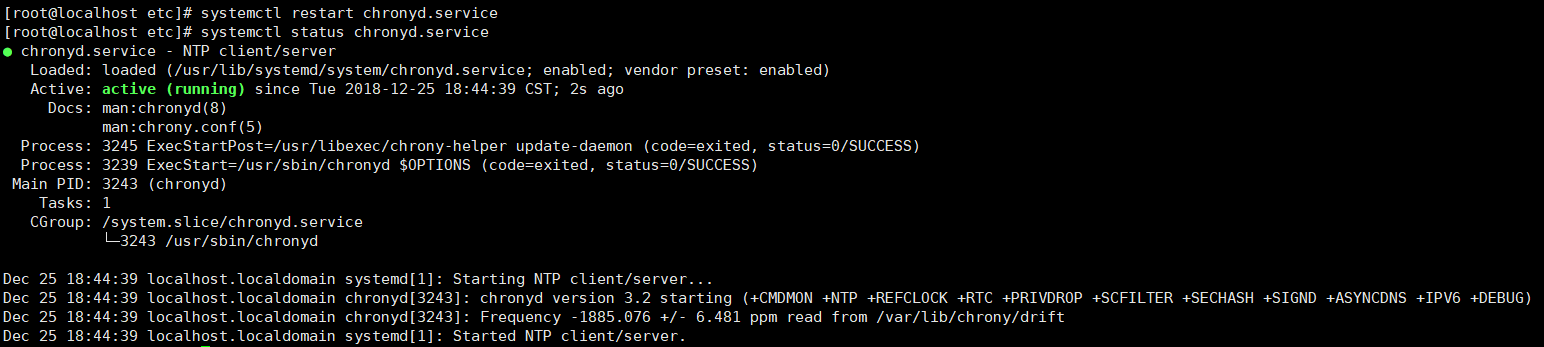
# systemctl restart chronyd.service

# systemctl status chronyd.service
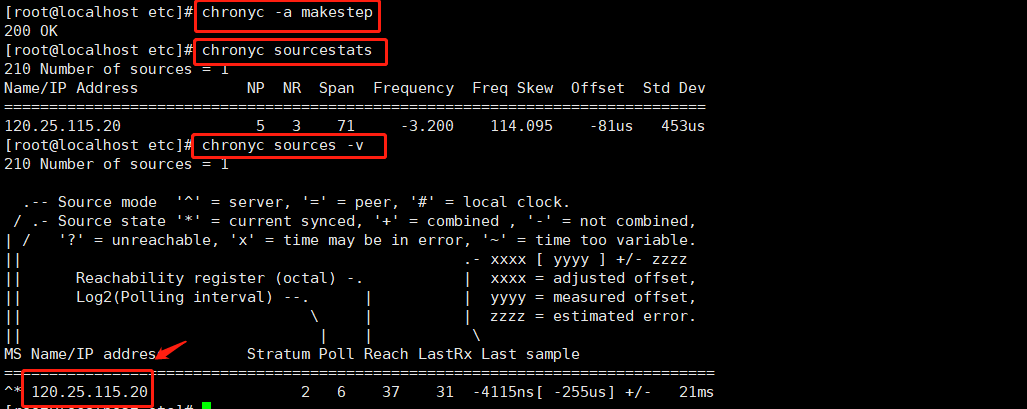
# chronyc -a makestep

# chronyc sourcestats

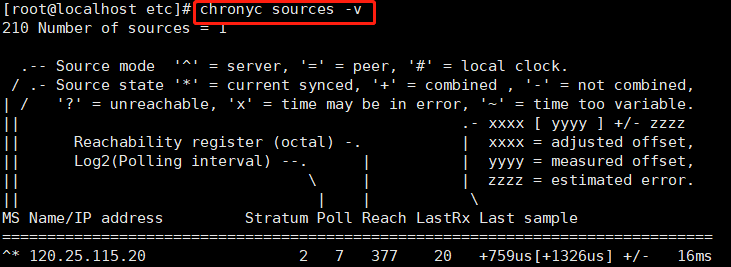
# chronyc sources -v
0x04 Node节点配置chrony
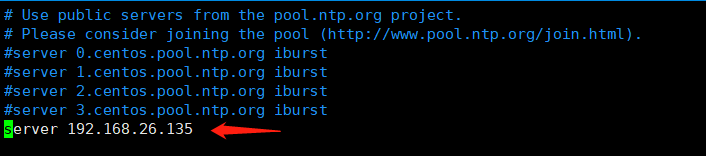
node节点(192.168.26.136)只需要注释掉原来的ip,新增Master主机的IP地址即可(记得重启chrony服务)
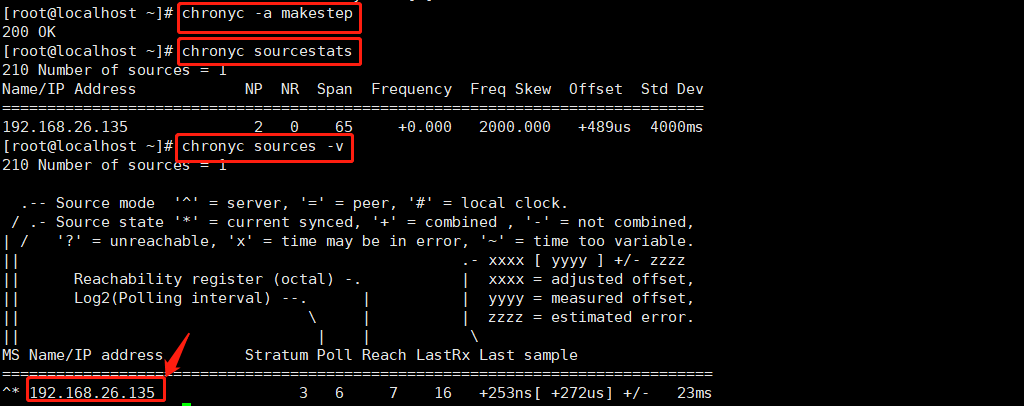
# systemctl restart chronyd.service

# systemctl status chronyd.service

# chronyc -a makestep

# chronyc sourcestats

# chronyc sources -v
0x05 chrony.conf文件详解
以下是系统默认配置文件的说明(CentOS7),了解一下各个配置是做什么。
这里是官网英文说明。
# 使用pool.ntp.org项目中的公共服务器。以server开,理论上你想添加多少时间服务器都可以。

# Please consider joining the pool (http://www.pool.ntp.org/join.html).

server 0.centos.pool.ntp.org iburst

server 1.centos.pool.ntp.org iburst

server 2.centos.pool.ntp.org iburst

server 3.centos.pool.ntp.org iburst

# 根据实际时间计算出服务器增减时间的比率,然后记录到一个文件中,在系统重启后为系统做出最佳时间补偿调整。

driftfile /var/lib/chrony/drift

# chronyd根据需求减慢或加速时间调整,

# 在某些情况下系统时钟可能漂移过快,导致时间调整用时过长。

# 该指令强制chronyd调整时期,大于某个阀值时步进调整系统时钟。

# 只有在因chronyd启动时间超过指定的限制时(可使用负值来禁用限制)没有更多时钟更新时才生效。

makestep 1.0 3

# 将启用一个内核模式,在该模式中,系统时间每11分钟会拷贝到实时时钟(RTC)。

rtcsync

# Enable hardware timestamping on all interfaces that support it.

# 通过使用hwtimestamp指令启用硬件时间戳

#hwtimestamp eth0

#hwtimestamp eth1

#hwtimestamp *

# Increase the minimum number of selectable sources required to adjust

# the system clock.

#minsources 2

# 指定一台主机、子网,或者网络以允许或拒绝NTP连接到扮演时钟服务器的机器

#allow 192.168.0.0/16

#deny 192.168/16

# Serve time even if not synchronized to a time source.

local stratum 10

# 指定包含NTP验证密钥的文件。

#keyfile /etc/chrony.keys

# 指定日志文件的目录。

logdir /var/log/chrony

# Select which information is logged.

#log measurements statistics tracking

0x06 chronyc命令参数说明
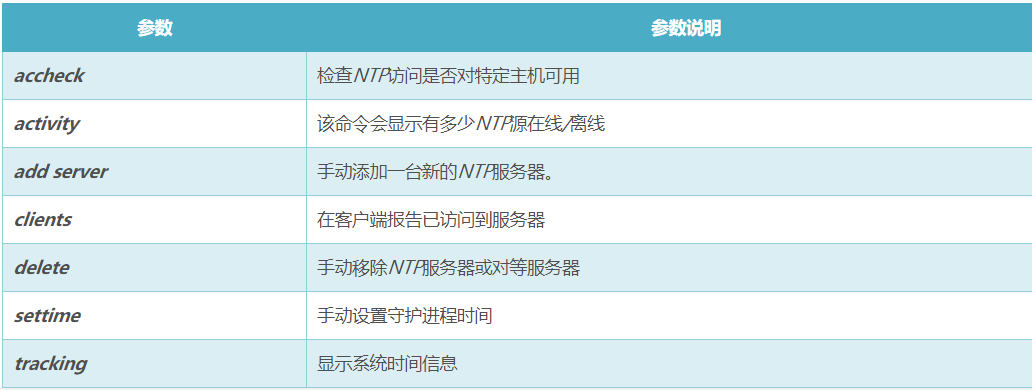
# chronyc -a makestep 查看ntp详细的同步状态
# chronyc sourcestats #查看同步状态

0x07 chrony的优势
chrony的优势更快的同步只需要数分钟而非数小时时间,从而最大程度减少了时间和频率误差,这对于并非全天 24 小时运行的台式计算机或系统而言非常有用。
能够更好地响应时钟频率的快速变化,这对于具备不稳定时钟的虚拟机或导致时钟频率发生变化的节能技术而言非常有用。
在初始同步后,它不会停止时钟,以防对需要系统时间保持单调的应用程序造成影响。
在应对临时非对称延迟时(例如,在大规模下载造成链接饱和时)提供了更好的稳定性。
无需对服务器进行定期轮询,因此具备间歇性网络连接的系统仍然可以快速同步时钟。
参考
K8S学习笔记之CentOS7集群使用Chrony实现时间同步的更多相关文章
- Redis学习笔记八:集群模式
作者:Grey 原文地址:Redis学习笔记八:集群模式 前面提到的Redis学习笔记七:主从复制和哨兵只能解决Redis的单点压力大和单点故障问题,接下来要讲的Redis Cluster模式,主要是 ...
- ZooKeeper学习笔记一:集群搭建
作者:Grey 原文地址:ZooKeeper学习笔记一:集群搭建 说明 单机版的zk安装和运行参考:https://zookeeper.apache.org/doc/r3.6.3/zookeeperS ...
- redis 学习笔记(6)-cluster集群搭建
上次写redis的学习笔记还是2014年,一转眼已经快2年过去了,在段时间里,redis最大的变化之一就是cluster功能的正式发布,以前要搞redis集群,得借助一致性hash来自己搞shardi ...
- 吴裕雄--天生自然HADOOP学习笔记:hadoop集群实现PageRank算法实验报告
实验课程名称:大数据处理技术 实验项目名称:hadoop集群实现PageRank算法 实验类型:综合性 实验日期:2018年 6 月4日-6月14日 学生姓名 吴裕雄 学号 15210120331 班 ...
- Hadoop学习笔记—13.分布式集群中节点的动态添加与下架
开篇:在本笔记系列的第一篇中,我们介绍了如何搭建伪分布与分布模式的Hadoop集群.现在,我们来了解一下在一个Hadoop分布式集群中,如何动态(不关机且正在运行的情况下)地添加一个Hadoop节点与 ...
- Redis学习笔记~conf自主集群模式
回到目录 Redis自主提供了集群模式,当然也只是比较简单的读写分离模式,或者叫主从模式,它在各个redis服务端自己做数据同步机制,当然就是将主服务端的信息同步到各个slave服务器上,在客户端集成 ...
- 开源流媒体服务器SRS学习笔记(4) - Cluster集群方案
单台服务器做直播,总归有单点风险,利用SRS的Forward机制 + Edge Server设计,可以很容易搭建一个大规模的高可用集群,示意图如下 源站服务器集群:origin server clus ...
- Nginx学习笔记---服务与集群
一.集群 什么是集群 服务器架构集群:多台服务器组成的响应式大并发,高数据量访问的架构体系. 特点: (1)成本高 (2)能够降低单台服务器的压力,使用流量平均分配到多台服务器 (3)使网站服务架构更 ...
- 【K8s学习笔记】K8s是如何部署应用的?
本文内容 本文致力于介绍K8s一些基础概念与串联部署应用的主体流程,使用Minikube实操 基础架构概念回顾 温故而知新,上一节[K8S学习笔记]初识K8S 及架构组件 我们学习了K8s的发展历史. ...
随机推荐
- NgDL:第三周:浅层NN
1.激活函数 1.tanh函数比sigmoid效果更好,它的区间是[-1,1],所以均值为0,有类似于让数据中心化的效果. //此时Ng说,tanh函数几乎在所有场合都更优越. 2.但是如果yhat是 ...
- [LeetCode] 586. Customer Placing the Largest Number of Orders_Easy tag;SQL
Query the customer_number from the orders table for the customer who has placed the largest number o ...
- PHP DDOS的UDP攻击,TCP攻击,和CC攻击的核心代码
网络安全向,请勿用作非法用途 CC攻击模块: <?phpecho “状态 : 正常运行中…..<br>”;echo “================================ ...
- Http 服务 简单示例
现在我们实现一个GO的Web http服务 只做演示,没有实际功能 但是能看出Go做Http服务的简洁 **************************************** package ...
- .Net拾忆:Asp.net请求管道
w3wp.exe应该很熟悉,调试应用时候附加到进程就是这个服务:w3wp.exe和应用池相关联,每个应用池会有一个w3wp; 一.Http请求到iis应用池 IIS 5.x iis运行在inetinf ...
- cocos2d 利用cocosStudio制作合图(plist与png)
- Cocos2d-JS studio基础控件的使用
在studio里把几个基础控件往场景文件一拖,然后导出json格式的资源文件 逻辑代码如下: 1 var HelloWorldLayer = cc.Layer.extend({ 2 sprite:nu ...
- 软工网络15团队作业4——Alpha阶段敏捷冲刺8.0
软工网络15团队作业4--Alpha阶段敏捷冲刺8.0 1.每天举行站立式会议,提供当天站立式会议照片一张. 2.项目每个成员的昨天进展.存在问题.今天安排. 2.1 任务完成安排: 成员 昨日已完成 ...
- 04-树6 Complete Binary Search Tree(30 分)
title: 04-树6 Complete Binary Search Tree(30 分) date: 2017-11-12 14:20:46 tags: - 完全二叉树 - 二叉搜索树 categ ...
- html5-css选择器
/*/**{color: red}p{color: green}#div1{background: blue;padding-top: 15px;}.kk{background: blue;borde ...