
Hadoop--之RPC开发
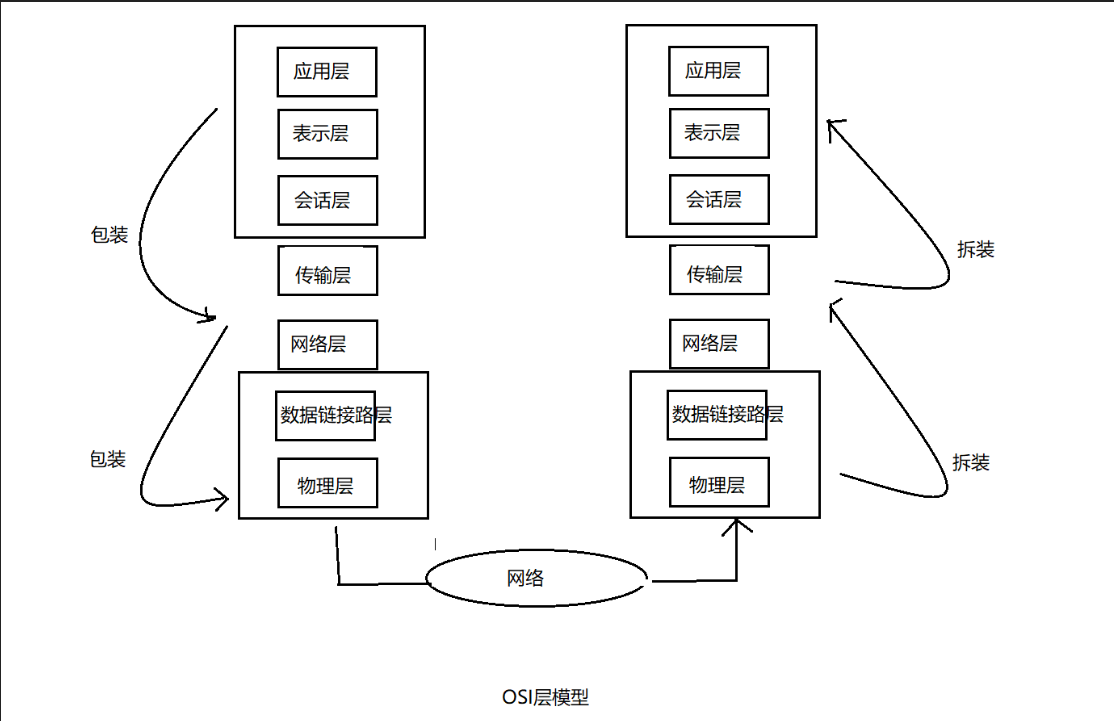
目前为止我对RCP的理解就是,服务端启动,客户端调用服务的方法做操作。接下来我就总结一下RPC和hadoop Java-Api的使用来对文件的上传和删除,增加的操作。
还是来一个demo来详解一下。你觉得怎么样?我觉得不错哦。那我们开始吧。建一个java项目,然后导入jar包,开始我们得编译。
RPC相对应的是Service(服务端)和Client(客户端),所以相对应的类一定会又两个类,还有需要又一个接口让服务端继承来实现事务。即代理模式~
首先看我们的接口:(我先上传代码,然后再详细将我的操作)
package com.huhu.rpc;

public interface SayHello {

    static long versionID = 666L;

    // say hello

    public String hello(String line);

    // insert file and Edit file

    public String hdfsUpLoad(String filename, String data);

    // upload a filename

    public String hdfsGet(String filename);

    // delete a folder OR file

    public String delete(String filename);

    // batch delete folder OR file

    public String deletes(String[] a);

    // newBuild a folder OR file

    public String newBuildForder(String forder);

    // batch DownLoad Text to the specified path

    public String DownLoadText(String[] file, String localPath);

    // Uploading text to the specified path

    public String UploadingaText(String[] file, String localPath, String hadoopPath);

}
再看我的Service:
package com.huhu.rpc;

import org.apache.hadoop.conf.Configuration;

import org.apache.hadoop.fs.FSDataInputStream;

import org.apache.hadoop.fs.FSDataOutputStream;

import org.apache.hadoop.fs.FileSystem;

import org.apache.hadoop.fs.LocalFileSystem;

import org.apache.hadoop.fs.Path;

import org.apache.hadoop.io.IOUtils;

import org.apache.hadoop.ipc.RPC;

import org.apache.hadoop.ipc.RPC.Server;

import com.huhu.util.FSUtils;

import com.huhu.util.RPCUtils;

public class RPCService implements SayHello {

	Configuration conf = new Configuration();

	public static void main(String[] args) throws Exception {

		Configuration conf = new Configuration();

		Server service = new RPC.Builder(conf).setProtocol(SayHello.class).setBindAddress("192.168.43.51").setPort(5566)

				.setInstance(new RPCService()).build();

		service.start();

		System.out.println("service已经启动");

	}

	@Override

	public String hello(String line) {

		// TODO Auto-generated method stub

		return "欢迎您" + line;

	}

	@Override

	public String hdfsUpLoad(String filename, String data) {

		FileSystem fs = null;

		if ("".equals(filename) || "".equals(data) || data.length() < 1) {

			return "You data" + filename + "have a probems,plseces again uplocad!";

		}

		try {

			fs = FSUtils.getFileSystem();

			if (fs.exists(new Path("/1708a1/" + filename + ".txt"))) {

				fs.delete(new Path("/1708a1/" + filename + ".txt"), true);

			}

			FSDataOutputStream create = fs.create(new Path("/1708a1/" + filename + ".txt"));

			create.writeUTF(data);

			IOUtils.closeStream(create);

		} catch (Exception e) {

			// TODO: handle exception

			e.printStackTrace();

		}

		return "OK!!";

	}

	@Override

	public String hdfsGet(String filename) {

		FileSystem fs = null;

		String data = null;

		try {

			fs = FSUtils.getFileSystem();

			if ("".equals(filename) || filename.length() < 1 || !fs.exists(new Path("/1708a1/" + filename + ".txt"))) {

				return "You data" + filename + "have a probems,plseces again uplocad!";

			}

			FSDataInputStream in = fs.open(new Path("/1708a1/" + filename + ".txt"));

			data = in.readUTF();

		} catch (Exception e) {

			// TODO: handle exception

			e.printStackTrace();

		}

		return data;

	}

	// file or folder delete

	@Override

	public String delete(String filename) {

		// TODO Auto-generated method stub

		try {

			FileSystem fs = FSUtils.getFileSystem();

			Path path = new Path("/1708a1/" + filename);

			if (filename.equals("") || filename.length() < 1) {

				return "There is a problem with your operation. Please start over again";

			}

			if (fs.exists(path)) {

				fs.delete(path, true);

			}

		} catch (Exception e) {

			// TODO: handle exception

			e.printStackTrace();

		}

		return "OK!!!";

	}

	// file or folder newBuild

	@Override

	public String newBuildForder(String forder) {

		try {

			Path path = new Path("/1708a1/" + forder);

			FileSystem fs = FSUtils.getFileSystem();

			if (forder.equals("") || forder.length() < 1 || fs.exists(path)) {

				return "There is a problem with your operation. Please start over again";

			}

			fs.mkdirs(path);

		} catch (Exception e) {

			// TODO: handle exception

			e.printStackTrace();

		}

		return "OK!!!";

	}

	// batch delete

	@Override

	public String deletes(String[] name) {

		// TODO Auto-generated method stub

		try {

			FileSystem fs = FSUtils.getFileSystem();

			Path path = null;

			if (name.length < 1 || name.equals("")) {

				return "There is a problem with your operation. Please start over again";

			}

			for (String n : name) {

				path = new Path("/1708a1/" + n);

				if (fs.exists(path)) {

					fs.delete(path, true);

				}

			}

		} catch (Exception e) {

			// TODO: handle exception

			e.printStackTrace();

		}

		return "OK!!!";

	}

	// batch DownLoad Text to the specified path

	@Override

	public String DownLoadText(String[] file, String localPath) {

		try {

			LocalFileSystem localFileSystem = FSUtils.getLocalFileSystem();

			FileSystem fs = FSUtils.getFileSystem();

			Path path = null;

			for (String f : file) {

				path = new Path("/1708a1/" + f);

				if (localPath.equals("") || !fs.exists(path)) {

					return "There is a problem with your operation. Please start over again";

				}

				String[] str = path.toString().split("/1708a1");

				if (fs.isDirectory(path)) {

					localFileSystem.mkdirs(new Path(localPath + "/" + str[1]));

				} else if (fs.isFile(path)) {

					System.out.println("-------------");

					FSDataInputStream in = fs.open(path);

					FSDataOutputStream create = localFileSystem.create(new Path(localPath + "/" + str[1]));

					System.out.println(new Path(localPath + "/" + str[1]) + "---------");

					IOUtils.copyBytes(in, create, conf, true);

				}

			}

		} catch (Exception e) {

			// TODO: handle exception

			e.printStackTrace();

		}

		return "OK!!";

	}

	// Uploading text to the specified path

	@Override

	public String UploadingaText(String[] file, String localPath, String hadoopPath) {

		try {

			LocalFileSystem localFileSystem = FSUtils.getLocalFileSystem();

			FileSystem fs = FSUtils.getFileSystem();

			Path path = null;

			for (String f : file) {

				path = new Path(localPath + "/" + f);

				if (localPath.equals("") || !localFileSystem.exists(path)) {

					return "There is a problem with your operation. Please start over again";

				}

				if (localFileSystem.isDirectory(path)) {

					fs.mkdirs(new Path(hadoopPath + "/" + f));

				} else if (localFileSystem.isFile(path)) {

					fs.copyFromLocalFile(path, new Path(hadoopPath + "/" + f));

				}

			}

		} catch (Exception e) {

			// TODO: handle exception

			e.printStackTrace();

		}

		return "OK!!";

		/*

		 * String uploadingaText = RPCUtils.UploadingaText(file, localPath, hadoopPath);

		 * return uploadingaText;

		 */

	}

}
最后是Client端:
package com.huhu.rpc;

import java.net.InetSocketAddress;

import org.apache.hadoop.conf.Configuration;

import org.apache.hadoop.ipc.RPC;

public class RPCClient {

	public static void main(String[] args) throws Exception {

		Configuration conf = new Configuration();

		SayHello client = RPC.getProxy(SayHello.class, 666L, new InetSocketAddress("192.168.43.51", 5566), conf);

		// file or folder delete

		// String deleteFile = client.delete("hehe.txt");

		// System.out.println(deleteFile);

		// file or folder newBuildv

		// String newBuildForder = client.newBuildForder("/huhula/hehe.txt");

		// System.out.println(newBuildForder);

		// String[] hehe = { "huhula", "f2.txt" };

		// String deletes = client.deletes(hehe);

		// System.out.println(deletes);

		// batch DownLoad Text to the specified path

		// String downLoadText = client.DownLoadText(hehe, "E:/data");

		// System.out.println(downLoadText);

		String[] a = { "44.txt", "55.txt", "66.txt" };

		String uploadingaText = client.UploadingaText(a, "C:/Users/Administrator/Desktop", "/1708a1/");

		System.out.println(uploadingaText);

	}

}
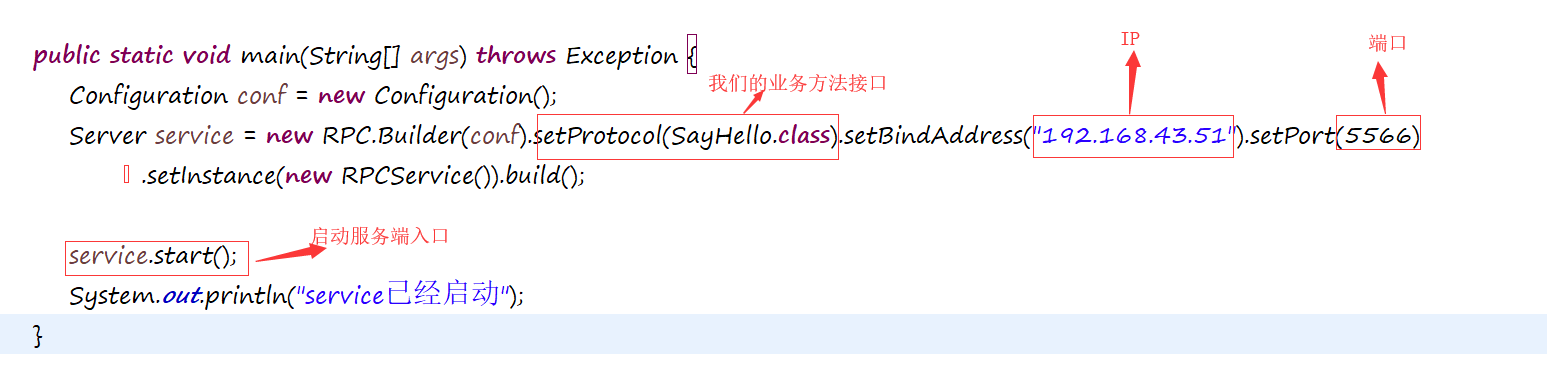
Service:
Client:

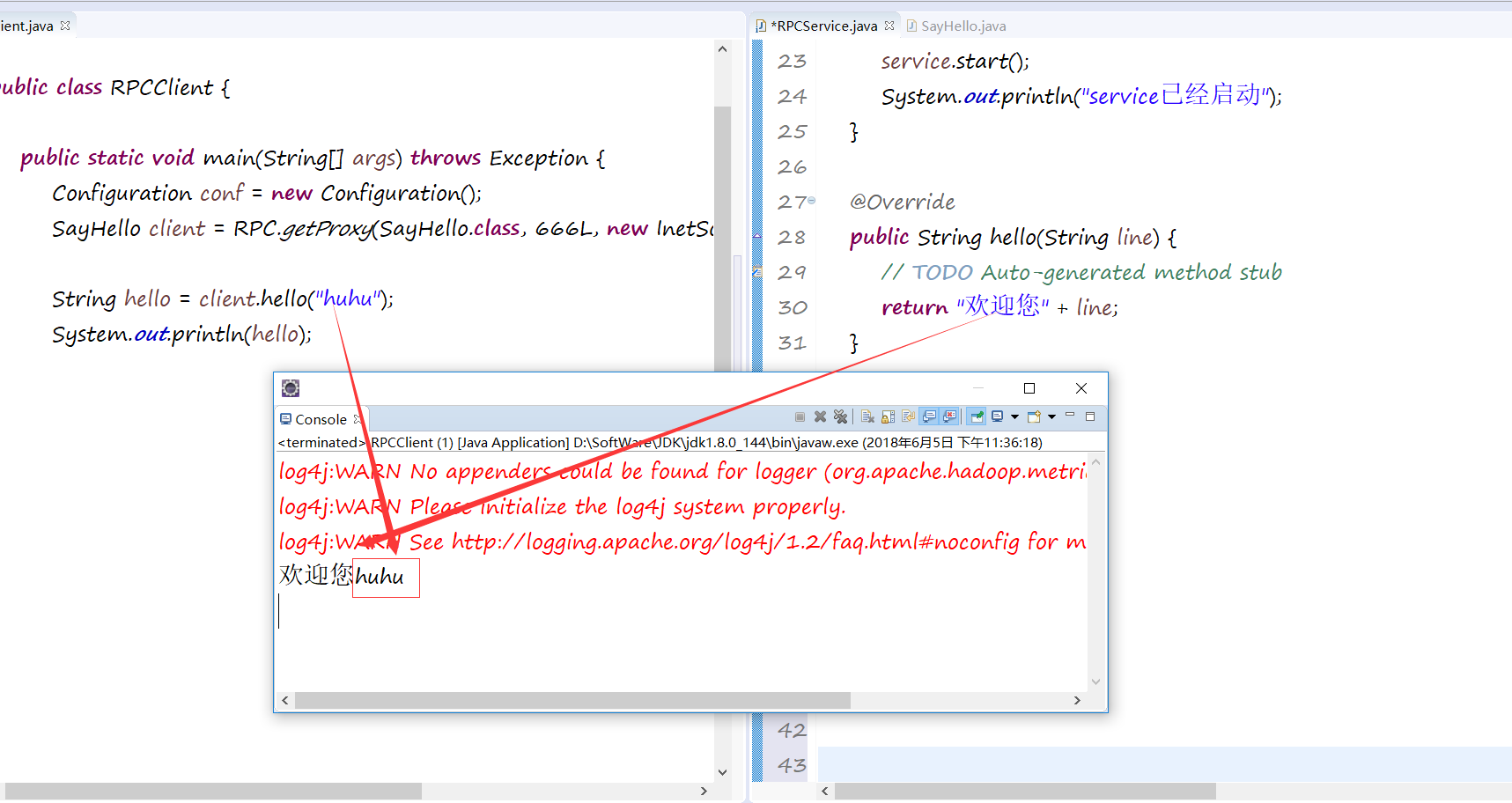
第一个:简单的sayhello向客户端,相当于让我们看看客户端和服务端的连接:
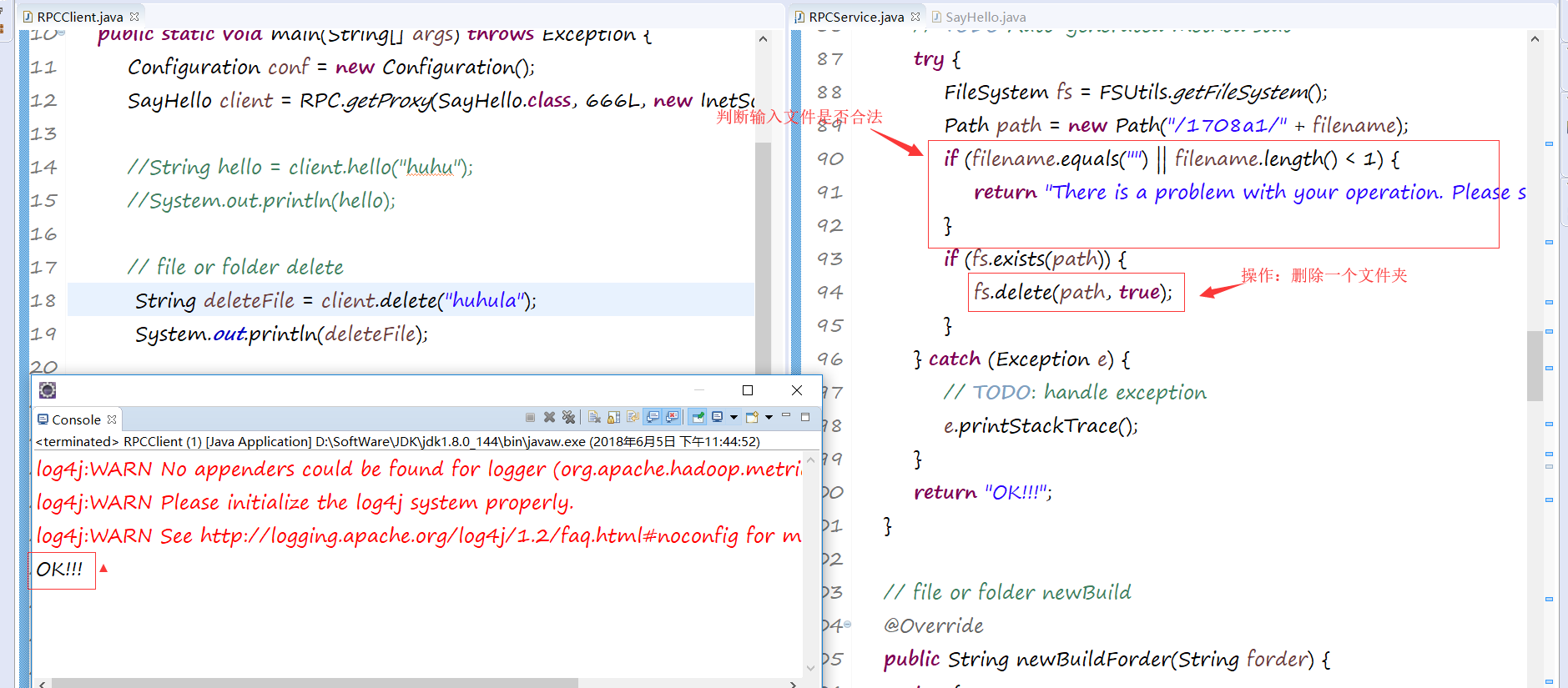
第二个文件的删除可以是file或者是folder:
第三个是创建一个新的文件或者 文件夹:
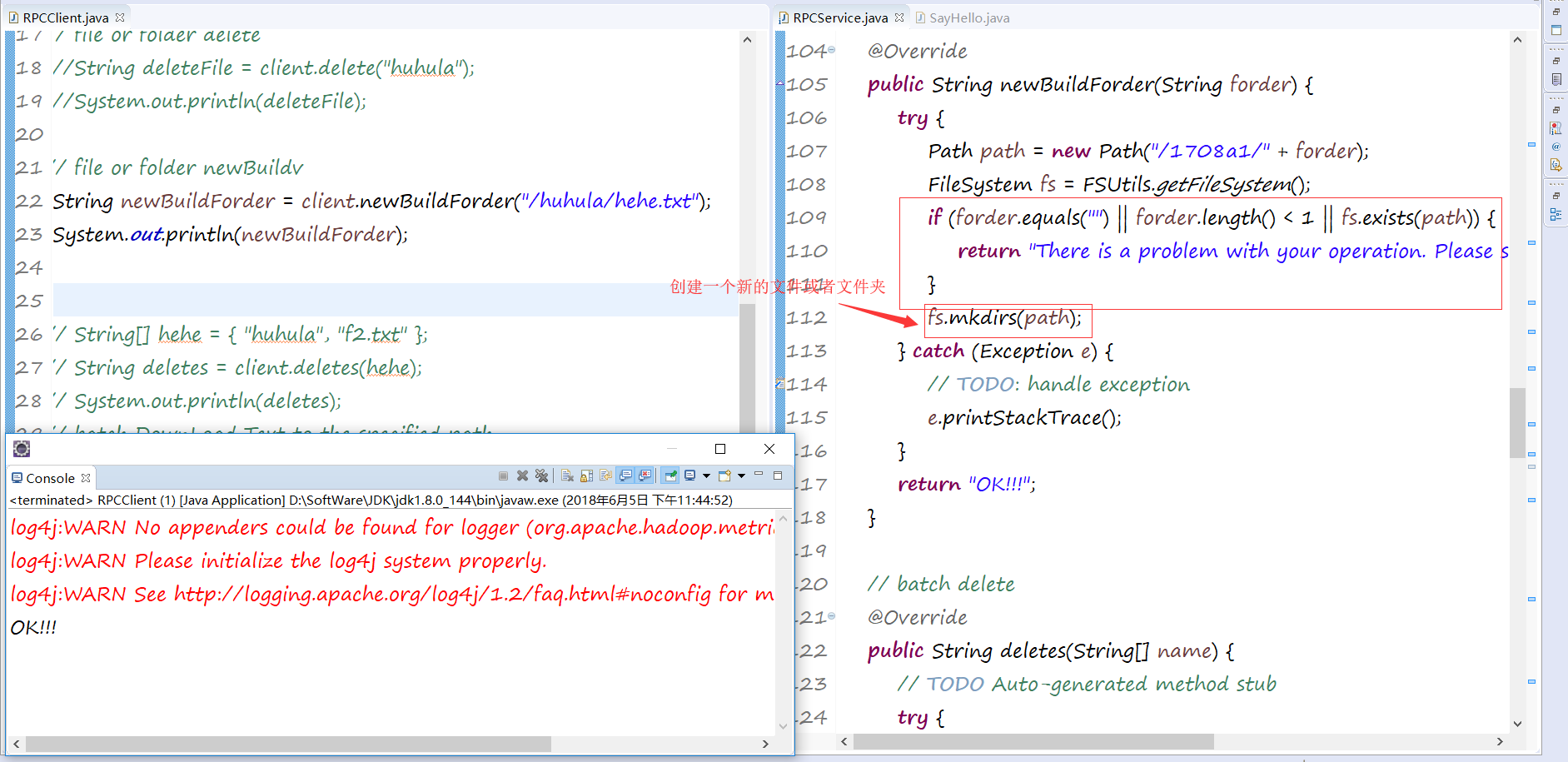
第四个是创建一个文本并编辑它:

第五种查看一个文档的内容:
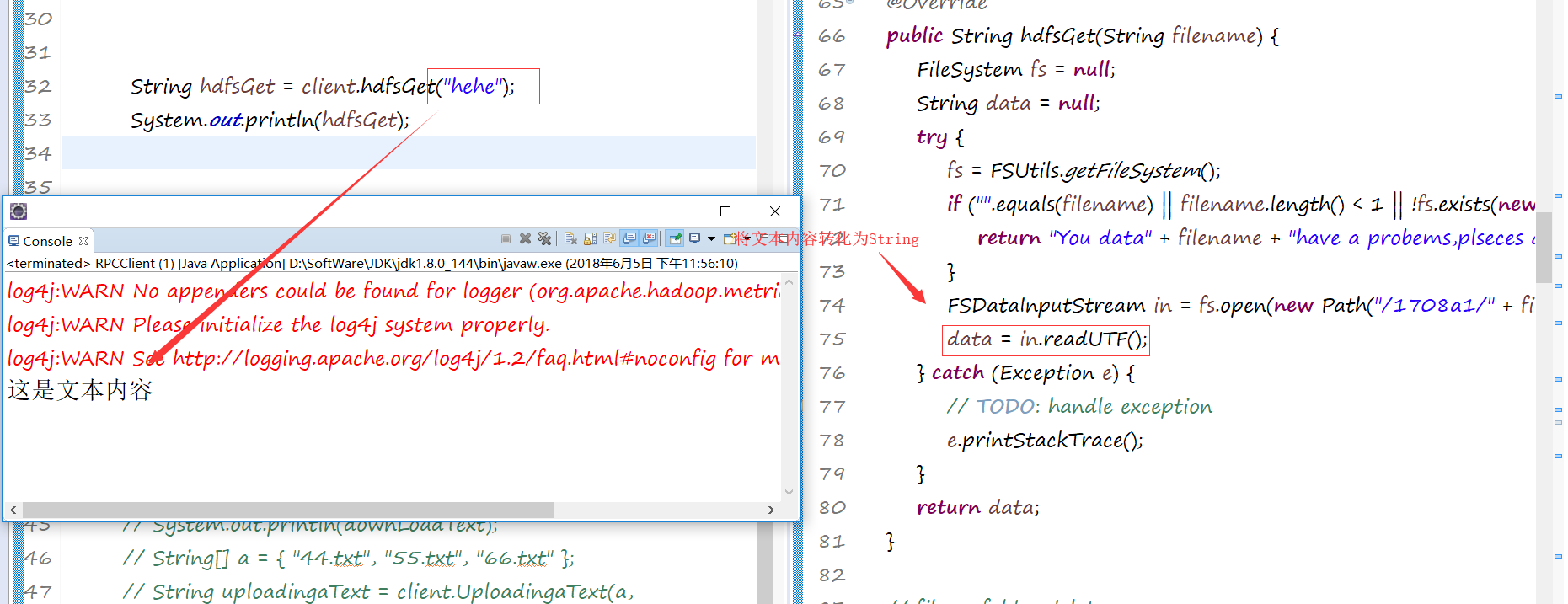
第六种批量删除文件和文本:
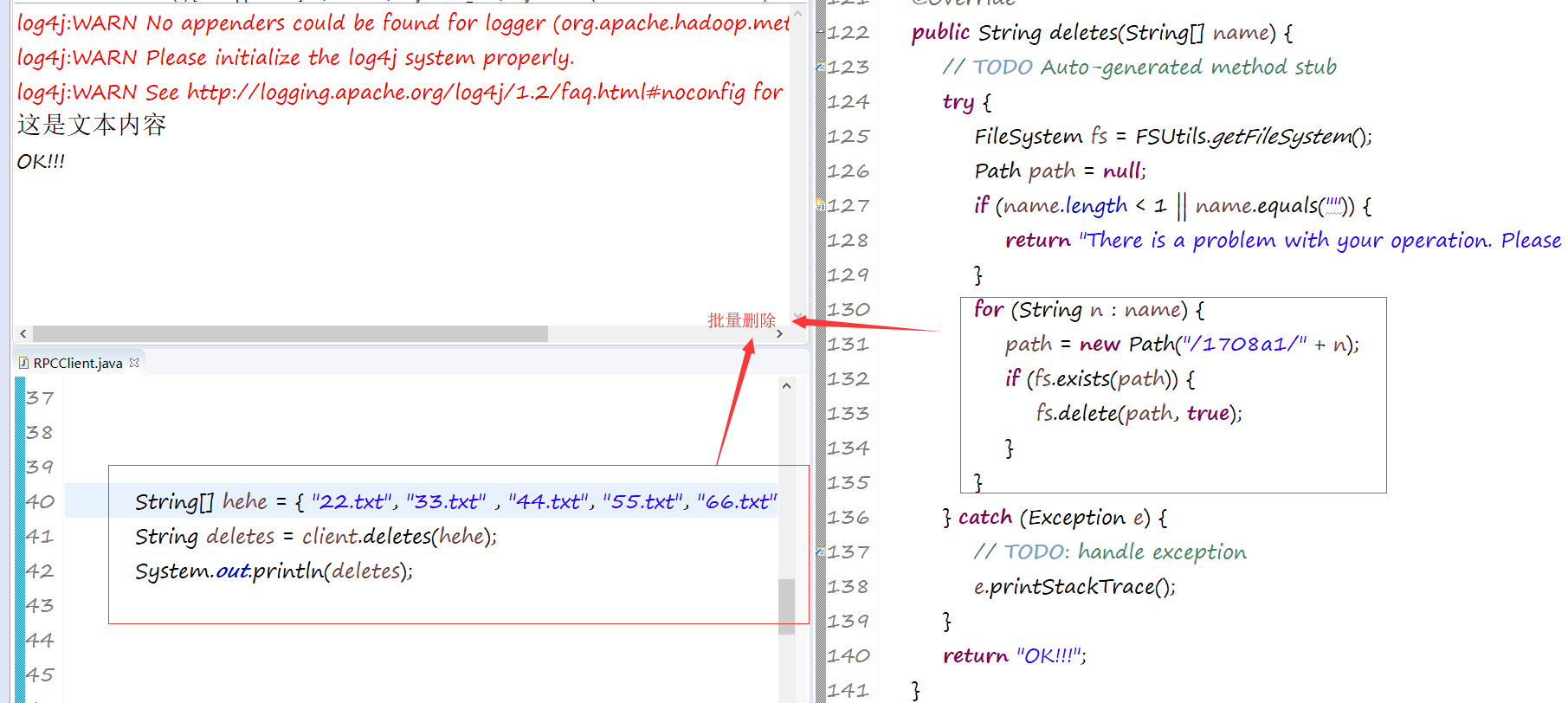
第七种批量下载:

第八种批量上传文本:

这些大概就是关于文件的赠删上传下载的操作。我自己总结了一个工具类。
RPCUtils工具类:
package com.huhu.util;

import org.apache.hadoop.conf.Configuration;

import org.apache.hadoop.fs.FSDataInputStream;

import org.apache.hadoop.fs.FSDataOutputStream;

import org.apache.hadoop.fs.FileSystem;

import org.apache.hadoop.fs.LocalFileSystem;

import org.apache.hadoop.fs.Path;

import org.apache.hadoop.io.IOUtils;

public class RPCUtils {

	// Loading configuration file

	private static Configuration conf = new Configuration();

	// HADOOP file Path

	private static FileSystem fs = null;

	// local file Path

	private static LocalFileSystem lfs = null;

	private static  String HADOOP_PATH = "/1708a1/";

	// upload file and Edit file

	public static String uploadFileAndEditFile(String filename, String data) {

		Path path = new Path(HADOOP_PATH + filename + ".txt");

		// Determine whether the incoming data is legitimate

		if (filename.equals("") || filename.length() < 1 || data.equals("")) {

			return "There is a problem with your operation. Please start over again";

		}

		try {

			// Obtain HADOOP Path

			fs = FSUtils.getFileSystem();

			if (fs.exists(path)) {

				// recursion delete

				fs.delete(path, true);

			}

			// upload file

			FSDataOutputStream create = fs.create(path);

			// edit file

			create.writeUTF(data);

			// close flow

			IOUtils.closeStream(create);

		} catch (Exception e) {

			// TODO: handle exception

			e.printStackTrace();

		}

		return "OK!!";

	}

	// delete a folder OR file

	public static String deleteAFolderOrFile(String name) {

		Path path = new Path(HADOOP_PATH + name);

		// Determine whether the incoming data is legitimate

		if (name.equals("") || name.length() < 1) {

			return "There is a problem with your operation. Please start over again";

		}

		try {

			// Obtain HADOOP Path

			fs = FSUtils.getFileSystem();

			if (fs.exists(path)) {

				fs.delete(path, true);

			}

		} catch (Exception e) {

			// TODO: handle exception

			e.printStackTrace();

		}

		return "OK!!!";

	}

	// look file content

	public static String lookFileContent(String filename) {

		Path path = new Path(HADOOP_PATH + filename);

		String data = null;

		try {

			// Obtain HADOOP Path

			fs = FSUtils.getFileSystem();

			// Determine whether the incoming data is legitimate

			if ("".equals(filename) || filename.length() < 1 || !fs.exists(path)) {

				return "There is a problem with your operation. Please start over again";

			}

			// open file

			FSDataInputStream in = fs.open(path);

			// read file Content

			data = in.readUTF();

		} catch (Exception e) {

			e.printStackTrace();

		}

		return data;

	}

	// file or folder newBuild

	public static String newBuildForder(String forder) {

		Path path = new Path(HADOOP_PATH + forder);

		try {

			// Obtain HADOOP Path

			fs = FSUtils.getFileSystem();

			// Determine whether the incoming data is legitimate

			if (forder.equals("") || forder.length() < 1 || fs.exists(path)) {

				return "There is a problem with your operation. Please start over again";

			}

			fs.mkdirs(path);

		} catch (Exception e) {

			e.printStackTrace();

		}

		return "OK!!!";

	}

	// batch delete file or folder

	public static String deletes(String[] name) {

		// Determine whether the incoming data is legitimate

		Path path = null;

		if (name.length < 1) {

			return "There is a problem with your operation. Please start over again";

		}

		try {

			// Obtain HADOOP Path

			fs = FSUtils.getFileSystem();

			for (String n : name) {

				path = new Path(HADOOP_PATH + n);

				if (fs.exists(path)) {

					fs.delete(path, true);

				}

			}

		} catch (Exception e) {

			// TODO: handle exception

			e.printStackTrace();

		}

		return "OK!!!";

	}

	// batch DownLoad Text to the specified path

	public static String DownLoadText(String[] file, String localPath) {

		Path path = null;

		try {

			lfs = FSUtils.getLocalFileSystem();

			fs = FSUtils.getFileSystem();

			for (String f : file) {

				path = new Path(HADOOP_PATH + f);

				// Determine whether the incoming data is legitimate

				if (localPath.equals("") || !fs.exists(path)) {

					return "There is a problem with your operation. Please start over again";

				}

				String[] str = path.toString().split(HADOOP_PATH);// /1708a1

				if (fs.isDirectory(path)) {

					lfs.mkdirs(new Path(localPath + "/" + str[1]));

				} else if (fs.isFile(path)) {

					FSDataInputStream in = fs.open(path);

					FSDataOutputStream create = lfs.create(new Path(localPath + "/" + str[1]));

					IOUtils.copyBytes(in, create, conf, true);

				}

			}

		} catch (Exception e) {

			// TODO: handle exception

			e.printStackTrace();

		}

		return "OK!!";

	}

	// Uploading text to the specified path 批量的文件上传和

	public static String UploadingaText(String[] file, String localPath, String hadoopPath) {

		Path path = null;

		try {

			lfs = FSUtils.getLocalFileSystem();

			fs = FSUtils.getFileSystem();

			for (String f : file) {

				path = new Path(localPath + "/" + f);

				// Determine whether the incoming data is legitimate

				if (localPath.equals("") || !lfs.exists(path)) {

					return "There is a problem with your operation. Please start over again";

				}

				if (lfs.isDirectory(path)) {

					fs.mkdirs(new Path(hadoopPath + "/" + f));

				} else if (lfs.isFile(path)) {

					fs.copyFromLocalFile(path, new Path(hadoopPath + "/" + f));

				}

			}

		} catch (Exception e) {

			// TODO: handle exception

			e.printStackTrace();

		}

		return "OK!!";

	}

}
然后就完成了今天学习的总结了。要睡觉觉了。。。。啦啦啦啦!!
huhu_k:晚睡是一种习惯,与你也是呀!
Hadoop--之RPC开发的更多相关文章
- Hadoop的RPC机制及简单实现
1.RPC简介 Remote Procedure Call 远程过程调用协议 RPC——远程过程调用协议,它是一种通过网络从远程计算机程序上请求服务,而不需要了解底层网络技术的协议.RPC协议假定某些 ...
- Windows10系统下Hadoop和Hive开发环境搭建填坑指南
前提 笔者目前需要搭建数据平台,发现了Windows系统下,Hadoop和Hive等组件的安装和运行存在大量的坑,而本着有坑必填的目标,笔者还是花了几个晚上的下班时候在多个互联网参考资料的帮助下完成了 ...
- Hadoop的RPC分析
一.基础知识 原理 http://www.cnblogs.com/edisonchou/p/4285817.html,这个谢了一些rpc与hadoop的例子. 用到了java的动态代理,服务端实现一个 ...
- eclipse连接远程hadoop集群开发时权限不足问题解决方案
转自:http://blog.csdn.net/shan9liang/article/details/9734693 eclipse连接远程hadoop集群开发时报错 Exception in t ...
- Hadoop的RPC框架介绍
为什么会引入RPC: RPC采用客户机/服务器模式.请求程序就是一个客户机,而服务提供程序就是一个服务器.当我们讨论HDFS的,通信可能发生在: Client-NameNode之间,其中NameNod ...
- Hadoop之RPC
Hadoop的RPC主要是通过Java的动态代理(Dynamic Proxy)与反射(Reflect)实现,代理类是由java.lang.reflect.Proxy类在运行期时根据接口, ...
- 如何进行Hadoop二次开发指导视频下载
本视频适合对Java有一定了解,熟悉java se的Hadoop爱好者,想对Hadoop进行二次开发.下面是以伪分布为例: 想对Hadoop二次开发:一.首先需要Hadoop和Java之间搭建Ecli ...
- eclipse连接远程hadoop集群开发时0700问题解决方案
eclipse连接远程hadoop集群开发时报错 错误信息: Exception in thread "main" java.io.IOException:Failed to se ...
- Hadoop之RPC简单使用(远程过程调用协议)
一.RPC概述 RPC是指远程过程调用,也就是说两台不同的服务器(不受操作系统限制),一个应用部署在Linux-A上,一个应用部署在Windows-B或Linux-B上,若A想要调用B上的某个方法me ...
- Hadoop的RPC通信原理
RPC调用: RPC(remote procedure call)远程过程调用: 不同java进程间的对象方法的调用. 一方称作服务端(server),一方称为客户端(client): server端 ...
随机推荐
- SAP 供应商/客户的冻结及其删除操作
SAP 供应商/客户的冻结及其删除操作 在SAP中,有所谓的财务供应商(Tcode:FK01)和后勤供应商(Tcode:XK01),供应商和客户主数据包括一般数据/公司代码数据/采购组织|销售范围三方 ...
- NPOI导入导出EXCEL通用类,可直接使用在WinForm项目中
由于XSSFWorkbook类型的Write方法限制,Write完成后就自动关闭流数据,所以无法很好的支持的Web模式,网上目前也未找到好的解决方案. 注意:若直接使用在WinForm项目中,必需先下 ...
- 深入理解char * ,char ** ,char a[ ] ,char *a[]
1.数组的本质 数组是多个元素的集合,在内存中分布在地址相连的单元中,所以可以通过其下标访问不同单元的元素. 2.指针 指针也是一种变量,只不过它的内存单元中保存的是一个标识其他位置的地址.由于地址也 ...
- go 多态
demo1 // Sample program to show how polymorphic behavior with interfaces. package main import ( &quo ...
- IIS上部署MVC网站,打开后ExtensionlessUrlHandler-4.0
IIS上部署MVC网站,打开后ExtensionlessUrlHandler-Integrated-4.0解决方法IIS上部署MVC网站,打开后500错误 IS上部署MVC网站,打开后Extensio ...
- mkdir -p a/b 表示创建目录a,并创建目录a的子目录b
mkdir -p 命令解释 2016年01月13日 14:24:03 阅读数:742 mkdir -p a/b 表示创建目录a,并创建目录a的子目录b, 若不使用命令-p的话,想要达到同样的效果,需要 ...
- 《剑指offer》第四十七题(礼物的最大价值)
// 面试题47:礼物的最大价值 // 题目:在一个m×n的棋盘的每一格都放有一个礼物,每个礼物都有一定的价值 // (价值大于0).你可以从棋盘的左上角开始拿格子里的礼物,并每次向左或 // 者向下 ...
- sort-桶排序
void list_insert(list<int> &t,int num) { auto iter=t.begin(); for(;iter!=t.end();++iter) { ...
- 学习笔记46—如何使Word和EndNote关联
1)打开Word文件项目中的选项,然后点击加载项, 2)找到Endnote安装目录,选择目录中的Configure EndNote.exe,选中configuration endnote compon ...
- 算法笔记--斜率优化dp
斜率优化是单调队列优化的推广 用单调队列维护递增的斜率 参考:https://www.cnblogs.com/ka200812/archive/2012/08/03/2621345.html 以例1举 ...