
关于SWT常用组件(按钮,复选框,单选框(Button类))
Button是SWT中最常用的组件.Button类的继承关系图:
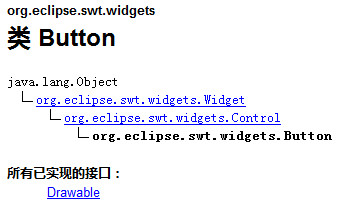
Button类的构造方法是newe Button(Composite parent,int style)它有两个参数:
第一个参数:是Button创建在哪个容器上.Composite是最常用的容器,而Shell是
Composite的子类.所以此参数也能接受Shell和任何继承自Composite的子类.
第二个参数用来指定Button应用哪种式样,SWT.NONE是保持Button组件的默认式样.
式样其实是一个常量,如SWT.NONE的值是0,查看SWT.class的源代码可以发现很多这种常量.
SWT组件的式样是比较有特点的.和new Button(Composite parent,int style)一样,大都在
构造函数中使用式样(style)来定义组件外观形态.例如:Button就可以通过式样的定义而成为
复选框,单选框,或者通过式样来设置按钮文字的排放和按钮外观.
如果要生成一个文字靠左的,深陷型的复选框,只要用符号"|"将各个式样连起来即可.
如下所示:new Button(shell,SWT.LEFT|SWT.BORDER|SWT.CHECK)
Button是SWT中最常用的组件.而且使用也比较简单.
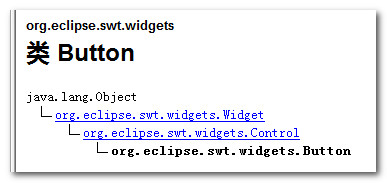
Button类的式样表
SWT组件的式样是比较有特点的,和new Button(Composite arent,int style)一样,大都在构造函数中使用式样(style)来定义组件外观形态,例如:Button就可以通过式样的定义而成为复选框,单选框或者通过式样来设置按钮文字的排放和按钮外观.
如果要生成一个文字靠左的,深陷型的复选框,只要用符号"|"将各个样式连起来,既可以了.
例如:new Button(shell,SWT.LEFT|SWT.BORDER|SWT.CHECK)
组件的常用方法
SWT/JFace中的每一个组件都有很多的同名的方法,这些同名方法在各个组件的作用和用法都是相同或者相似的,这就为我们节省了很多的学习精力.在此将一些常用的方法总结如下:
setText(String string)
说明:设置组件的标签文字.
例子:button.setText("确定").
setToolTipText(String string)
说明:设置鼠标停留在组件上时,出现的黄色提示条中的文字.
例子:button.setToolTipText("单击确定按钮,结束设置")
setBounds(int x,int y,int width,int height)
说明:设置组件的坐标位置和大小,(x轴坐标,y轴坐标,按钮宽度,按钮长度)
例子:button.setBounds(45,45,56,13)
setEnabled(boolean enabled)
说明:设置组件是否可用,false不可用,true(默认值)可用
例子:button.setEnable(false)
setFont(Font font)
说明:设置文字的字体
例子:button.setFont(ResourceManager.getFont("",14,SWT.BOLD|SWT.ITALIC)
setSelection(boolean selected)
说明:设置是否选上,true为选上,false(默认)为不选上.当Button是复选框或者单选框的时候此方法才有效
例子:button.setSelection(false)
setForeground(Color color)
说明:设置前景色
例子:button.setForeground()
setBackground(Color color)
说明:设置背景色
例子:label.setBackground()
setAlignment(int alignment)
说明:设置标签文字的对齐方式
例子:label.setAlignment(SWT.RIGHT)
setImage(Image image)
说明:设置显示的图片.
例子:button.setImage(new Image(display,"icons/selectAll.gif")) 把图片selectAll.gif设置在按钮上.
例子代码:
Button1.java (注意这个地方Button是一个类名,关键字,这个地方不能用Button.java命名类名,否则出现冲突)
 public class Button1 {

     public static void main(String[] args) {

         Display display = Display.getDefault();

         Shell shell = new Shell();

         shell.setSize(450, 300);

         shell.setText("SWT Application");

         //事件代码里要访问button,所以加上一个final

         final Button btnNewButton = new Button(shell,SWT.NONE);

         btnNewButton.addSelectionListener(new SelectionAdapter() {

             @Override

             public void widgetSelected(SelectionEvent e) {

                 MessageDialog.openInformation(null, "","你单击了 "+ btnNewButton.getText()+" 按钮");

             }

         });

         btnNewButton.setBounds(78, 51, 80, 27);

         btnNewButton.setText("确定");

         shell.open();

         shell.layout();

         while (!shell.isDisposed()) {

             if (!display.readAndDispatch()) {

                 display.sleep();

             }

         }

     }

 }
运行结果:
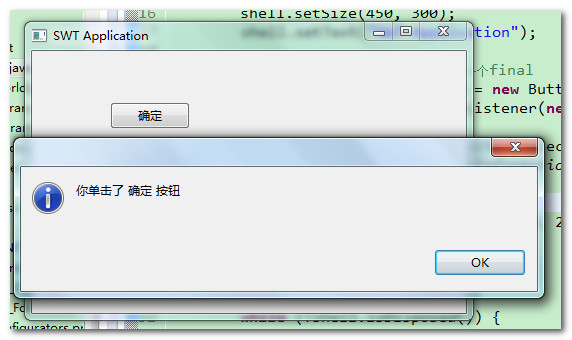
程序说明:
Button类的造成方法是new Button(Composite parent,int style),它有两个参数:
第一个参数是指Button创建在哪一个容器上.Composite是最常用的容器,而Shell是Composite的子类,所以此参数也能接受Shell和任何继承自Composite的类.
第二个参数用来指定Button应用哪种(或几种)式样,SWT.NONE是保持Button组件的默认式样.式样其实是一个常量,如SWT.NONE的值是0,查看SWT.class的源代码可以发现很多这种常量.
Button1.java
 public class Button1 {

     public static void main(String[] args) {

         final Display display = Display.getDefault();

         final Shell shell = new Shell();

         shell.setSize(327, 253);

         // ---------创建窗口中的其他界面组件-------------

         final Button radio1 = new Button(shell, SWT.RADIO);// 事件代码里要访问radio1,所以加一个final

         radio1.setText("男");// 设置按钮上的文字

         radio1.setSelection(true);// 设置按钮处于选择状态

         radio1.setBounds(10, 10, 40, 25); // 设置按钮位置

         final Button radio2 = new Button(shell, SWT.RADIO);

         radio2.setText("女");

         radio2.setBounds(10, 30, 40, 25);

         final Button check1 = new Button(shell, SWT.CHECK);

         check1.setText("旅游");

         check1.setBounds(70, 10, 40, 25);

         final Button check2 = new Button(shell, SWT.CHECK);

         check2.setText("篮球");

         check2.setBounds(70, 30, 40, 25);

         Button okButton = new Button(shell, SWT.NONE);

         okButton.setText("确定");

         okButton.setBounds(10, 70, 100, 25);

         okButton.addSelectionListener(new SelectionAdapter() {

             public void widgetSelected(SelectionEvent e) {

                 String str = "小明,";

                 if (radio1.getSelection())// 判断按钮是否被选

                     str += radio1.getText();// 取得按钮上的文字

                 if (radio2.getSelection())

                     str += radio2.getText();

                 str += "。爱好:";

                 if (check1.getSelection())

                     str += check1.getText();

                 if (check2.getSelection())

                     str += check2.getText();

                 // 信息提示框的第一、二个参数为空值也是可以的

                 MessageDialog.openInformation(null, null, str);

             }

         });

         // -----------------END------------------------

         shell.layout();

         shell.open();

         while (!shell.isDisposed()) {

             if (!display.readAndDispatch())

                 display.sleep();

         }

         display.dispose();

     }

 }
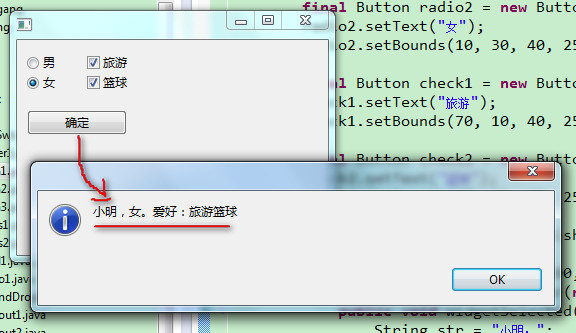
程序说明:
Button类的构造方法是new Button(Composite parent,int style),它有两个参数:
第一个参数指定Button创建在哪个容器上.Composite是最常用的容器,而Shell是Composite的子类,所以此参数也能接受Shell.
第二个参数指定Button所用的式样:SWT.RaDIO 是单选按钮;SWT.CHECK是复选框,SWT.NONE是普通按钮(默认式样)
Button类的式样表.
SWT组件的创建格式和Button一样,一般都是构造函数的第一个参数指定父容器,第二个参数指定式样,不过各组件所支持的式样各有不同.SWT通过式样来定义组件的外观形态;
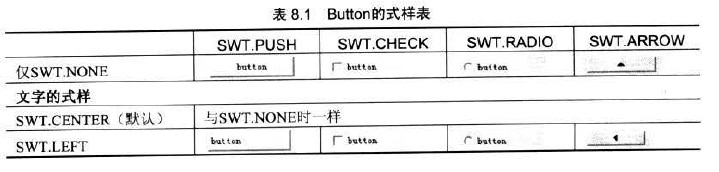
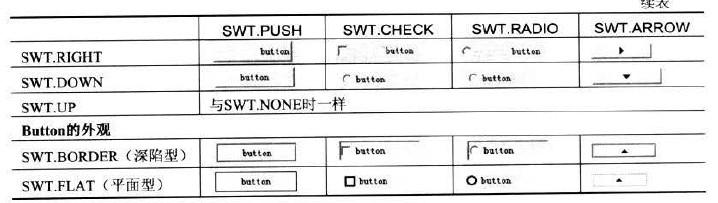
式样其实是一个常量,SWT.NONE的对应值是0,查看SWT.class的源代码能发现很多这种常量.多个式样可以用符号"|"组合在一起,比如生成一个文字靠左的,深陷型的复选框:new Button(shell,SWT.LEFT|SWT.BORDER|SWT.CHECK).
使用事件参数SelectionEvent
事件方法一般都带有一个参数,比如Button的选择事件widgetSelected(SelectionEvent e)的参数SelectionEvent.事件参数一般会包含一些事件触发者(如Button)的信息.
举个实例:一窗口中0~9依次排列着十个数字按钮,单击这些按钮后弹出提示框显示相应的数值,实现这个例子的关键是获得数字按钮对象的引用,有两种方式,第一种是惯用做法:
Button2.java
 public class Button2 {

     public static void main(String[] args) {

         final Display display = Display.getDefault();

         final Shell shell = new Shell();

         shell.setSize(327, 253);

         // ---------创建窗口中的其他界面组件-------------

         for (int i = 0; i < 10; i++) {

             final Button button = new Button(shell, SWT.NONE);

             button.setText(i + "");

             button.setBounds(i * 20, 10, 20, 20); // 设置按钮位置

             button.addSelectionListener(new SelectionAdapter() {

                 public void widgetSelected(SelectionEvent e) {

                     MessageDialog.openInformation(null, null, button.getText());

                 }

             });

         }

         // -----------------END------------------------

         shell.layout();

         shell.open();

         while (!shell.isDisposed()) {

             if (!display.readAndDispatch())

                 display.sleep();

         }

         display.dispose();

     }

 }
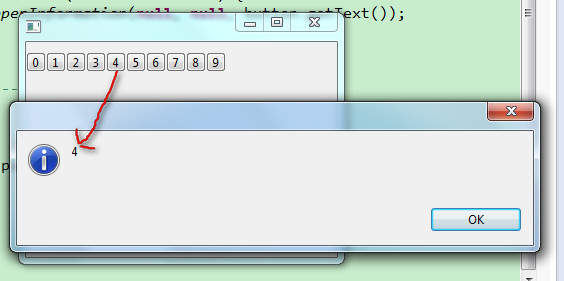
第二种是通过事件参数SelectionEvent的getSource方法得到按钮对象的引用,另外,由于事件代码中不必直接引用button变量,所以第二句前面不用加final前缀.
Button3.java
 public class Button3 {

     public static void main(String[] args) {

         final Display display = Display.getDefault();

         final Shell shell = new Shell();

         shell.setSize(327, 253);

         // ---------创建窗口中的其他界面组件-------------

         for (int i = 0; i < 10; i++) {

             Button button = new Button(shell, SWT.NONE);

             button.setText(i + "");

             button.setBounds(i * 20, 10, 20, 20); // 设置按钮位置

             button.addSelectionListener(new SelectionAdapter() {

                 public void widgetSelected(SelectionEvent e) {

                     Button b = (Button) e.getSource();

                     MessageDialog.openInformation(null, null, b.getText());

                 }

             });

         }

         // -----------------END------------------------

         shell.layout();

         shell.open();

         while (!shell.isDisposed()) {

             if (!display.readAndDispatch())

                 display.sleep();

         }

         display.dispose();

     }

 }
关于SWT常用组件(按钮,复选框,单选框(Button类))的更多相关文章
- Chapter 4. Button, Checkbutton, and Radiobutton Widgets 按钮,复选按钮,单选按钮
Chapter 4. Button, Checkbutton, and Radiobutton Widgets 按钮,复选按钮,单选按钮 几乎所有的Perl/Tk 应用使用按钮以这样或者那样的方式 ...
- MFC控件编程之复选框单选框分组框
MFC控件编程之复选框单选框分组框 一丶分组框 分组框 英文叫做 GroubBox 添加了分组框主要就是分组.好看.不重点介绍 二丶单选框 英文: Raido Button 单选框需要注意的事项 1. ...
- [CSS]复选框单选框与文字对齐问题的研究与解决.
前言:今天碰到的这个问题, 恰好找到一个很好的博文, 在这里转载过来 学习下. 原文地址:复选框单选框与文字对齐问题的研究与解决. 目前中文网站上面的文字,就我的个人感觉而言,绝大多数网站的主流文字大 ...
- pentaho cde 自定义复选下拉框 checkbox select
pentaho 自带的component 虽多,但是当用户需要在一个表格中查看多个组别的数据时,pentaho自带的单选框就不能实现了,所以复选下拉框势在必行,实现效果如下: 实现原理是借用了jqu ...
- ztree根据参数动态控制是否显示复选框/单选框(静态JSON数据)
本文不再更新,可能存在内容过时的情况,实时更新请访问原地址:ztree根据参数动态控制是否显示复选框/单选框(静态JSON数据): 现有全省各地区静态JSON数据,现在想通过Url参数,动态控制是否显 ...
- jq check 复选变单选。
$("input[type='checkbox']").on("click",function(e){ var $checked = $("input ...
- php 查找数组中是否存在某项,并返回指定的字符串,可用于检查复选,单选等
/** * 查找数组中是否存在某项,并返回指定的字符串,可用于检查复选,单选等 * @param $id * @param $ids * @param string $returnstr * @ret ...
- JQ判断按钮,复选框是否选中
var oRdoValue=$("#Radio1").is (":checked")?"男":"女"; //获取单选框按 ...
- SWT常用组件(转)
转载自:http://www.cnblogs.com/happyPawpaw/archive/2012/10/19/2730478.html 1按钮组件(Button) (1)Button组件常用样式 ...
随机推荐
- 环境监测小助手V1.1的Windows版
环境监测小助手V1.1——可以实时查看空气质量和城市排名 一款跨平台空气质量监测软件 数据来源互联网,请联网使用. 暂不支持效果预览. 下载地址:http://files.cnblogs.com/py ...
- 线性存储结构-Stack
Stack继承于Vector,是一个模拟堆栈结构的集合类.当然也属于顺序存储结构.这里注意Android在com.android.layoutlib.bridge.impl包中也有一个Stack的实现 ...
- 浅析Netty的异步事件驱动(一)
本篇文章着重于浅析一下Netty的事件处理流程,Netty版本为netty-3.6.6.Final. Netty定义了非常丰富的事件类型,代表了网络交互的各个阶段.并且当各个阶段发生时,触发相应的事件 ...
- 电脑突然死机,系统日志记录事件ID=6008
刚才正在写代码,在一次保存之后,正要刷新看下效果,电脑突然关机,没有任何提示或延迟.我的笔记本电池是一直插上的,也连接着电源. 重新开机之后,找到系统日志查看.只有这一条错误记录:非正常关机,事件60 ...
- 远程控制篇:在DELPHI程序中拨号上网
用MODEM拨号上网,仍是大多数个人网民选择上网的方式.如果能在我们的应用程序中启动拨号连接(如IE浏览器程序中的自动拨号功能),无疑将会方便我们的软件用户(不用再切换应用程序,运行拨号网络),提高我 ...
- 转载 GUID介绍
转载 http://www.cnblogs.com/illele/archive/2008/02/25/1080554.html GUID(Global unique identifier)全局唯一标 ...
- Android Design 与 Holo Theme
转载:http://www.geekpark.net/topics/179488 [核心提示] 提到 Android Design,很多人会做出”啊,知道,就是黑色的背景和灰蓝色的平的按钮嘛”,那么到 ...
- C#- 实用的Log4Net日志记录例子
工作中也是要用到日志记录的,LOG4NET在这块做的不错,以后可以继续拿来用. 1.引用DLL 2.LOG4NET的配置文件 <?xml version="1.0" enco ...
- cocos2d-x Animation
转自:http://codingnow.cn/cocos2d-x/810.html 这一篇来学习怎么使用cocos2d-x引擎播放帧动画,就是把一帧一帧的图片像电影那样显示出来.1. 首先来了解一下相 ...
- 作为平台的Windows PowerShell(二)
在此系列文章的前一篇,我们看到了怎样使用System.Management.Automation.PowerShell 类来在c#应用程序中运行PowerShell 命令.在那些例子中,我们创建的都是 ...