
[iOS UI进阶 - 2.1] 彩票Demo v1.1
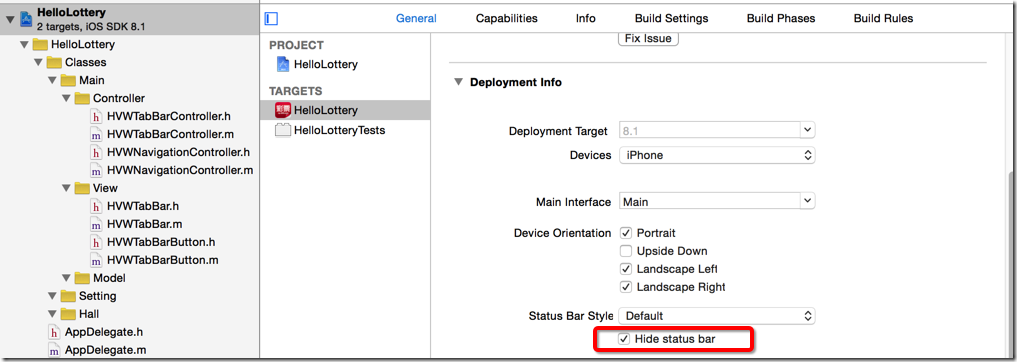
 - (BOOL)application:(UIApplication *)application didFinishLaunchingWithOptions:(NSDictionary *)launchOptions {

     // Override point for customization after application launch.

     // 设置状态栏样式为白色

     application.statusBarHidden = NO;

     application.statusBarStyle = UIStatusBarStyleLightContent;

     return YES;

 }
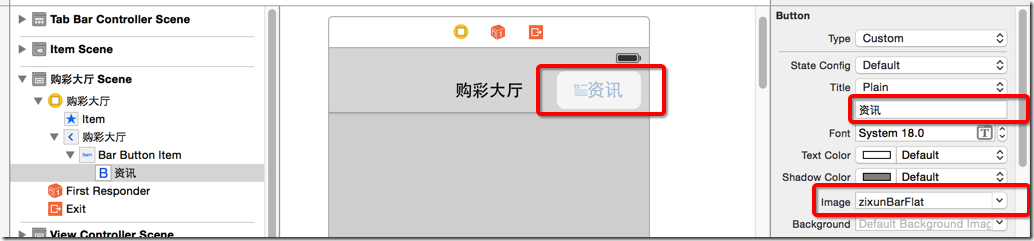
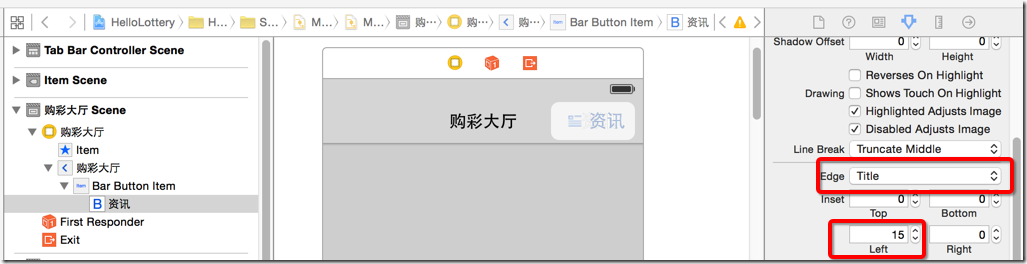
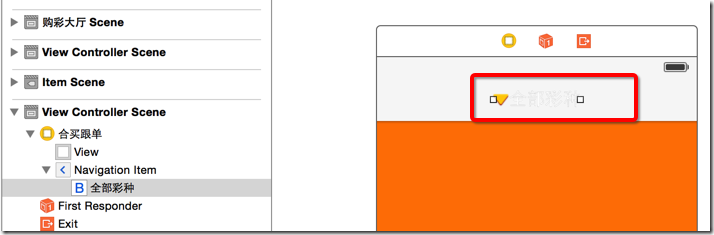
 //

 //  TitleExtendButton.m

 //  HelloLottery

 //

 //  Created by hellovoidworld on 15/1/3.

 //  Copyright (c) 2015年 hellovoidworld. All rights reserved.

 //

 #import "TitleExtendButton.h"

 @interface TitleExtendButton()

 @property(nonatomic, strong) UIFont *titleFont;

 @end

 @implementation TitleExtendButton

 /** 从文件加载对象就会调用此方法,例如xib和storybard */

 - (id)initWithCoder:(NSCoder *)aDecoder {

     NSLog(@"从文件加载TitleButton");

     if (self = [super initWithCoder:aDecoder]) {

         [self initializeButton];

     }

     return self;

 }

 /** 从代码中加载对象就会调用此方法 */

 - (instancetype)initWithFrame:(CGRect)frame {

     NSLog(@"从代码加载TitleButton");

     if (self = [super initWithFrame:frame]) {

         [self initializeButton];

     }

     return self;

 }

 - (void) initializeButton {

     // 设置font

     self.titleFont = [UIFont systemFontOfSize:]; // 暂时先自定义font

     self.titleLabel.font = self.titleFont;

     // 图标居中

     [self.imageView setContentMode:UIViewContentModeCenter];

 }

 /** 返回title的frame */

 - (CGRect)titleRectForContentRect:(CGRect)contentRect {

     CGFloat titleX = ;

     CGFloat titleY = ;

     NSDictionary *attr = @{NSFontAttributeName : self.titleFont};

     CGFloat titleWidth;

     // 只有 iOS7 版本以上才能运行以下代码

     if (iOS7) {

         // 只有 Xcode5 或以上版本才能识别这段代码

 #ifdef __IPHONE_7_0

     titleWidth = [self.currentTitle boundingRectWithSize:CGSizeMake(MAXFLOAT, MAXFLOAT) options:NSStringDrawingUsesLineFragmentOrigin attributes:attr context:nil].size.width;

 #else

         titleWidth = [self.currentTitle sizeWithFont:self.titleFont].width;

 #endif

     } else { // 否则使用旧的API

         titleWidth = [self.currentTitle sizeWithFont:self.titleFont].width;

     }

     CGFloat titleHeight = contentRect.size.height;

     return CGRectMake(titleX, titleY, titleWidth, titleHeight);

 }

 /** 返回image的frame */

 - (CGRect)imageRectForContentRect:(CGRect)contentRect {

     CGFloat imageWidth = ;

     CGFloat imageHeight = contentRect.size.height;

     CGFloat imageX = contentRect.size.width - imageWidth;

     CGFloat imageY = ;

     return CGRectMake(imageX, imageY, imageWidth, imageHeight);

 }

 @end
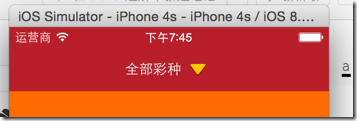
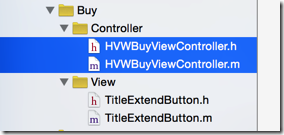
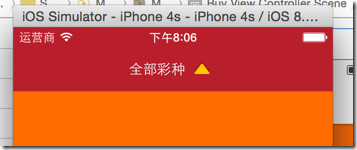
 //

 //  HVWBuyViewController.m

 //  HelloLottery

 //

 //  Created by hellovoidworld on 15/1/3.

 //  Copyright (c) 2015年 hellovoidworld. All rights reserved.

 //

 #import "HVWBuyViewController.h"

 #import "TitleExtendButton.h"

 @interface HVWBuyViewController ()

 @property(nonatomic, weak) UIView *popupView;

 /** 标题点击事件 */

 - (IBAction)titleClicked:(TitleExtendButton *)sender;

 @end

 @implementation HVWBuyViewController

 - (void)viewDidLoad {

     [super viewDidLoad];

     // Do any additional setup after loading the view.

 }

 - (void)didReceiveMemoryWarning {

     [super didReceiveMemoryWarning];

     // Dispose of any resources that can be recreated.

 }

 /** 延迟初始化弹出view

 * (发现放在viewDidLoad的时候,在点击按钮调用的时候pupupView的frame没有被初始化)

 */

 - (UIView *)popupView {

     if (_popupView == nil) {

         // 初始化弹出view

         UIView *popupView = [[UIView alloc] init];

         CGFloat popupViewX = ;

         CGFloat popupViewY = [UIApplication sharedApplication].statusBarFrame.size.height + self.navigationController.navigationBar.frame.size.height;

         CGFloat popupViewWidth = self.navigationController.navigationBar.frame.size.width;

         CGFloat popupViewHeight = self.view.frame.size.height - popupViewY - self.tabBarController.tabBar.frame.size.height;

         popupView.frame = CGRectMake(popupViewX, popupViewY, popupViewWidth, popupViewHeight);

         popupView.backgroundColor = [UIColor grayColor];

         UILabel *label = [[UILabel alloc] initWithFrame:CGRectMake(, , , )];

         label.text = @"这是全部彩种de弹出内容";

         [popupView addSubview:label];

         self.popupView = popupView;

         NSLog(@"%@", NSStringFromCGRect(self.popupView.frame));

     }

     return _popupView;

 }

 /** 标题点击事件

 * 转换箭头方向

 * 伸缩内容

 */

 - (IBAction)titleClicked:(TitleExtendButton *)sender {

     [UIView animateWithDuration:0.5 animations:^{

         // 按钮旋转

         sender.imageView.transform = CGAffineTransformRotate(sender.imageView.transform, M_PI);

     }];

     // 弹出view

     if (![self.popupView isDescendantOfView:self.view]) {

         [self.view addSubview:self.popupView];

     } else {

         [self.popupView removeFromSuperview];

     }

 }

 @end
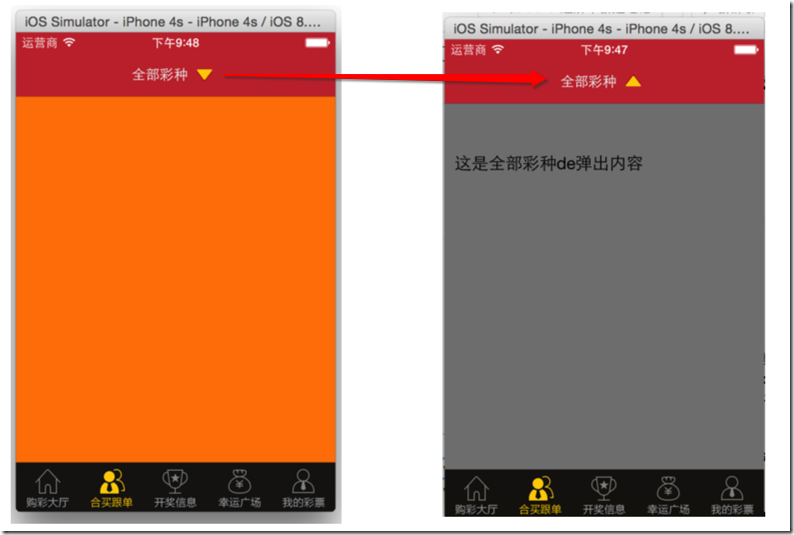
 #define __IPHONE_2_0     20000

 #define __IPHONE_2_1     20100

 #define __IPHONE_2_2     20200

 #define __IPHONE_3_0     30000

 #define __IPHONE_3_1     30100

 #define __IPHONE_3_2     30200

 #define __IPHONE_4_0     40000

 #define __IPHONE_4_1     40100

 #define __IPHONE_4_2     40200

 #define __IPHONE_4_3     40300

 #define __IPHONE_5_0     50000

 #define __IPHONE_5_1     50100

 #define __IPHONE_6_0     60000

 #define __IPHONE_6_1     60100

 #define __IPHONE_7_0     70000

 #define __IPHONE_7_1     70100

 #define __IPHONE_8_0     80000

 #define __IPHONE_8_1     80100
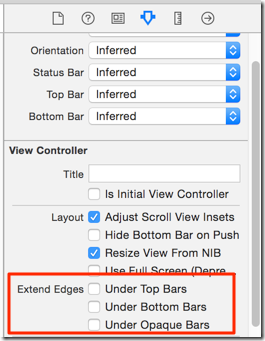

 //

 //  UIImage+Extend.m

 //  HelloLottery

 //

 //  Created by hellovoidworld on 15/1/3.

 //  Copyright (c) 2015年 hellovoidworld. All rights reserved.

 //

 #import "UIImage+Extend.h"

 @implementation UIImage(Extend)

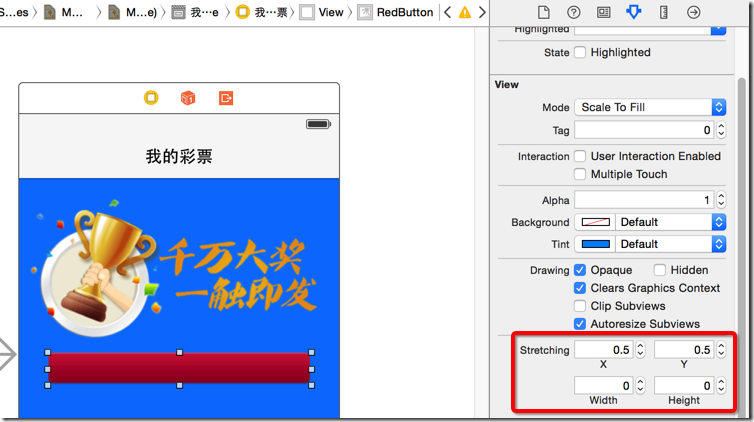
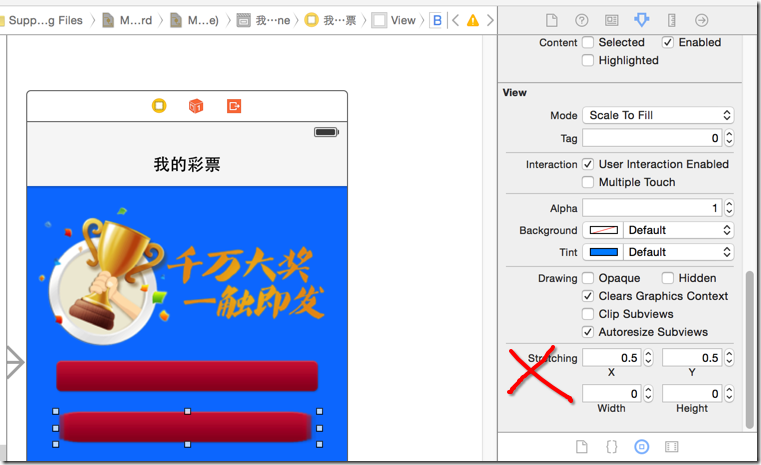
 /**  返回一个中心扩展拉伸的图片 */

 + (UIImage *) resizableImage:(NSString *) imageName {

     UIImage *image = [UIImage imageNamed:imageName];

     // 这个参数决定了左边的保护区域,右边的保护区域为左边+1开始到末端

     CGFloat width = image.size.width * 0.5;

     // 原理同左右保护区域

     CGFloat height = image.size.height * 0.5;

     // 也就是,取中间1x1的区域作为扩展区域

     return [image stretchableImageWithLeftCapWidth:width topCapHeight:height];

 }

 @end
 //

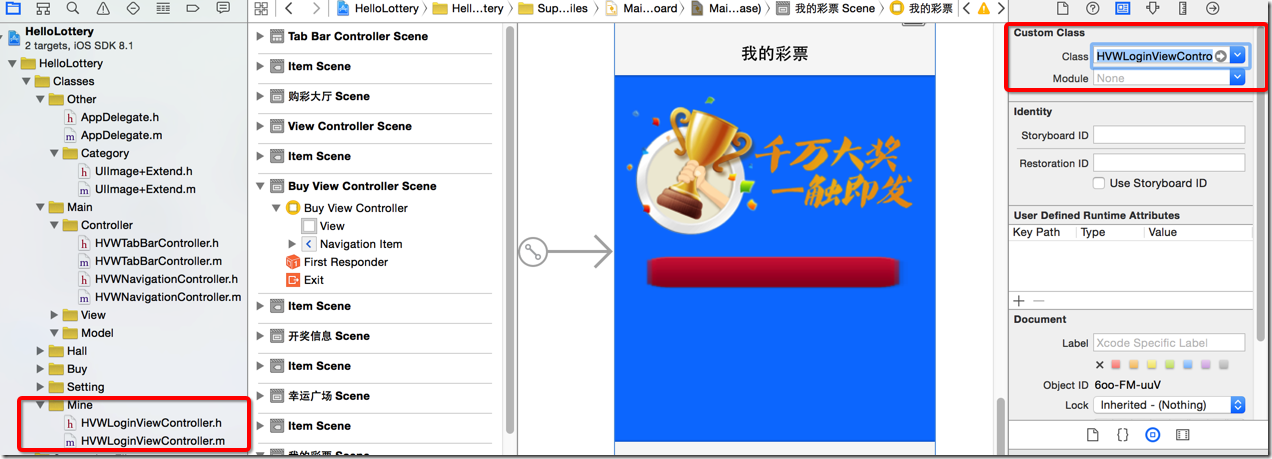
 //  HVWLoginViewController.m

 //  HelloLottery

 //

 //  Created by hellovoidworld on 15/1/3.

 //  Copyright (c) 2015年 hellovoidworld. All rights reserved.

 //

 #import "HVWLoginViewController.h"

 #import "UIImage+Extend.h"

 @interface HVWLoginViewController ()

 /** 登陆按钮 */

 @property (weak, nonatomic) IBOutlet UIButton *loginButton;

 @end

 @implementation HVWLoginViewController

 - (void)viewDidLoad {

     [super viewDidLoad];

     // Do any additional setup after loading the view.

     UIImage *normal = [UIImage resizableImage:@"RedButton"];

     UIImage *highlighted = [UIImage resizableImage:@"RedButtonPressed"];

     [self.loginButton setBackgroundImage:normal forState:UIControlStateNormal];

     [self.loginButton setBackgroundImage:highlighted forState:UIControlStateHighlighted];

 }

 - (void)didReceiveMemoryWarning {

     [super didReceiveMemoryWarning];

     // Dispose of any resources that can be recreated.

 }

 @end
[iOS UI进阶 - 2.1] 彩票Demo v1.1的更多相关文章
- [iOS UI进阶 - 2.4] 彩票Demo v1.4 转盘动画
A.需求 幸运广场界面中有一个幸运转盘,平时能够自动缓缓转动 能够选择星座 点击“开始选号”开速旋转转盘,旋转一定周数 转盘转动速度节奏:开始-慢-块-慢-结束 设置其余的背景和按钮 code s ...
- [iOS UI进阶 - 2.0] 彩票Demo v1.0
A.需求 1.模仿“网易彩票”做出有5个导航页面和相应功能的Demo 2.v1.0 版本搭建基本框架 code source:https://github.com/hellovoidworld/H ...
- [iOS UI进阶 - 2.3] 彩票Demo v1.3
A.需求 真机调试 "关于”模块 存储开关状态 打电话.发短信 应用评分 打开其他应用 cell 在iOS6 和 iOS7的适配 block的循环引用 屏幕适配 code source: ...
- [iOS UI进阶 - 2.2] 彩票Demo v1.2 UICollectionView基本
A.需要掌握的 设计.实现设置界面 cell的封装 UICollectionView的使用 自定义UICollectionView 抽取控制器父类 "帮助"功能 code sour ...
- [iOS UI进阶 - 5.0] 手势解锁Demo
A.需求 1.九宫格手势解锁 2.使用了绘图和手势事件 code source: https://github.com/hellovoidworld/GestureUnlockDemo B ...
- [iOS UI进阶 - 4.0] 涂鸦app Demo
A.需求 1.超简易画图,只有一种画笔 2.清屏功能 3.回退功能 4.保存功能 5.使用了cocos2D code source: https://github.com/hellovoidwor ...
- [iOS UI进阶 - 0] Quiartz2D
A.简介 1. 需要掌握的 drawRect:方法的使用 常见图形的绘制:线条.多边形.圆 绘图状态的设置:文字颜色.线宽等 图形上下文状态的保存与恢复 图形上下文栈 1.基本图形绘制* 线段(线宽. ...
- iOS UI进阶-1.0 Quartz2D
概述 Quartz 2D是一个二维绘图引擎,同时支持iOS和Mac系统.Quartz 2D能完成的工作: 绘制图形 : 线条\三角形\矩形\圆\弧等 绘制文字 绘制\生成图片(图像) 读取\生成PDF ...
- UI进阶之--网易彩票手写plist文件,动态创建控制器与tableViewcell
点击右上角设置按钮 点击按钮后发生的事件:1. 控制器的跳转,进入新的控制器.view, 2. 跳转的时候对将要跳转的目标控制的子控件进行了布局.---通过手写plist文件的方式加载 为按钮注册单击 ...
随机推荐
- [HIHO1184]连通性二·边的双连通分量(双连通分量)
题目链接:http://hihocoder.com/problemset/problem/1184 题意裸,写个博客记下输出姿势. /* ━━━━━┒ギリギリ♂ eye! ┓┏┓┏┓┃キリキリ♂ mi ...
- zoj 3785 What day is that day? (打表找规律)
题目 思路:比赛的时候有想过找循环节,但是,打表打错了. 后来,看着过了挺多人,就急了, 看了一下别人的时间 耗时都挺长的,就以为不是找规律, 没想到真是找规律,不过,这个题的数据可能挺大的. AC代 ...
- 给你的JAVA程序配置参数(Properties的使用)
我们在写JAVA程序时,很多时候运行程序的参数是需要动态改变的 测试时一系列参数,运行时一系列参数 又或者数据库地址也需要配一套参数,以方便今后的动态部署 这些变量的初始化,我们在写小DEMO时完全可 ...
- 关于fft的一点总结
好吧,其实我并没有深入运用fft,只会优化卷积 听说fft经常和生成函数结合在一起………………oi真是迅猛发展,我真是与时代脱节了…… 关于fft的学习推荐直接去看算法导论,写得非常清楚 主要弄懂n次 ...
- ASP.NET MVC从客户端中检测到有潜在危险的 Request.Form 值
ASP.NET MVC4(Razor)从客户端中检测到有潜在危险的 Request.Form 值 “/”应用程序中的服务器错误. 从客户端(Content=" sdfdddd ...&quo ...
- UVA 568 Just the Facts (水)
题意: 求一个数n的阶乘,其往后数第1个不是0的数字是多少. 思路: [1,n]逐个乘,出现后缀0就过滤掉,比如12300就变成123,继续算下去.为解决爆long long问题,将其余一个数mod, ...
- exec、eval
#!/usr/bin/env python3 # -*- coding: utf-8 -*- #info #warning def log(message): print('------------- ...
- Python用smtplib发送邮件
参照了下面: 1. 先随便照着试试这个: http://blog.csdn.net/zhaoweikid/article/details/1638349 2. 这个写了一个很简洁的代码,看过NO.1就 ...
- IOS的XML文件解析,利用了NSData和NSFileHandle
如果需要了解关于文档对象模型和XML的介绍,参看 http://www.cnblogs.com/xinchrome/p/4890723.html 读取XML 上代码: NSFileHandle *fi ...
- POJ 1833 排列
题意: 给你某个排列 求从下一个排列开始的第k个排列如果是最后一个排列 则下一个排列为1 2 3 ... n// 1 用stl 里面的 next_permutation// 2 用生成下一个排列算法/ ...