
iOS8中的UIAlertController
转: iOS8推出了几个新的“controller”,主要是把类似之前的UIAlertView变成了UIAlertController,这不经意的改变,貌似把我之前理解的“controller”一下子推翻了~但是也无所谓,有新东西不怕,学会使用了就行。接下来会探讨一下这些个新的Controller。

- (void)showOkayCancelAlert {

    NSString *title = NSLocalizedString(@"A Short Title Is Best", nil);

    NSString *message = NSLocalizedString(@"A message should be a short, complete sentence.", nil);

    NSString *cancelButtonTitle = NSLocalizedString(@"Cancel", nil);

    NSString *otherButtonTitle = NSLocalizedString(@"OK", nil);

    UIAlertController *alertController = [UIAlertController alertControllerWithTitle:title message:message preferredStyle:UIAlertControllerStyleAlert];

    // Create the actions.

    UIAlertAction *cancelAction = [UIAlertAction actionWithTitle:cancelButtonTitle style:UIAlertActionStyleCancel handler:^(UIAlertAction *action) {

        NSLog(@"The \"Okay/Cancel\" alert's cancel action occured.");

    }];

    UIAlertAction *otherAction = [UIAlertAction actionWithTitle:otherButtonTitle style:UIAlertActionStyleDefault handler:^(UIAlertAction *action) {

        NSLog(@"The \"Okay/Cancel\" alert's other action occured.");

    }];

    // Add the actions.

    [alertController addAction:cancelAction];

    [alertController addAction:otherAction];

    [self presentViewController:alertController animated:YES completion:nil];

}
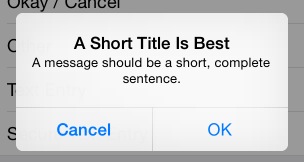
这是最普通的一个alertcontroller,一个取消按钮,一个确定按钮。
新的alertcontroller,其初始化方法也不一样了,按钮响应方法绑定使用了block方式,有利有弊。需要注意的是不要因为block导致了引用循环,记得使用__weak,尤其是使用到self。
上面的界面如下:
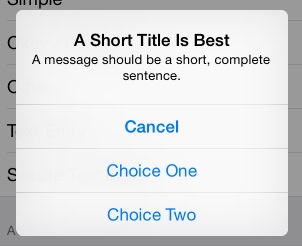
如果UIAlertAction *otherAction这种otherAction多几个的话,它会自动排列成如下:
另外,很多时候,我们需要在alertcontroller中添加一个输入框,例如输入密码:
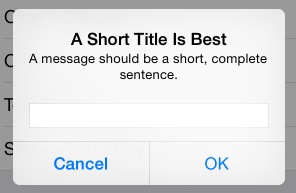
这时候可以添加如下代码:
 [alertController addTextFieldWithConfigurationHandler:^(UITextField *textField) {

        // 可以在这里对textfield进行定制,例如改变背景色

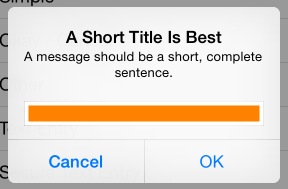
        textField.backgroundColor = [UIColor orangeColor];

    }];
而改变背景色会这样:
完整的密码输入:
- (void)showSecureTextEntryAlert {

    NSString *title = NSLocalizedString(@"A Short Title Is Best", nil);

    NSString *message = NSLocalizedString(@"A message should be a short, complete sentence.", nil);

    NSString *cancelButtonTitle = NSLocalizedString(@"Cancel", nil);

    NSString *otherButtonTitle = NSLocalizedString(@"OK", nil);

    UIAlertController *alertController = [UIAlertController alertControllerWithTitle:title message:message preferredStyle:UIAlertControllerStyleAlert];

    // Add the text field for the secure text entry.

    [alertController addTextFieldWithConfigurationHandler:^(UITextField *textField) {

        // Listen for changes to the text field's text so that we can toggle the current

        // action's enabled property based on whether the user has entered a sufficiently

        // secure entry.

        [[NSNotificationCenter defaultCenter] addObserver:self selector:@selector(handleTextFieldTextDidChangeNotification:) name:UITextFieldTextDidChangeNotification object:textField];

        textField.secureTextEntry = YES;

    }];

    // Create the actions.

    UIAlertAction *cancelAction = [UIAlertAction actionWithTitle:cancelButtonTitle style:UIAlertActionStyleCancel handler:^(UIAlertAction *action) {

        NSLog(@"The \"Secure Text Entry\" alert's cancel action occured.");

        // Stop listening for text changed notifications.

        [[NSNotificationCenter defaultCenter] removeObserver:self name:UITextFieldTextDidChangeNotification object:alertController.textFields.firstObject];

    }];

    UIAlertAction *otherAction = [UIAlertAction actionWithTitle:otherButtonTitle style:UIAlertActionStyleDefault handler:^(UIAlertAction *action) {

        NSLog(@"The \"Secure Text Entry\" alert's other action occured.");

        // Stop listening for text changed notifications.

        [[NSNotificationCenter defaultCenter] removeObserver:self name:UITextFieldTextDidChangeNotification object:alertController.textFields.firstObject];

    }];

    // The text field initially has no text in the text field, so we'll disable it.

    otherAction.enabled = NO;

    // Hold onto the secure text alert action to toggle the enabled/disabled state when the text changed.

    self.secureTextAlertAction = otherAction;

    // Add the actions.

    [alertController addAction:cancelAction];

    [alertController addAction:otherAction];

    [self presentViewController:alertController animated:YES completion:nil];

}
注意四点:
1.添加通知,监听textfield内容的改变:
// Add the text field for the secure text entry.

    [alertController addTextFieldWithConfigurationHandler:^(UITextField *textField) {

        // Listen for changes to the text field's text so that we can toggle the current

        // action's enabled property based on whether the user has entered a sufficiently

        // secure entry.

        [[NSNotificationCenter defaultCenter] addObserver:self selector:@selector(handleTextFieldTextDidChangeNotification:) name:UITextFieldTextDidChangeNotification object:textField];

        textField.secureTextEntry = YES;

    }];
2.初始化时候,禁用“ok”按钮:
otherAction.enabled = NO;
self.secureTextAlertAction = otherAction;//定义一个全局变量来存储
3.当输入超过5个字符时候,使self.secureTextAlertAction = YES:
- (void)handleTextFieldTextDidChangeNotification:(NSNotification *)notification {

    UITextField *textField = notification.object;

    // Enforce a minimum length of >= 5 characters for secure text alerts.

    self.secureTextAlertAction.enabled = textField.text.length >= 5;

}
4.在“OK”action中去掉通知:
UIAlertAction *otherAction = [UIAlertAction actionWithTitle:otherButtonTitle style:UIAlertActionStyleDefault handler:^(UIAlertAction *action) {

        NSLog(@"The \"Secure Text Entry\" alert's other action occured.");

        // Stop listening for text changed notifications.

        [[NSNotificationCenter defaultCenter] removeObserver:self name:UITextFieldTextDidChangeNotification object:alertController.textFields.firstObject];

    }];
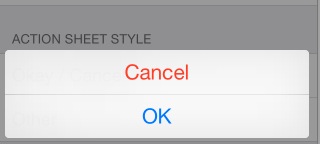
最后是以前经常是alertview与actionsheet结合使用,这里同样也有:
- (void)showOkayCancelActionSheet {

    NSString *cancelButtonTitle = NSLocalizedString(@"Cancel", nil);

    NSString *destructiveButtonTitle = NSLocalizedString(@"OK", nil);

    UIAlertController *alertController = [UIAlertController alertControllerWithTitle:nil message:nil preferredStyle:UIAlertControllerStyleActionSheet];

    // Create the actions.

    UIAlertAction *cancelAction = [UIAlertAction actionWithTitle:cancelButtonTitle style:UIAlertActionStyleCancel handler:^(UIAlertAction *action) {

        NSLog(@"The \"Okay/Cancel\" alert action sheet's cancel action occured.");

    }];

    UIAlertAction *destructiveAction = [UIAlertAction actionWithTitle:destructiveButtonTitle style:UIAlertActionStyleDestructive handler:^(UIAlertAction *action) {

        NSLog(@"The \"Okay/Cancel\" alert action sheet's destructive action occured.");

    }];

    // Add the actions.

    [alertController addAction:cancelAction];

    [alertController addAction:destructiveAction];

    [self presentViewController:alertController animated:YES completion:nil];

}
在底部显示如下:
好了,至此,基本就知道这个新的controller到底是怎样使用了。
iOS8中的UIAlertController的更多相关文章
- iOS 学习笔记 九 (2015.04.02)IOS8中使用UIAlertController创建警告窗口
1.IOS8中使用UIAlertController创建警告窗口 #pragma mark - 只能在IOS8中使用的,警告窗口- (void)showOkayCancelAlert{ NSSt ...
- iOS- Swift:如何使用iOS8中的UIAlertController
1.前言 在前段时间手机QQ:升级iOS8.3后,发图就崩的情况, 就是因为iOS8更新UIAlertController后,仍然使用UIAlertview导致的 具体原因分析 这个可以看腾讯团队发出 ...
- iOS8中定位服务的变化(CLLocationManager协议方法不响应,无法回掉GPS方法,不出现获取权限提示)
最近在写一个LBS的项目的时候,因为考虑到适配iOS8,就将项目迁移到Xcode6.0.1上,出现了不能正常获取定位服务权限的问题. self.manger = [[CLLocationManager ...
- iOS8中使用CoreLocation定位[转]
本文转自:http://blog.devzeng.com/blog/ios8-corelocation-framework.html iOS8以前使用CoreLocation定位 1.首先定义一个全局 ...
- 在iOS 8中使用UIAlertController
iOS 8的新特性之一就是让接口更有适应性.更灵活,因此许多视图控制器的实现方式发生了巨大的变化.全新的UIPresentationController在实现视图控制器间的过渡动画效果和自适应设备尺寸 ...
- ios8中的UIScreen
let orientation: UIInterfaceOrientation = UIApplication.sharedApplication().statusBarOrientation pri ...
- iOS8中的UIActionSheet添加UIDatePicker后,UIDatePicker不显示问题
解决方法: IOS8以前: UIActionSheet* startsheet = [[UIActionSheet alloc] initWithTitle:title delegate:self ...
- iOS8中添加的extensions总结(一)——今日扩展
通知栏中的今日扩展 分享扩展 Action扩展 图片编辑扩展 文件管理扩展 第三方键盘扩展 注:此教程来源于http://www.raywenderlich.com的<iOS8 by Tutor ...
- ios8中百度推送接收不到
ios8中百度推送接收类型会有所改变: //消息推送注冊 if ([[[UIDevice currentDevice] systemVersion] floatValue] >= 8.0) { ...
随机推荐
- phpQuery用法
了解phpQuery使用前了温习jquery.js的选择用法 jquery选择器,还有一个衍生产品QueryList 例: include 'phpQuery.php'; phpQuery::newD ...
- js 实现angylar.js view层和model层双绑定(改变view刷新 model,改变model自动刷新view)
近段时间研究了下angular.js 觉得它内部实现的view和model层之间存在很微妙的关系,如下图 如上图说的,view的改变会update 数据层model, 数据层会update视图层vie ...
- Table of Contents - Tomcat
Manager 持久化 Session JNDI Resources JNDI 配置 JDBC DataSources DBCP 配置 Realm Configuration 设置 HTTP 基本认证 ...
- 学习Slim Framework for PHP v3 (六)--route怎么被匹配的?
先标记觉得以后会用到的内容: // add route to the request's attributes in case a middleware or handler needs access ...
- Android Studio 1.3新版体验
Google发布的Android Studio最新版是 1.3 版,上周的I/O大会中三位Google工程师对Android Studio作了将近1小时的演讲: 之前一直习惯用Eclipse luna ...
- 每天一道LeetCode--344. Reverse String
Write a function that takes a string as input and returns the string reversed. Example:Given s = &qu ...
- 关于Java中计算日期差值不准确问题
1.字符串日期相减 如:2016-4-1,必须先将此字符串转成Date对象,并且, 格式必须为:yyyy—MM—dd HH:mm:ss. 如果不转就直接计算(2016-4-1)两个这样的日期,则误差 ...
- 【百度地图API】JS版本的常见问题
1.请问如何将我的店铺标注在百度地图上?我是否可以做区域代理?在百度地图上标注是否免费? 答复: 这里只负责API的技术咨询,不解决任何地图标注问题.在百度地图上标注自己公司,即气泡标注业务.该业务已 ...
- Fragstats景观分析研究
QQ 交流群: Fragstats景观分析 加群链接:http://url.cn/N4wZ3N
- Cllimbing Stairs [LeetCode 70]
1- 问题描述 You are climbing a stair case. It takes n steps to reach to the top. Each time you can eithe ...