
iOS- Swift:如何使用iOS8中的UIAlertController
1.前言

2.如何使用UIAlertController
2.2.第一种创建方式——默认提示框
最原始的init一般不用这种,默认是上拉菜单样式
import UIKit

class ViewController: UIViewController {

    override func viewDidLoad() {

        super.viewDidLoad()

        // Do any additional setup after loading the view, typically from a nib.

    }

    override func didReceiveMemoryWarning() {

        super.didReceiveMemoryWarning()

        // Dispose of any resources that can be recreated.

    }

    override func touchesBegan(touches: Set<NSObject>, withEvent event: UIEvent) {

        // 单击屏幕触发

        //方式一

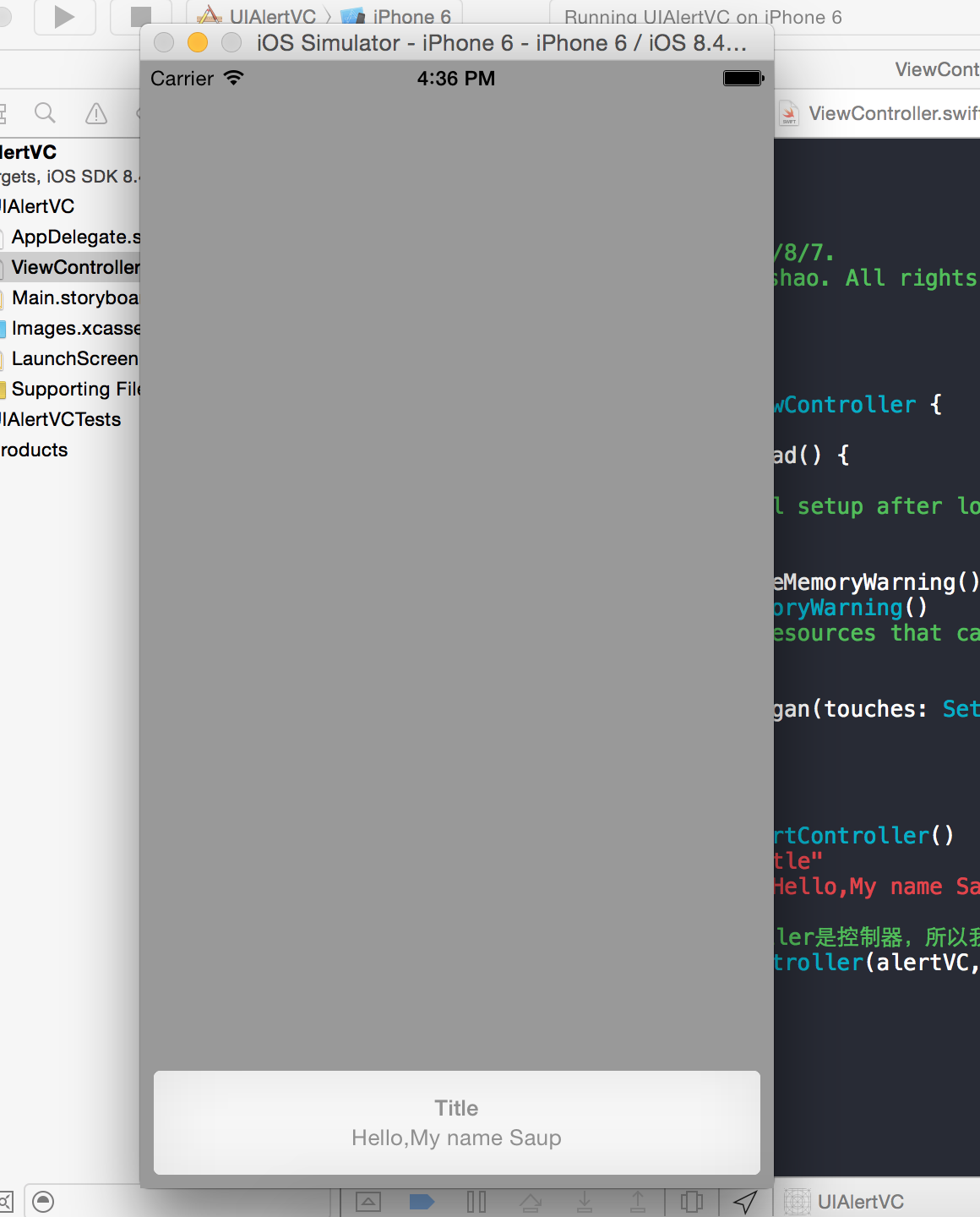
        var alertVC = UIAlertController()

        alertVC.title = "Title"

        alertVC.message = "Hello,My name Saup"

        //因为UIAlertController是控制器,所以我们现在得改用控制器弹出

        self.presentViewController(alertVC, animated: true, completion: nil)

    }
效果图1:
2.2.第二种创建方式——自定义提示框
    override func touchesBegan(touches: Set<NSObject>, withEvent event: UIEvent) {

        // 单击屏幕触发

        //方式二

        //创建控制器

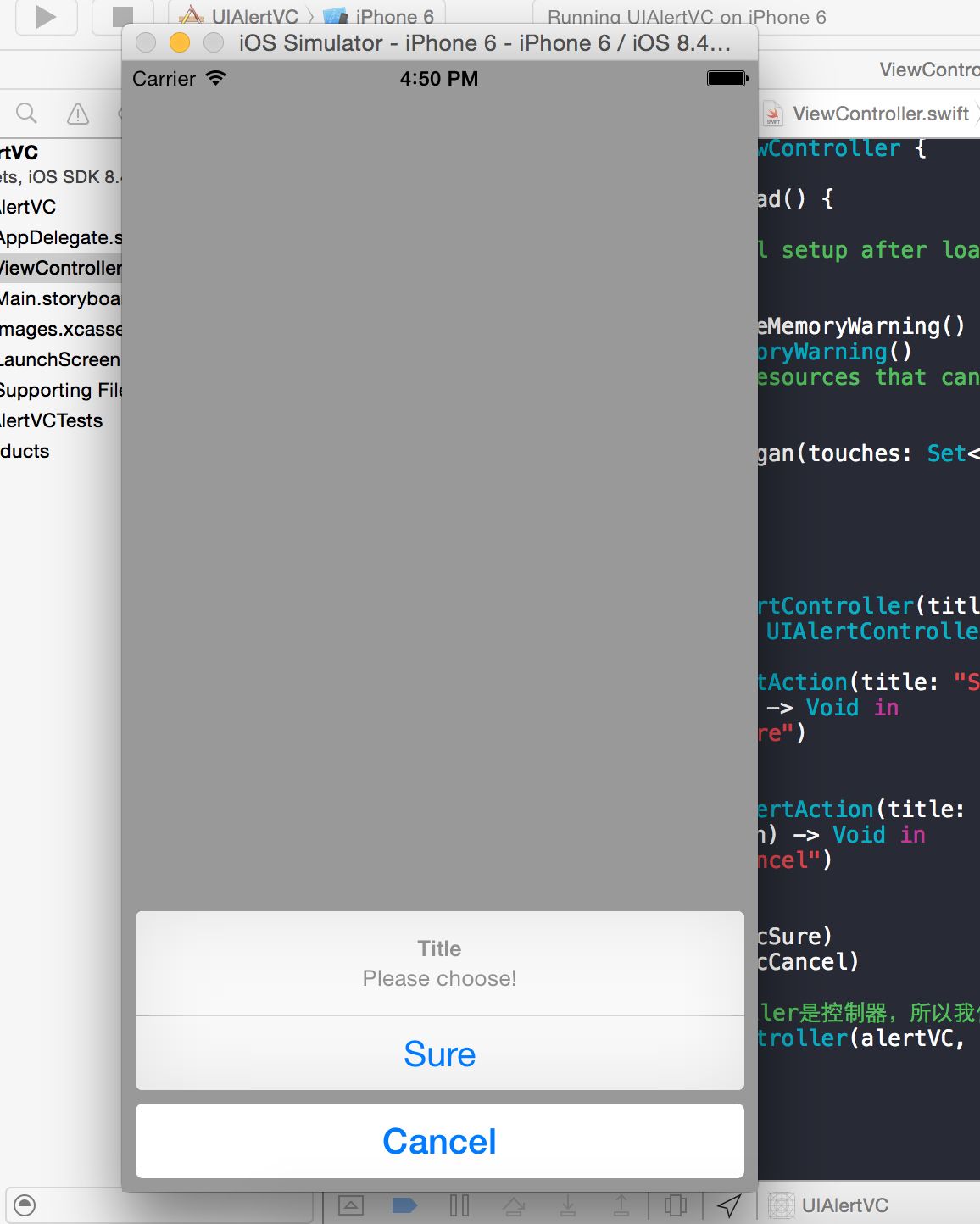
        var alertVC = UIAlertController(title: "Title", message: "Please choose!", preferredStyle: UIAlertControllerStyle.ActionSheet)

        //创建按钮

        var acSure = UIAlertAction(title: "Sure", style: UIAlertActionStyle.Default) { (UIAlertAction) -> Void in

            print("click Sure")

        }

        var acCancel = UIAlertAction(title: "Cancel", style: UIAlertActionStyle.Cancel) { (UIAlertAction) -> Void in

            print("click Cancel")

        }

//        var acDestuctive = UIAlertAction(title: "Destuctive", style: //UIAlertActionStyle.Destuctive) { (UIAlertAction) -> Void in

//            print("click Destuctive")

//        }

        alertVC.addAction(acSure)

        alertVC.addAction(acCancel)

//      alertVC.addAction(acDestuctive)

        //因为UIAlertController是控制器,所以我们现在得改用控制器弹出

        self.presentViewController(alertVC, animated: true, completion: nil)

    }
效果图2:

2.3.第三种创建方式——文本对话框
    override func touchesBegan(touches: Set<NSObject>, withEvent event: UIEvent) {

        // 单击屏幕触发

        //方式三

        //创建控制器

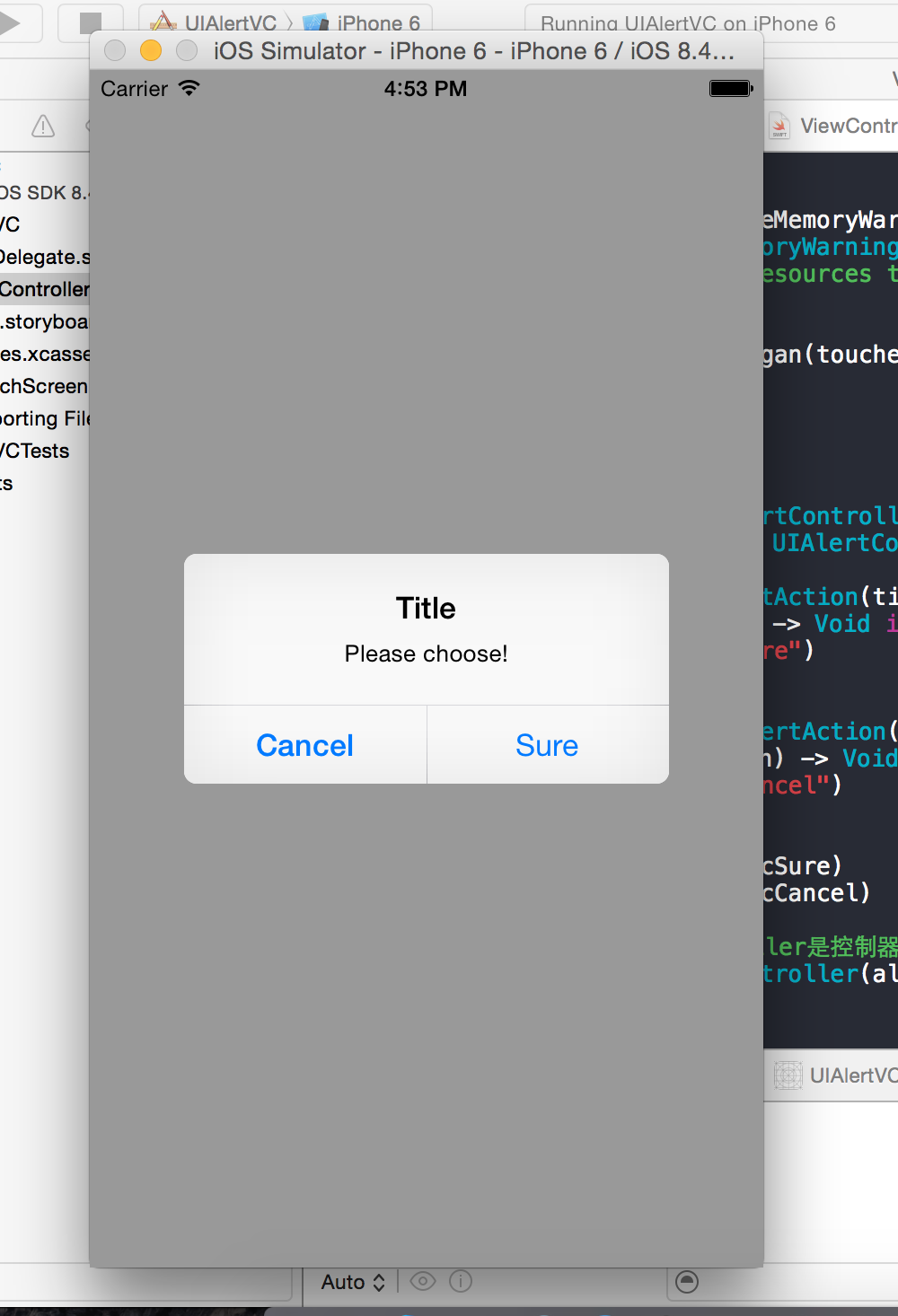
        var alertVC = UIAlertController(title: "TextFiled", message: "Please input!", preferredStyle: UIAlertControllerStyle.Alert)

        alertVC.addTextFieldWithConfigurationHandler { (tField:UITextField!) -> Void in

            tField.placeholder = "Account"

        }

        alertVC.addTextFieldWithConfigurationHandler {(textField:UITextField!) -> Void in

            textField.placeholder = "Password"

            textField.secureTextEntry = true;

        }

        var acOK = UIAlertAction(title: "OK", style: UIAlertActionStyle.Default) { (alertAction:UIAlertAction!) -> Void in

        }

        var acCancel = UIAlertAction(title: "Cancel", style: UIAlertActionStyle.Cancel) { (alertAction:UIAlertAction!) -> Void in

        }

        acOK.enabled = false

        alertVC.addAction(acOK)

        alertVC.addAction(acCancel)

        //因为UIAlertController是控制器,所以我们现在得改用控制器弹出

        self.presentViewController(alertVC, animated: true, completion: nil)

    }
效果图3:
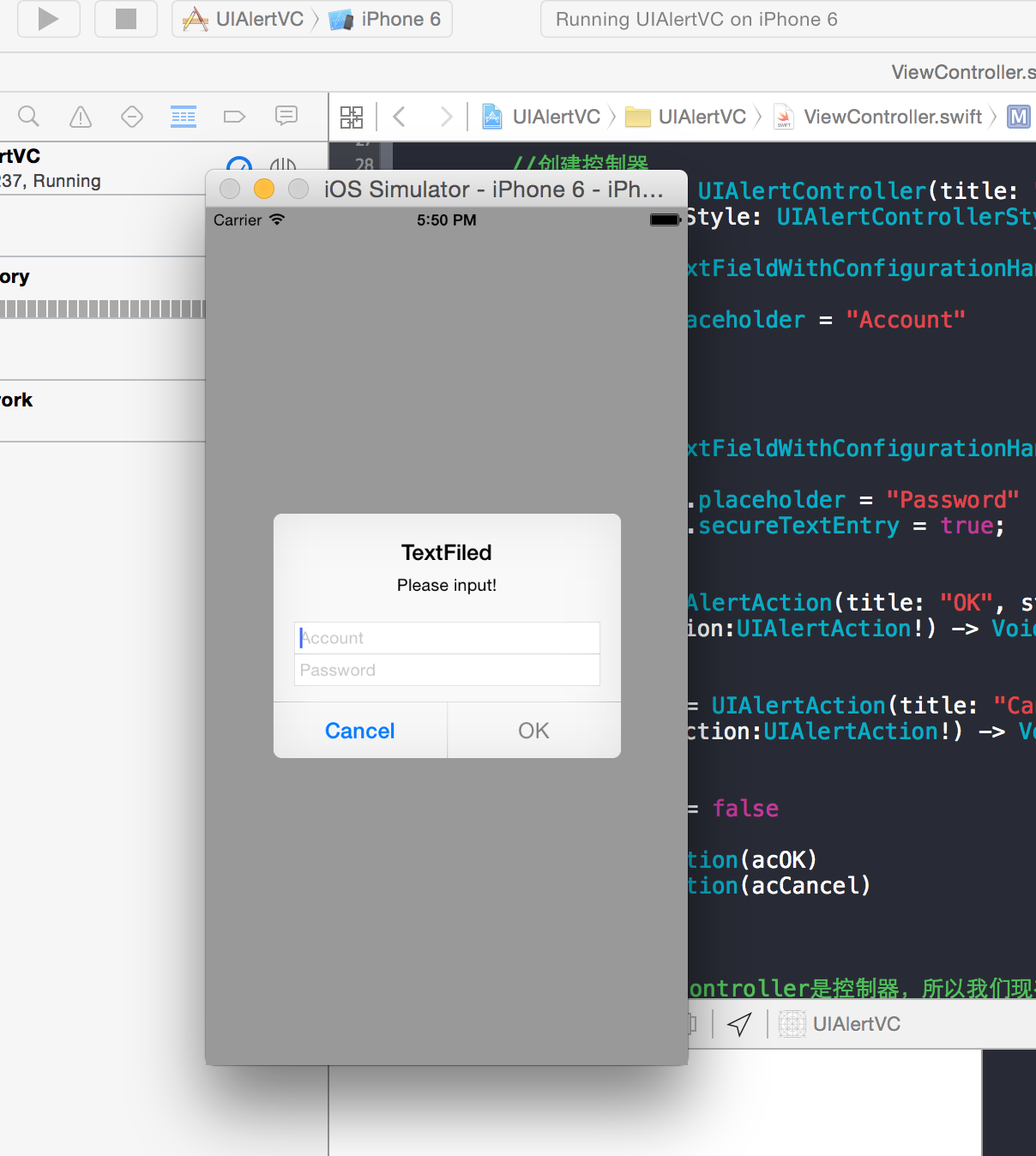
作者: 清澈Saup
出处:http://www.cnblogs.com/qingche/
本文版权归作者和博客园共有,欢迎转载,但必须保留此段声明,且在文章页面明显位置给出原文连接。
iOS- Swift:如何使用iOS8中的UIAlertController的更多相关文章
- iOS 学习笔记 九 (2015.04.02)IOS8中使用UIAlertController创建警告窗口
1.IOS8中使用UIAlertController创建警告窗口 #pragma mark - 只能在IOS8中使用的,警告窗口- (void)showOkayCancelAlert{ NSSt ...
- iOS8中的UIAlertController
转: iOS8推出了几个新的“controller”,主要是把类似之前的UIAlertView变成了UIAlertController,这不经意的改变,貌似把我之前理解的“controlle ...
- iOS开发手记-iOS8中使用定位服务解决方案
问题描述: 在iOS8之前,app第一次开始定位服务时,系统会弹出一个提示框来让用户选择是否允许使用定位信息.但iOS8后,app将不会出现这个弹窗.第一次运行之后,在设置->隐私->定位 ...
- 在iOS 8中使用UIAlertController
iOS 8的新特性之一就是让接口更有适应性.更灵活,因此许多视图控制器的实现方式发生了巨大的变化.全新的UIPresentationController在实现视图控制器间的过渡动画效果和自适应设备尺寸 ...
- 【iOS】swift-ObjectC 在iOS 8中使用UIAlertController
iOS 8的新特性之一就是让接口更有适应性.更灵活,因此许多视图控制器的实现方式发生了巨大的变化.全新的UIPresentationController在实现视图控制器间的过渡动画效果和自适应设备尺寸 ...
- [iOS] 初探 iOS8 中的 Size Class
本文转载至 http://www.itnose.net/detail/6112176.html 以前和安卓的同学聊天的时候,谈到适配一直是一个非常开心的话题,看到他们被各种屏幕适配折磨的欲仙欲死 ...
- iOS开发--Swift 如何完成工程中Swift和OC的混编桥接(Cocoapods同样适用)
由于SDK现在大部分都是OC版本, 所以假如你是一名主要以Swift语言进行开发的开发者, 就要面临如何让OC和Swift兼容在一个工程中, 如果你没有进行过这样的操作, 会感觉异常的茫然, 不用担心 ...
- iOS8中的动态文本
原文链接 : Swift Programming 101: Mastering Dynamic Type in iOS 8 原文作者 : Kevin McNeish Apple声称鼓励第三方App能够 ...
- [Swift]UIKit学习之警告框:UIAlertController和UIAlertView
Important: UIAlertView is deprecated in iOS 8. (Note that UIAlertViewDelegate is also deprecated.) T ...
随机推荐
- 树莓3B+_中文支持安装输入法
参考: https://www.cnblogs.com/collisionzhang/p/7413349.html 莓派默认是采用英文字库的,而且系统里没有预装中文字库,所以即使你在locale中改成 ...
- 数据结构与算法之数组(1)——in dart
import 'dart:math' show Random; List<int> _array; final _rnd = Random(); final _capacity = 100 ...
- C++与C#的多态
C++ 多态 多态按字面的意思就是多种形态.当类之间存在层次结构,并且类之间是通过继承关联时,就会用到多态. C++ 多态意味着调用成员函数时,会根据调用函数的对象的类型来执行不同的函数. 下面的实例 ...
- HDFS(0.20.2)运营中急救方案
这段时间折腾的都是hadoop和lucene,总结了hadoop在运营过程中出现问题时的解决方案,请大家指教! HDFS(0.20.2)运营中急救方案 1 Namenode 挂掉( ...
- 20145226 《Java程序设计》第3周学习总结
教材学习内容总结 学习目标 区分基本类型与类类型 理解对象的生成与引用的关系 掌握String类和数组 理解封装的概念 掌握构造方法的定义 理解重载的概念 掌握static的应用 教材第四章内容总结 ...
- 【转载】C++资源之不完全导引
1,前言 无数次听到“我要开始学习C++!”的呐喊,无数次听到“C++太复杂了,我真的学不会”的无奈.Stan Lippman先生曾在<C++ Primer>一书中指出“C++是最为难学的 ...
- Apache入门篇(四)之LAMP架构部署
一.LAMP解析 a: apachem: mariadb, mysqlp: php, perl, python 静态资源:静态内容:客户端从服务器获得的资源的表现形式与原文件相同:动态资源:通常是程序 ...
- 【搜索好题】bzoj1501 [NOI2005]智慧珠游戏
bzoj1501 [NOI2005]智慧珠游戏 搜索苟逼题系列. 暴力枚举每一种情况(包括旋转翻转全都考虑在内)然后码出代码. (正解似乎不是这样子的) 那年好像还有平衡树苟逼题维护数列233333心 ...
- [vijos1067]Warcraft III 守望者的烦恼
就是上次考得fyfy.竟然是原题... // It is made by XZZ #include<cstdio> #include<algorithm> #include&l ...
- [cogs347]地震
COGS:地震(平衡树) COGS上一道题...文件名是equake 还是又打了一遍板子... 加个lazy标记就行了... 注意查询时先下传标记(lazy) // It is made by XZZ ...