
FastDFS4 + Ubuntu12安装及部署
1、 安装libevent
如果需要使用http进行下载,需要安装这个组件。
2、 安装fastdfs
3、 配置fastdfs
4、 安装nginx
问题4.1:安装nginx启动后访问原先资源URL出现404错误
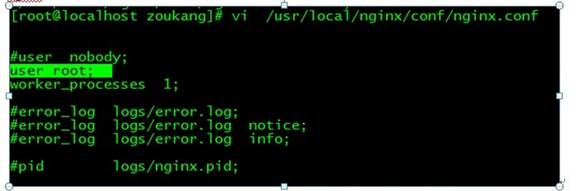
#sudo gedit /nginx安装目录/conf/nginx.conf
在nginx.conf添加“user root;”并保存,重启nginx服务后OK
问题4.2:8090端口被占用
nginx: [emerg] bind() to 0.0.0.0:8090 failed (98: Address already in use)
nginx: [emerg] bind() to 0.0.0.0:8090 failed (98: Address already in use)
nginx: [emerg] bind() to 0.0.0.0:8090 failed (98: Address already in use)
nginx: [emerg] bind() to 0.0.0.0:8090 failed (98: Address already in use)
nginx: [emerg] bind() to 0.0.0.0:8090 failed (98: Address already in use)
nginx: [emerg] still could not bind()
#killall -9 nginx
// 中断nginx进程
# /nginx安装目录/sbin/nginx -s reload
// 重启nginx
问题4.3:nginx 403 Forbidden
nginx不允许访问请求的资源。可能的原因:
1.网站禁止特定的用户访问所有内容,例:网站屏蔽某个ip访问。
2.访问禁止目录浏览的目录,例:设置autoindex off后访问目录。
3.用户访问只能被内网访问的文件。
案例:在location{allow:all;},我按照网上的例子一直设置为127.0.0.1,导致本机访问没有问题,但是局域网内电脑访问时始终报错。
5、 开机启动
6、 测试上传
7、 在c#中上传文件
下载FastDFS .net Client
https://code.google.com/p/fastdfs/downloads/detail?name=FastDFS_Client_Dotnet.rar&can=2&q=
附:官方安装说明(网上的教程很多,但这个才是本尊)
#step 1. download FastDFS source package and unpack it

tar xzf FastDFS_v1.x.tar.gz

#for example:

tar xzf FastDFS_v1.11.tar.gz

#step 2. enter the FastDFS dir

cd FastDFS

#step 3. make all

./make.sh

#step 4. make install

./make.sh install

#step 5. edit/modify the config file of tracker and storage

#step 6. run server programs

#start the tracker server:

/usr/local/bin/fdfs_trackerd <tracker_conf_filename>

#start the storage server:

/usr/local/bin/fdfs_storaged <storage_conf_filename>

#step 7. run test program

#run the client test program:

/usr/local/bin/fdfs_test <storage_conf_filename> <operation>

#for example, upload a file:

/usr/local/bin/fdfs_test conf/storage.conf upload /usr/include/stdlib.h

#step 8. run monitor program

#run the monitor program:

/usr/local/bin/fdfs_monitor <storage_conf_filename>
FastDFS4 + Ubuntu12安装及部署的更多相关文章
- Windows Server 2012 虚拟化实战:SCVMM的安装和部署
本篇大概介绍一下在Windows Server 2012 R2上安装和部署SCVMM的过程及其注意事项.下图是我们数据中心SCVMM的基本架构,其中 SCVMM Database 是用于存储了所有配置 ...
- Linux下Redis的安装和部署
一.Redis介绍 Redis是当前比较热门的NOSQL系统之一,它是一个key-value存储系统.和Memcache类似,但很大程度补偿了Memcache的不足,它支持存储的value类型相对更多 ...
- 他山之石——vs2013 安装与部署及程序打包
C#打包需要这个:InstallShield 2013 Limited Edition for Visual Studio .下载地址: InstallShield 2013 Limited Edi ...
- 阿里云服务器Linux CentOS安装配置(六)resin多端口配置、安装、部署
阿里云服务器Linux CentOS安装配置(六)resin多端口配置.安装.部署 1.下载resin包 http://125.39.66.162/files/2183000003E08525/cau ...
- Kafka的安装和部署及测试
1.简介 大数据分析处理平台包括数据的接入,数据的存储,数据的处理,以及后面的展示或者应用.今天我们连说一下数据的接入,数据的接入目前比较普遍的是采用kafka将前面的数据通过消息的方式,以数据流的形 ...
- Redis的安装与部署
为了解决公司产品数据增长过快,初始化太耗费时间的问题,决定使用redis作为缓存服务器. Windows下的安装与部署: 可以直接参考这个文章,我也是实验了一遍:http://www.runoob.c ...
- Office web app server2013详细的安装和部署
转自:http://blog.csdn.net/u011355311/article/details/9360293 SharePoint 2013集成Office web apps server20 ...
- Lucene/Solr搜索引擎开发笔记 - 第2章 Solr安装与部署(Tomcat篇)
一.安装环境 图1-1 Tomcat和Solr的版本 我本机目前使用的Java版本为JDK 1.8,因为Solr 4.9要求Java版本为1.7+,请注意. 二.Solr部署到Tomcat流程 图1- ...
- Kibana安装及部署
安装及部署 一.环境配置 操作系统:Cent OS 7 Kibana版本:3.1.2 JDK版本:1.7.0_51 SSH Secure Shell版本:XShell 5 二.操作过程 1.下载指定版 ...
随机推荐
- iOS “请在微信客户端打开链接” UIWebview加载H5页面携带session、cookie、User-Agent信息 设置cookie、清除cookie、设置User-Agent
公司新开的一个项目..内容基本上是加载H5页面显示..当时觉得挺简单的..后来发现自己掉坑里了..一些心理历程就不说了..说这个项目主要用到的知识点吧..也是自己踩得坑. 首先说说..这个项目上的内容 ...
- 如何利用log4Net自定义属性配置功能记录完整的日志信息
log4Net作为专业的log记录控件,对于它的强大功能大家一定不陌生.下面我将详细介绍如何利用其自定义属性,让日志信息更完整. 一,创建测试工程,log4Net组件可以自己从网上下载,也可通过Nug ...
- IOS开发 xcode报错之has been modified since the precompiled header was built
转载的文章 很实用 IOS开发xcode报错之has been modified since the precompiled header was built 今天做百度地图的时候第一次发现下面错误 ...
- Android 高级UI设计笔记12:ImageSwitcher图片切换器
1. ImageSwitcher ImageSwitcher是Android中控制图片展示效果的一个控件,如:幻灯片效果...,颇有感觉啊.做相册一绝 2. 重要方法 setImageURI(Uri ...
- WCF架构日记-1
WCF功能很强大,但是真的能把其中的原理说清楚,对于我比较困难,今天对之前的笔记总结一下: 首先WCF的契约可以总结为四大类:消息契约.数据契约.服务契约.错误处理契约. [客户端处理是如何处 ...
- android studio1.3安装终于成功
本人机器是win7 32位旗舰版,4G内存.以前使用eclipse adt bundle开发Android程序感觉非常方便,但随着google对andriod studio支持力度加大,转向studi ...
- codeforces 613B B. Skills(枚举+二分+贪心)
题目链接: B. Skills time limit per test 2 seconds memory limit per test 256 megabytes input standard inp ...
- java的技术调用栈图示例
- JavaWeb 学习的第一阶段总结
本人从事Asp.net开发三年,结合市场情况,综合考虑后决心转向JavaWeb方向.于是开始了自学Java的历程. 首先,我用马士兵的Java基础教学视频,快速地学习了一遍Java基础.因为有C#基础 ...
- MVC Action,Service中筛选int 和list<int>
action: public ActionResult DeleteByID(int id) { this.MessageService.DeleteMailTemplate(id); var fro ...