
[html5] (Notification) 桌面通知
前几天要做一个桌面通知的功能,翻查以前做的笔记,发现webkitNotifications这个已经不能用了,baidu了下,基本都是介绍webkitNotifications的,后来在SOF上找到答案,现在chrome支持的是Notification,估计是W3C标准化了。api也变了,mark之。
Notification
Properties
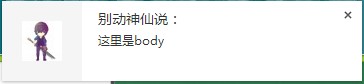
title:"别动神仙说:" body:"这里是body" icon:"http://q4.qlogo.cn/g?b=qq&k=icUjVAN5Ja7BCDQ1ICl8Svw&s=40" tag:"1"// 通知框ID,相同id可替换,而不是出现新的通知框lang:""// 语言 dir:"auto"// 文字方向
new Notification('别动神仙说:', {

 body: '这里是body',

 icon: 'http://q4.qlogo.cn/g?b=qq&k=icUjVAN5Ja7BCDQ1ICl8Svw&s=40',

 tag: 1

});
onshow: null // 显示通知框时调用 onclick: null // 点击通知框时调用 onclose: null // 点击通知框关闭按钮时调用 onerror: null
例如实现通知弹出一段时间后自动关闭
var notification = new Notification('标题');

notification.onshow = function () {

 setTimeout(function () {

notification.close();

 }, 3000);

}
Notification.permission 有三种状态
default:未设置过为这个状态,通过Notification.requestPermission()可以询问用户是否允许通知granted:用户点击允许后的状态denied: 用户点击拒绝后的状态,通知框不可用
Methods
Notification.requestPermission() 
document.onclick = function() {

Notification.requestPermission()

}
使用回调
Notification.requestPermission(function (permission) {

 // 可在确认后直接弹出

 if (permission === 'granted') {

 var notification = new Notification('弹窗');

}

});
Notification.close() 通知框关闭
function notify() {

 if (!("Notification"in window)) {

 alert("This browser does not support desktop notification");

return;

}

 if (Notification.permission ==="granted") {

 var notification = new Notification("Hi there!");

}

 else if (Notification.permission === 'default') {

 Notification.requestPermission(function (permission) {

 if (permission ==="granted") {

 var notification = new Notification("Hi there!");

}

});

}

}
References:
https://developer.mozilla.org/en-US/docs/Web/API/Notification.tag
from :http://www.thinksaas.cn/group/topic/347544/
[html5] (Notification) 桌面通知的更多相关文章
- html5 notification桌面提醒功能
html5 notification桌面提醒功能 <!DOCTYPE html> <html lang="en"> <head> <met ...
- HTML5中的Web Notification桌面通知(右下角提示)
html5桌面通知(Web Notifications)对于需要实现在新消息入线时,有桌面通知效果的情况下非常有用,在此简单介绍一下这个html5的新属性.通过Web Notifications(桌面 ...
- 聊聊HTML5中的Web Notification桌面通知
有的时候我们会在桌面右下角看到这样的提示: 这种桌面提示是HTML5新增的 Web Push Notifications 技术. Web Notifications 技术使页面可以发出通知,通知将被显 ...
- 简单了解HTML5中的Web Notification桌面通知
原文:http://www.zhangxinxu.com/wordpress/2016/07/know-html5-web-notification/ 需要注意的是,消息通知只有通过Web服务访问该页 ...
- HTML5中的Web Notification桌面通知
大家在做一些浏览器端的聊天功能的时候,或者在一些网站跟在线客服咨询的时候,会看到一些消息通知的提示,常见的有浏览器标签页的闪烁和屏幕右侧的消息通知.本篇博客就在这里简单的介绍一下如何实现这样的功能. ...
- HTML5桌面通知:notification api
1. 为什么需要HTML5的桌面通知 传统的桌面通知可以写一个div放到页面右下角自动弹出来,并通过轮询等等其他方式去获取消息并推送给用户.这种方式有个弊端就是:当我在使用京东 进行购物的时候,我是不 ...
- H5 notification浏览器桌面通知
Notification是HTML5新增的API,用于向用户配置和显示桌面通知.上次在别的网站上看到别人的通知弹窗,好奇之余也想知道如何实现的.实际去查一下发现并不复杂,且可以说比较简单,故写篇博客分 ...
- HTML5桌面通知:notification
最近由于公司业务需要,领导要求IM消息有像网页微信那样有新消息桌面右下角弹出一个提示框的效果!由于自己才疏学浅,一时还没明白微信是怎么实现的!所以只能问百度(因为懒得FQ)咯! 在网上搜索了N久,心都 ...
- HTML5 桌面通知:Notification API
原文地址:http://blog.gdfengshuo.com/article/23/ 前言 Notification API 是 HTML5 新增的桌面通知 API,用于向用户显示通知信息.该通知是 ...
随机推荐
- WebApp之 apple-touch-icon
在iPhone,iPad,iTouch的safari上可以使用添加到主屏按钮将网站添加到主屏幕上.apple-touch-icon是IOS设备的私有标签,如果设置了相应apple-touch-icon ...
- 五、mysql存储引擎
show variable like 'table_type'; 显示系统默认存储引擎 show engine\G 显示系统支持存储殷勤 =============================== ...
- DemoExample
<HTML> <HEAD> <TITLE>使用递归求解斐波那契数列</TITLE> </HEAD> <BODY> <?ph ...
- python 记录日志logging
在项目开发中,往往要记录日志文件.用python记录日志有两种方式: 1.利用python 自带的logging库,例如: # -*- coding: utf-8 -*- import osimpor ...
- VPN销售管理系统一键安装包
wget http://d.zmrbk.com/vpn/zmrvpn.sh;chmod +x zmrvph.sh;sh zmrvpn.sh 2>&1 | tee zmrbk.com.lo ...
- c++ 发布动态.so
原文地址 代码改变世界 Posts - 105, Articles - 0, Comments - 1561 Cnblogs Dashboard Logout Home Contact Gallery ...
- 谈谈怎么实现Oracle数据库分区表
谈谈怎么实现Oracle数据库分区表 数据库的读写分离 SQLSERVER性能监控级别步骤 Oracle索引问题诊断与优化(1)
- Python:使用threading模块实现多线程编程
转:http://blog.csdn.net/bravezhe/article/details/8585437 Python:使用threading模块实现多线程编程一[综述] Python这门解释性 ...
- POJ3034+DP
题意:给定一个N*N的矩阵, 然后在这个矩阵的每个格子在任意时间会出现一个鼹鼠,这个出现 出现鼹鼠的时间是输出信息所确定的. 现在你手里有一把锤子能够去锤这些鼹鼠. 你能 够移动锤子, ...
- weblogic集群无法启动,提示java.lang.NumberFormatException
我有两台weblogic9.2做的集群A,B,A是主服务器,B是受管服务器,后来通过脚本启动weblogic服务,A服务启动异常,经查后台的日志文件发现报错消息如下: WebLogic Server ...