
DropDownList的用法
DropDownList是一个下拉列表菜单,平时我们也会经常用到,下面就来看看如何绑定值
1> 静态添加,就是说在值都很明确的情况下
ListItem list1 = new ListItem("a","1");
ListItem list2 = new ListItem("b", "2");
ListItem list3 = new ListItem("c", "3");
ListItem list4 = new ListItem("d", "4");
this.DropDownList2.Items.Add(list1);
this.DropDownList2.Items.Add(list2);
this.DropDownList2.Items.Add(list3);
this.DropDownList2.Items.Add(list4);
如果是要特别放置,明确每个的具体索引,我们可以采用insert方法添加
This.DropDownList2.Items.insert(int index,Listitem item)
也可以在后台html直接添加:
<asp:DropDownList ID="DropDownList2" runat="server" >
<asp:ListItem Value="1">a</asp:ListItem>
<asp:ListItem Value="2">b</asp:ListItem>
<asp:ListItem Value="3">c</asp:ListItem>
<asp:ListItem Value="4">d</asp:ListItem>
</asp:DropDownList>
转为html就是
<select id="select">
<option value="1">a</option>
<option value="2">a</option>
<option value="3">a</option>
<option value="4">a</option>
</select>
2> 动态绑定
@ 视图绑定
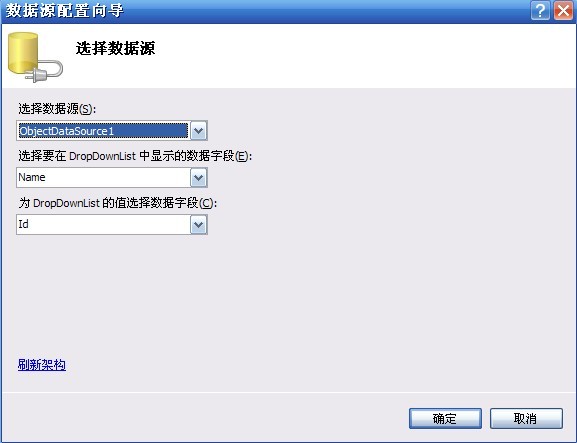
<asp:DropDownList ID="DropDownList1" runat="server"
DataTextField="Name" DataValueField="Id">
</asp:DropDownList>
<asp:ObjectDataSource ID="ObjectDataSource2" runat="server"
OldValuesParameterFormatString="original_{0}" SelectMethod="GetAllUser"
TypeName="MyBookShop.BLL.UserManager"></asp:ObjectDataSource>
这样绑定唯一不好的一点就是无法再第一个列表中显示“—请选择—”
@ 代码绑定
这种绑定方式非常灵活,也能很好的解决上面的问题,下面就来看看如何绑定
this.DropDownList1.DataSource = UserManager.GetAllUser();
this.DropDownList1.DataBind();
具体有两种方法:
1 ListItem list = new ListItem("--请选择--","0");
this.DropDownList1.DataSource = UserManager.GetAllUser();
this.DropDownList1.Items.Insert(0, list);
this.DropDownList1.DataTextField = "name";
this.DropDownList1.DataValueField = "id";
this.DropDownList1.DataBind();
但是当我绑定是DataSet的时候,上面那样写的话就没有加上("--请选择--"),这个要放在下面写才可以,如
protected void LinkBind()
{
DataSet ds = linkManager.GetList(" jh_checked='是'");
DroUrl.DataSource = ds;
DroUrl.DataTextField = "jh_linkname";
DroUrl.DataValueField = "jh_linkurl";
DroUrl.DataBind();
ListItem item = new ListItem("--请选择---", "#");
DroUrl.Items.Insert(0,item);
}
2 IList<DepartInfo> departList = DepartInfoManager.GetDepartList();
departList.Insert(0, new DepartInfo { DepartId = 0, DepartName = "--请选择--" });
ddDepart.DataSource = departList;
ddDepart.DataTextField = "DepartName";
ddDepart.DataValueField = "DepartId";
ddDepart.DataBind();
平时我们会在友情链接中使用,选择一项的时候链接会改变,而且打开一个新的页面,这个很好实现
protected void DropDownList1_TextChanged(object sender, EventArgs e)
{
string link = this.DropDownList1.SelectedValue;
Response.Write("<script>window.open('"+link+"','_Blank')</script>");
}
灵活掌握就可以了
DropDownList的用法的更多相关文章
- Html.DropDownList的用法
直接上代码 页面代码 <td> <%= Html.DropDownList("selCity") %> </td> controller里面的代 ...
- Html.DropDownList()的用法
页面代码如下: <%= Html.DropDownList("Category", ViewData["Categories"] as SelectLis ...
- [转]Html.DropDownList()的用法 ( Asp.Net MVC)
Html.DropDownList()赋默认值: 页面代码如下: <% List<SelectListItem> list = new List<SelectListItem& ...
- DropDownList和GridView用法
DropDownList和GridView用法 DropDownList控件和GridView控件在Asp.net中相当常用,以下是控件的解释,有些是常用的,有些是偶尔的,查找.使用.记录,仅此而 ...
- [摘]在ASP.NET MVC中使用DropDownList
在ASP.NET MVC中,尽管我们可以直接在页面中编写HTML控件,并绑定控件的属性,但更方便的办法还是使用HtmlHelper中的辅助方法.在View中,包含一个类型为HtmlHelper的属性H ...
- ASP.NET MVC中使用DropDownList
在ASP.NET MVC中,尽管我们可以直接在页面中编写HTML控件,并绑定控件的属性,但更方便的办法还是使用HtmlHelper中的辅助方法.在View中,包含一个类型为HtmlHelper的属性H ...
- GridView的常规用法
GridView控件在Asp.net中相当常用,以下是控件的解释,有些是常用的,有些是偶尔用到的,查找.使用.记录,仅此而已.(最后附带DropDownList控件) ASP.NET中GridView ...
- 在ASP.NET MVC中使用DropDownList
在ASP.NET MVC中,尽管我们可以直接在页面中编写HTML控件,并绑定控件的属性,但更方便的办法还是使用HtmlHelper中的辅助方法.在View中,包含一个类型为HtmlHelper的属性H ...
- <转>ASP.NET学习笔记之在ASP.NET MVC中使用DropDownList
看到一篇关于dropdownlist的用法很好的阐述,比较清楚,留着,防止以后自己不记得,还可以瞅瞅. 在ASP.NET MVC中,尽管我们可以直接在页面中编写HTML控件,并绑定控件的属性,但更方便 ...
随机推荐
- c++学习-字符串
字符数组和 string类型比较的区别 #include<iostream> #include<string> using namespace std; class area{ ...
- [复变函数]第15堂课 4.3 解析函数的 Taylor 展式
1. Taylor 定理: 设 $f(z)$ 在 $K:|z-a|<R$ 内解析, 则 $$\bee\label{15:taylor} f(z)=\sum_{n=0}^\infty c_n(z ...
- listview--记录ListView滚动停止位置与设置显示位置
在项目中经常使用到listView控件,当想记录滚动停止时的记录,当点击加载新的数据,从记录的位置开始显示的操作怎么实现尼?分为如下步骤 1.记录位置代码 //声明记录停止滚动时候,可见的位置 pri ...
- jq鼠标点击滚动锚点
鼠标点击滚动锚点 //滚动锚点 $('.menus-c ul li a').click(function(){ //alert(); $('html, body').animate({ scrollT ...
- Google是如何做代码审查的?
Google是一个非常优秀的公司.他们做出了很多令人称赞的东西—既是公司外部,人们可以看到的东西,也是公司内部.有一些在公司内部并不属于保密的事情,在外部并没有给予足够广泛的讨论.这就是我今天要说的. ...
- python抓取百度百科点赞数等动态数据
利用selenium 模拟浏览器打开页面,加载后抓取数据 #!/usr/bin/env python # coding=utf-8 import urllib2 import re from bs4 ...
- Git中的文件状态和使用
(暂存区 即Index In Git) commit 到 local respository的内容,不想push,则使用git reset 将文件状态回转到staged|modified|unstag ...
- Excel常用函数大全
1.ABS函数 函数名称:ABS 主要功能:求出相应数字的绝对值. 使用格式:ABS(number) 参数说明:number代表需要求绝对值的数值或引用的单元格. 应用举例:如果在B2单元格 ...
- Dynamics CRM 2011 权限管理(转)
http://www.cnblogs.com/LeoTang/p/3344265.html Dynamics CRM 2011 权限管理 CRM系统基于角色的权限主要通过部门.角色.用户.团队来 进行 ...
- Ext 中xtype一览
基本组件: xtype Class 描述 button Ext.Button 按钮 splitbutton Ext.SplitButton 带下拉菜单的按钮 cycle Ext.CycleButton ...