
python提取网页表格并保存为csv
0.
1.参考
表格标签
| 表格 | 描述 |
|---|---|
| <table> | 定义表格 |
| <caption> | 定义表格标题。 |
| <th> | 定义表格的表头。 |
| <tr> | 定义表格的行。 |
| <td> | 定义表格单元。 |
| <thead> | 定义表格的页眉。 |
| <tbody> | 定义表格的主体。 |
| <tfoot> | 定义表格的页脚。 |
| <col> | 定义用于表格列的属性。 |
| <colgroup> | 定义表格列的组。 |
表格元素定位
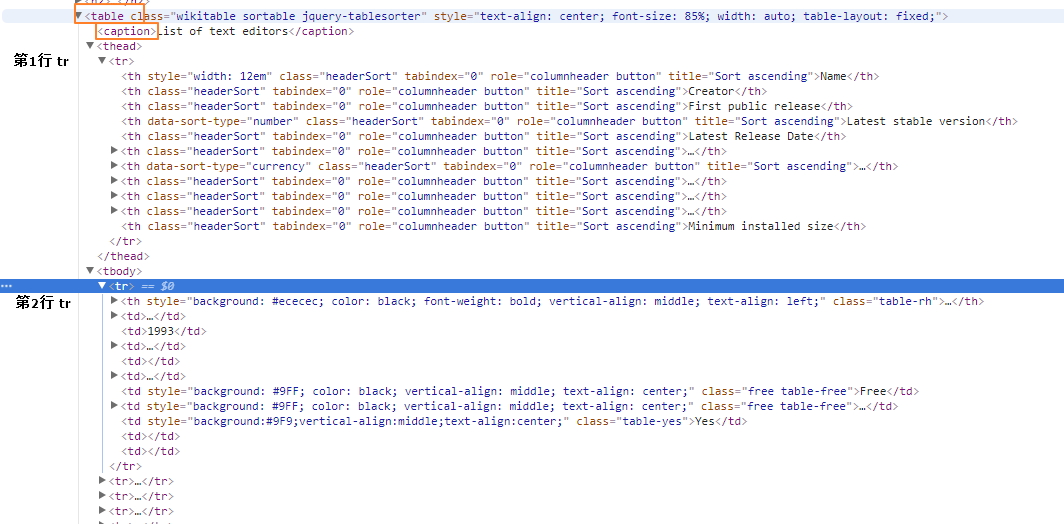
参看网页源代码并没有 thead 和 tbody。。。
<table class="wikitable sortable" style="text-align: center; font-size: 85%; width: auto; table-layout: fixed;">

  <caption>List of text editors</caption>

  <tr>

    <th style="width: 12em">Name</th>

    <th>Creator</th>

    <th>First public release</th>

    <th data-sort-type="number">Latest stable version</th>

    <th>Latest Release Date</th>

    <th><a href="/wiki/Programming_language" title="Programming language">Programming language</a></th>

    <th data-sort-type="currency">Cost (<a href="/wiki/United_States_dollar" title="United States dollar">US$</a>)</th>

    <th><a href="/wiki/Software_license" title="Software license">Software license</a></th>

    <th><a href="/wiki/Free_and_open-source_software" title="Free and open-source software">Open source</a></th>

    <th><a href="/wiki/Command-line_interface" title="Command-line interface">Cli available</a></th>

    <th>Minimum installed size</th>

  </tr>

  <tr>

    <th
2.提取表格数据
表格标题可能出现超链接,导致标题被拆分,
也可能不带表格标题。。
<caption>Text editor support for remote file editing over
  <a href="/wiki/Lists_of_network_protocols" title="Lists of network protocols">network protocols</a>
</caption>
表格内容换行
<td>
  <a href="/wiki/Plan_9_from_Bell_Labs" title="Plan 9 from Bell Labs">Plan 9</a>
   and
  <a href="/wiki/Inferno_(operating_system)" title="Inferno (operating system)">Inferno</a>
</td>
tag 规律
| table | ||||
| thead tr1 | th | th | th | th |
| tbody tr2 | td/th | td | ||
| tbody tr3 | td/th | |||
| tbody tr3 | td/th | |||
2.1提取所有表格标题列表
filenames = []

for index, table in enumerate(response.xpath('//table')):

    caption = table.xpath('string(./caption)').extract_first()    #提取caption tag里面的所有text,包括子节点内的和文本子节点,这样也行 caption = ''.join(table.xpath('./caption//text()').extract())

    filename = str(index+1)+'_'+caption if caption else str(index+1)  #xpath 要用到 table 计数,从[1]开始

    filenames.append(re.sub(r'[^\w\s()]','',filename))    #移除特殊符号

In [233]: filenames

Out[233]:

[u'1_List of text editors',

 u'2_Text editor support for various operating systems',

 u'3_Available languages for the UI',

 u'4_Text editor support for common document interfaces',

 u'5_Text editor support for basic editing features',

 u'6_Text editor support for programming features (see source code editor)',

 u'7_Text editor support for other programming features',

 '',

 u'9_Text editor support for key bindings',

 u'10_Text editor support for remote file editing over network protocols',

 u'11_Text editor support for some of the most common character encodings',

 u'12_Right to left (RTL)  bidirectional (bidi) support',

 u'13_Support for newline characters in line endings']
2.2每个表格分别写入csv文件
for index, filename in enumerate(filenames):

    print filename

    with open('%s.csv'%filename,'wb') as fp:

        writer = csv.writer(fp)

        for tr in response.xpath('//table[%s]/tr'%(index+1)):

            writer.writerow([i.xpath('string(.)').extract_first().replace(u'\xa0', u' ').strip().encode('utf-8','replace') for i in tr.xpath('./*')])  #xpath组合,限定 tag 范围,tr.xpath('./th | ./td')
代码处理 .replace(u'\xa0', u' ')
HTML转义字符&npsp;表示non-breaking space,unicode编码为u'\xa0',超出gbk编码范围?
使用 'w' 写csv文件,会出现如下问题,使用'wb' 即可解决问题
【已解决】Python中通过csv的writerow输出的内容有多余的空行 – 在路上
所有表格写入同一excel文件的不同工作表 sheet,需要使用xlwt
python ︰ 创建 excel 工作簿和倾倒 csv 文件作为工作表
python提取网页表格并保存为csv的更多相关文章
- Python读取网页表格数据
学会了从网格爬取数据,就可以告别从网站一页一页复制表格数据的时代了. 说个亲身经历的事: 以前我的本科毕业论文是关于"燃放烟花爆竹和空气质量"之间关系的,就要从环保局官网查资料. ...
- python提取分析表格数据
#/bin/python3.4# -*- coding: utf-8 -*- import xlrd def open_excel(file="file.xls"): try: d ...
- python爬取昵称并保存为csv
代码: import sys import io import re sys.stdout=io.TextIOWrapper(sys.stdout.buffer,encoding='gb18030') ...
- python爬取信息并保存至csv
import csv import requests from bs4 import BeautifulSoup res=requests.get('http://books.toscrape.com ...
- 使用python 提取网页的特定数据转
http://blog.csdn.net/nwpulei/article/details/7272832
- Python:提取网页中的电子邮箱
import requests, re #regex = r"([a-zA-Z0-9_.+-]+@[a-zA-Z0-9-]+\.[a-zA-Z0-9-.]+)"#这个正则表达式过滤 ...
- Python使用Tabula提取PDF表格数据
今天遇到一个批量读取pdf文件中表格数据的需求,样式大体是以下这样: python读取PDF无非就是三种方式(我所了解的),pdfminer.pdf2htmlEX 和 Tabula.综合考虑后,选择了 ...
- python笔记之提取网页中的超链接
python笔记之提取网页中的超链接 对于提取网页中的超链接,先把网页内容读取出来,然后用beautifulsoup来解析是比较方便的.但是我发现一个问题,如果直接提取a标签的href,就会包含jav ...
- python学习笔记——爬虫中提取网页中的信息
1 数据类型 网页中的数据类型可分为结构化数据.半结构化数据.非结构化数据三种 1.1 结构化数据 常见的是MySQL,表现为二维形式的数据 1.2 半结构化数据 是结构化数据的一种形式,并不符合关系 ...
随机推荐
- Linux取代ifconfig指令的ip指令
- 线程池、进程池(concurrent.futures模块)和协程
一.线程池 1.concurrent.futures模块 介绍 concurrent.futures模块提供了高度封装的异步调用接口 ThreadPoolExecutor:线程池,提供异步调用 Pro ...
- ORM基础之ORM介绍和基础操作
一.ORM介绍 1.ORM概念 对象关系映射(Object Relational Mapping,简称ORM)模式是一种为了解决面向对象与关系数据库存在的互不匹配的现象的技术. 简单的说,ORM是通过 ...
- Django admin组件源码流程
admin 组件 Django 自带的用户后台组件 用于用户便携的操作 admin 组件核心 启动 注册 设计url 启动核心代码 每个app 通过 apps.py 扫描 admin.py 文件 并执 ...
- Js中常用知识点(typeof、instanceof、动态属性、变量作用域)
1.Js中各类型的常量表示形式:Number:number String:string Object:objec 2.typeof运算符在Js中的使用:用于判断某一对象是何种类型,返回值 ...
- 解决CentOS出现"No package redis available"提示问题
[root@bogon src]# yum install redis Loaded plugins: fastestmirror, langpacks Repository base is list ...
- C#中的Finalize,Dispose,SuppressFinalize的实现和使用介绍
原文地址:http://www.csharpwin.com/csharpspace/8927r1397.shtml MSDN建议按照下面的模式实现IDisposable接口: public class ...
- LFYZ-OJ ID: 1008 求A/B高精度值
思路 小数点前的部分可以通过m/n直接计算得出 小数点后的20位可通过循环进行快速计算,计算方法如下: m%=n m*=10 小数点后第i位为m/n,回到第1步 第3步后,如果m%n为0,说明已经除净 ...
- 第二节:如何正确使用WebApi和使用过程中的一些坑
一. 基本调用规则 1. 前提 WebApi的默认路由规则为:routeTemplate: "api/{controller}/{id}", 下面为我们统一将它改为 routeTe ...
- ES6 Class语法学习
前言 大多数面向对象的编程语言都支持类和类继承的特性,而JS却不支持这些特性,只能通过其他方法定义并关联多个相似的对象,这种状态一直延续到了ES5.由于类似的库层出不穷,最终还是在ECMAScript ...