
python提取网页表格并保存为csv
0.
1.参考
表格标签
| 表格 | 描述 |
|---|---|
| <table> | 定义表格 |
| <caption> | 定义表格标题。 |
| <th> | 定义表格的表头。 |
| <tr> | 定义表格的行。 |
| <td> | 定义表格单元。 |
| <thead> | 定义表格的页眉。 |
| <tbody> | 定义表格的主体。 |
| <tfoot> | 定义表格的页脚。 |
| <col> | 定义用于表格列的属性。 |
| <colgroup> | 定义表格列的组。 |
表格元素定位
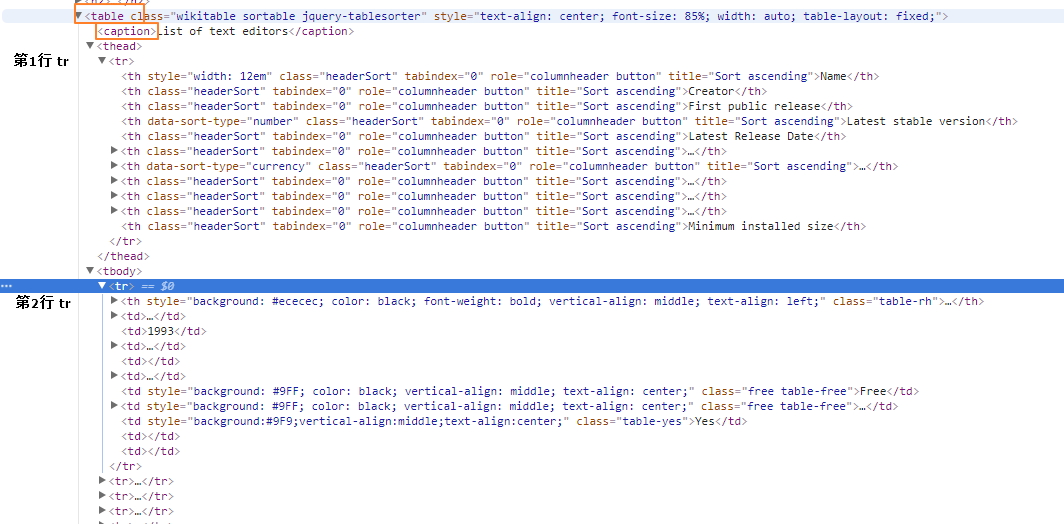
参看网页源代码并没有 thead 和 tbody。。。
<table class="wikitable sortable" style="text-align: center; font-size: 85%; width: auto; table-layout: fixed;">

  <caption>List of text editors</caption>

  <tr>

    <th style="width: 12em">Name</th>

    <th>Creator</th>

    <th>First public release</th>

    <th data-sort-type="number">Latest stable version</th>

    <th>Latest Release Date</th>

    <th><a href="/wiki/Programming_language" title="Programming language">Programming language</a></th>

    <th data-sort-type="currency">Cost (<a href="/wiki/United_States_dollar" title="United States dollar">US$</a>)</th>

    <th><a href="/wiki/Software_license" title="Software license">Software license</a></th>

    <th><a href="/wiki/Free_and_open-source_software" title="Free and open-source software">Open source</a></th>

    <th><a href="/wiki/Command-line_interface" title="Command-line interface">Cli available</a></th>

    <th>Minimum installed size</th>

  </tr>

  <tr>

    <th
2.提取表格数据
表格标题可能出现超链接,导致标题被拆分,
也可能不带表格标题。。
<caption>Text editor support for remote file editing over
  <a href="/wiki/Lists_of_network_protocols" title="Lists of network protocols">network protocols</a>
</caption>
表格内容换行
<td>
  <a href="/wiki/Plan_9_from_Bell_Labs" title="Plan 9 from Bell Labs">Plan 9</a>
   and
  <a href="/wiki/Inferno_(operating_system)" title="Inferno (operating system)">Inferno</a>
</td>
tag 规律
| table | ||||
| thead tr1 | th | th | th | th |
| tbody tr2 | td/th | td | ||
| tbody tr3 | td/th | |||
| tbody tr3 | td/th | |||
2.1提取所有表格标题列表
filenames = []

for index, table in enumerate(response.xpath('//table')):

    caption = table.xpath('string(./caption)').extract_first()    #提取caption tag里面的所有text,包括子节点内的和文本子节点,这样也行 caption = ''.join(table.xpath('./caption//text()').extract())

    filename = str(index+1)+'_'+caption if caption else str(index+1)  #xpath 要用到 table 计数,从[1]开始

    filenames.append(re.sub(r'[^\w\s()]','',filename))    #移除特殊符号

In [233]: filenames

Out[233]:

[u'1_List of text editors',

 u'2_Text editor support for various operating systems',

 u'3_Available languages for the UI',

 u'4_Text editor support for common document interfaces',

 u'5_Text editor support for basic editing features',

 u'6_Text editor support for programming features (see source code editor)',

 u'7_Text editor support for other programming features',

 '',

 u'9_Text editor support for key bindings',

 u'10_Text editor support for remote file editing over network protocols',

 u'11_Text editor support for some of the most common character encodings',

 u'12_Right to left (RTL)  bidirectional (bidi) support',

 u'13_Support for newline characters in line endings']
2.2每个表格分别写入csv文件
for index, filename in enumerate(filenames):

    print filename

    with open('%s.csv'%filename,'wb') as fp:

        writer = csv.writer(fp)

        for tr in response.xpath('//table[%s]/tr'%(index+1)):

            writer.writerow([i.xpath('string(.)').extract_first().replace(u'\xa0', u' ').strip().encode('utf-8','replace') for i in tr.xpath('./*')])  #xpath组合,限定 tag 范围,tr.xpath('./th | ./td')
代码处理 .replace(u'\xa0', u' ')
HTML转义字符&npsp;表示non-breaking space,unicode编码为u'\xa0',超出gbk编码范围?
使用 'w' 写csv文件,会出现如下问题,使用'wb' 即可解决问题
【已解决】Python中通过csv的writerow输出的内容有多余的空行 – 在路上
所有表格写入同一excel文件的不同工作表 sheet,需要使用xlwt
python ︰ 创建 excel 工作簿和倾倒 csv 文件作为工作表
python提取网页表格并保存为csv的更多相关文章
- Python读取网页表格数据
学会了从网格爬取数据,就可以告别从网站一页一页复制表格数据的时代了. 说个亲身经历的事: 以前我的本科毕业论文是关于"燃放烟花爆竹和空气质量"之间关系的,就要从环保局官网查资料. ...
- python提取分析表格数据
#/bin/python3.4# -*- coding: utf-8 -*- import xlrd def open_excel(file="file.xls"): try: d ...
- python爬取昵称并保存为csv
代码: import sys import io import re sys.stdout=io.TextIOWrapper(sys.stdout.buffer,encoding='gb18030') ...
- python爬取信息并保存至csv
import csv import requests from bs4 import BeautifulSoup res=requests.get('http://books.toscrape.com ...
- 使用python 提取网页的特定数据转
http://blog.csdn.net/nwpulei/article/details/7272832
- Python:提取网页中的电子邮箱
import requests, re #regex = r"([a-zA-Z0-9_.+-]+@[a-zA-Z0-9-]+\.[a-zA-Z0-9-.]+)"#这个正则表达式过滤 ...
- Python使用Tabula提取PDF表格数据
今天遇到一个批量读取pdf文件中表格数据的需求,样式大体是以下这样: python读取PDF无非就是三种方式(我所了解的),pdfminer.pdf2htmlEX 和 Tabula.综合考虑后,选择了 ...
- python笔记之提取网页中的超链接
python笔记之提取网页中的超链接 对于提取网页中的超链接,先把网页内容读取出来,然后用beautifulsoup来解析是比较方便的.但是我发现一个问题,如果直接提取a标签的href,就会包含jav ...
- python学习笔记——爬虫中提取网页中的信息
1 数据类型 网页中的数据类型可分为结构化数据.半结构化数据.非结构化数据三种 1.1 结构化数据 常见的是MySQL,表现为二维形式的数据 1.2 半结构化数据 是结构化数据的一种形式,并不符合关系 ...
随机推荐
- Django模板语言进阶
一.母板 1.什么情况下使用母版 当多个页面的大部分内容都一样的时候,我们可以把相同的部分提取出来,放到一个单独的母版HTML文件中 然后在母版中定义需要被替换的block 例如:母板页面 <! ...
- 关于vue-cli的项目结构【转】
一.总体框架 一个vue-cli的项目结构如下,其中src文件夹是需要掌握的,所以本文也重点讲解其中的文件,至于其他相关文件,了解一下即可. vue-cli项目总体结构 二.文件结构细分 1.buil ...
- Prince and Princess HDU - 4685(匹配 + 强连通)
Prince and Princess Time Limit: 6000/3000 MS (Java/Others) Memory Limit: 65535/32768 K (Java/Othe ...
- 【dp】求最长上升子序列
题目描述 给定一个序列,初始为空.现在我们将1到N的数字插入到序列中,每次将一个数字插入到一个特定的位置.我们想知道此时最长上升子序列长度是多少? 输入 第一行一个整数N,表示我们要将1到N插入序列中 ...
- [HNOI2016]矿区
[HNOI2016]矿区 平面图转对偶图 方法: 1.分成正反两个单向边,每个边属于一个面 2.每个点按照极角序sort出边 3.枚举每一个边,这个边的nxt就是反边的前一个(这样找到的是面的边逆时针 ...
- Hadoop记录-hadoop jmx配置
1.hadoop-env.sh添加export HADOOP_JMX_OPTS="-Dcom.sun.management.jmxremote.authenticate=false -Dco ...
- 清除系统默认样式,文本样式,高级选择器(权重),边界圆角,a标签的四大伪类,背景图片
清除系统默认样式 大多系统预定义标签,有默认样式,不满足实际开发需求,反倒影响布局通常清除系统样式,利于开发 body,h1-h6,p,table { margin:; } ul { margin:; ...
- Memorise Me!——用数值做地址,实现快速查找
题目如下: Arijit is a brilliant boy. He likes memory games. He likes to participate alone but this time ...
- [物理学与PDEs]第2章习题2 质量力有势时的能量方程
试证明: 如果质量力有势, 即存在 $\phi$ 使 ${\bf F}=-\n \phi$, 那么理想流体的能量守恒方程的微分形式可写为 $$\bex \cfrac{\rd}{\rd t}\sex{e ...
- 运维工作笔记-------nginx的反向代理
1.nginx的反向代理意义 一般来说,我们在项目中,不会直接让项目服务器ip与外网做直接映射,这样一则是不安全,二是客户直接去访问项目服务器,对项目服务器带来的压力太大,从而导致项目运行速度变慢,程 ...