
Unity 编辑器学习(三)之 Light & Baked
上一篇博客已经详细的介绍GI了,接下来我们讲点实际的,怎么烘焙场景及注意事项。
一、Light
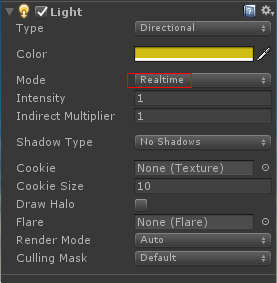
| Property: | Function: |
|---|---|
| Type | 当前灯光的类型。有四种类型:Directional, Point, Spot and Area。 |
| Range | 灯光照射的距离 (只有Point和Spot光源有这个属性). |
| Spot Angle | 聚光灯照射范围所张开的角度(Spot light only). |
| Color | 光的颜色 |
| Mode | 指定光的模式. 三种模式 Realtime, Mixed and Baked。 |
| Intensity | 光照强度 |
| Indirect Multiplier | 改变间接光的强度,间接光光线从一个对象反弹到另一个对象。如果值大于1则反射光将变得更亮,小于1反射光暗淡 |
| Shadow Type | 阴影类型:Hard Shadows, Soft Shadows, or no shadows 。 |
| Baked Shadow Angle | 烘焙时,软化边缘阴影,让他们看起来更自然。(Directional ) |
| Baked Shadow Radius | 烘焙时,软化边缘阴影,让他们看起来更自然。(Point or Spot) |
| Realtime Shadows | 实时阴影。 |
| Strength | 阴影的强度 |
| Resolution | 阴影分辨率,越高越消耗性能。 |
| Bias | 阴影距离物体的距离。 |
| Normal Bias | |
| Near Plane | Use the slider to control the value for the near clip plane when rendering shadows, defined as a value between 0.1 and 10. This value is clamped to 0.1 units or 1% of the light’s Range property, whichever is lower. This is set to 0.2 by default. |
| Cookie | (靠) |
| Draw Halo | Tick this box to draw a spherical Halo of light with a diameter equal to the Range value. You can also use the Halo component to achieve this. Note that the Halo component is drawn in addition to the halo from the Light component, and that the Halo component’s Size parameter determines its radius, not its diameter. |
| Flare | If you want to set a Flare to be rendered at the Light’s position, place an Asset in this field to be used as its source. |
| Render Mode | Use this drop-down to set the rendering priority of the selected Light. This can affect lighting fidelity and performance (see Performance Considerations, below). |
| Auto | The rendering method is determined at run time, depending on the brightness of nearby lights and the current Quality Settings. |
| Important | The light is always rendered at per-pixel quality. Use Important mode only for the most noticeable visual effects (for example, the headlights of a player’s car). |
| Not Important | The light is always rendered in a faster, vertex/object light mode. |
| Culling Mask | Use this to selectively exclude groups of objects from being affected by the Light. For more information, see Layers. |
Unity 编辑器学习(三)之 Light & Baked的更多相关文章
- Unity 编辑器学习(二)之 全局光照(GI)
光影流年,花影阡陌.光与影交织的岁月教育我们,不会使用光照的程序员不是个好美术. 一.概述 点击 Window > Lighting > Settings 会弹出Lighting窗口,这个 ...
- Unity 编辑器学习(四)之 静态游戏物体
一.Static GameObjects 关于静态对象的信息往往可以预先在编辑器里计算,不需要实时计算,进而优化性能,明显降低DrawCall. 各种Static说明: Lightmapping: 用 ...
- Unity ShaderLab学习总结
http://www.jianshu.com/p/7b9498e58659 Unity ShaderLab学习总结 Why Bothers? 为什么已经有ShaderForge这种可视化Shader编 ...
- 【Unity编辑器】UnityEditor多重弹出窗体与编辑器窗口层级管理
一.简介 最近马三为公司开发了一款触发器编辑器,对于这个编辑器策划所要求的质量很高,是模仿暴雪的那个触发器编辑器来做的,而且之后这款编辑器要作为公司内部的一个通用工具链使用.其实,在这款触发器编辑器之 ...
- 【Unity】2.1 初识Unity编辑器
分类:Unity.C#.VS2015 创建日期:2016-03-26 一.简介 本节要点:了解Unity编辑器的菜单和视图界面,以及最基本的操作,这是入门的最基础部分,必须掌握. 二.启动界面 双击桌 ...
- [转]Unity Shader 学习总结
1.先来一段单张纹理贴图的shader示例代码: // Upgrade NOTE: replaced 'mul(UNITY_MATRIX_MVP,*)' with 'UnityObjectToClip ...
- Unity Shader 学习之旅
Unity Shader 学习之旅 unityshader图形图像 纸上学来终觉浅,绝知此事要躬行 美丽的梦和美丽的诗一样 都是可遇而不可求的——席慕蓉 一.渲染流水线 示例图 Tips:什么是 GP ...
- Unity Shader 学习之旅之SurfaceShader
Unity Shader 学习之旅之SurfaceShader unity shader 图形图像 如果大地的每个角落都充满了光明 谁还需要星星,谁还会 在夜里凝望 寻找遥远的安慰——江河 官方文档 ...
- MarkDown 编辑器学习
MarkDown 编辑器学习 是一种简单快键的文字排版工具,可以用于编写说明文档,鉴于其语法简洁明了,且其渲染生成的样式简单美观,很多开发者也用它来写博客,已被国内外很多流行博客平台所支持.生成的文件 ...
随机推荐
- 准备把平台挪到linux
在上午准备周末胡老师的课程考核的Ppt时,逐渐我觉得不得不把平台挪到linux了.很多并行的应用不只是在linux上效率更高,而且很多包都在linux上.另外如果不及早挪到Linux上,后面遇到的问题 ...
- 找出在使用临时表空间的SQL
SELECT a.username, a.sid, a.serial#, a.osuser, b.tablespace, b.blocks, c.sql_text FROM v$session a, ...
- tinymce原装插件源码分析(三)-code
code: 用于显示源码.主要包含一个弹框.设置显示内容以及内容的更新. function showDialog() { var win = editor.windowManager.open({ t ...
- BZOJ 3529 [Sdoi2014]数表 (莫比乌斯反演+树状数组+离线)
题目大意:有一张$n*m$的数表,第$i$行第$j$列的数是同时能整除$i,j$的所有数之和,求数表内所有不大于A的数之和 先是看错题了...接着看对题了发现不会做了...刚了大半个下午无果 看了Po ...
- Hibernate简单的保存操作
1.这里面我想先说一下session对象的创建,这个是我们操纵数据库的核心对象,因此首先我们应该获取相应的session对象. public static Configuration cfg; pub ...
- [LeetCode] 122. 买卖股票的最佳时机ii best-time-to-buy-and-sell-stock-ii(贪心算法)
思路: 只要第二天的价格高于第一天,就进行交易.(这样的话就默认可以同一天内先卖出再买进) class Solution(object): def maxProfit(self, prices): & ...
- CSDN博客给我带来的一些诱惑和选择机会
武汉九天鸟-p2p网贷系统开发-互联网应用软件开发 公司官网:http://jiutianniao.com 社交问答:http://ask.jiutianniao.com 最近1年多,尤其是今年5月 ...
- 收集整理的openstack java封装 api的第三方实现的选择
Apache jclouds 地址:http://jclouds.apache.org/guides/openstack/ 一个开源库,java实现,支持cloudstack,openstack以及各 ...
- 洛谷 P2183 巧克力
P2183 巧克力 题目描述 佳佳邀请了M个同学到家里玩.为了招待客人,她需要将巧克力分给她的好朋友们.她有N(1<=N<=5000)块巧克力,但是大小各不一样,第i块巧克力大小为为1*X ...
- Beat 'Em Up Game Starter Kit (横版格斗游戏) cocos2d-x游戏源代码
浓缩精华.专注战斗! 游戏的本质是什么?界面?养成?NoNo! 游戏来源于对实战和比赛的模拟,所以它的本源就是对抗.就是战斗! 是挥洒热血的一种方式! 一个游戏最复杂最难做的是什么?UI?商城? ...