
kali 2.0 linux中的Nmap的主机探测
不多说,直接上干货!


如果是第一次接触Nmap,推荐在MSF终端中输入不加任何参数的Nmap命令,以查看其使用方法。



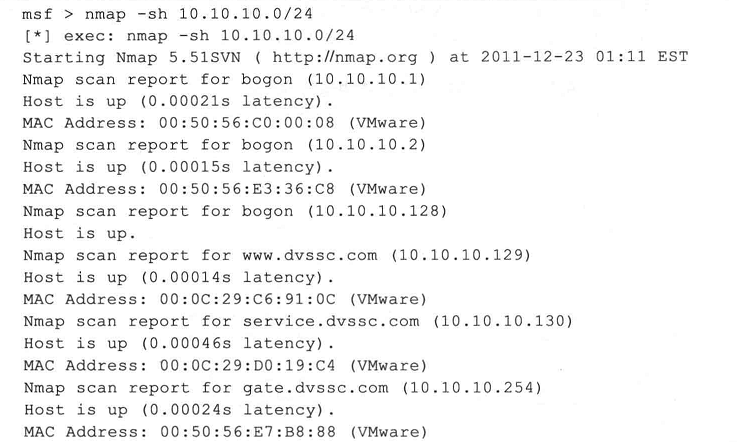
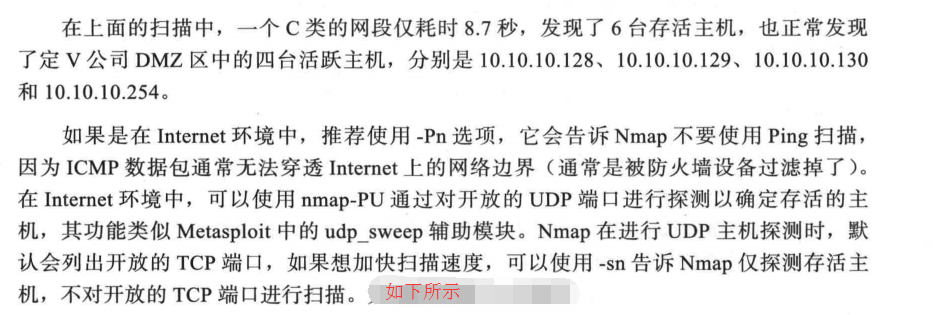
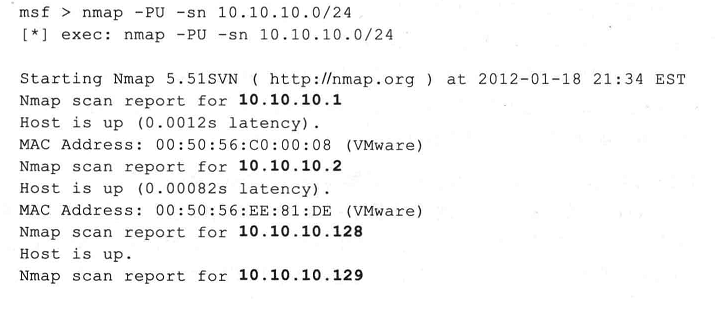
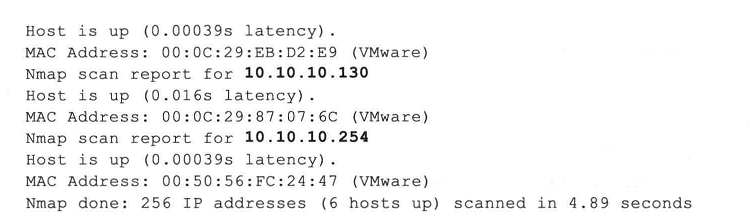
更多,其实,
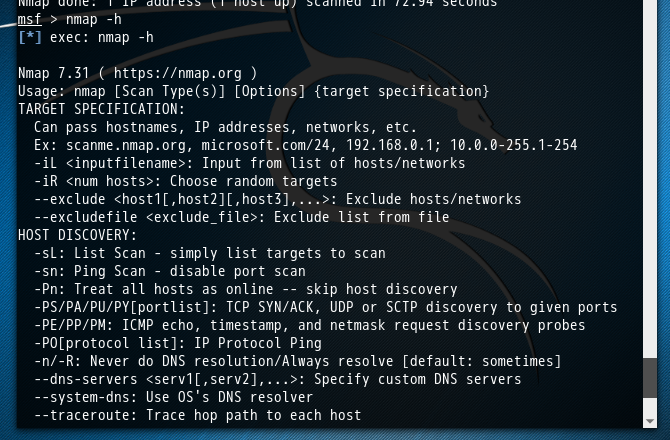

msf > nmap -h

[*] exec: nmap -h

Nmap 7.31 ( https://nmap.org )

Usage: nmap [Scan Type(s)] [Options] {target specification}

TARGET SPECIFICATION:

  Can pass hostnames, IP addresses, networks, etc.

  Ex: scanme.nmap.org, microsoft.com/24, 192.168.0.1; 10.0.0-255.1-254

  -iL <inputfilename>: Input from list of hosts/networks

  -iR <num hosts>: Choose random targets

  --exclude <host1[,host2][,host3],...>: Exclude hosts/networks

  --excludefile <exclude_file>: Exclude list from file

HOST DISCOVERY:

  -sL: List Scan - simply list targets to scan

  -sn: Ping Scan - disable port scan

  -Pn: Treat all hosts as online -- skip host discovery

  -PS/PA/PU/PY[portlist]: TCP SYN/ACK, UDP or SCTP discovery to given ports

  -PE/PP/PM: ICMP echo, timestamp, and netmask request discovery probes

  -PO[protocol list]: IP Protocol Ping

  -n/-R: Never do DNS resolution/Always resolve [default: sometimes]

  --dns-servers <serv1[,serv2],...>: Specify custom DNS servers

  --system-dns: Use OS's DNS resolver

  --traceroute: Trace hop path to each host

SCAN TECHNIQUES:

  -sS/sT/sA/sW/sM: TCP SYN/Connect()/ACK/Window/Maimon scans

  -sU: UDP Scan

  -sN/sF/sX: TCP Null, FIN, and Xmas scans

  --scanflags <flags>: Customize TCP scan flags

  -sI <zombie host[:probeport]>: Idle scan

  -sY/sZ: SCTP INIT/COOKIE-ECHO scans

  -sO: IP protocol scan

  -b <FTP relay host>: FTP bounce scan

PORT SPECIFICATION AND SCAN ORDER:

  -p <port ranges>: Only scan specified ports

    Ex: -p22; -p1-65535; -p U:53,111,137,T:21-25,80,139,8080,S:9

  --exclude-ports <port ranges>: Exclude the specified ports from scanning

  -F: Fast mode - Scan fewer ports than the default scan

  -r: Scan ports consecutively - don't randomize

  --top-ports <number>: Scan <number> most common ports

  --port-ratio <ratio>: Scan ports more common than <ratio>

SERVICE/VERSION DETECTION:

  -sV: Probe open ports to determine service/version info

  --version-intensity <level>: Set from 0 (light) to 9 (try all probes)

  --version-light: Limit to most likely probes (intensity 2)

  --version-all: Try every single probe (intensity 9)

  --version-trace: Show detailed version scan activity (for debugging)

SCRIPT SCAN:

  -sC: equivalent to --script=default

  --script=<Lua scripts>: <Lua scripts> is a comma separated list of

           directories, script-files or script-categories

  --script-args=<n1=v1,[n2=v2,...]>: provide arguments to scripts

  --script-args-file=filename: provide NSE script args in a file

  --script-trace: Show all data sent and received

  --script-updatedb: Update the script database.

  --script-help=<Lua scripts>: Show help about scripts.

           <Lua scripts> is a comma-separated list of script-files or

           script-categories.

OS DETECTION:

  -O: Enable OS detection

  --osscan-limit: Limit OS detection to promising targets

  --osscan-guess: Guess OS more aggressively

TIMING AND PERFORMANCE:

  Options which take <time> are in seconds, or append 'ms' (milliseconds),

  's' (seconds), 'm' (minutes), or 'h' (hours) to the value (e.g. 30m).

  -T<0-5>: Set timing template (higher is faster)

  --min-hostgroup/max-hostgroup <size>: Parallel host scan group sizes

  --min-parallelism/max-parallelism <numprobes>: Probe parallelization

  --min-rtt-timeout/max-rtt-timeout/initial-rtt-timeout <time>: Specifies

      probe round trip time.

  --max-retries <tries>: Caps number of port scan probe retransmissions.

  --host-timeout <time>: Give up on target after this long

  --scan-delay/--max-scan-delay <time>: Adjust delay between probes

  --min-rate <number>: Send packets no slower than <number> per second

  --max-rate <number>: Send packets no faster than <number> per second

FIREWALL/IDS EVASION AND SPOOFING:

  -f; --mtu <val>: fragment packets (optionally w/given MTU)

  -D <decoy1,decoy2[,ME],...>: Cloak a scan with decoys

  -S <IP_Address>: Spoof source address

  -e <iface>: Use specified interface

  -g/--source-port <portnum>: Use given port number

  --proxies <url1,[url2],...>: Relay connections through HTTP/SOCKS4 proxies

  --data <hex string>: Append a custom payload to sent packets

  --data-string <string>: Append a custom ASCII string to sent packets

  --data-length <num>: Append random data to sent packets

  --ip-options <options>: Send packets with specified ip options

  --ttl <val>: Set IP time-to-live field

  --spoof-mac <mac address/prefix/vendor name>: Spoof your MAC address

  --badsum: Send packets with a bogus TCP/UDP/SCTP checksum

OUTPUT:

  -oN/-oX/-oS/-oG <file>: Output scan in normal, XML, s|<rIpt kIddi3,

     and Grepable format, respectively, to the given filename.

  -oA <basename>: Output in the three major formats at once

  -v: Increase verbosity level (use -vv or more for greater effect)

  -d: Increase debugging level (use -dd or more for greater effect)

  --reason: Display the reason a port is in a particular state

  --open: Only show open (or possibly open) ports

  --packet-trace: Show all packets sent and received

  --iflist: Print host interfaces and routes (for debugging)

  --append-output: Append to rather than clobber specified output files

  --resume <filename>: Resume an aborted scan

  --stylesheet <path/URL>: XSL stylesheet to transform XML output to HTML

  --webxml: Reference stylesheet from Nmap.Org for more portable XML

  --no-stylesheet: Prevent associating of XSL stylesheet w/XML output

MISC:

  -6: Enable IPv6 scanning

  -A: Enable OS detection, version detection, script scanning, and traceroute

  --datadir <dirname>: Specify custom Nmap data file location

  --send-eth/--send-ip: Send using raw ethernet frames or IP packets

  --privileged: Assume that the user is fully privileged

  --unprivileged: Assume the user lacks raw socket privileges

  -V: Print version number

  -h: Print this help summary page.

EXAMPLES:

  nmap -v -A scanme.nmap.org

  nmap -v -sn 192.168.0.0/16 10.0.0.0/8

  nmap -v -iR 10000 -Pn -p 80

SEE THE MAN PAGE (https://nmap.org/book/man.html) FOR MORE OPTIONS AND EXAMPLES

msf >
kali 2.0 linux中的Nmap的主机探测的更多相关文章
- kali 2.0 linux中的Nmap的操作系统扫描功能
不多说,直接上干货! 可以使用-O选项,让Nmap对目标的操作系统进行识别. msf > nmap -O 202.193.58.13 [*] exec: nmap -O 202.193.58.1 ...
- 如何在Linux中显示和设置主机名
原文链接 随着连接到网络的计算机数量越来越多,每一台计算机都需要有一个属性来区别于其它计算机.和现实世界中的人一样,计算机也有一个叫做hostname(主机名)的属性. 什么是hostname 从它的 ...
- 如何在Linux中显示和设置主机名(适用ubantu、centos等版本)
随着连接到网络的计算机数量越来越多,每一台计算机都需要有一个属性来区别于其它计算机.和现实世界中的人一样,计算机也有一个叫做hostname(主机名)的属性. 什么是hostname 从它的操作手册来 ...
- Kali Linux:使用nmap扫描主机
nmap-Network Mapper,是著名的网络扫描和嗅探工具包.他同样支持Windows和OS X. 扫描开放端口和判断操作系统类型 先让我们ping一段地址范围,找到启动的主机: # nmap ...
- Linux中使用python测试主机存活 Linux系统CentOS Linux release 7.3.1611 (Core) py版本Python 2.7.5
下面是最初的情况 #/usr/bin/env python # -*- coding: utf-8 -*- import os import time import subprocess import ...
- linux中uptime命令获取主机运行时间和查询系统负载信息
系统中的uptime命令主要用于获取主机运行时间和查询linux系统负载等信息.uptime命令可以显示系统已经运行了多长时间,信息显示依次为:现在时间.系统已经运行了多长时间.目前有多少登陆用户.系 ...
- 在linux 中wget 无法解析主机
vim /etc/resolv.cof 在里面加入节点 nameserver 8.8.8.8 / nameserver 8.8.4.4 即可 失败时: 成功时:
- 如何在Kali Linux中搭建钓鱼热点
文中提及的部分技术可能带有一定攻击性,仅供安全学习和教学用途,禁止非法使用! 0×00 实验环境 操作系统:Kali 1.0 (VM) FackAP: easy-creds 硬件:NETGEAR wg ...
- Linux中W与Who命令的使用
踢掉一个从某个终端连上的用户pkill -kill -t pts/0 ---------------------------------------------------------------- ...
随机推荐
- sap abap 对字符串的操作
替换字段内容 REPLACE [FIRST /ALL OCCURRENCES OF]<STR1>INTO <STR> WITH <STR2> DATA STR ...
- linux中sed的使用方法具体解释(对行数据的加入、删除等)
sed使用语法 [root@fwq test]# sed --help 使用方法: sed [选项]... {脚本(假设没有其它脚本)} [输入文件]... -n, --quiet, --silent ...
- node12---mongodb
一.传统数据库技术回顾 数据库就是存储数据的,那么存储数据就用txt就行了啊,为什么要有数据库? 理由之1: 数据库有行.列的概念,数据有关系,数据不是散的. 老牌数据库,比如MySQL.SQL Se ...
- node11---相册
app.js /* littleAlbum --.idea --controller(控制层相当于action层) --package.json --router.js --models(做事的是mo ...
- postMan模拟get和post请求,支持局域网和外网
chrome应用postMan,可以安装一下,非常方便. 可以FQ下载安装. post参数要在body中设置 get参数直接在url中
- [JZOJ 5465] [NOIP2017提高A组冲刺11.9] 道路重建 解题报告 (e-dcc+树的直径)
题目链接: http://172.16.0.132/senior/#main/show/5465 题目: 小X所居住的X国共有n个城市,有m条无向道路将其连接.作为一个统一的国家,X 城的任意两个城市 ...
- HD-ACM算法专攻系列(7)——Text Reverse
问题描述: 源码: /**/ #include"iostream" #include"string" using namespace std; void Pri ...
- SpringCloud学习笔记(4)----Spring Cloud Netflix之Eureka的配置
1. Eureka监控配置 Eureka的客户端需要加入依赖 <dependency> <groupId>org.springframework.boot</groupI ...
- 如何取未知Json字符串 某个主键取对应的Value
需添加引用using Newtonsoft.Json; string strJon "Json 字符串"; JObject obj = JObject.Parse(strJon ...
- 洛谷P2766 最长不下降子序列问题 网络流_DP
Code: #include<cstdio> #include<iostream> #include<vector> #include<algorithm&g ...