
kali 2.0 linux中的Nmap的操作系统扫描功能
不多说,直接上干货!

可以使用-O选项,让Nmap对目标的操作系统进行识别。
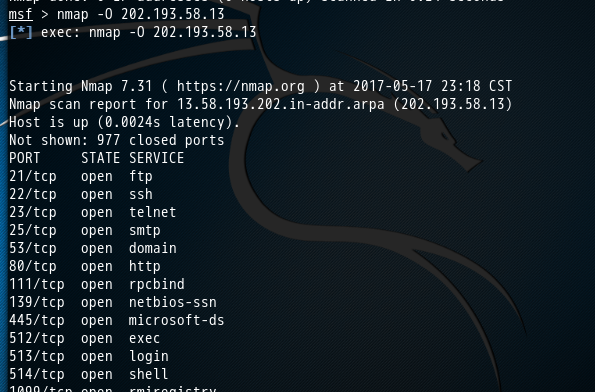
msf > nmap -O 202.193.58.13

[*] exec: nmap -O 202.193.58.13

Starting Nmap 7.31 ( https://nmap.org ) at 2017-05-17 23:18 CST

Nmap scan report for 13.58.193.202.in-addr.arpa (202.193.58.13)

Host is up (.0024s latency).

Not shown:  closed ports

PORT     STATE SERVICE

/tcp   open  ftp

/tcp   open  ssh

/tcp   open  telnet

/tcp   open  smtp

/tcp   open  domain

/tcp   open  http

/tcp  open  rpcbind

/tcp  open  netbios-ssn

/tcp  open  microsoft-ds

/tcp  open  exec

/tcp  open  login

/tcp  open  shell

/tcp open  rmiregistry

/tcp open  ingreslock

/tcp open  nfs

/tcp open  ccproxy-ftp

/tcp open  mysql

/tcp open  postgresql

/tcp open  vnc

/tcp open  X11

/tcp open  irc

/tcp open  ajp13

/tcp open  unknown

MAC Address: :AD::::5C (Unknown)

Device type: general purpose

Running: Linux 2.6.X

OS CPE: cpe:/o:linux:linux_kernel:2.6

OS details: Linux 2.6. - 2.6.

Network Distance:  hop

OS detection performed. Please report any incorrect results at https://nmap.org/submit/ .

Nmap done:  IP address ( host up) scanned in 4.72 seconds

msf >
或者
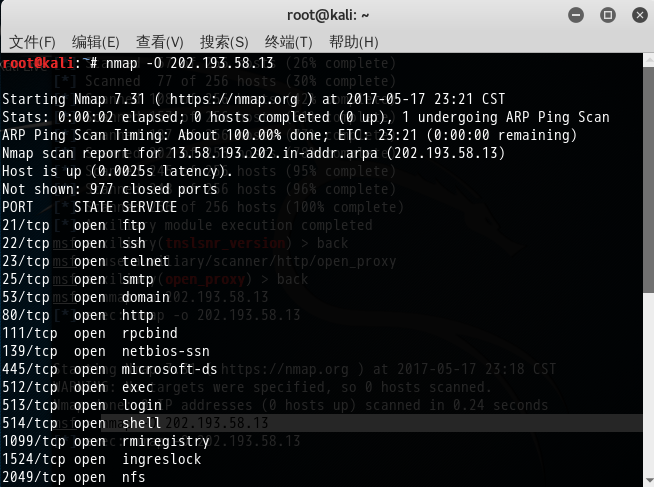
root@kali:~# nmap -O 202.193.58.13

Starting Nmap 7.31 ( https://nmap.org ) at 2017-05-17 23:21 CST

Stats: :: elapsed;  hosts completed ( up),  undergoing ARP Ping Scan

ARP Ping Scan Timing: About 100.00% done; ETC: : (:: remaining)

Nmap scan report for 13.58.193.202.in-addr.arpa (202.193.58.13)

Host is up (.0025s latency).

Not shown:  closed ports

PORT     STATE SERVICE

/tcp   open  ftp

/tcp   open  ssh

/tcp   open  telnet

/tcp   open  smtp

/tcp   open  domain

/tcp   open  http

/tcp  open  rpcbind

/tcp  open  netbios-ssn

/tcp  open  microsoft-ds

/tcp  open  exec

/tcp  open  login

/tcp  open  shell

/tcp open  rmiregistry

/tcp open  ingreslock

/tcp open  nfs

/tcp open  ccproxy-ftp

/tcp open  mysql

/tcp open  postgresql

/tcp open  vnc

/tcp open  X11

/tcp open  irc

/tcp open  ajp13

/tcp open  unknown

MAC Address: :AD::::5C (Unknown)

Device type: general purpose

Running: Linux 2.6.X

OS CPE: cpe:/o:linux:linux_kernel:2.6

OS details: Linux 2.6. - 2.6.

Network Distance:  hop

OS detection performed. Please report any incorrect results at https://nmap.org/submit/ .

Nmap done:  IP address ( host up) scanned in 5.51 seconds

root@kali:~#
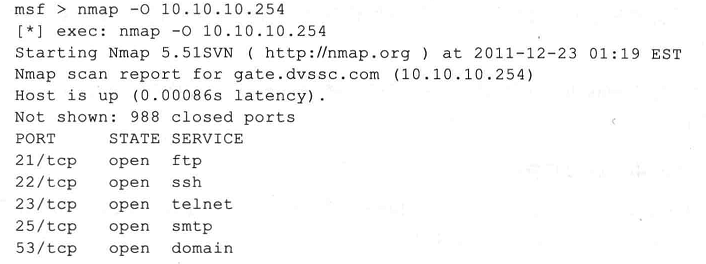
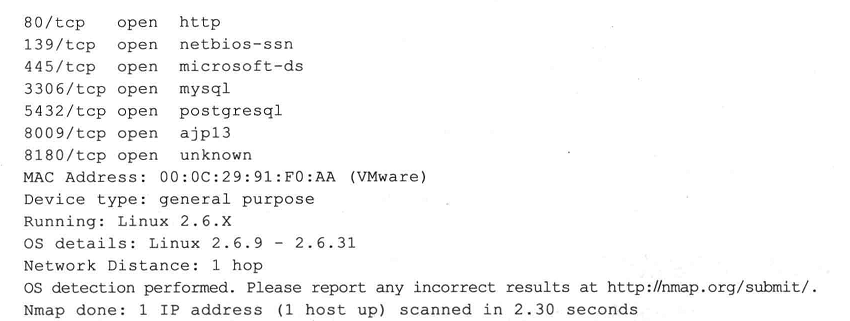
大家,也可以拿下面的主机,来扫描
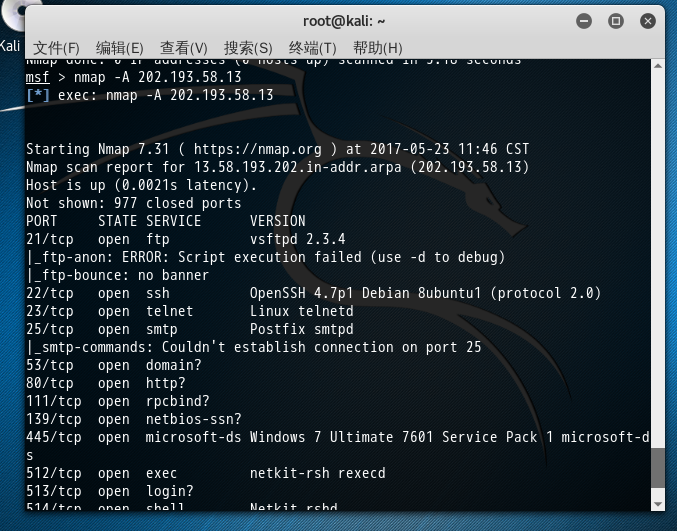
msf > nmap -A 202.193.58.13

[*] exec: nmap -A 202.193.58.13

Starting Nmap 7.31 ( https://nmap.org ) at 2017-05-23 11:46 CST

Nmap scan report for 13.58.193.202.in-addr.arpa (202.193.58.13)

Host is up (.0021s latency).

Not shown:  closed ports

PORT     STATE SERVICE      VERSION

/tcp   open  ftp          vsftpd 2.3.

|_ftp-anon: ERROR: Script execution failed (use -d to debug)

|_ftp-bounce: no banner

/tcp   open  ssh          OpenSSH .7p1 Debian 8ubuntu1 (protocol 2.0)

/tcp   open  telnet       Linux telnetd

/tcp   open  smtp         Postfix smtpd

|_smtp-commands: Couldn't establish connection on port 25

/tcp   open  domain?

/tcp   open  http?

/tcp  open  rpcbind?

/tcp  open  netbios-ssn?

/tcp  open  microsoft-ds Windows  Ultimate  Service Pack  microsoft-ds

/tcp  open  exec         netkit-rsh rexecd

/tcp  open  login?

/tcp  open  shell        Netkit rshd

/tcp open  rmiregistry?

/tcp open  shell        Metasploitable root shell

/tcp open  nfs?

/tcp open  ccproxy-ftp?

/tcp open  mysql        MySQL 5.0.51a-3ubuntu5

/tcp open  postgresql?

/tcp open  vnc          VNC (protocol 3.3)

/tcp open  X11?

|_x11-access: ERROR: Script execution failed (use -d to debug)

/tcp open  irc          Unreal ircd

|_irc-info: Unable to open connection

/tcp open  ajp13?

/tcp open  unknown

MAC Address: :AD::::5C (Unknown)

Device type: firewall

Running (JUST GUESSING): Fortinet embedded (%)

OS CPE: cpe:/h:fortinet:fortigate_100d

Aggressive OS guesses: Fortinet FortiGate 100D firewall (%)

No exact OS matches for host (test conditions non-ideal).

Network Distance:  hop

Service Info: Hosts:  metasploitable.localdomain, irc.Metasploitable.LAN; OSs: Unix, Linux; CPE: cpe:/o:linux:linux_kernel

Host script results:

|_clock-skew: mean: -24s, deviation: 0s, median: -24s

| smb-os-discovery:

|   OS: Windows  Ultimate  Service Pack  (Windows  Ultimate 6.1)

|   OS CPE: cpe:/o:microsoft:windows_7::sp1

|   Computer name: PH-PC

|   NetBIOS computer name: PH-PC

|   Workgroup: WORKGROUP

|_  System time: --23T11::+:

| smb-security-mode:

|   account_used: guest

|   authentication_level: user

|   challenge_response: supported

|_  message_signing: disabled (dangerous, but default)

|_smbv2-enabled: Server supports SMBv2 protocol

TRACEROUTE

HOP RTT     ADDRESS

   2.09 ms 13.58.193.202.in-addr.arpa (202.193.58.13)

Post-scan script results:

| clock-skew:

|_  -24s: Majority of systems scanned

OS and Service detection performed. Please report any incorrect results at https://nmap.org/submit/ .

Nmap done:  IP address ( host up) scanned in 72.94 seconds

msf >
更多,其实,
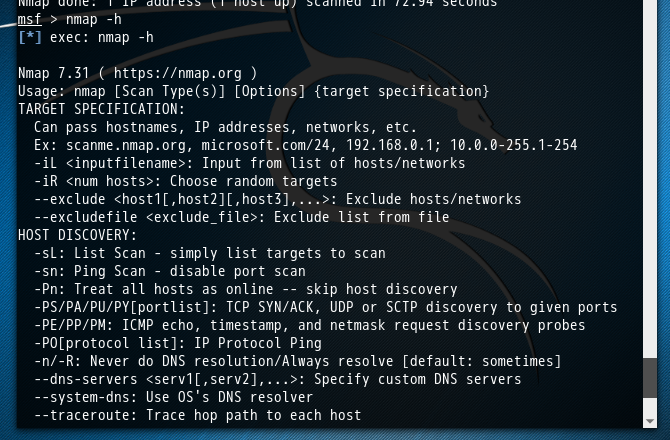
msf > nmap -h

[*] exec: nmap -h

Nmap 7.31 ( https://nmap.org )

Usage: nmap [Scan Type(s)] [Options] {target specification}

TARGET SPECIFICATION:

  Can pass hostnames, IP addresses, networks, etc.

  Ex: scanme.nmap.org, microsoft.com/, 192.168.0.1; 10.0.-255.1-

  -iL <inputfilename>: Input from list of hosts/networks

  -iR <num hosts>: Choose random targets

  --exclude <host1[,host2][,host3],...>: Exclude hosts/networks

  --excludefile <exclude_file>: Exclude list from file

HOST DISCOVERY:

  -sL: List Scan - simply list targets to scan

  -sn: Ping Scan - disable port scan

  -Pn: Treat all hosts as online -- skip host discovery

  -PS/PA/PU/PY[portlist]: TCP SYN/ACK, UDP or SCTP discovery to given ports

  -PE/PP/PM: ICMP echo, timestamp, and netmask request discovery probes

  -PO[protocol list]: IP Protocol Ping

  -n/-R: Never do DNS resolution/Always resolve [default: sometimes]

  --dns-servers <serv1[,serv2],...>: Specify custom DNS servers

  --system-dns: Use OS's DNS resolver

  --traceroute: Trace hop path to each host

SCAN TECHNIQUES:

  -sS/sT/sA/sW/sM: TCP SYN/Connect()/ACK/Window/Maimon scans

  -sU: UDP Scan

  -sN/sF/sX: TCP Null, FIN, and Xmas scans

  --scanflags <flags>: Customize TCP scan flags

  -sI <zombie host[:probeport]>: Idle scan

  -sY/sZ: SCTP INIT/COOKIE-ECHO scans

  -sO: IP protocol scan

  -b <FTP relay host>: FTP bounce scan

PORT SPECIFICATION AND SCAN ORDER:

  -p <port ranges>: Only scan specified ports

    Ex: -p22; -p1-; -p U:,,,T:-,,,,S:

  --exclude-ports <port ranges>: Exclude the specified ports from scanning

  -F: Fast mode - Scan fewer ports than the default scan

  -r: Scan ports consecutively - don't randomize

  --top-ports <number>: Scan <number> most common ports

  --port-ratio <ratio>: Scan ports more common than <ratio>

SERVICE/VERSION DETECTION:

  -sV: Probe open ports to determine service/version info

  --version-intensity <level>: Set from  (light) to  (try all probes)

  --version-light: Limit to most likely probes (intensity )

  --version-all: Try every single probe (intensity )

  --version-trace: Show detailed version scan activity (for debugging)

SCRIPT SCAN:

  -sC: equivalent to --script=default

  --script=<Lua scripts>: <Lua scripts> is a comma separated list of

           directories, script-files or script-categories

  --script-args=<n1=v1,[n2=v2,...]>: provide arguments to scripts

  --script-args-file=filename: provide NSE script args in a file

  --script-trace: Show all data sent and received

  --script-updatedb: Update the script database.

  --script-help=<Lua scripts>: Show help about scripts.

           <Lua scripts> is a comma-separated list of script-files or

           script-categories.

OS DETECTION:

  -O: Enable OS detection

  --osscan-limit: Limit OS detection to promising targets

  --osscan-guess: Guess OS more aggressively

TIMING AND PERFORMANCE:

  Options which take <time> are in seconds, or append 'ms' (milliseconds),

  's' (seconds), 'm' (minutes), or 'h' (hours) to the value (e.g. 30m).

  -T<->: Set timing template (higher is faster)

  --min-hostgroup/max-hostgroup <size>: Parallel host scan group sizes

  --min-parallelism/max-parallelism <numprobes>: Probe parallelization

  --min-rtt-timeout/max-rtt-timeout/initial-rtt-timeout <time>: Specifies

      probe round trip time.

  --max-retries <tries>: Caps number of port scan probe retransmissions.

  --host-timeout <time>: Give up on target after this long

  --scan-delay/--max-scan-delay <time>: Adjust delay between probes

  --min-rate <number>: Send packets no slower than <number> per second

  --max-rate <number>: Send packets no faster than <number> per second

FIREWALL/IDS EVASION AND SPOOFING:

  -f; --mtu <val>: fragment packets (optionally w/given MTU)

  -D <decoy1,decoy2[,ME],...>: Cloak a scan with decoys

  -S <IP_Address>: Spoof source address

  -e <iface>: Use specified interface

  -g/--source-port <portnum>: Use given port number

  --proxies <url1,[url2],...>: Relay connections through HTTP/SOCKS4 proxies

  --data <hex string>: Append a custom payload to sent packets

  --data-string <string>: Append a custom ASCII string to sent packets

  --data-length <num>: Append random data to sent packets

  --ip-options <options>: Send packets with specified ip options

  --ttl <val>: Set IP time-to-live field

  --spoof-mac <mac address/prefix/vendor name>: Spoof your MAC address

  --badsum: Send packets with a bogus TCP/UDP/SCTP checksum

OUTPUT:

  -oN/-oX/-oS/-oG <file>: Output scan in normal, XML, s|<rIpt kIddi3,

     and Grepable format, respectively, to the given filename.

  -oA <basename>: Output in the three major formats at once

  -v: Increase verbosity level (use -vv or more for greater effect)

  -d: Increase debugging level (use -dd or more for greater effect)

  --reason: Display the reason a port is in a particular state

  --open: Only show open (or possibly open) ports

  --packet-trace: Show all packets sent and received

  --iflist: Print host interfaces and routes (for debugging)

  --append-output: Append to rather than clobber specified output files

  --resume <filename>: Resume an aborted scan

  --stylesheet <path/URL>: XSL stylesheet to transform XML output to HTML

  --webxml: Reference stylesheet from Nmap.Org for more portable XML

  --no-stylesheet: Prevent associating of XSL stylesheet w/XML output

MISC:

  -: Enable IPv6 scanning

  -A: Enable OS detection, version detection, script scanning, and traceroute

  --datadir <dirname>: Specify custom Nmap data file location

  --send-eth/--send-ip: Send using raw ethernet frames or IP packets

  --privileged: Assume that the user is fully privileged

  --unprivileged: Assume the user lacks raw socket privileges

  -V: Print version number

  -h: Print this help summary page.

EXAMPLES:

  nmap -v -A scanme.nmap.org

  nmap -v -sn 192.168.0.0/ 10.0.0.0/

  nmap -v -iR  -Pn -p

SEE THE MAN PAGE (https://nmap.org/book/man.html) FOR MORE OPTIONS AND EXAMPLES

msf >
kali 2.0 linux中的Nmap的操作系统扫描功能的更多相关文章
- kali 2.0 linux中的Nmap的主机探测
不多说,直接上干货! 如果是第一次接触Nmap,推荐在MSF终端中输入不加任何参数的Nmap命令,以查看其使用方法. 更多,其实, msf > nmap -h [*] exec: nmap -h ...
- Kali linux 2016.2(Rolling)中的Nmap的端口扫描功能
不多说,直接上干货! 如下,是使用Nmap对主机202.193.58.13进行一次端口扫描的结果,其中使用 root@kali:~# nmap -sS -Pn 202.193.58.13 Starti ...
- 如何在Kali Linux中搭建钓鱼热点
文中提及的部分技术可能带有一定攻击性,仅供安全学习和教学用途,禁止非法使用! 0×00 实验环境 操作系统:Kali 1.0 (VM) FackAP: easy-creds 硬件:NETGEAR wg ...
- Linux中W与Who命令的使用
踢掉一个从某个终端连上的用户pkill -kill -t pts/0 ---------------------------------------------------------------- ...
- linux中vi和vim编辑工具
linux中知名的还有emacs,功能比vim还要强大 vim 如果文件存在vim是打开这个文件,若果不存在,则先新建再打开 命令模式:任何模式都可以通过Esc回到命令模式,命令模式可以通过命令进行选 ...
- linux中shell变量$#,$@,$0,$1,$2的含义解释
linux中shell变量$#,$@,$0,$1,$2的含义解释: 变量说明: $$ Shell本身的PID(ProcessID) $! Shell最后运行的后台Process的PID $? 最后运行 ...
- Kali Linux中MySQL重置root密码
参考:使用mysqladmin命令修改MySQL密码与忘记密码 前言:(在Windows的DOS命令行下和在kali Linux下修改方法是一样的)在kali Linux中默认安装了MySQL的最新版 ...
- linux中shell变量$#,$@,$0,$1,$2的含义解释
linux中shell变量$#,$@,$0,$1,$2的含义解释 linux中shell变量$#,$@,$0,$1,$2的含义解释: 变量说明: $$ Shell本身的PID(ProcessID ...
- kali 2.0中msf连接postgres数据库
装好kali 2.0后直接运行msfconsole msf> db_status postgres selected, no connection 百度到的解决方法多是针对BT和kali 1.0 ...
随机推荐
- (hdu step 7.1.6)最大三角形(凸包的应用——在n个点中找到3个点,它们所形成的三角形面积最大)
题目: 最大三角形 Time Limit: 5000/2000 MS (Java/Others) Memory Limit: 32768/32768 K (Java/Others) Total Sub ...
- ORA 12505 Listener does not currently know of SID given in connection descriptor
oracle数据库正常启动后.在本地能够正常訪问,可是远程使用sqldevelop却不能訪问.提示ORA 12505 Listener does not currently know of SID g ...
- xmanager使用
Xmanager全称Netsarang Xmanager,是国外一套非常优秀的远程监控软件.在UNIX/Linux和Windows网络环境中,Xmanager是最好的连通解决方案.我推 荐大家下载En ...
- MetaSploit攻击实例讲解------社会工程学set攻击(kali linux 2016.2(rolling))(详细)
不多说,直接上干货! 首先,如果你是用的BT5,则set的配置文件是在 /pentest/exploits/set/set_config下. APACHE_SERVER=ONSELF_SIGNED_A ...
- php创建图像具体步骤
php 的图像处理在验证码是最常见的,下面说下使用php创建图像的具体步骤. 简要说明:PHP 并不仅限于创建 HTML 输出, 它也可以创建和处理包括 GIF, PNG(推荐), JPEG, WBM ...
- js 关于height()、innerHeight()、outerHeight()函数的区别
- 优动漫PAINT绘制紫阳花教程
紫阳花是插画.漫画很常见的绘画画材.这个教程非常好懂.而且很方便就能绘制出漂亮的效果.因为这种花一个月内能变化三种颜色,故而人们赋予它的花语是善变.背叛. 教程是简单,呃.... 没有优动漫PAINT ...
- 为什么在3ds Max 按系统默认的快捷键AIT+W 视口最大化切换没反应?
经常使用3ds Max快捷键做效果图可谓是提高作图速度的毕竟之路,做效果图的朋友或许会遇到最大化视口显示失灵的问题,max默认快捷键为Alt+W,这里我不建议大家更改max的默认快捷键,当然Max也提 ...
- Site Isolation Design Document
This design document covers technical information about how Site Isolation is built. For a general ...
- 路飞学城Python-Day18
[1.编程范式] 1.面向过程编程 2.面向对象编程 [2.面向过程编程] 面向过程:核心就是过程 什么是过程? 过程指的是解决问题的步骤,先做什么,在作什么,面向过程就像是设计一个流水线,是一种 ...