
jupyter notebook 代码补全插件工具-nbextensions(并修改默认的工作目录)
# conda install -c conda-forge jupyter_contrib_nbextensions
Collecting package metadata: done
Solving environment: done
==> WARNING: A newer version of conda exists. <==
current version: 4.6.8
latest version: 4.6.12
Please update conda by running
$ conda update -n base conda
## Package Plan ##
environment location: S:\Users\jiangshan\Anaconda3
added / updated specs:
- jupyter_contrib_nbextensions
The following packages will be downloaded:
package | build
---------------------------|-----------------
conda-4.6.12 | py37_0 920 KB conda-forge
jupyter_contrib_core-0.3.3 | py_2 15 KB conda-forge
jupyter_contrib_nbextensions-0.5.1| py37_0 19.5 MB conda-forge
jupyter_highlight_selected_word-0.2.0| py37_1000 13 KB conda-forge
jupyter_latex_envs-1.4.4 | py37_1000 753 KB conda-forge
jupyter_nbextensions_configurator-0.4.1| py37_0 487 KB conda-forge
------------------------------------------------------------
Total: 21.7 MB
The following NEW packages will be INSTALLED:
jupyter_contrib_c~ conda-forge/noarch::jupyter_contrib_core-0.3.3-py_2
jupyter_contrib_n~ conda-forge/win-64::jupyter_contrib_nbextensions-0.5.1-py37_0
jupyter_highlight~ conda-forge/win-64::jupyter_highlight_selected_word-0.2.0-py37_1000
jupyter_latex_envs conda-forge/win-64::jupyter_latex_envs-1.4.4-py37_1000
jupyter_nbextensi~ conda-forge/win-64::jupyter_nbextensions_configurator-0.4.1-py37_0
The following packages will be UPDATED:
conda anaconda/cloud/conda-forge::conda-4.6~ --> conda-forge::conda-4.6.12-py37_0
Proceed ([y]/n)?
Downloading and Extracting Packages
jupyter_contrib_core | 15 KB | ###################################################### | 100%
conda-4.6.12 | 920 KB | ######################################################### | 100%
jupyter_highlight_se | 13 KB | ##################################################### | 100%
jupyter_latex_envs-1 | 753 KB | ##################################################### | 100%
jupyter_nbextensions | 487 KB | ######################################################### | 100%
jupyter_contrib_nbex | 19.5 MB | ######################################################## | 100%
Preparing transaction: done
Verifying transaction: done
Executing transaction: |..................
# conda install -c conda-forge jupyter_nbextensions_configurator
# jupyter contrib nbextension install --user
# jupyter nbextensions_configurator enable --user
=============================安装步骤==========================
conda install -c conda-forge jupyter_contrib_nbextensions jupyter_nbextensions_configurator
jupyter contrib nbextension install --user
jupyter nbextensions_configurator enable --user
重启 jupyter notebook 你的工作目录
==============================================================
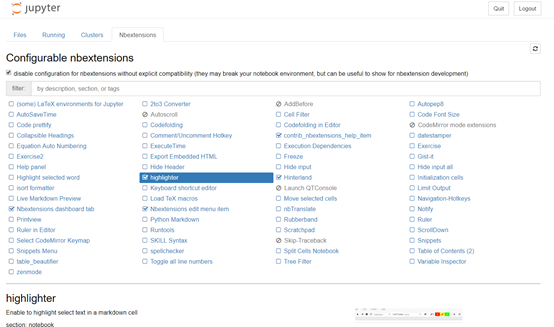
Nbextensions

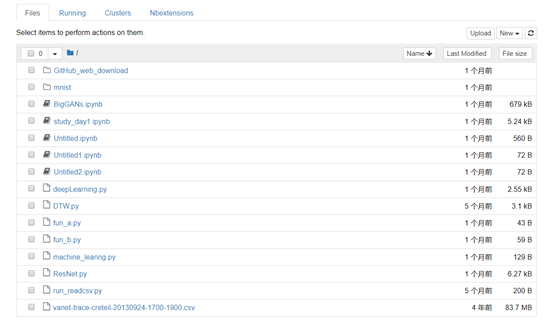
Jupyter notebook改变默认的工作目录
查看配置文件位置
jupyter notebook --generate-config
Writing default config to: C:\Users\jiangshan\.jupyter\jupyter_notebook_config.py
打开jupyter_notebook_config.py找到如下
## The directory to use for notebooks and kernels.
#c.NotebookApp.notebook_dir = ''这一行修改如下:
windows是双斜杠(\\),linux是反斜杠(/)
c.NotebookApp.notebook_dir = 'F:\\workspace'
jupyter notebook 代码补全插件工具-nbextensions(并修改默认的工作目录)的更多相关文章
- jupyter lab最强代码补全插件
1 简介 提起kite相信不少朋友都有印象,它是一个功能非常强大的代码补全工具,目前可用于Python与javascript,为许多知名的编辑器譬如Vs Code.Pycharm提供对应的插件. 图1 ...
- Jupyter Notebook自动补全
大多数程序员都非常熟悉不同的自动补全工具.然而,我注意到许多数据科学家还没有使用它.如果你是他们中的一员,是时候开始使用这个提高效率的工具了 什么是自动补全? 它是你的编程环境提供的一种功能,用于完成 ...
- Windows 10环境安装VIM代码补全插件YouCompleteMe
Windows 10环境安装VIM代码补全插件YouCompleteMe 折腾一周也没搞定Windows下安装VIM代码补全插件YouCompleteMe,今天在家折腾一天总算搞定了.关键问题是在于P ...
- Sublime text代码补全插件(支持Javascript、JQuery、Bootstrap框架)
Sublime text代码补全插件(支持Javascript.JQuery.Bootstrap框架) 插件名称:javascript-API-Completions 支持Javascript.J ...
- MaxScript代码补全插件
MaxScript代码补全插件 作者Nik,原文发布于ScriptSpot 安装后max自带脚本编辑器会有自动补全,效果如下:
- Jupyter notebook 自动补全
Jupyter notebook 自动补全 Jupyter notebook使用默认的自动补全是关掉的.要打开自动补全,需修改默认配置. ipython profile create 以上命令会 ...
- Jupyter Notebook修改默认的工作目录
Jupyter Notebook修改默认的工作目录 方法1:通过配置文件修改 只适合从命令行启动notebook生成配置文件,如果你已经在windows环境变量中设置好了jupyter noteboo ...
- jupyter notebook自动补全功能实现
Jupyter notebook使用默认的自动补全是关掉的.要打开自动补全,需修改默认配置. 命令行中输入:ipython profile create 以上命令会在~/.ipython/profil ...
- Vim使用Vundle安装代码补全插件(YouCompleteMe)
安装 Vundle 它的使用方法很简单,安装一个插件只需要在 ~/.vimrc 按照规则中添加 Plugin 的名称,某些需要添加路径,之后在 Vim 中使用:PluginInstall既可以自动化安 ...
随机推荐
- CSS3的媒体查询(Media Queries)与移动设备显示尺寸大全
媒体查询介绍 我今天就总结一下响应式设计的核心CSS技术Media(媒体查询器)的用法. 先看一个简单的例子: <link rel="stylesheet" media=&q ...
- css小知识
7. span { display:inline-block; width:70px; /* 超出长度以...显示 */ text-overflow: ellipsis; white-space: n ...
- spring boot 集成 redis lettuce
一.简介 spring boot框架中已经集成了redis,在1.x.x的版本时默认使用的jedis客户端,现在是2.x.x版本默认使用的lettuce客户端,两种客户端的区别如下 # Jedis和L ...
- iOS----------开发中常用的宏有那些
OC对象判断是否为空? 字符串是否为空 #define kStringIsEmpty(str) ([str isKindOfClass:[NSNull class]] || str == nil || ...
- iOS------获取当前时间和当前时间戳
//获取当前的时间 +(NSString*)getCurrentTimes{ NSDateFormatter *formatter = [[NSDateFormatter alloc] init]; ...
- [iOS]创建界面方法的讨论
以前在入门的时候,找的入门书籍上编写的 demo 都是基于 Storyboards 拖界面的.后来接触公司项目,发现界面都是用纯代码去写复杂的 autoLayout 的.再然后,领导给我发了个 Mas ...
- java垃圾回收机制GC
记得第一次总结java 的GC的时候,是刚开始在课堂上学习GC的时候,那时候许老师第一节java课 课后老师说同学们可以去深入理解一下java的GC机制: 但是是花费了三四个小时,翻看了<Thi ...
- C#-判断语句(五)
判断语句主要有if...else.switch和 条件?语句1:语句2 三种,而if...else中又有if语句,if...else.if...else if...else和if中嵌套if这几种,但是 ...
- hive笔记:时间格式的统一
一.string类型,年月日部分包含的时间统一格式: 原数据格式(时间字段为string类型) 取数时间和格式的语法 2018-11-01 00:12:49.0 substr(regexp_repl ...
- Android 加了自定义Application后报错 Unable to instantiate activity ComponentInfo ClassNotFoundException
在Android自定义一个类继承集成Application后,并在AndroidManifest.xml里面配置了application的name属性为该类名称后报错: Unable to insta ...