
Maven的porfile与SpringBoot的profile结合使用详解
一、思路
示例一:

    maven打包命令为   mvn clean package -P test

    那么application.properties里面的spring.profiles.active值就是maven中 id为test的profile的activatedProperties参数值

示例二:

    maven打包命令为   mvn clean package -P product

那么application.properties里面的spring.profiles.active值就是maven中 id为product的profile的activatedProperties参数值示例一:
maven打包命令为 mvn clean package -P test
那么application.properties里面的spring.profiles.active值就是maven中 id为test的profile的activatedProperties参数值
示例二:
maven打包命令为 mvn clean package -P product
那么application.properties里面的spring.profiles.active值就是maven中 id为product的profile的activatedProperties参数值
二、案例
(1)项目结构介绍
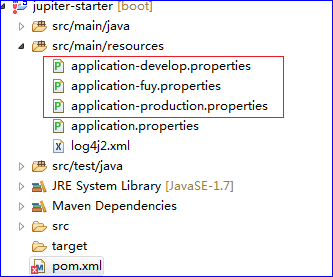
(2)pom文件中配置maven的profile
    <profiles>

        <profile>

        	<!-- 开发 -->

            <id>develop</id>

            <activation>

                <activeByDefault>true</activeByDefault>

            </activation>

            <properties>

                <activatedProperties>develop</activatedProperties>

            </properties>

        </profile>

        <profile>

        	<!-- 测试 -->

            <id>fuy</id>

            <properties>

                <activatedProperties>fuy</activatedProperties>

            </properties>

        </profile>

        <profile>

        	<!-- 生产 -->

            <id>production</id>

            <properties>

                <activatedProperties>production</activatedProperties>

            </properties>

        </profile>

    </profiles>
x
<profiles>
<profile>
<!-- 开发 -->
<id>develop</id>
<activation>
<activeByDefault>true</activeByDefault>
</activation>
<properties>
<activatedProperties>develop</activatedProperties>
</properties>
</profile>
<profile>
<!-- 测试 -->
<id>fuy</id>
<properties>
<activatedProperties>fuy</activatedProperties>
</properties>
</profile>
<profile>
<!-- 生产 -->
<id>production</id>
<properties>
<activatedProperties>production</activatedProperties>
</properties>
</profile>
</profiles>
(3)application.properties中的配置
spring.profiles.active=@activatedProperties@spring.profiles.active=@activatedProperties@
(4)如何打包
(5)效果图
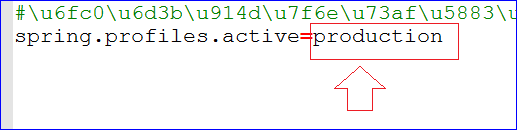
三、小结
四、参考链接
Maven的porfile与SpringBoot的profile结合使用详解的更多相关文章
- profile的使用详解
前言 在开发过程中,我们的项目会存在不同的运行环境,比如开发环境.测试环境.生产环境,而我们的项目在不同的环境中,有的配置可能会不一样,比如数据源配置.日志文件配置.以及一些软件运行过程中的基本配置, ...
- maven之(六)setting.xml的配置文件详解
setting.xml配置文件 maven的配置文件settings.xml存在于两个地方: 1.安装的地方:${M2_HOME}/conf/settings.xml 2.用户的目录:${user.h ...
- Maven使用笔记(四)pom.xml配置详解
pom.xml文件配置详解 --声明规范 <project xmlns="http://maven.apache.org/POM/4.0.0" xmlns:xsi=" ...
- SpringBoot第二篇:配置文件详解一
作者:追梦1819 原文:https://www.cnblogs.com/yanfei1819/p/10837594.html 版权声明:本文为博主原创文章,转载请附上博文链接! 前言 Sprin ...
- IntelliJ IDEA 2017版 spring-boot加载jsp配置详解(详细图文实例)
一.创建项目 (File--->New-->Project) 2.项目配置内容 3.选择配置项目的Group包名,Artifact项目名称 4.选择项目类型为web类型 5.创建成功,点击 ...
- SpringBoot与Mybatis整合实例详解
介绍 从Spring Boot项目名称中的Boot可以看出来,SpringBoot的作用在于创建和启动新的基于Spring框架的项目,它的目的是帮助开发人员很容易的创建出独立运行的产品和产品级别的基于 ...
- SpringBoot入门及YML文件详解
SpringBoot 简介 微框架,与 Spring4 一起诞生,基于约定.生来为了简化 spring 的配置 优点 可以快速的上手,整合了一些子项目(开源框架或者第三方开源库) 可以依赖很少的配置快 ...
- springboot(四):thymeleaf使用详解
在上篇文章springboot(二):web综合开发中简单介绍了一下thymeleaf,这篇文章将更加全面详细的介绍thymeleaf的使用.thymeleaf 是新一代的模板引擎,在spring4. ...
- SpringBoot (四) :thymeleaf 使用详解
原文出处: 纯洁的微笑 在上篇文章< springboot(二):web综合开发 >中简单介绍了一下thymeleaf,这篇文章将更加全面详细的介绍thymeleaf的使用.thymele ...
随机推荐
- bat 批处理获取时间语法格式
bat 批处理获取时间语法格式 取年份:echo %date:~0,4% 取月份:echo %date:~5,2% 取日期:echo %date:~8,2% 取星期:echo %date:~10 ...
- chrome离线包出现的小问题
网友使用离线包时出现的一些小问题,在此做个记录: 1. @200258 这个版本就是个坑.chrome低版本显示空白,高版本界面乱掉,有反馈出54可以,有说56可以 亲测:即使不用离线包直接FQ,也会 ...
- DAY4(python)打印字符串以及增删改查
用while循环打印字符串 #if i in s: # print ( i ) s='nanfjkhndaol' index = 0 while 1 : print (s[index]) index+ ...
- 【redis专题(9)】事务
Redis支持简单的事务,所谓简单是因为其不支持回滚(回滚是用队列模仿的),与mysql有以下区别 rollback与discard的区别: 如果已经成功执行了2条语句, 第3条语句出错 Rollba ...
- Dapp已来,如何把握区块链创富模式变化的趋势
区块链技术持续升温,Dapp迅速成为焦点,未来区块链市场上新的蓝海.这么说当然不是空想出来的,而是从区块链市场的发展趋势中推断而来.区块链市场由最初的挖矿炒币到如今尝试投入行业应用,随着技术和应用模式 ...
- c/c++柔性数组成员
柔性数组成员 定义和声明分离 #include <stdio.h> //只是告诉编译器,当编译到使用到这个函数的的代码时,虽然还没有找到函数定义的实体,但是也让它编译不出错误. exter ...
- centos7 下安装Apache2+MariaDB+PHP5过程详解
1.启用Apache2 Centos7默认已经安装httpd服务,只是没有启动.如果你需要全新安装,可以 yum install -y httpd 启动服务:systemctl start httpd ...
- Windows 命令行
1.d: 进入d盘 2.dir(directory) 显示当前文件夹下的所有内容 3.md (make directory) +文件夹名 在当前文件夹下创建文件夹 4.rd (remove ...
- 聚类——WKFCM的matlab程序
聚类——WKFCM的matlab程序 作者:凯鲁嘎吉 - 博客园 http://www.cnblogs.com/kailugaji/ 在聚类——WKFCM文章中已介绍了WKFCM算法的理论知识,现在用 ...
- C语言 投票系统:给定候选人,从键盘输入候选人的名字,统计票数,并输出最终获胜者
投票系统:给定候选人名单,从键盘输入候选人的名字,统计票数,并输出最终获胜者.若投票人输入的名字不在其候选名单上,则该票数无效. //凯鲁嘎吉 - 博客园 http://www.cnblogs.com ...