
Maven的porfile与SpringBoot的profile结合使用详解
一、思路
示例一:

    maven打包命令为   mvn clean package -P test

    那么application.properties里面的spring.profiles.active值就是maven中 id为test的profile的activatedProperties参数值

示例二:

    maven打包命令为   mvn clean package -P product

那么application.properties里面的spring.profiles.active值就是maven中 id为product的profile的activatedProperties参数值示例一:
maven打包命令为 mvn clean package -P test
那么application.properties里面的spring.profiles.active值就是maven中 id为test的profile的activatedProperties参数值
示例二:
maven打包命令为 mvn clean package -P product
那么application.properties里面的spring.profiles.active值就是maven中 id为product的profile的activatedProperties参数值
二、案例
(1)项目结构介绍
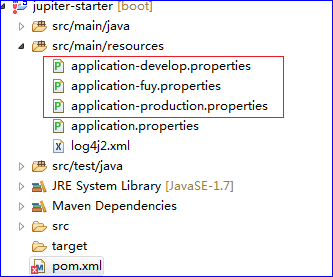
(2)pom文件中配置maven的profile
    <profiles>

        <profile>

        	<!-- 开发 -->

            <id>develop</id>

            <activation>

                <activeByDefault>true</activeByDefault>

            </activation>

            <properties>

                <activatedProperties>develop</activatedProperties>

            </properties>

        </profile>

        <profile>

        	<!-- 测试 -->

            <id>fuy</id>

            <properties>

                <activatedProperties>fuy</activatedProperties>

            </properties>

        </profile>

        <profile>

        	<!-- 生产 -->

            <id>production</id>

            <properties>

                <activatedProperties>production</activatedProperties>

            </properties>

        </profile>

    </profiles>
x
<profiles>
<profile>
<!-- 开发 -->
<id>develop</id>
<activation>
<activeByDefault>true</activeByDefault>
</activation>
<properties>
<activatedProperties>develop</activatedProperties>
</properties>
</profile>
<profile>
<!-- 测试 -->
<id>fuy</id>
<properties>
<activatedProperties>fuy</activatedProperties>
</properties>
</profile>
<profile>
<!-- 生产 -->
<id>production</id>
<properties>
<activatedProperties>production</activatedProperties>
</properties>
</profile>
</profiles>
(3)application.properties中的配置
spring.profiles.active=@activatedProperties@spring.profiles.active=@activatedProperties@
(4)如何打包
(5)效果图
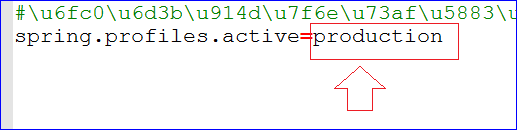
三、小结
四、参考链接
Maven的porfile与SpringBoot的profile结合使用详解的更多相关文章
- profile的使用详解
前言 在开发过程中,我们的项目会存在不同的运行环境,比如开发环境.测试环境.生产环境,而我们的项目在不同的环境中,有的配置可能会不一样,比如数据源配置.日志文件配置.以及一些软件运行过程中的基本配置, ...
- maven之(六)setting.xml的配置文件详解
setting.xml配置文件 maven的配置文件settings.xml存在于两个地方: 1.安装的地方:${M2_HOME}/conf/settings.xml 2.用户的目录:${user.h ...
- Maven使用笔记(四)pom.xml配置详解
pom.xml文件配置详解 --声明规范 <project xmlns="http://maven.apache.org/POM/4.0.0" xmlns:xsi=" ...
- SpringBoot第二篇:配置文件详解一
作者:追梦1819 原文:https://www.cnblogs.com/yanfei1819/p/10837594.html 版权声明:本文为博主原创文章,转载请附上博文链接! 前言 Sprin ...
- IntelliJ IDEA 2017版 spring-boot加载jsp配置详解(详细图文实例)
一.创建项目 (File--->New-->Project) 2.项目配置内容 3.选择配置项目的Group包名,Artifact项目名称 4.选择项目类型为web类型 5.创建成功,点击 ...
- SpringBoot与Mybatis整合实例详解
介绍 从Spring Boot项目名称中的Boot可以看出来,SpringBoot的作用在于创建和启动新的基于Spring框架的项目,它的目的是帮助开发人员很容易的创建出独立运行的产品和产品级别的基于 ...
- SpringBoot入门及YML文件详解
SpringBoot 简介 微框架,与 Spring4 一起诞生,基于约定.生来为了简化 spring 的配置 优点 可以快速的上手,整合了一些子项目(开源框架或者第三方开源库) 可以依赖很少的配置快 ...
- springboot(四):thymeleaf使用详解
在上篇文章springboot(二):web综合开发中简单介绍了一下thymeleaf,这篇文章将更加全面详细的介绍thymeleaf的使用.thymeleaf 是新一代的模板引擎,在spring4. ...
- SpringBoot (四) :thymeleaf 使用详解
原文出处: 纯洁的微笑 在上篇文章< springboot(二):web综合开发 >中简单介绍了一下thymeleaf,这篇文章将更加全面详细的介绍thymeleaf的使用.thymele ...
随机推荐
- 简单 PHP + MySQL 数据库动态网站制作 -- 摘抄
在这篇文章中,我尽量用最浅显易懂的语言来说明使用 PHP, MySQL 制作一个动态网站的基本技术.阅读本文需要简单的 HTML 基础知识和(任一编程语言的)编程基础知识(例如变量.值.循环.语句块的 ...
- 商品描述里包含了英文双引号,ERP无法同步菜品信息
1. 2.因菜品描述里包含英文双引号,破坏了json格式,导致json格式错乱,ERP无法解析,所以无法同步数据.
- turnserver 配置说明记录
coTurn工程提供了较完整的STUN和TURN服务,记录其主要的命令行参数配置说明 针对TURN/STUN服务进程turnserver.exe的使用参数做简单说明 -L 监听的IP地址 -p 监听端 ...
- sql-server的添加数据库文件(日志数据)以及收缩数据库文件(日志数据)
环境: SSMS sql-server2016 一.为数据库添加数据文件 添加日志数据文件 以下是添加数据文件和日志文件的代码 ALTER DATABASE [joinbest] ADD FILE ( ...
- C#中ExecuteReader、ExecuteNonQuery、ExecuteScalar、SqlDataReader、SqlDataAdapter应该怎么用?
C#中ExecuteReader.ExecuteNonQuery.ExecuteScalar.SqlDataReader.SqlDataAdapter应该怎么用? (2013-10-16 13:21: ...
- C#学习之接口
什么是接口?其实,接口简单理解就是一种约定,使得实现接口的类或结构在形式上保持一致.个人觉得,使用接口可以使程序更加清晰和条理化,这就是接口的好处,但并不是所有的编程语言都支持接口,C#是支持接口的. ...
- Oracl数据库+PL/SQL安装与配置
资源位置:百度网盘/Oracle+PL/SQL 一.Oracle安装与配置 Oracle 11g 最好安装在Win7上,Win10会有各种不兼容问题. 先安装Oracle数据库,database数据库 ...
- IEEE754浮点数的表示方法
https://blog.csdn.net/K346K346/article/details/50487127
- 【2018.08.13 C与C++基础】C++语言的设计与演化读书笔记
先占坑 老实说看这本书的时候,有很多地方都很迷糊,但却说不清楚问题到底在哪里,只能和Effective C++联系起来,更深层次的东西就想不到了. 链接: https://blog.csdn.net/ ...
- February 23rd, 2018 Week 8th Friday
It takes a strong man to save himself, and a great man to save another. 强者自救,圣者渡人. When you are not ...