
React-Native之轮播组件looped-carousel的介绍与使用
React-Native之轮播组件looped-carousel的介绍与使用
一,关于react-native轮播组件的介绍与对比
1,react-native-swiper在动态使用网页图片,多张图片时iOS上总是只显示第一张,Android正常显示,支持加载json数组数据。
2,react-native-viewpager,因为轮播时,下面的圆点有时显示会有误,加载上百页数据并且表现性能良好。在Android平台上面除此特性以外,ViewPager还支持自动循环无限轮播功能,类似与listview,需构建DataSource对象。
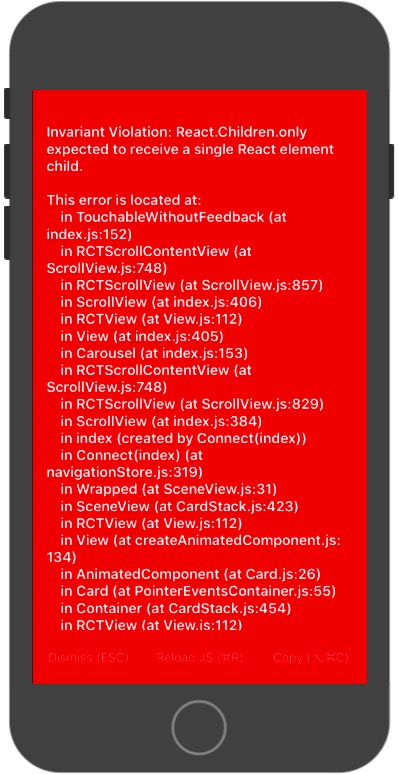
3,新的组件 react-native-looped-carousel ,整体看起来还不错(支持iOS Android),但是不支持加载json数组数据,只支持限制数组数据,而且在动态从数据库获取的数据时,如果数据还没获取完就渲染react-native-looped-carousel组件会报错:
二,react-native-looped-carousel的介绍
1,安装:
npm install react-native-looped-carousel --save
2,属性
| Name | propType | default value | description |
|---|---|---|---|
| autoplay | boolean | true | 是否自动轮播 |
| delay | number | 4000 | 多少毫秒切换一次 |
| currentPage | number | 0 | 设置初始页 |
| pageStyle | style | null | 页面的样式 |
| contentContainerStyle | style | null | contentContainerStyle for the scrollView |
| onAnimateNextPage | func | null | 切换轮播图时的回调方法 |
| swipe | bool | true | 是否允许手势滑动也换页面 |
| 分页 | --- | --- | --- |
| pageInfo | boolean | false | 是否在底部显示当前页面下标 / 页面个数 |
| pageInfoBackgroundColor | string | 'rgba(0, 0, 0, 0.25)' | 分页的背景色 |
| pageInfoBottomContainerStyle | style | null | pageInfo容器的样式 |
| pageInfoTextStyle | style | null | pageInfo中的文本样式 |
| pageInfoTextSeparator | string | ' / ' | 在 当前页面下标 和 页面个数之间的分隔符 |
| 小圆点 | --- | --- | --- |
| bullets | bool | false | 是否在轮播的底部显示小圆点 |
| bulletStyle | style | null | bullet(小圆点)的样式 |
| bulletsContainerStyle | style | null | style for the bullets container |
| chosenBulletStyle | stlye | null | bullet的容器的样式 |
| 导航箭头 | --- | --- | --- |
| arrows | bool | false | 是否显示轮播的导航箭头 |
| arrowsStyle | style | null | 导航箭头的样式 |
| arrowsContainerStyle | style | null | 导航箭头的容器样式 |
| leftArrowText | string / element | 'Left' | 左箭头的文字或图片 |
| rightArrowText | string / element | 'Right' | label / icon for right navigation arrow |
三,react-native-looped-carousel的使用实例
1,官网使用实例:
 import React, { Component } from 'react';

 import {

   Text,

   View,

   Dimensions,

 } from 'react-native';

 import Carousel from 'react-native-looped-carousel';

 const { width, height } = Dimensions.get('window');

 export default class CarouselExample extends Component {

   constructor(props) {

     super(props);

     this.state = {

       size: { width, height },

     };

   }

   _onLayoutDidChange = (e) => {

     const layout = e.nativeEvent.layout;

     this.setState({ size: { width: layout.width, height: layout.height } });

   }

   render() {

     return (

       <View style={{ flex: 1 }} onLayout={this._onLayoutDidChange}>

         <Carousel

           delay={2000}

           style={this.state.size}

           autoplay

           pageInfo

           onAnimateNextPage={(p) => console.log(p)}

         >

           <View style={[{ backgroundColor: '#BADA55' }, this.state.size]}><Text>1</Text></View>

           <View style={[{ backgroundColor: 'red' }, this.state.size]}><Text>2</Text></View>

           <View style={[{ backgroundColor: 'blue' }, this.state.size]}><Text>3</Text></View>

         </Carousel>

       </View>

     );

   }

 }
2,我的使用实例:
  <Carousel

                 delay={4000}   //自动切换的延迟 (毫秒)

                 style={{ height: Boxheight, width: AppSetting.ScreenWidth, backgroundColor: AppSetting.BLACK }}          //样式

                 autoplay    //自动轮播

                 pageInfo={false}    //在底部显示当前页面下标 / 页面个数

                 swiper      //允许手势滑动

                 bullets={true}  //显示小圆点

                 bulletStyle={{           //未选中的圆点样式

                     backgroundColor: 'rgba(255,255,255,0.4)',

                     width: 12,

                     height: 12,

                     borderRadius: 50,

                     borderColor:'rgba(255,255,255,0.4)',

                     // marginLeft: 10,

                     // marginRight: 9,

                     // marginTop: 6,

                     // marginBottom: 9,

                     margin:6

                 }} //未选中时小圆点的样式

                 chosenBulletStyle={{    //选中的圆点样式

                     backgroundColor: AppSetting.MAIN_COLOR,

                     width: 16,

                     height: 16,

                     borderRadius: 50,

                     // marginLeft: 10,

                     // marginRight: 9,

                     // marginTop: 9,

                     // marginBottom: 9,

                     margin:6

                 }}//选中时小圆点的样式

             >

                 {React.Children.map(self.state.dataImageSource, (child, index) => {

                     return (

                         <View>

                             <TouchableOpacity

                                 // key={index}

                                 style={styles.img}

                                 activeOpacity={1}

                                 //onPress={() => { Actions.AnnouncementDetails({ model: child }) }}

                                  onPress={() => { this.openAnnouncementData(child) }}

                             >

                                 <Image

                                     source={{ uri: child }}

                                     style={styles.img}

                                     resizeMode='stretch' />

                             </TouchableOpacity>

                         </View>

                     )

                 })}

             </Carousel>
 self.setState({

             announcementData: [

                 {

                     id: 1,

                     title: 'React Native之TextInput的介绍与使用(富文本封装与使用实例,常用输入框封装与使用实例)',

                     imageurl: 'http://www.baidu.com/images/banner1.png',

                     url: 'https://www.cnblogs.com/jackson-zhangjiang/p/9524842.html'

                 },

                 {

                     id: 3,

                     title: 'React Native之FlatList的介绍与使用实例',

                     imageurl: 'http://www.baidu.com/images/banner2.png',

                     url: 'https://www.cnblogs.com/jackson-zhangjiang/p/9523927.html'

                 },

                 {

                     id: 4,

                     title: '将数字转换成千分位表示',

                     imageurl: 'http://pic.58pic.com/58pic/10/97/02/30a58PICH7N.jpg',

                     url: 'https://www.cnblogs.com/jackson-zhangjiang/p/9454362.html'

                 },

             ],

  dataImageSource: [

                 'http://www.baidu.com/images/banner1.png',

                 'http://www.baidu.com/baidufiles/banner/images/2018/08/07/QQ%E5%9B%BE%E7%89%8720180807164315.jpg',

                 'http://www.baidu.com/images/banner2.png',

                 'http://pic.58pic.com/58pic/10/97/02/30a58PICH7N.jpg',

             ],

             isStartRendering:true

    })
当数据加载完成后,再渲染界面:
{this.state.isStartRendering?this.SowingMap():null}
React-Native之轮播组件looped-carousel的介绍与使用的更多相关文章
- React Native 之轮播图swiper组件
注释:swiper组件是第三方组件 所以在使用之前应该先在命令行安装,然后将第三方的模块引入(第三方模块地址:https://github.com/leecade/react-native-swipe ...
- 基于移动端Reactive Native轮播组件的应用与开发详解
总结下这段时间学习reactive native的一些东西,我们来认识一下,被炒得这么火的rn,究竟是个什么东西,以及如何去搭建自己的demo. reactive native是什么 由facebo ...
- 移动端Reactive Native轮播组件
移动端Reactive Native轮播组件 总结下这段时间学习reactive native的一些东西,我们来认识一下,被炒得这么火的rn,究竟是个什么东西,以及如何去搭建自己的demo. reac ...
- 一分钟搞定AlloyTouch图片轮播组件
轮播图也涉及到触摸和触摸反馈,同时,AlloyTouch可以把惯性运动打开或者关闭,并且设置min和max为运动区域,超出会自动回弹. 除了一般的竖向滚动,AlloyTouch也可以支持横向滚动,甚至 ...
- bootstrap轮播组件之“如何关闭自动轮播”
在一个页面里使用多个bootstrap轮播组件的时候,如果还让所有轮播图都自动轮播的话,整个画面都在动,会给用户一种很不好的体验感受.所以,需要关闭轮播图的自动轮播. 关闭方法:去除如下属性即可: d ...
- Omi-touch实战 移动端图片轮播组件的封装
pc端的轮播,移动端的轮播都很常见.一年前,我还为手机端没有左滑,右滑事件从而封装了一个swipe库,可以自定义超过多少滑动时间就不触发,也可以设置滑动多少距离才触发,这一个功能的代码就达到400多行 ...
- bootstrap轮播组件,大屏幕图片居中效果
在慕课网学习bootstrap轮播组件的时候,了解到轮播的图片都放在了类名为item下的img中 视频中老师对图片自适应采用给图片img设置width=100%完成,然而这样自适应处理图片在不同屏幕中 ...
- 轮播组件iceSlider
~~~~作为编写组件的一个参考吧,在js输出组件样式的问题上 探讨一下 尽量简化组件的调用 function iceSlider(element,options) { /* 功能:广告翻转切换控制 参 ...
- C-Swipe Mobile 一个适用于Vue2.x的移动端轮播组件
近期在做的一个Vue2项目里需要一个可以滑动的轮播组件,但是又因为现有的传统轮播库功能过于繁琐和笨重.因此自己写了一个针对于Vue2.x的轻型轮播组件. 项目GitHub链接:C-Swipe Mobi ...
随机推荐
- JDK版本更换,Eclipse中所有的项目报错
我将JDK10切换成JDK8版本以后,原先在eclipse中写的项目全部都报错了.解决方案如下: 1.设置eclipse中的JDK版本和JRE环境:window-preference-java-Com ...
- ZooKeeper典型应用场景概览
ZooKeeper是一个高可用的分布式数据管理与系统协调框架.基于对Paxos算法的实现,使该框架保证了分布式环境中数据的强一致性,也正是基于这样的特性,使得ZooKeeper解决很多分布式问题.网上 ...
- 如何用chrome扩展将网页变成黑底白字,用以保护视力
不知道有没有科学依据,自己感觉黑底白字对视力好些,于是动手加个chrome扩展: 第一步:建个文件夹,名称比如叫changeColor; 第二步:在changeColor文件夹中建三个文件:manif ...
- Python之Requests库的7个主要方法
方法 说明 requests.request() 构造一个请求,支撑一下各方法的基础方法 requests.get() 获取HTML网页的主要方法 requests.head() 获取网页头信息的方法 ...
- forall 与 for loop 案例
create table a_tab(ver number,id number);create table b_tab(ver number,id number);set timing on DECL ...
- pgsql SQL复杂查询示例
每天学习一点点 编程PDF电子书.视频教程免费下载:http://www.shitanlife.com/code WITH tmp AS(SELECT sum(sessioncount) as v ...
- P2819 图的m着色问题(DFS)
思路:最开始的回溯顺序是正常的图遍历的回溯顺序,其实也没有错.但是,因为怎么调都不对,看了题解.下面,请结合题解思路和代码一起感受一下回溯顺序的改变,算法的改变和代码在哪里实现了这种顺序. 回溯顺序: ...
- 【Vuex】mapGetters 辅助函数
mapGetters 辅助函数仅仅是将 store 中的 getter 映射到局部计算属性: import { mapGetters } from 'vuex' export default { // ...
- JDK动态代理(3)--------动态代理具体实现
写个HelloWorld 接口 package com.spring.aop.proxy; public interface HelloWorld { public void sayHello(); ...
- Mac定时关机、重启、休眠命令行
由于一些原因,需要在不上班的时间去连公司电脑来做一些事.所以公司电脑很少关机.但是在没多天没有关机以后电脑会变得很卡.所以现在每天早上去公司的第一件事情就是先重启一下电脑.人工重启,太不符合程序员的作 ...