
spring boot:actuator的安全配置:使用spring security做ip地址限制(spring boot 2.3.2)
一,actuator有哪些环节要做安全配置?
actuator是应用广泛的监控工具,
但在生产环境中使用时,需要做严格的安全保障,
避免造成信息泄露等严重的安全问题
actuator可以采取的安全措施包括以下:
ip地址: 只允许来自ip地址白名单上的访问(用security)
路径:使用自定义的访问路径,不要使用默认的actuator路径
用户的权限:只有登录用户有相应的权限才可以访问(用security)
内容:只打开自己需要的endpoint,
只暴露自己需要的endpoint
说明:刘宏缔的架构森林是一个专注架构的博客,地址:https://www.cnblogs.com/architectforest
对应的源码可以访问这里获取: https://github.com/liuhongdi/
说明:作者:刘宏缔 邮箱: 371125307@qq.com
二,演示项目的相关信息
1,项目地址
https://github.com/liuhongdi/actuator
2, 项目功能说明:
演示了actuator+spring security的安全配置
3,项目结构;如图:

三,配置文件说明
1,pom.xml
        <dependency>

            <groupId>org.springframework.boot</groupId>

            <artifactId>spring-boot-starter-web</artifactId>

        </dependency>

        <!--actuator begin-->

        <dependency>

            <groupId>org.springframework.boot</groupId>

            <artifactId>spring-boot-starter-actuator</artifactId>

        </dependency>

        <!-- spring security -->

        <dependency>

            <groupId>org.springframework.boot</groupId>

            <artifactId>spring-boot-starter-security</artifactId>

        </dependency>
说明:ip地址的限制需要用到spring security
2,application.properties
#路径映射

management.endpoints.web.base-path=/lhdmon

#允许访问的ip列表

management.access.iplist = 127.0.0.1,192.168.1.100,192.168.2.3/24,192.168.1.6

#指定端口

#management.server.port=8081

#关闭默认打开的endpoint

management.endpoints.enabled-by-default=false

#需要访问的endpoint在这里打开

management.endpoint.info.enabled=true

management.endpoint.health.enabled=true

management.endpoint.env.enabled=true

management.endpoint.metrics.enabled=true

management.endpoint.mappings.enabled=true

#sessions需要spring-session包的支持

#management.endpoint.sessions.enabled=true

#允许查询所有列出的endpoint

management.endpoints.web.exposure.include=info,health,env,metrics,mappings

#显示所有健康状态

management.endpoint.health.show-details=always
四,java代码说明
1,SecurityConfig.java
@Configuration

@EnableWebSecurity

 public class SecurityConfig extends WebSecurityConfigurerAdapter {

     @Value("${management.access.iplist}")

     private String iplist;

    @Override

    protected void configure(HttpSecurity http) throws Exception {

        //得到iplist列表

        String iprule = "";

        //hasIpAddress('10.0.0.0/16') or hasIpAddress('127.0.0.1/32')

        String[] splitAddress=iplist.split(",");

        for(String ip : splitAddress){

            if (iprule.equals("")) {

                iprule = "hasIpAddress('"+ip+"')";

            } else {

                iprule += " or hasIpAddress('"+ip+"')";

            }

        }

        String actuatorRule = "hasAnyRole('ADMIN','DEV') and ("+iprule+")";

        //login和logout

        http.formLogin()

                .defaultSuccessUrl("/home/session")

                .failureUrl("/login-error.html")

                .permitAll()

                .and()

                .logout();

        //匹配的页面,符合限制才可访问

        http.authorizeRequests()

                .antMatchers("/lhdmon/**").access(actuatorRule)

                .antMatchers("/goods/**").hasAnyRole("ADMIN","DEV");

        //剩下的页面,允许访问

        http.authorizeRequests().anyRequest().permitAll();

    }

    @Autowired

    public  void configureGlobal(AuthenticationManagerBuilder auth) throws Exception {

        //添加两个账号用来做测试

        auth.inMemoryAuthentication().passwordEncoder(new BCryptPasswordEncoder())

                .withUser("lhdadmin")

                .password(new BCryptPasswordEncoder().encode("123456"))

                .roles("ADMIN","USER")

                .and()

                .withUser("lhduser")

                .password(new BCryptPasswordEncoder().encode("123456"))

                .roles("USER");

    }

 }
说明:配置文件中的ip需要我们用代码解析后添加到访问限制
另外添加了两个不同role的账号供测试用
2,HomeController.java
@RestController

@RequestMapping("/home")

public class HomeController {

    //查看ip地址

    @GetMapping("/ip")

    public String ip(HttpServletRequest request) {

       String ip = request.getRemoteAddr();

       return ip;

    }

    //session详情

    @GetMapping("/session")

    @ResponseBody

    public String session() {

        HttpSession session = ((ServletRequestAttributes) RequestContextHolder.getRequestAttributes()).getRequest().getSession();

        Enumeration e   =   session.getAttributeNames();

        String s = "";

        while( e.hasMoreElements())   {

            String sessionName=(String)e.nextElement();

            s += "name="+sessionName+";<br/>";

            s += "value="+session.getAttribute(sessionName)+";";

        }

        return s;

    }

}
说明:打印session,为的是能看到当前登录用户的role信息
五,测试效果
1,用有权限用户访问:
http://127.0.0.1:8080/lhdmon
跳转到:

用lhdadmin 123456登录
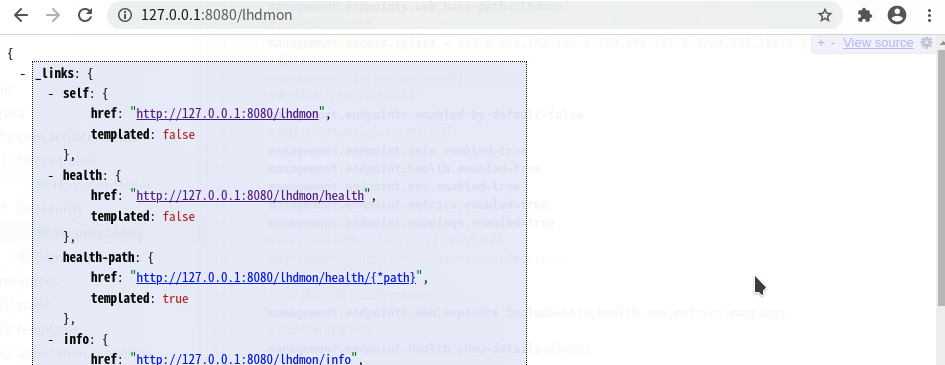
登录后可以看到actuator的endpoints
查看session:

2,用无权限的账号访问:
用lhduser 123456登录:session信息中可以看到
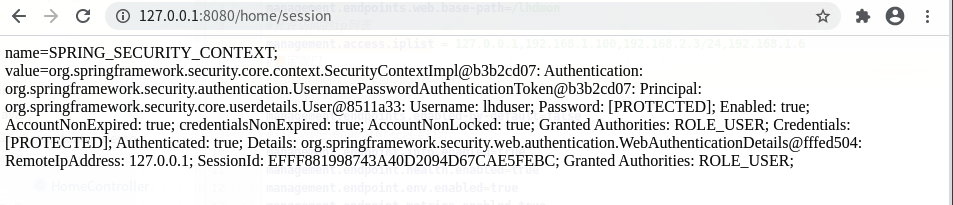
可以看到角色信息,不包含被授权访问的'ADMIN','DEV'

3,测试切换到ip地址列表之外的ip访问:
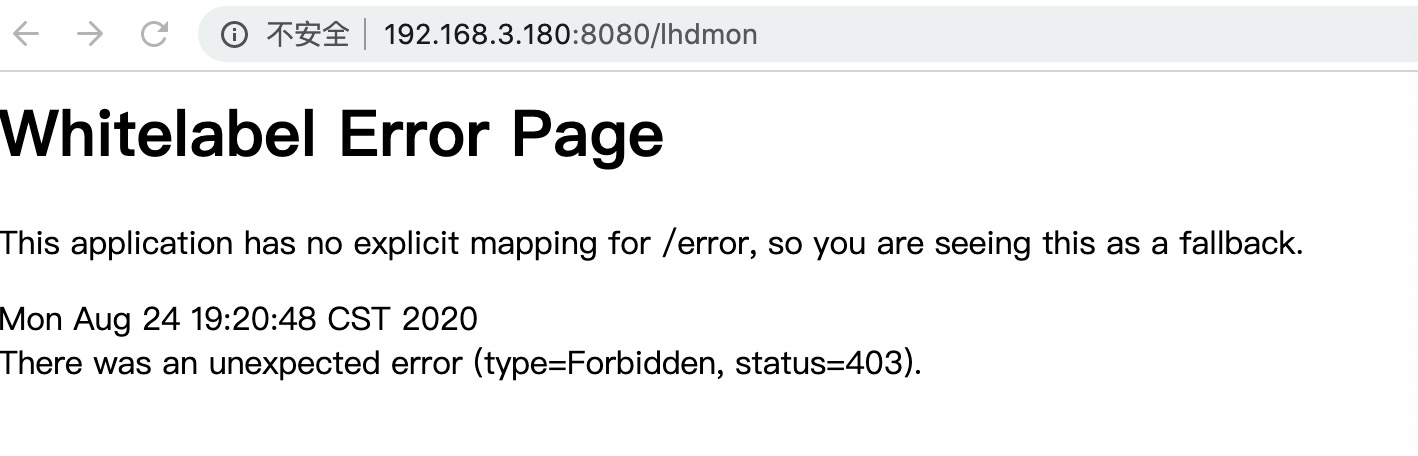
即使用正确有权限的账号登录后也无法访问
六,查看spring boot的版本
  .   ____          _            __ _ _

 /\\ / ___'_ __ _ _(_)_ __  __ _ \ \ \ \

( ( )\___ | '_ | '_| | '_ \/ _` | \ \ \ \

 \\/  ___)| |_)| | | | | || (_| |  ) ) ) )

  '  |____| .__|_| |_|_| |_\__, | / / / /

 =========|_|==============|___/=/_/_/_/

 :: Spring Boot ::        (v2.3.2.RELEASE)
spring boot:actuator的安全配置:使用spring security做ip地址限制(spring boot 2.3.2)的更多相关文章
- Spring Boot 2.X(十六):应用监控之 Spring Boot Actuator 使用及配置
Actuator 简介 Actuator 是 Spring Boot 提供的对应用系统的自省和监控功能.通过 Actuator,可以使用数据化的指标去度量应用的运行情况,比如查看服务器的磁盘.内存.C ...
- Linux学习笔记(10)linux网络管理与配置之一——主机名与IP地址,DNS解析与本地hosts解析(1-4)
Linux学习笔记(10)linux网络管理与配置之一——主机名与IP地址,DNS解析与本地hosts解析 大纲目录 0.常用linux基础网络命令 1.配置主机名 2.配置网卡信息与IP地址 3.配 ...
- 如何配置Linux系统的网络IP地址
一台安装了Linux系统的电脑如果想要联网,首先要做的就是进行网络配置.今天小编就以CentOS6.4系统为例为大家介绍整个网络配置的过程,虽然只是以CentOS6.4系统为例,但是其它的Linux系 ...
- 配置 Gii 允许访问的 IP 地址
通过本机以外的机器访问 Gii,请求会被出于安全原因拒绝,在 config/web.php 配置 Gii 为其添加允许访问的 IP 地址: if (YII_ENV_DEV) { // configur ...
- 配置IIS Express以便通过IP地址访问调试的网站
问题背景 最近使用C#编写了一个WebService,希望通过Java进行调用.使用Visual Studio 2013调试WebService时,可以在浏览器中通过localhost地址访问WSDL ...
- Linux 最小化安装后IP的配置(手动获取静态IP地址)
一.图形化界面配置(假设为电脑A) 如果你的Linux安装有图形化界面,那么通过以下方式来配置: 我这里是有两块网卡,第一个网卡在上篇中已经通过DHCP来配置了:Linux 最小化安装后IP的配置(D ...
- 【linux基础】如何配置ubuntu系统为静态IP地址
前言 连接远程server重启的时候发现IP发生变化,影响远程连接,此时,需要将server配置为静态IP. 系统环境 ubuntu16.04 操作过程 1. 设置IP和DNS command sud ...
- php虚拟主机配置( 输入网址 对应 ip地址)
1.启动http_vhost.conf文件 在httpd-conf中,#virtual hosts 去掉前面的井号 # Includeconf/extra/httpd_vhost.conf 2.配置h ...
- java:Spring框架1(基本配置,简单基础代码模拟实现,spring注入(DI))
1.基本配置: 步骤一:新建项目并添加spring依赖的jar文件和commons-logging.xx.jar: 步骤二:编写实体类,DAO及其实现类,Service及其实现类; 步骤三:在src下 ...
随机推荐
- Python 之 Django框架( Cookie和Session、Django中间件、AJAX、Django序列化)
12.4 Cookie和Session 12.41 cookie Cookie具体指的是一段小信息,它是服务器发送出来存储在浏览器上的一组组键值对,下次访问服务器时浏览器会自动携带这些键值对,以便服务 ...
- ribbon源码(4) 载均衡算法
负载均衡算法模块主要的功能是从负载均衡器中获取服务器列表信息,根据算法选取出一个服务器. IRule 负载均衡算法接口 public interface IRule{ public Server ch ...
- Oracle学习(一)SQL基础
一.认识SQL SQL是什么? SQL,结构化查询语言,全称是 Structured Query Language. SQL 是一门 ANSI(American National Standards ...
- python安装和首次使用
安装: 1.安装python环境: 首先打开python官网,下载配置环境:www.python.org 点击上方downloads, 根据系统选择python环境下载 找到 windows x86- ...
- 获取IP 地址,失败!解决方法
命令ip addr 获取IP地址失败,见下图: 解决方法,查看ens33网卡的配置: 控制台,路径输入: vi /etc/sysconfig/network-scripts/ifcfg-ens33 然 ...
- C++实现职工管理系统(中)
C++实现职工管理系统(中) 大家好,今天是在博客园的第九天,博主今天给大家带来的是职工管理系统(C++)(中) 这次的随笔记录是实现(上)结语处说的几个功能 目录 C++实现职工管理系统(中) 1. ...
- 浅谈 Java线程状态转换及控制
线程的状态(系统层面) 一个线程被创建后就进入了线程的生命周期.在线程的生命周期中,共包括新建(New).就绪(Runnable).运行(Running).阻塞(Blocked)和死亡(Dead)这五 ...
- 【typedef】Type definitions 自定义类型
- ThinkPHP 5 生命周期
前段时间用TP5开发了一个小程序,就熟悉了一下TP5.TP5是TP框架最新的一个版本,与以前的3还是有很大的区别,有人说和laravel比较靠近,其实也还好,每个人都有自己不同的看法,只要是选择一个自 ...
- 03 以Hello World为例,分析C语言的最小的程序结构
C程序主要包含的部分 预处理器指令 函数 变量 语句 & 表达式 注释 C Hello World 实例 如下程序,可以在屏幕输出短句"Hello World" #incl ...