
python pytest测试框架介绍二
在介绍一中简单介绍了pytest的安装和简单使用,接下来我们就要实际了解pytest了
一、pytest的用例发现规则
pytest可以在不同的函数、包中发现用例,发现的规则如下
- 文件名以test_开头的py文件
- 以test_开头的函数
- 以Test开头的类
- 以test_开头的方法(与2类似)
- 要注意的是所有的包必须要有init.py文件(在使用各种编辑器时会自动生成)
二、pytest运行方式
1、单独执行某一个py文件里所有的用例
pytest test_mod.py
2、执行目录下所有的用例
pytest testing/
会按发现规则执行该目录下符合的用例
3、单独执行某一个用例
以函数形式的用例

pytest test_mod.py::testfunc

以类形式的用例

pytest testmod.py::testclass::test_method
三、pytest的测试框架(fixture)模式---xUnit格式
pytest支持以xUnit格式型的测试模型(setup/teardown),但还与python自带的unittest还是有一点差别,如下
- 模块形式----使用setup_module/teardown_module
- 函数形式----使用setup_function/teardown_function
- 类形式----使用setup_class/teardown_class
- 方法形式---使用setup_method/teardown_method
说了还是不好理解,我们还是通过例子还呈现
1、pytest以函数形式形成测试用例
from __future__ import print_function

def setup_module(module):

    print('\nsetup_module()')

def teardown_module(module):

    print('teardown_module()')

def setup_function(function):

    print('\nsetup_function()')

def teardown_function(function):

    print('\nteardown_function()')

def test_1():

    print('-  test_1()')

def test_2():

    print('-  test_2()')
运行结果如下:
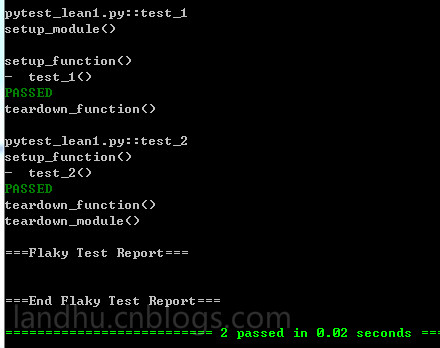
通过结果可以看出,各顺序如下
setup_module()----->setup_function()----->test_1----->teardown_function()----->setup_function()----->test_2--->teardown_function()---->teardown_module()
setup_module()和teardown_module只会在开始测试及测试结束时各运行一次
而setup_function()和teardwon_function会在每个用例开始前及结束后各运行一次
2、pytest以类形式的测试用例
from __future__ import print_function

class TestClass:

    @classmethod

    def setup_class(cls):

        print ('\nsetup_class()')

    @classmethod

    def teardown_class(cls):

        print ('teardown_class()')

    def setup_method(self, method):

        print ('\nsetup_method()')

    def teardown_method(self, method):

        print ('\nteardown_method()')

    def test_3(self):

        print('- test_3()')

    def test_4(self):

        print('- test_4()')
运行结果如下
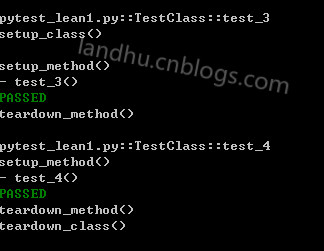
从结果可以看出,类形式的执行顺序如下
setup_class()--->setup_method()---->test_3()---->teardown_method()--->setup_mothod()-->test_4()---->teardown_method()---->teardonw_class()
setup_class和teardown_class只会在类调用前及结束后各运行一次
setup_method和teardown_method会在每个用例时都会运行
以类形式运行时,类里的用例执行顺序是不会变的,这点比unittest好
3、运行unittest框架模式
pytest也可以直接运行unittest模式的测试用例,如下
class my(unittest.TestCase):

    def delf(self,a):

        print a

    @classmethod

    def set_resource(self):

        bb='setUpclass'

        print bb

    @classmethod

    def setUpClass(cls):

        print "setUpclass"

        cls.set_resource()

    def setUp(self):

        print "setUp"

        floating_ip = ('setUptoTearDwon',)

        self.addCleanup(self.delf,

                        floating_ip[0])

    def test_1(self):

        '''i dont konw'''

        a=''

        print "test_1"

        floating_ip = ('bbbbb',)

        self.addCleanup(self.delf,

                        floating_ip[0])

        print ""

        self.addCleanup(self.delf,

                        a)

    def tearDown(self):

        print 'this is tearDown'

    def test_2(self):

        print "test_2"

    @classmethod

    def tearDownClass(cls):

        print "teardown...."
使用pytest运行该文件,结果如下
collected 2 items

unittest_fomater.py ..

========================== 2 passed in 0.19 seconds ===========================
可以看出,pytest也支持unittest的addCleanup功能等
需要注意的是,如果你在pytest模式中使用setupClass()函数是不行的,不会识别,但如果用例类继承之unittest.Testcase,还是可以识别的
class TestClass:

    @classmethod

    def setUpClass(cls):

        print ('\nsetup_class()')

    @classmethod

    def teardown_class(cls):

        print ('teardown_class()')

    def setup(self):

        print ('\nsetup_method()')

    def teardown_method(self, method):

        print ('\nteardown_method()')

    def test_3(self):

        print('- test_3()')

    def test_4(self):

        print('- test_4()')
用pytest运行时,结果如下,没有识别到setUpclass
collected 2 items

pytest_lean1.py::TestClass::test_3

setup_method()

- test_3()

PASSED

teardown_method()

pytest_lean1.py::TestClass::test_4

setup_method()

- test_4()

PASSED

teardown_method()

teardown_class()
python pytest测试框架介绍二的更多相关文章
- python pytest测试框架介绍四----pytest-html插件html带错误截图及失败重测机制
一.html报告错误截图 这次介绍pytest第三方插件pytest-html 这里不介绍怎么使用,因为怎么使用网上已经很多了,这里给个地址给大家参考,pytest-html生成html报告 今天在这 ...
- python pytest测试框架介绍三
之前介绍了pytest以xUnit形式来写用例,下面来介绍pytest特有的方式来写用例 1.pytest fixture实例1 代码如下 from __future__ import print_f ...
- python pytest测试框架介绍一
一.安装 pytest不是python默认的package,需要自动手工安装. pytest支持python 2.6--3.5之间的版本,同时可以在unix及windows上安装 安装方式: pip ...
- python pytest测试框架介绍五---日志实时输出
同样的,在使用pytest进行自动化测试时,需要将实时日志打印出来,而不是跑完后才在报告中出结果. 不过,好在pytest在3.3版本开始,就支持这一功能了,而不用再像nose一样,再去装第三方插件. ...
- Pytest测试框架(二):pytest 的setup/teardown方法
PyTest支持xUnit style 结构, setup() 和 teardown() 方法用于初始化和清理测试环境,可以保证测试用例的独立性.pytest的setup/teardown方法包括:模 ...
- 『德不孤』Pytest框架 — 1、Pytest测试框架介绍
目录 1.什么是单元测试框架 2.单元测试框架主要做什么 3.单元测试框架和自动化测试框架有什么关系 4.Pytest测试框架说明 5.Pytest框架和Unittest框架区别 (1)Unittes ...
- 【pytest系列】- pytest测试框架介绍与运行
如果想从头学起pytest,可以去看看这个系列的文章! https://www.cnblogs.com/miki-peng/category/1960108.html 前言 目前有两种纯测试的测 ...
- [翻译]pytest测试框架(二):使用
此文已由作者吴琪惠授权网易云社区发布. 欢迎访问网易云社区,了解更多网易技术产品运营经验. 调用pytest 调用命令: python -m pytest [...] 上面的命令相当于在命令行直接调用 ...
- python nose测试框架全面介绍十---用例的跳过
又来写nose了,这次主要介绍nose中的用例跳过应用,之前也有介绍,见python nose测试框架全面介绍四,但介绍的不详细.下面详细解析下 nose自带的SkipTest 先看看nose自带的S ...
随机推荐
- UNIX环境编程学习笔记(13)——文件I/O之标准I/O流
lienhua342014-09-29 1 标准 I/O 流 之前学习的都是不带缓冲的 I/O 操作函数,直接针对文件描述符的,每调用一次函数可能都会触发一次系统调用,单次调用可能比较快捷.但是,对于 ...
- Xcode不太常见又实用的小技巧
备份, 原文: http://rocry.com/2012/12/17/xcode-tips/ 让代码中的TODO和FIXME变成Warning 选中某个Target > Build Phase ...
- cordova开发跨平台应用问题随笔记
iOS下频繁请求地理位置授权 做的某个cordova应用有用到geolocation插件,跑在iOS的时候发现app请求了一次授权,结果webkit还请求了一次授权,不但如此,webkit请求的格式还 ...
- 16 go操作Mysql
mysql模块下载 mysql模块我们从github上下载,地址为:www.github.com/go-sql-driver/mysql go get "github.com/go-sql- ...
- Spring MVC手札
本文用于记录使用Spring MVC中的零散手札 1.在普通java类中获取HttpServletRequest对象 在web.xml的listener节点加入 <listener> & ...
- 虚拟机中安装linux系统步骤
参考:http://blog.csdn.net/u013111221/article/details/50856934 后面参考:http://blog.csdn.net/chenweitang123 ...
- mysql压缩版的安装教程
1. 首先创建 my.ini,在mysql解压目录下的bin文件夹中新建一个名为 my.ini 的文件,内容为 [client] port=3306 default-character-set ...
- POJ 1459 && ZOJ 1734--Power Network【最大流dinic】
Power Network Time Limit: 2000MS Memory Limit: 32768K Total Submissions: 25108 Accepted: 13077 D ...
- SpringMVC由浅入深day01_7入门程序小结
7 入门程序小结 通过入门程序理解springmvc前端控制器.处理器映射器.处理器适配器.视图解析器用法. 前端控制器配置: 处理器映射器: 非注解处理器映射器(了解) 注解的处理器映射器(掌握) ...
- Ubuntu 16.04服务器 软件的安装及配置
SSH的安装及配置 SSH分客户端openssh-client和openssh-server 如果你只是想登陆别的机器的SSH只需要安装openssh-client(ubuntu有默认安装,如果没有则 ...