
spring cloud config —— git配置管理
talk is cheep, show your the code
废话不多说,直接开干
本文基于 2.1.1版本
github地址
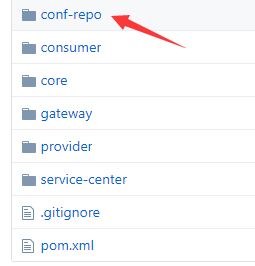
例如我们目前将配置放在了github上的这个目录下
Server端
pom.xml
需要添加一个依赖,一般我们配置中心和注册中心可以放在一起,因此我就和eureka注册服务器一起了
    <dependencies>

        <dependency>

            <groupId>org.springframework.cloud</groupId>

            <artifactId>spring-cloud-starter-netflix-eureka-server</artifactId>

        </dependency>

        <dependency>

            <groupId>org.springframework.cloud</groupId>

            <artifactId>spring-cloud-config-server</artifactId>

        </dependency>

    </dependencies>
server的application.yml
导入了jar包,按照spring的尿性,当然是要继续写配置信息了
server:

  port: 8761

eureka:

  client:

    service-url:

      defaultZone: http://localhost:8761/eureka/

spring:

  application:

    name: service-center

  cloud:

    config:

      server:

        git:

          uri: # 你的git地址

          # git账号

          username: '你的账号'

          # git密码

          password: '你的密码'

          # 默认从master分支读取配置文件

          default-label: develop # for test

          # 配置文件的路径,因为我项目的根目录是 my-demo,因此这里查询的路径就是 m.../conf-repo, 可以配置多个,按逗号分割

          search-paths: microservice/conf-repo  #
配置文件
关于配置文件,必须按照约定的命名, 就是 {application}-{profile}.properties 或 {application}-{profile}.yml,不这么命名的话,是没法后面被加载到的
例如我创建的文件名为 demo-dev.properties,里面的内容为
 version=1

name=demo
测试Server
spring cloud config会将文件生成对应的接口,
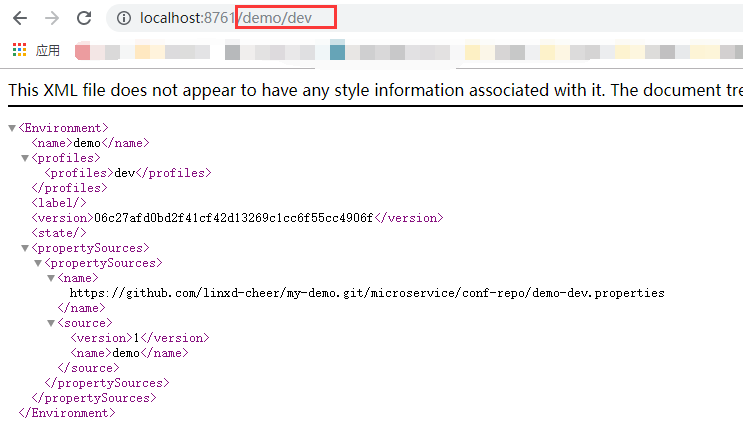
明显看出接口是按照 {application}/{profile} 这样的方式来自动生成的
官方文档表明有以下几种
- /{application}/{profile}[/{label}]
- /{application}-{profile}.yml
- /{label}/{application}-{profile}.yml
- /{application}-{profile}.properties
- /{label}/{application}-{profile}.properties
client端
pom.xml
需要导入一个jar包
        <dependency>

            <groupId>org.springframework.cloud</groupId>

            <artifactId>spring-cloud-starter-config</artifactId>

        </dependency>
添加配置文件,不是application.yml
spring cloud config 通过bootstrap.yml 中的内容来对配置文件进行读取
spring:

  cloud:

    config:

      discovery:

        enabled: true

      # 对应配置中心的 spring.application.name

        service-id: service-center

      # name 表示配置文件的 {application} 部分

      name: demo

      # profile 表示配置文件的 {profile}部分

      profile: dev

      # label 表示 git上的分支

      label: develop

      # uri 表示 访问配置中心的uri

      uri: http://localhost:8761/
测试的controller
@RestController

public class ConfigClientController {

    @Value("${version}")

    private String v;

    @GetMapping("/get")

    public String get(){

        return this.v;

    }

}
测试client
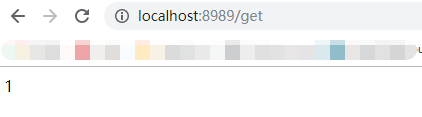
启动,然后发送http请求 http://localhost:8989/get
读取多个配置文件
我们的配置文件可能需要读取的不止一个,那么要怎么配置呢,查看了官方文档以后,配置的方式如下
我们添加一个属性 demo-prod.properties
spring:

  profiles:

    active: dev,prod   # 添加这个属性可以读取多个文件

  cloud:

    config:

      discovery:

        enabled: true

        service-id: service-center

      # name 表示配置文件的 {application} 部分

      name: demo

      # profile 表示配置文件的 {profile}部分

#      profile: dev

      # label 表示 git上的分支

      label: develop

      # uri 表示 访问配置中心的uri

      uri: http://localhost:8761/
相应的,controller的代码也需要进行修改
@RestController

public class ConfigClientController {

    @Value("${version}")

    private String v;

    @Value("${namespace}")

    private String ns;

    @GetMapping("/get")

    public String get(){

        return this.v;

    }

    @GetMapping("/namespace")

    public String getNs(){

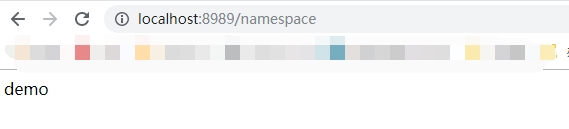
        return this.ns;  // 应该得到 demo

    }

}
配置更新
spring cloud config 能够监听github上配置的变化,但它不会进行进行变化的通知,而是需要client自己主动的进行pull的操作,将配置更新
这里就需要引入 spring-cloud-starter-actuator了。
        <dependency>

            <groupId>org.springframework.boot</groupId>

            <artifactId>spring-boot-starter-actuator</artifactId>

        </dependency>
在 application.yml中添加配置属性,将更新的接口暴露出来
management:

  endpoints:

    web:

      exposure:

        include: refresh
在我们希望能够进行配置更新的地方,添加注解 @RefreshScope
@RestController

@RefreshScope

public class ConfigClientController {

    @Value("${version}")

    private String v;

    @Value("${namespace}")

    private String ns;

    @GetMapping("/get")

    public String get(){

        return this.v;

    }

    @GetMapping("/namespace")

    public String getNs(){

        return this.ns;

    }

}
到此,我们的准备工作就好了,然后启动,访问/get接口,然后修改配置文件,再访问的时候还是旧的值,这个时候使用工具进行post的调用
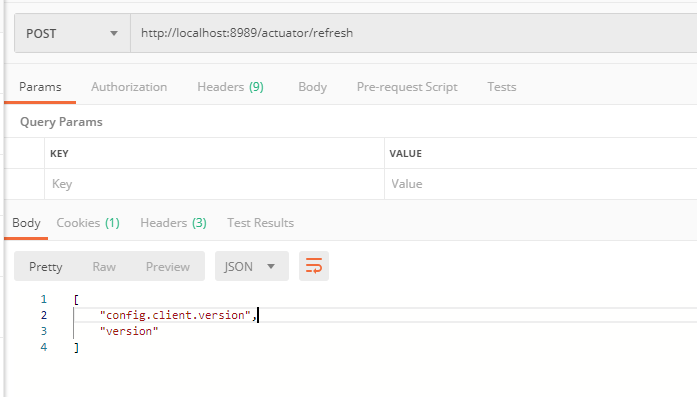
刷新结束后,再次访问

在github上可以通过配置webhook的方式,当有新的push操作时,让github去调用 client的refresh接口
这个方案在client数量较少是还可以,但数量一多,并且每次新增机器都需要修改webhook,显然不够智能,因此后面就需要考虑使用 spring-cloud-bus来进行解决了
spring cloud config —— git配置管理的更多相关文章
- Spring Cloud Config 分布式配置管理 5.3
Spring Cloud Config简介 在传统的单体式应用系统中,我们通常会将配置文件和代码放在一起,但随着系统越来越大,需要实现的功能越来越多时,我们又不得不将系统升级为分布式系统,同时也会将系 ...
- spring cloud config git库文件搜索顺序
spring.cloud.config.server.git.uri只配置到仓库那一层就行了,需要访问仓库的子目录的话就配置spring.cloud.config.server.git.searchP ...
- Spring Cloud Config git版
由于在学习这块内容的时候还不会使用gitHub所以就用了osc的码云 config server POM文件 <dependency> <groupId>org.springf ...
- Spring Cloud Config采用数据库存储配置内容
在之前的<Spring Cloud构建微服务架构:分布式配置中心>一文中,我们介绍的Spring Cloud Server配置中心采用了Git的方式进行配置信息存储.这一设计巧妙的利用Gi ...
- spring cloud学习(六)Spring Cloud Config
Spring Cloud Config 参考个人项目 参考个人项目 : (希望大家能给个star~) https://github.com/FunriLy/springcloud-study/tree ...
- 【Spring Cloud】Spring Cloud Config 实现分布式配置中心
Spring Cloud Config 实现分布式配置中心 一.分布式配置中心 分布式系统中,往往拥有大量的服务应用,而每个应用程序都需要有对应的配置文件来协助完成服务环境初始化.运行.因此生产了大量 ...
- Spring Cloud Config采用Git存储时两种常用的配置策略
由于Spring Cloud Config默认采用了Git存储,相信很多团队在使用Spring Cloud的配置中心时也会采用这样的策略.即便大家都使用了Git存储,可能还有各种不同的配置方式,本文就 ...
- 微服务SpringCloud之Spring Cloud Config配置中心Git
微服务以单个接口为颗粒度,一个接口可能就是一个项目,如果每个项目都包含一个配置文件,一个系统可能有几十或上百个小项目组成,那配置文件也会有好多,对后续修改维护也是比较麻烦,就和前面的服务注册一样,服务 ...
- SpringCloud的配置管理:Spring Cloud Config
演示如何使用ConfigServer提供统一的参数配置服务 ###################################################################一.概 ...
随机推荐
- python的数据缓存
Python的数据缓存 python 的内置数据类型,数值型,字符串,列表,字典等都会有自己的对象缓存池, 这样做的好处是,避免了频繁的申请内存,释放内存,这样会极大的降低应用程序的运行速度,还会造成 ...
- 数据结构与算法——图(游戏中的自动寻路-A*算法)
在复杂的 3D 游戏环境中如何能使非玩家控制角色准确实现自动寻路功能成为了 3D 游戏开 发技术中一大研究热点.其中 A*算法得到了大量的运用,A*算法较之传统的路径规划算法,实时性更高.灵活性更强, ...
- 2020-2021-1 20209307《Linux内核原理与分析》第一周作业
一.Linux基础命令操作 1.查看目录.新建文件.复制移除文件等 ls[选项] [文件或目录] -a 显示所有文件 包含隐藏文件 -l显示详细信息 -d查看目录属性 pwd显示当前目录 mkdir ...
- Mybatis(二)--SqlMapConfig.xml配置文件
一.简介 SqlMapConfig.xml是Mybatis的全局配置文件,我们在写mybatis项目时,在SqlMapConfig.xml文件中主要配置了数据库数据源.事务.映射文件等,其实还有很多配 ...
- eclipse 创建自己的Maven项目(超详细)
本文章 主要是 讲解 是讲解 eclipse创建项目 --SpiritMark_liu 先配置 Maven 的 settings 地址 (Window -> Perferences–>Ma ...
- Python开发的面试准备
1.is和==的区别: is比较的是id,对象的内存地址 = =比较的是值 2.按字典中的value值进行排序 sorted(dict.items(), key = lambda x: x[1]) 3 ...
- Python 爬虫进阶必备
关于新闻平台请求头加密参数逻辑分析 抓包与加密定位 先来看看加密的请求
- C# 编译机器码过程原理之再谈反射
一.引言 我们知道在Java中有虚拟机,代码运行时虚拟机把Java语言编译成与机器无关的字节码,然后再把字节码编译成机器指令执行,那么在.NET中程序是如何运行的呢? 其实运行原理是一样的,.NET中 ...
- 深入理解MySQL系列之redo log、undo log和binlog
事务的实现 redo log保证事务的持久性,undo log用来帮助事务回滚及MVCC的功能. InnoDB存储引擎体系结构 redo log Write Ahead Log策略 事务提交时,先写重 ...
- 微信小程序--每周图书推荐
这是我个人的第一个原生微信小程序,作为一枚萌新,自己没有前端经历,所以代码很混乱,界面很简单,难度也很低,主要用来记录自己学小程序过程中遇到的问题. 一. 先上预览图 左右滑动切换每周推荐的图书,点击 ...