
flink安装及standalone模式启动、idea中项目开发
安装
环境
- Ubuntu 18
- jdk8
- flink-1.8.1
安装步骤
安装jdk(略)
下载flink-1.8.1-bin-scala_2.12.tgz,解压到指定目录
wget http://mirror.bit.edu.cn/apache/flink/flink-1.8.1/flink-1.8.1-bin-scala_2.12.tgz
sudo mkdir /opt/flink
sudo chown test flink
sudo chgrp test flink
tar -zxvf flink-1.8.1-bin-scala_2.12.tgz -C /opt/flink单机资源有限,修改配置文件flink-conf.yaml
The heap size for the JobManager JVM
jobmanager.heap.size: 256m
The heap size for the TaskManager JVM
taskmanager.heap.size: 256m
standalone模式启动
启动
bin目录下执行./start-cluster.sh
jps进程查看
3857 TaskManagerRunner

3411 StandaloneSessionClusterEntrypoint

3914 Jps
查看web页面

运行example
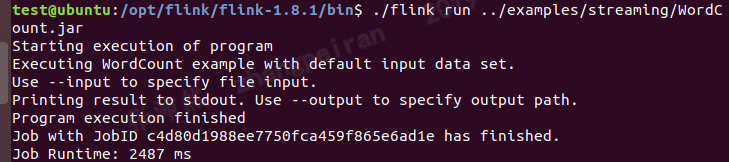
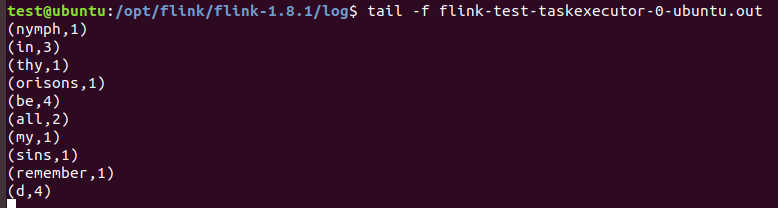
查看结果文件
IDEA中编写flink项目
在idea中会启动一个本地的flink,适合作为开发环境
maven中添加依赖
<dependencies>

    <!-- https://mvnrepository.com/artifact/org.apache.flink/flink-streaming-java -->

    <dependency>

        <groupId>org.apache.flink</groupId>

        <artifactId>flink-streaming-java_2.12</artifactId>

        <version>1.8.1</version>

    </dependency>

    <!-- https://mvnrepository.com/artifact/org.apache.flink/flink-java -->

    <dependency>

        <groupId>org.apache.flink</groupId>

        <artifactId>flink-java</artifactId>

        <version>1.8.1</version>

    </dependency>

    <!-- https://mvnrepository.com/artifact/org.apache.flink/flink-clients -->

    <dependency>

        <groupId>org.apache.flink</groupId>

        <artifactId>flink-clients_2.12</artifactId>

        <version>1.8.1</version>

    </dependency>

</dependencies>
example代码
package test;

import org.apache.flink.api.common.functions.FlatMapFunction;

import org.apache.flink.api.common.functions.ReduceFunction;

import org.apache.flink.streaming.api.datastream.DataStream;

import org.apache.flink.streaming.api.environment.StreamExecutionEnvironment;

import org.apache.flink.streaming.api.windowing.time.Time;

import org.apache.flink.util.Collector;

public class StreamingWindowWordCountJava {

public static void main(String[] args) throws Exception {

    // the port to connect to

    final int port = 9000;

    // get the execution environment

    final StreamExecutionEnvironment env = StreamExecutionEnvironment.getExecutionEnvironment();

    // get input data by connecting to the socket

    DataStream<String> text = env.socketTextStream("192.168.29.129", port, "\n");

    // parse the data, group it, window it, and aggregate the counts

    DataStream<WordWithCount> windowCounts = text

            .flatMap(new FlatMapFunction<String, WordWithCount>() {

                //@Override

                public void flatMap(String value, Collector<WordWithCount> out) {

                    for (String word : value.split("\\s")) {

                        out.collect(new WordWithCount(word, 1L));

                    }

                }

            })

            .keyBy("word")

            .timeWindow(Time.seconds(5), Time.seconds(1))

            .reduce(new ReduceFunction<WordWithCount>() {

                //@Override

                public WordWithCount reduce(WordWithCount a, WordWithCount b) {

                    return new WordWithCount(a.word, a.count + b.count);

                }

            });

    // print the results with a single thread, rather than in parallel

    windowCounts.print().setParallelism(1);

    env.execute("Socket Window WordCount");

}

// Data type for words with count

public static class WordWithCount {

    public String word;

    public long count;

    public WordWithCount() {}

    public WordWithCount(String word, long count) {

        this.word = word;

        this.count = count;

    }

    @Override

    public String toString() {

        return word + " : " + count;

    }

}

}
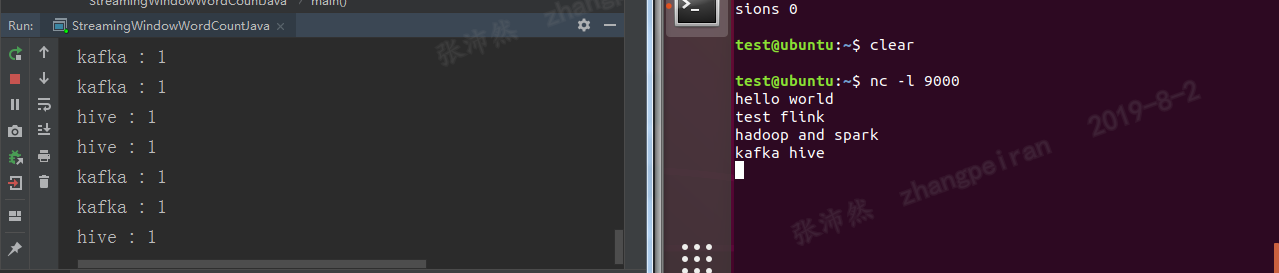
IDEA中运行结果
代码打包运行
上述代码,打包成simple-flink-code.jar
在flink的bin目录下执行:
./flink run -c test.StreamingWindowWordCountJava /home/test/Desktop/simple-flink-code.jar(注意运行类前面写上package名,-c参数顺序在jar包前面,否则报错)
参考
flink安装及standalone模式启动、idea中项目开发的更多相关文章
- 深入理解 JBoss 7/WildFly Standalone 模式启动过程
概述 JBoss 7/WildFly Standalone 模式启动过程大致例如以下: 启动脚本 standalone.sh 启动 JBoss Modules,JBoss Modules 启动 JBo ...
- SpringMVC内容略多 有用 熟悉基于JSP和Servlet的Java Web开发,对Servlet和JSP的工作原理和生命周期有深入了解,熟练的使用JSTL和EL编写无脚本动态页面,有使用监听器、过滤器等Web组件以及MVC架构模式进行Java Web项目开发的经验。
熟悉基于JSP和Servlet的Java Web开发,对Servlet和JSP的工作原理和生命周期有深入了解,熟练的使用JSTL和EL编写无脚本动态页面,有使用监听器.过滤器等Web组件以及MVC架构 ...
- Flink架构分析之Standalone模式启动流程
概述 FLIP6 对Flink架构进行了改进,引入了Dispatcher组件集成了所有任务共享的一些组件:SubmittedJobGraphStore,LibraryCacheManager等,为了保 ...
- Spark2.1集群安装(standalone模式)
机器部署 准备三台Linux服务器,安装好JDK1.7 下载Spark安装包 上传spark-2.1.0-bin-hadoop2.6.tgz安装包到Linux(intsmaze-131)上 解压安装包 ...
- MVC模式学习--雇员管理系统项目开发
1, 项目开发,使用原型开发, ① 开发流程: 需求分析->设计阶段->编码阶段->测试阶段->发布阶段/维护阶段 需求阶段:PM/项目经理 对客户 设计阶段:技术人员(架构师 ...
- Spark环境搭建(七)-----------spark的Local和standalone模式启动
spark的启动方式有两种,一种单机模式(Local),另一种是多机器的集群模式(Standalone) Standalone 搭建: 准备:hadoop001,hadoop002两台安装spark的 ...
- Spark2.2.0分布式集群安装(StandAlone模式)
一.依赖文件安装 1.1 JDK 参见博文:http://www.cnblogs.com/liugh/p/6623530.html 1.2 Scala 参见博文:http://www.cnblogs. ...
- 开发工具IntelliJ IDEA的安装步骤及首次启动和创建项目
开发工具IDEA概述 DEA是一个专门针对Java的集成开发工具(IDE),由Java语言编写.所以,需要有JRE运行环境并配置好环境变量.它可以极大地提升我们的开发效率.可以自动编译,检查错误.在公 ...
- iOS中 项目开发易错知识点总结
点击return取消textView 的响应者 - (BOOL)textFieldShouldReturn:(UITextField *)textField { [_contactTextFiled ...
随机推荐
- kali 更新msf
用leafpad打开,方便复制粘贴 leafpad /etc/apt/sources.list 然后复制下面的源覆盖原本的 deb http://mirrors.ustc.edu.cn/kali ka ...
- Sound Forge批量转换音频格式,实现高效编辑音频
Sound Forge的批量处理功能可以实现批量格式转换.批量添加效果等功能,让用户可以在处理其他音频编辑任务的同时,自动完成格式转换.效果添加等重复性任务.接下来,一起来看看如何借助批处理转换器实现 ...
- 如何在苹果电脑下载器Folx中管理下载列表
Folx是一款Mas OS专用的下载器,提供了便捷的下载管理.灵活的设置.今天小编准备跟大家聊一聊关于Folx中常见的几种下载管理方式. 一.管理任务状态栏 在Folx下载面板上,可以通过类别查看任务 ...
- 「LOJ 537」「LibreOJ NOIP Round #1」DNA 序列
description NOIP 复赛之前,HSD 桑进行了一项研究,发现人某条染色体上的一段 DNA 序列中连续的\(k\)个碱基组成的碱基序列与做题的 AC 率有关!于是他想研究一下这种关系. 现 ...
- 三 CSS基础入门
CSS介绍 CSS(Cascading Style Sheet,层叠样式表)定义如何显示HTML元素. 当浏览器读到一个样式表,它就会按照这个样式表来对文档进行格式化(渲染). CSS语法 CSS实例 ...
- 解决Jenkins可安装界面是空白的小技巧
打开后这里面最底下有个[升级站点],把其中的链接改成http的就好了,http://updates.jenkins.io/update-center.json. 然后在服务列表中关闭jenkins,再 ...
- 关于CopyOnWriterArrayList的一些理解
学了cowarraylist之后,有些不明白的地方, 1.我们为什么要用写时复制的策略呢?,这样每次不是都要复制吗,性能不是很低吗?直接在元素组上扩容不好吗?而且读的时候数据一致性也保证不了,如果只是 ...
- 一键加Q群的实现
打开网址 选择创建的群 选择所需要的二维码或者代码
- django基本内容
1,流程 1.1 了解web程序工作流程 1.2 django生命周期 2,django介绍 目的:了解Django框架的作用和特点 作用: 简便.快速的开发数据库驱动的网站 django的优 ...
- pytest失败重跑
一.说明 平常在做功能测试的时候,经常会遇到某个模块不稳定,偶然会出现一些bug,对于这种问题我们会针对此用例反复执行多次,最终复现出问题来.自动化运行用例时候,也会出现偶然的bug,可以针对单个用例 ...