
flink安装及standalone模式启动、idea中项目开发
安装
环境
- Ubuntu 18
- jdk8
- flink-1.8.1
安装步骤
安装jdk(略)
下载flink-1.8.1-bin-scala_2.12.tgz,解压到指定目录
wget http://mirror.bit.edu.cn/apache/flink/flink-1.8.1/flink-1.8.1-bin-scala_2.12.tgz
sudo mkdir /opt/flink
sudo chown test flink
sudo chgrp test flink
tar -zxvf flink-1.8.1-bin-scala_2.12.tgz -C /opt/flink单机资源有限,修改配置文件flink-conf.yaml
The heap size for the JobManager JVM
jobmanager.heap.size: 256m
The heap size for the TaskManager JVM
taskmanager.heap.size: 256m
standalone模式启动
启动
bin目录下执行./start-cluster.sh
jps进程查看
3857 TaskManagerRunner

3411 StandaloneSessionClusterEntrypoint

3914 Jps
查看web页面

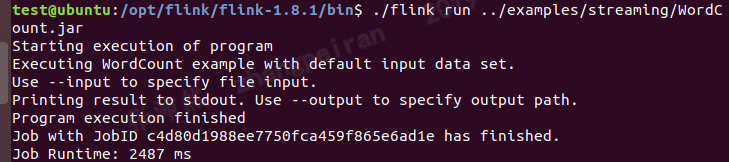
运行example
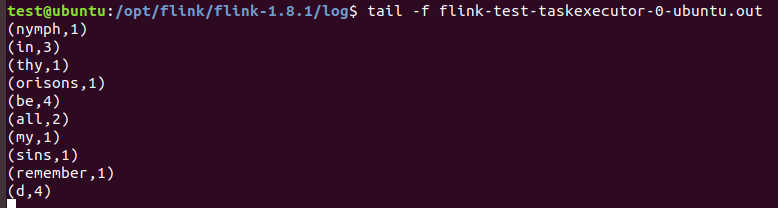
查看结果文件
IDEA中编写flink项目
在idea中会启动一个本地的flink,适合作为开发环境
maven中添加依赖
<dependencies>

    <!-- https://mvnrepository.com/artifact/org.apache.flink/flink-streaming-java -->

    <dependency>

        <groupId>org.apache.flink</groupId>

        <artifactId>flink-streaming-java_2.12</artifactId>

        <version>1.8.1</version>

    </dependency>

    <!-- https://mvnrepository.com/artifact/org.apache.flink/flink-java -->

    <dependency>

        <groupId>org.apache.flink</groupId>

        <artifactId>flink-java</artifactId>

        <version>1.8.1</version>

    </dependency>

    <!-- https://mvnrepository.com/artifact/org.apache.flink/flink-clients -->

    <dependency>

        <groupId>org.apache.flink</groupId>

        <artifactId>flink-clients_2.12</artifactId>

        <version>1.8.1</version>

    </dependency>

</dependencies>
example代码
package test;

import org.apache.flink.api.common.functions.FlatMapFunction;

import org.apache.flink.api.common.functions.ReduceFunction;

import org.apache.flink.streaming.api.datastream.DataStream;

import org.apache.flink.streaming.api.environment.StreamExecutionEnvironment;

import org.apache.flink.streaming.api.windowing.time.Time;

import org.apache.flink.util.Collector;

public class StreamingWindowWordCountJava {

public static void main(String[] args) throws Exception {

    // the port to connect to

    final int port = 9000;

    // get the execution environment

    final StreamExecutionEnvironment env = StreamExecutionEnvironment.getExecutionEnvironment();

    // get input data by connecting to the socket

    DataStream<String> text = env.socketTextStream("192.168.29.129", port, "\n");

    // parse the data, group it, window it, and aggregate the counts

    DataStream<WordWithCount> windowCounts = text

            .flatMap(new FlatMapFunction<String, WordWithCount>() {

                //@Override

                public void flatMap(String value, Collector<WordWithCount> out) {

                    for (String word : value.split("\\s")) {

                        out.collect(new WordWithCount(word, 1L));

                    }

                }

            })

            .keyBy("word")

            .timeWindow(Time.seconds(5), Time.seconds(1))

            .reduce(new ReduceFunction<WordWithCount>() {

                //@Override

                public WordWithCount reduce(WordWithCount a, WordWithCount b) {

                    return new WordWithCount(a.word, a.count + b.count);

                }

            });

    // print the results with a single thread, rather than in parallel

    windowCounts.print().setParallelism(1);

    env.execute("Socket Window WordCount");

}

// Data type for words with count

public static class WordWithCount {

    public String word;

    public long count;

    public WordWithCount() {}

    public WordWithCount(String word, long count) {

        this.word = word;

        this.count = count;

    }

    @Override

    public String toString() {

        return word + " : " + count;

    }

}

}
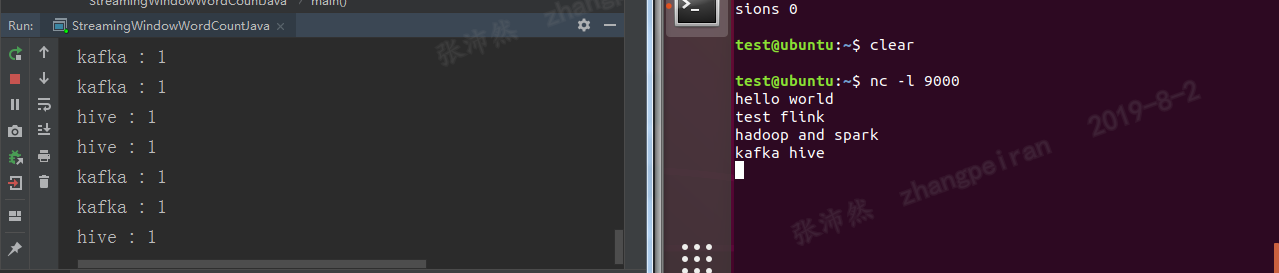
IDEA中运行结果
代码打包运行
上述代码,打包成simple-flink-code.jar
在flink的bin目录下执行:
./flink run -c test.StreamingWindowWordCountJava /home/test/Desktop/simple-flink-code.jar(注意运行类前面写上package名,-c参数顺序在jar包前面,否则报错)
参考
flink安装及standalone模式启动、idea中项目开发的更多相关文章
- 深入理解 JBoss 7/WildFly Standalone 模式启动过程
概述 JBoss 7/WildFly Standalone 模式启动过程大致例如以下: 启动脚本 standalone.sh 启动 JBoss Modules,JBoss Modules 启动 JBo ...
- SpringMVC内容略多 有用 熟悉基于JSP和Servlet的Java Web开发,对Servlet和JSP的工作原理和生命周期有深入了解,熟练的使用JSTL和EL编写无脚本动态页面,有使用监听器、过滤器等Web组件以及MVC架构模式进行Java Web项目开发的经验。
熟悉基于JSP和Servlet的Java Web开发,对Servlet和JSP的工作原理和生命周期有深入了解,熟练的使用JSTL和EL编写无脚本动态页面,有使用监听器.过滤器等Web组件以及MVC架构 ...
- Flink架构分析之Standalone模式启动流程
概述 FLIP6 对Flink架构进行了改进,引入了Dispatcher组件集成了所有任务共享的一些组件:SubmittedJobGraphStore,LibraryCacheManager等,为了保 ...
- Spark2.1集群安装(standalone模式)
机器部署 准备三台Linux服务器,安装好JDK1.7 下载Spark安装包 上传spark-2.1.0-bin-hadoop2.6.tgz安装包到Linux(intsmaze-131)上 解压安装包 ...
- MVC模式学习--雇员管理系统项目开发
1, 项目开发,使用原型开发, ① 开发流程: 需求分析->设计阶段->编码阶段->测试阶段->发布阶段/维护阶段 需求阶段:PM/项目经理 对客户 设计阶段:技术人员(架构师 ...
- Spark环境搭建(七)-----------spark的Local和standalone模式启动
spark的启动方式有两种,一种单机模式(Local),另一种是多机器的集群模式(Standalone) Standalone 搭建: 准备:hadoop001,hadoop002两台安装spark的 ...
- Spark2.2.0分布式集群安装(StandAlone模式)
一.依赖文件安装 1.1 JDK 参见博文:http://www.cnblogs.com/liugh/p/6623530.html 1.2 Scala 参见博文:http://www.cnblogs. ...
- 开发工具IntelliJ IDEA的安装步骤及首次启动和创建项目
开发工具IDEA概述 DEA是一个专门针对Java的集成开发工具(IDE),由Java语言编写.所以,需要有JRE运行环境并配置好环境变量.它可以极大地提升我们的开发效率.可以自动编译,检查错误.在公 ...
- iOS中 项目开发易错知识点总结
点击return取消textView 的响应者 - (BOOL)textFieldShouldReturn:(UITextField *)textField { [_contactTextFiled ...
随机推荐
- linux执行cmd之一
执行方法: 1.手动执行 2.程序执行 涉及到的权限问题: 1.应用程序的权限 2.被执行文件的权限
- MyBatis学习02
3.增删改查实现 select select标签是mybatis中最常用的标签之一 select语句有很多属性可以详细配置每一条SQL语句 SQL语句返回值类型.[完整的类名或者别名] 传入SQL语句 ...
- iMindMap:一款可以免费试用的思维导图软件
思维导图在我们的生活中已经越来越常见了,在市场上也有很多思维导图的软件.今天小编给大家推荐的是一款免费思维导图软件-iMindMap.它具有22种布局模式,包含组织架构图.鱼骨图.时间线.气泡图等,3 ...
- 清理工具CleanMyMac如何帮助用户清空DNS缓存
什么是DNS缓存?这个缓存有什么危害?相信大家平时使用浏览器时,有时候会遇到一个很奇怪的问题,就是Mac打开许多网站如百度网站,都是可以访问的,但是在打开某个特定网站时,却发现浏览器提示检测不到网络连 ...
- 【PUPPETEER】初探之获取元素文本值(三)
一.知识点 page.$eval(selector, pageFunction[, ...args]) page.$$eval(selector, pageFunction[, ...args]) i ...
- python测试代码
前言: 编写函数或者类时,需要编写测试代码,来保证其的功能运行是否按预期的那样工作.在程序添加新的代码时,用来测试是否会破坏本身的功能. 我们使用python自带的unittest模块来测试代码. 编 ...
- C语言讲义——内存管理
动态分配内存 动态分配内存,在堆(heap)中分配. void *malloc(unsigned int num_bytes); 头文件 stdlib.h或malloc.h 向系统申请分配size个字 ...
- gitlab 文件读取+rce复现 CVE202010977
文件读取实现,首先生成两个project 再任意一个project添加issue,然后描述如下: ![a](/uploads/11111111111111111111111111111111/../. ...
- redis的配置文件redis.conf常用配置
参数说明redis.conf 配置项说明如下:1. Redis默认不是以守护进程的方式运行,可以通过该配置项修改,使用yes启用守护进程 daemonize no2. 当Redis以守护进程方式运行时 ...
- Python中判断字符串是否为数字的三个方法isdecimal 、isdigit、isnumeric的差别
isdecimal .isdigit.isnumeric这三个字符串方法都用于判断字符串是否为数字,为什么用三个方法呢?他们的差别是什么内? isdecimal:是否为十进制数字符,包括Unicode ...