
JavaWeb_(SSH)三大框架整合struts+hibernate+spring_Demo
三大框架整合
一、SSH导包
二、书写Spring
三、书写Struts
四、整合Spring与Struts
五、书写(与整合)Hibernate、引入c3p0连接池并使用hibernate模板
六、整合事务
--完成用户登录
项目已上传到github 传送门
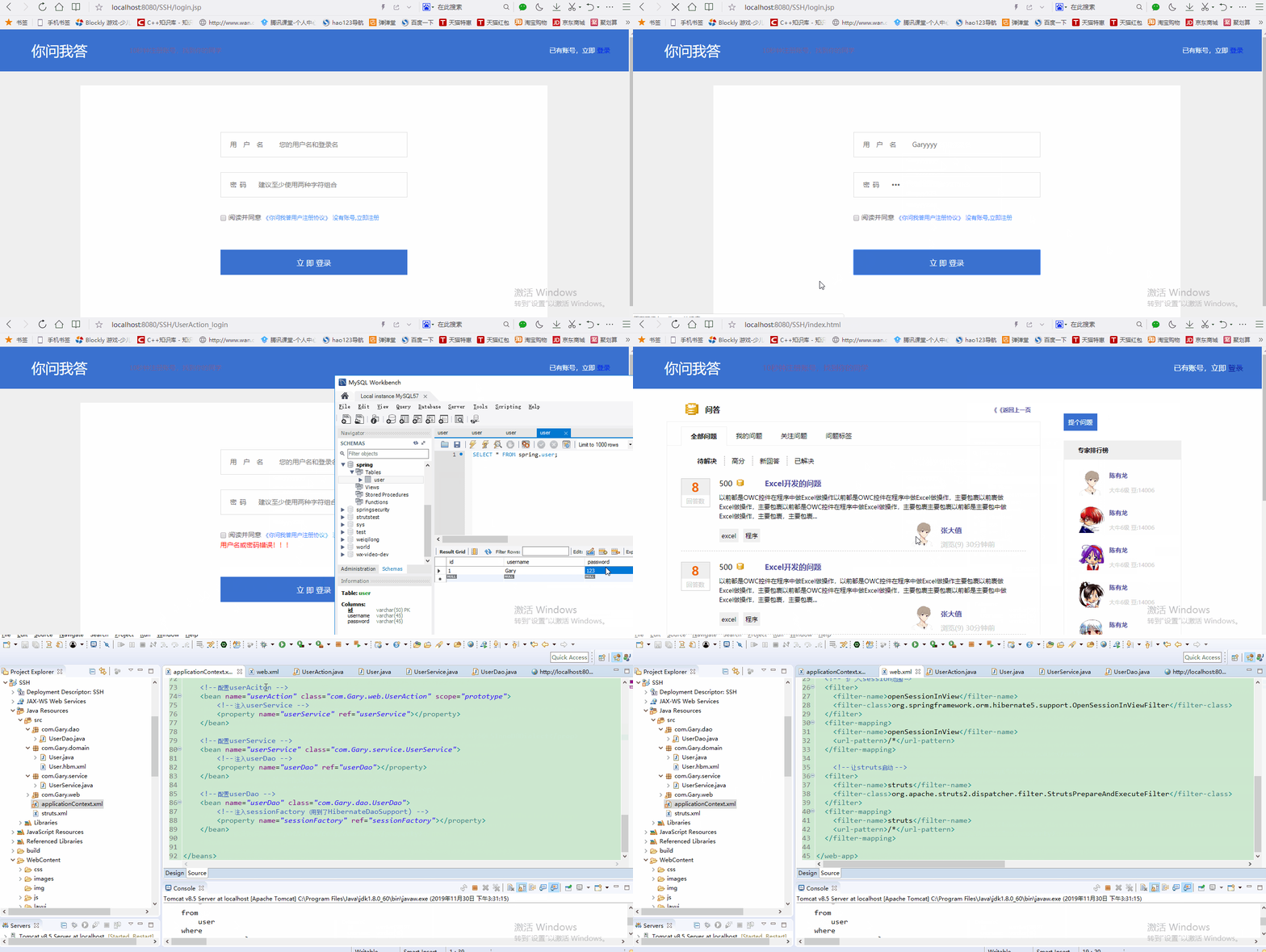
在MySQL数据库中创建spring表,添加一条假数据
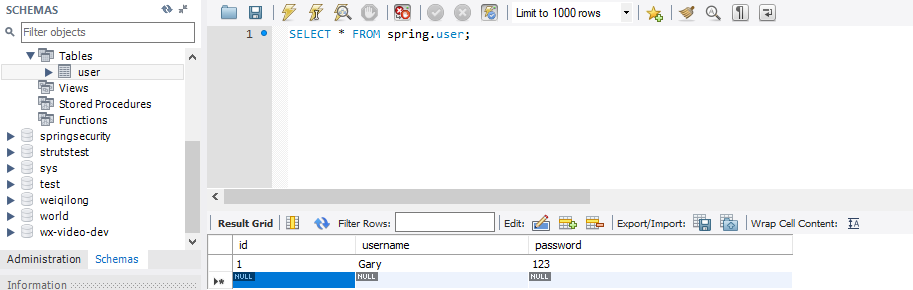
一、SSH导包
导入struts的jar包

导入spring的jar包
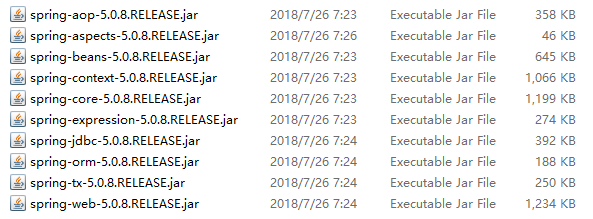
导入hibernate的jar包
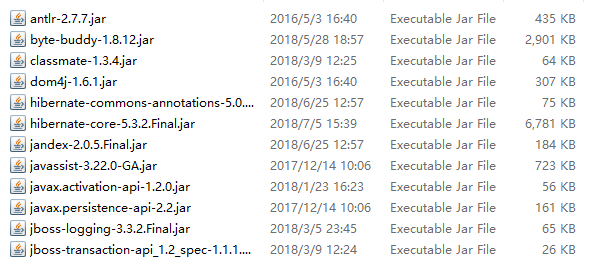
导入c3p0连接池jar包和springapo的jar包,mysql链接数据库驱动包,第四个spring整合包暂时不需要导入,下文导入的时候会说!!!

二、书写Spring
准备applicationContext.xml作为spring的配置文件
<?xml version="1.0" encoding="UTF-8"?>

<beans xmlns="http://www.springframework.org/schema/beans"

    xmlns:xsi="http://www.w3.org/2001/XMLSchema-instance"

    xmlns:context="http://www.springframework.org/schema/context"

    xmlns:aop="http://www.springframework.org/schema/aop"

    xmlns:tx="http://www.springframework.org/schema/tx"

    xsi:schemaLocation="http://www.springframework.org/schema/beans

    http://www.springframework.org/schema/beans/spring-beans.xsd

    http://www.springframework.org/schema/context

    http://www.springframework.org/schema/context/spring-context.xsd

    http://www.springframework.org/schema/aop

    http://www.springframework.org/schema/aop/spring-aop.xsd

    http://www.springframework.org/schema/tx

    http://www.springframework.org/schema/tx/spring-tx.xsd">

</beans>
applicationContext.xml
编写web.xml
    <!-- 让spring随着web项目的启动而启动 -->

  <listener>

      <listener-class>org.springframework.web.context.ContextLoaderListener</listener-class>

  </listener>

    <!-- 读取配置文件 -->

  <context-param>

      <param-name>contextConfigLocation</param-name>

      <param-value>classpath:applicationContext.xml</param-value>

  </context-param>
<?xml version="1.0" encoding="UTF-8"?>

<web-app xmlns:xsi="http://www.w3.org/2001/XMLSchema-instance" xmlns="http://xmlns.jcp.org/xml/ns/javaee" xsi:schemaLocation="http://xmlns.jcp.org/xml/ns/javaee http://xmlns.jcp.org/xml/ns/javaee/web-app_3_1.xsd" id="WebApp_ID" version="3.1">

  <display-name>SSH</display-name>

  <welcome-file-list>

    <welcome-file>index.html</welcome-file>

    <welcome-file>index.htm</welcome-file>

    <welcome-file>index.jsp</welcome-file>

    <welcome-file>default.html</welcome-file>

    <welcome-file>default.htm</welcome-file>

    <welcome-file>default.jsp</welcome-file>

  </welcome-file-list>

    <!-- 让spring随着web项目的启动而启动 -->

  <listener>

      <listener-class>org.springframework.web.context.ContextLoaderListener</listener-class>

  </listener>

    <!-- 读取配置文件 -->

  <context-param>

      <param-name>contextConfigLocation</param-name>

      <param-value>classpath:applicationContext.xml</param-value>

  </context-param>

</web-app>
web.xml
三、配置struts
准备struts.xml配置文件
<?xml version="1.0" encoding="UTF-8"?>

<!DOCTYPE struts PUBLIC

    "-//Apache Software Foundation//DTD Struts Configuration 2.5//EN"

    "http://struts.apache.org/dtds/struts-2.5.dtd">

    <struts>

    </struts>
<?xml version="1.0" encoding="UTF-8"?>

<!DOCTYPE struts PUBLIC

    "-//Apache Software Foundation//DTD Struts Configuration 2.5//EN"

    "http://struts.apache.org/dtds/struts-2.5.dtd">

    <struts>

    </struts>
struts.xml
在web.xml中开启struts
    <!-- 让struts启动 -->

  <filter>

      <filter-name>struts</filter-name>

      <filter-class>org.apache.struts2.dispatcher.filter.StrutsPrepareAndExecuteFilter</filter-class>

  </filter>

  <filter-mapping>

      <filter-name>struts</filter-name>

      <url-pattern>/*</url-pattern>

  </filter-mapping>
<?xml version="1.0" encoding="UTF-8"?>

<web-app xmlns:xsi="http://www.w3.org/2001/XMLSchema-instance" xmlns="http://xmlns.jcp.org/xml/ns/javaee" xsi:schemaLocation="http://xmlns.jcp.org/xml/ns/javaee http://xmlns.jcp.org/xml/ns/javaee/web-app_3_1.xsd" id="WebApp_ID" version="3.1">

  <display-name>SSH</display-name>

  <welcome-file-list>

    <welcome-file>index.html</welcome-file>

    <welcome-file>index.htm</welcome-file>

    <welcome-file>index.jsp</welcome-file>

    <welcome-file>default.html</welcome-file>

    <welcome-file>default.htm</welcome-file>

    <welcome-file>default.jsp</welcome-file>

  </welcome-file-list>

    <!-- 让spring随着web项目的启动而启动 -->

  <listener>

      <listener-class>org.springframework.web.context.ContextLoaderListener</listener-class>

  </listener>

    <!-- 读取配置文件 -->

  <context-param>

      <param-name>contextConfigLocation</param-name>

      <param-value>classpath:applicationContext.xml</param-value>

  </context-param>

    <!-- 让struts启动 -->

  <filter>

      <filter-name>struts</filter-name>

      <filter-class>org.apache.struts2.dispatcher.filter.StrutsPrepareAndExecuteFilter</filter-class>

  </filter>

  <filter-mapping>

      <filter-name>struts</filter-name>

      <url-pattern>/*</url-pattern>

  </filter-mapping>

</web-app>
web.xml
四.1、书写Action,并在struts.xml中开启动态方法调用
package com.Gary.domain;

public class User {

    private String id;

    private String username;

    private String password;

    public String getId() {

        return id;

    }

    public void setId(String id) {

        this.id = id;

    }

    public String getUsername() {

        return username;

    }

    public void setUsername(String username) {

        this.username = username;

    }

    public String getPassword() {

        return password;

    }

    public void setPassword(String password) {

        this.password = password;

    }

}
User.java
<?xml version="1.0" encoding="UTF-8"?>

<!DOCTYPE hibernate-mapping PUBLIC

    "-//Hibernate/Hibernate Mapping DTD 3.0//EN"

    "http://www.hibernate.org/dtd/hibernate-mapping-3.0.dtd">

    <!-- 配置包名字 -->

    <hibernate-mapping package="com.Gary.domain">

           <!-- 配置包类和数据库中的哪个表对应 -->

        <class name="User" table="user">

        <!-- 主键 -->

            <id name="id">

                <generator class="uuid"></generator>

            </id>

            <!-- 普通字段 -->

            <property name="username" column="username"></property>

            <property name="password" column="password"></property>

        </class>

    </hibernate-mapping>
User.hbm.xml
package com.Gary.web;

import com.Gary.domain.User;

import com.Gary.service.UserService;

import com.opensymphony.xwork2.ActionContext;

import com.opensymphony.xwork2.ActionSupport;

import com.opensymphony.xwork2.ModelDriven;

public class UserAction extends ActionSupport implements ModelDriven<User>{

    public User user = new User();

    private UserService userService;

    public String execute() throws Exception {

        boolean success = userService.findUser(user);

        if(success)

        {

            return "toIndex";

        }else {

            ActionContext.getContext().put("error", "用户名或密码错误!!!");

            return "login";

        }

    }

    public UserService getUserService() {

        return userService;

    }

    public void setUserService(UserService userService) {

        this.userService = userService;

    }

    @Override

    public User getModel() {

        return user;

    }

}
UserAction.java
package com.Gary.service;

import com.Gary.dao.UserDao;

import com.Gary.domain.User;

public class UserService {

    private UserDao userDao;

    public boolean findUser(User user) {

        User temp = userDao.findUser(user);

        return temp == null?false:true;

    }

    public UserDao getUserDao() {

        return userDao;

    }

    public void setUserDao(UserDao userDao) {

        this.userDao = userDao;

    }

}
UserService.java
package com.Gary.dao;

import org.hibernate.Session;

import org.hibernate.query.NativeQuery;

import org.springframework.orm.hibernate5.support.HibernateDaoSupport;

import com.Gary.domain.User;

public class UserDao extends HibernateDaoSupport {

    public User findUser(User user) {

        Session session = getHibernateTemplate().getSessionFactory().getCurrentSession();

        String sql = "select * from user where username = ? and password = ?";

        NativeQuery query = session.createSQLQuery(sql);

        query.setParameter(1,user.getUsername());

        query.setParameter(2, user.getPassword());

        query.addEntity(User.class);

        User result = (User) query.uniqueResult();

        return result;

    }

}
UserDao.java
<struts>

        <!-- 开启动态方法调用 -->

        <constant name="struts.devMode" value="true"></constant>

        <constant name="struts.enable.DynamicMethodInvocation" value="true"></constant>

        <package name="ssh" namespace="/" extends="struts-default">

            <!-- 允许所有方法 -->

            <global-allowed-methods>regex:.*</global-allowed-methods>

            <!-- 配置Action -->

            <action name="UserAction_*" class="com.Gary.web.UserAction">

                <!-- 配置结果集第一个为转发,第二个为重定向 -->

                <result name="login">/login.jsp</result>

                <result name="toIndex" type="redirect">/index.html</result>

            </action>

        </package>

    </struts>
<?xml version="1.0" encoding="UTF-8"?>

<!DOCTYPE struts PUBLIC

    "-//Apache Software Foundation//DTD Struts Configuration 2.5//EN"

    "http://struts.apache.org/dtds/struts-2.5.dtd">

    <struts>

        <!-- 开启动态方法调用 -->

        <constant name="struts.devMode" value="true"></constant>

        <constant name="struts.enable.DynamicMethodInvocation" value="true"></constant>

        <package name="ssh" namespace="/" extends="struts-default">

            <!-- 允许所有方法 -->

            <global-allowed-methods>regex:.*</global-allowed-methods>

            <!-- 配置Action -->

            <action name="UserAction_*" class="com.Gary.web.UserAction">

                <!-- 配置结果集第一个为转发,第二个为重定向 -->

                <result name="login">/login.jsp</result>

                <result name="toIndex" type="redirect">/index.html</result>

            </action>

        </package>

    </struts>
struts.xml
提交登陆<form>表单
<form action="${pageContext.request.contextPath }/UserAction_login" method="post">

                <div class="register-box">

                    <label for="username" class="username_label">

                    用 户 名

                    <input maxlength="20" name="username" type="text"

                        placeholder="您的用户名和登录名" />

                </label>

                    <div class="tips">

                    </div>

                </div>

                <div class="register-box">

                    <label for="username" class="other_label">

                     密 码

                    <input maxlength="20" type="password" name="password"

                        placeholder="建议至少使用两种字符组合" />

                </label>

                    <div class="tips">

                    </div>

                </div>

                <div class="arguement">

                    <input type="checkbox" id="xieyi" /> 阅读并同意

                    <a href="javascript:void(0)">《你问我答用户注册协议》</a>

                    <a href="register.html">没有账号,立即注册</a>

                    <div class="tips" style="color: red">

                        <s:property value="#error"/>

                    </div>

                </div>

                <div class="submit_btn">

                    <button type="submit" id="submit_btn">

                    立 即 登录

                </button>

                </div>

            </form>
<%@ page language="java" contentType="text/html; charset=UTF-8"
pageEncoding="UTF-8"%>
<%@taglib uri="/struts-tags" prefix="s" %>
<!DOCTYPE html>
<html> <head>
<meta charset="UTF-8"> <link rel="stylesheet" href="css/head.css" />
<link rel="stylesheet" type="text/css" href="css/login.css" />
</head> <body>
<div class="dvhead">
<div class="dvlogo"><a href="index.html">你问我答</a></div>
<div class="dvsearch">10秒钟注册账号,找到你的同学</div>
<div class="dvreg">
已有账号,立即 <a href="login.html">登录</a>
</div>
</div>
<section class="sec">
<form action="${pageContext.request.contextPath }/UserAction_login" method="post">
<div class="register-box">
<label for="username" class="username_label">
用 户 名
<input maxlength="20" name="username" type="text"
placeholder="您的用户名和登录名" />
</label>
<div class="tips">
</div>
</div>
<div class="register-box">
<label for="username" class="other_label">
密 码
<input maxlength="20" type="password" name="password"
placeholder="建议至少使用两种字符组合" />
</label>
<div class="tips"> </div>
</div>
<div class="arguement">
<input type="checkbox" id="xieyi" /> 阅读并同意
<a href="javascript:void(0)">《你问我答用户注册协议》</a>
<a href="register.html">没有账号,立即注册</a>
<div class="tips" style="color: red">
<s:property value="#error"/>
</div>
</div>
<div class="submit_btn">
<button type="submit" id="submit_btn">
立 即 登录
</button>
</div>
</form>
</section>
<script src="js/index.js" type="text/javascript" charset="utf-8"></script>
</body>
login.jsp
四.2、整合Spring与Struts
导入struts2-spring-plugin-2.5.16.jar整合包
在stuts.xml中让spring管理Action的创建
  <!-- 让spring管理Action的创建 -->

  <constant name="struts.objectFactory" value="spring"></constant>
在applicationContext.xml中配置web层、service层、dao层的<bean>元素
<!-- 配置userAciton -->

    <bean name="userAction" class="com.Gary.web.UserAction" scope="prototype">

        <!-- 注入userService -->

        <property name="userService" ref="userService"></property>

    </bean>

    <!-- 配置userService -->

    <bean name="userService" class="com.Gary.service.UserService">

        <!-- 注入userDao -->

        <property name="userDao" ref="userDao"></property>

    </bean>

    <!-- 配置userDao -->

    <bean name="userDao" class="com.Gary.dao.UserDao">

        <!-- 注入sessionFactory (用到了HibernateDaoSupport) -->

        <property name="sessionFactory" ref="sessionFactory"></property>

    </bean>
<?xml version="1.0" encoding="UTF-8"?>

<beans xmlns="http://www.springframework.org/schema/beans"

    xmlns:xsi="http://www.w3.org/2001/XMLSchema-instance"

    xmlns:context="http://www.springframework.org/schema/context"

    xmlns:aop="http://www.springframework.org/schema/aop"

    xmlns:tx="http://www.springframework.org/schema/tx"

    xsi:schemaLocation="http://www.springframework.org/schema/beans

    http://www.springframework.org/schema/beans/spring-beans.xsd

    http://www.springframework.org/schema/context

    http://www.springframework.org/schema/context/spring-context.xsd

    http://www.springframework.org/schema/aop

    http://www.springframework.org/schema/aop/spring-aop.xsd

    http://www.springframework.org/schema/tx

    http://www.springframework.org/schema/tx/spring-tx.xsd">

    <!-- 配置userAciton -->

    <bean name="userAction" class="com.Gary.web.UserAction" scope="prototype">

        <!-- 注入userService -->

        <property name="userService" ref="userService"></property>

    </bean>

    <!-- 配置userService -->

    <bean name="userService" class="com.Gary.service.UserService">

        <!-- 注入userDao -->

        <property name="userDao" ref="userDao"></property>

    </bean>

    <!-- 配置userDao -->

    <bean name="userDao" class="com.Gary.dao.UserDao">

        <!-- 注入sessionFactory (用到了HibernateDaoSupport) -->

        <property name="sessionFactory" ref="sessionFactory"></property>

    </bean>

</beans>
applicationContext.xml
五、整合Hibernate、引入连接池并使用hibernate模板
在applicationContext.xml中整合Hibernate
<bean name="dataSource"

        class="com.mchange.v2.c3p0.ComboPooledDataSource">

        <property name="jdbcUrl" value="jdbc:mysql:///spring"></property>

        <property name="driverClass" value="com.mysql.jdbc.Driver"></property>

        <property name="user" value="root"></property>

        <property name="password" value="123456"></property>

    </bean>

    <!-- 配置sesisonFactory -->

    <bean name="sessionFactory"

        class="org.springframework.orm.hibernate5.LocalSessionFactoryBean">

        <!-- 配置dataSource -->

        <property name="dataSource" ref="dataSource"></property>

        <!-- 配置基本属性 -->

        <property name="hibernateProperties">

            <props>

                <!-- 方言 -->

                <prop key="hibernate.dialect">org.hibernate.dialect.MySQL5InnoDBDialect</prop>

                <!-- 生成表策略 -->

                <prop key="hibernate.hbm2ddl.auto">update</prop>

                <!-- 是否生成sql语句 -->

                <prop key="hibernate.show_sql">true</prop>

                <!-- 是否格式化sql -->

                <prop key="hibernate.format_sql">true</prop>

            </props>

        </property>

        <!-- 读取orm元数据 -->

        <property name="mappingDirectoryLocations"

            value="classpath:com/Gary/domain"></property>

    </bean>
<?xml version="1.0" encoding="UTF-8"?>

<beans xmlns="http://www.springframework.org/schema/beans"

    xmlns:xsi="http://www.w3.org/2001/XMLSchema-instance"

    xmlns:context="http://www.springframework.org/schema/context"

    xmlns:aop="http://www.springframework.org/schema/aop"

    xmlns:tx="http://www.springframework.org/schema/tx"

    xsi:schemaLocation="http://www.springframework.org/schema/beans

    http://www.springframework.org/schema/beans/spring-beans.xsd

    http://www.springframework.org/schema/context

    http://www.springframework.org/schema/context/spring-context.xsd

    http://www.springframework.org/schema/aop

    http://www.springframework.org/schema/aop/spring-aop.xsd

    http://www.springframework.org/schema/tx

    http://www.springframework.org/schema/tx/spring-tx.xsd">

    <bean name="dataSource"

        class="com.mchange.v2.c3p0.ComboPooledDataSource">

        <property name="jdbcUrl" value="jdbc:mysql:///spring"></property>

        <property name="driverClass" value="com.mysql.jdbc.Driver"></property>

        <property name="user" value="root"></property>

        <property name="password" value="123456"></property>

    </bean>

    <!-- 配置sesisonFactory -->

    <bean name="sessionFactory"

        class="org.springframework.orm.hibernate5.LocalSessionFactoryBean">

        <!-- 配置dataSource -->

        <property name="dataSource" ref="dataSource"></property>

        <!-- 配置基本属性 -->

        <property name="hibernateProperties">

            <props>

                <!-- 方言 -->

                <prop key="hibernate.dialect">org.hibernate.dialect.MySQL5InnoDBDialect</prop>

                <!-- 生成表策略 -->

                <prop key="hibernate.hbm2ddl.auto">update</prop>

                <!-- 是否生成sql语句 -->

                <prop key="hibernate.show_sql">true</prop>

                <!-- 是否格式化sql -->

                <prop key="hibernate.format_sql">true</prop>

            </props>

        </property>

        <!-- 读取orm元数据 -->

        <property name="mappingDirectoryLocations"

            value="classpath:com/Gary/domain"></property>

    </bean>

    <!-- 配置userAciton -->

    <bean name="userAction" class="com.Gary.web.UserAction" scope="prototype">

        <!-- 注入userService -->

        <property name="userService" ref="userService"></property>

    </bean>

    <!-- 配置userService -->

    <bean name="userService" class="com.Gary.service.UserService">

        <!-- 注入userDao -->

        <property name="userDao" ref="userDao"></property>

    </bean>

    <!-- 配置userDao -->

    <bean name="userDao" class="com.Gary.dao.UserDao">

        <!-- 注入sessionFactory (用到了HibernateDaoSupport) -->

        <property name="sessionFactory" ref="sessionFactory"></property>

    </bean>

</beans>
applicationContext.xml
在web.xml中扩大session范围【扩大session范围<filter>一定要放在启动struts上】
  <!-- 扩大session范围 -->

  <filter>

      <filter-name>openSessionInView</filter-name>

      <filter-class>org.springframework.orm.hibernate5.support.OpenSessionInViewFilter</filter-class>

  </filter>

  <filter-mapping>

      <filter-name>openSessionInView</filter-name>

      <url-pattern>/*</url-pattern>

  </filter-mapping>
<?xml version="1.0" encoding="UTF-8"?>

<web-app xmlns:xsi="http://www.w3.org/2001/XMLSchema-instance" xmlns="http://xmlns.jcp.org/xml/ns/javaee" xsi:schemaLocation="http://xmlns.jcp.org/xml/ns/javaee http://xmlns.jcp.org/xml/ns/javaee/web-app_3_1.xsd" id="WebApp_ID" version="3.1">

  <display-name>SSH</display-name>

  <welcome-file-list>

    <welcome-file>index.html</welcome-file>

    <welcome-file>index.htm</welcome-file>

    <welcome-file>index.jsp</welcome-file>

    <welcome-file>default.html</welcome-file>

    <welcome-file>default.htm</welcome-file>

    <welcome-file>default.jsp</welcome-file>

  </welcome-file-list>

    <!-- 让spring随着web项目的启动而启动 -->

  <listener>

      <listener-class>org.springframework.web.context.ContextLoaderListener</listener-class>

  </listener>

    <!-- 读取配置文件 -->

  <context-param>

      <param-name>contextConfigLocation</param-name>

      <param-value>classpath:applicationContext.xml</param-value>

  </context-param>

  <!-- 扩大session范围 -->

  <filter>

      <filter-name>openSessionInView</filter-name>

      <filter-class>org.springframework.orm.hibernate5.support.OpenSessionInViewFilter</filter-class>

  </filter>

  <filter-mapping>

      <filter-name>openSessionInView</filter-name>

      <url-pattern>/*</url-pattern>

  </filter-mapping>

    <!-- 让struts启动 -->

  <filter>

      <filter-name>struts</filter-name>

      <filter-class>org.apache.struts2.dispatcher.filter.StrutsPrepareAndExecuteFilter</filter-class>

  </filter>

  <filter-mapping>

      <filter-name>struts</filter-name>

      <url-pattern>/*</url-pattern>

  </filter-mapping>

</web-app>
web.xml
六、整合事务
在applicationContext.xml中配置事务
    <!-- 事务的核心管理器 -->

    <bean name="transactionManager"

        class="org.springframework.orm.hibernate5.HibernateTransactionManager">

        <!-- 需要sessionFactory -->

        <property name="sessionFactory" ref="sessionFactory"></property>

    </bean>

    <!-- 通知 -->

    <tx:advice id="advice"

        transaction-manager="transactionManager">

        <tx:attributes>

            <tx:method name="*" />

        </tx:attributes>

    </tx:advice>

    <!-- 织入 -->

    <aop:config>

        <!-- 切入点 -->

        <aop:pointcut

            expression="execution(* com.Gary.service.*.*(..))" id="pc" />

        <!-- 配置切面 -->

        <aop:advisor advice-ref="advice" pointcut-ref="pc" />

    </aop:config>
<?xml version="1.0" encoding="UTF-8"?>

<beans xmlns="http://www.springframework.org/schema/beans"

    xmlns:xsi="http://www.w3.org/2001/XMLSchema-instance"

    xmlns:context="http://www.springframework.org/schema/context"

    xmlns:aop="http://www.springframework.org/schema/aop"

    xmlns:tx="http://www.springframework.org/schema/tx"

    xsi:schemaLocation="http://www.springframework.org/schema/beans

    http://www.springframework.org/schema/beans/spring-beans.xsd

    http://www.springframework.org/schema/context

    http://www.springframework.org/schema/context/spring-context.xsd

    http://www.springframework.org/schema/aop

    http://www.springframework.org/schema/aop/spring-aop.xsd

    http://www.springframework.org/schema/tx

    http://www.springframework.org/schema/tx/spring-tx.xsd">

    <bean name="dataSource"

        class="com.mchange.v2.c3p0.ComboPooledDataSource">

        <property name="jdbcUrl" value="jdbc:mysql:///spring"></property>

        <property name="driverClass" value="com.mysql.jdbc.Driver"></property>

        <property name="user" value="root"></property>

        <property name="password" value="123456"></property>

    </bean>

    <!-- 配置sesisonFactory -->

    <bean name="sessionFactory"

        class="org.springframework.orm.hibernate5.LocalSessionFactoryBean">

        <!-- 配置dataSource -->

        <property name="dataSource" ref="dataSource"></property>

        <!-- 配置基本属性 -->

        <property name="hibernateProperties">

            <props>

                <!-- 方言 -->

                <prop key="hibernate.dialect">org.hibernate.dialect.MySQL5InnoDBDialect</prop>

                <!-- 生成表策略 -->

                <prop key="hibernate.hbm2ddl.auto">update</prop>

                <!-- 是否生成sql语句 -->

                <prop key="hibernate.show_sql">true</prop>

                <!-- 是否格式化sql -->

                <prop key="hibernate.format_sql">true</prop>

            </props>

        </property>

        <!-- 读取orm元数据 -->

        <property name="mappingDirectoryLocations"

            value="classpath:com/Gary/domain"></property>

    </bean>

    <!-- 事务的核心管理器 -->

    <bean name="transactionManager"

        class="org.springframework.orm.hibernate5.HibernateTransactionManager">

        <!-- 需要sessionFactory -->

        <property name="sessionFactory" ref="sessionFactory"></property>

    </bean>

    <!-- 通知 -->

    <tx:advice id="advice"

        transaction-manager="transactionManager">

        <tx:attributes>

            <tx:method name="*" />

        </tx:attributes>

    </tx:advice>

    <!-- 织入 -->

    <aop:config>

        <!-- 切入点 -->

        <aop:pointcut

            expression="execution(* com.Gary.service.*.*(..))" id="pc" />

        <!-- 配置切面 -->

        <aop:advisor advice-ref="advice" pointcut-ref="pc" />

    </aop:config>

    <!-- 配置userAciton -->

    <bean name="userAction" class="com.Gary.web.UserAction" scope="prototype">

        <!-- 注入userService -->

        <property name="userService" ref="userService"></property>

    </bean>

    <!-- 配置userService -->

    <bean name="userService" class="com.Gary.service.UserService">

        <!-- 注入userDao -->

        <property name="userDao" ref="userDao"></property>

    </bean>

    <!-- 配置userDao -->

    <bean name="userDao" class="com.Gary.dao.UserDao">

        <!-- 注入sessionFactory (用到了HibernateDaoSupport) -->

        <property name="sessionFactory" ref="sessionFactory"></property>

    </bean>

</beans>
applicationContext.xml
JavaWeb_(SSH)三大框架整合struts+hibernate+spring_Demo的更多相关文章
- Maven SSH三大框架整合的加载流程
<Maven精品教程视频\day02视频\03ssh配置文件加载过程.avi;> 此课程中讲 SSH三大框架整合的加载流程,还可以,初步接触的朋友可以听一听. < \day02视频\ ...
- 三大框架:Struts+Hibernate+Spring
三大框架:Struts+Hibernate+Spring Java三大框架主要用来做WEN应用. Struts主要负责表示层的显示 Spring利用它的IOC和AOP来处理控制业务(负责对数据库的操作 ...
- SSH三大框架整合案例
SSH三大框架的整合 SSH三个框架的知识点 一.Hibernate框架 1. Hibernate的核心配置文件 1.1 数据库信息.连接池配置 1.2 Hibernate信息 1.3 映射配置 ...
- SSH三大框架整合配置详解
首先,三大框架整合,肯定是要导入相当多的jar包,这是不容置疑的! 这里就不一一列举了,直接截图吧: (1) 基于配置文件的整合: 第一步:我们需要在we ...
- 关于ssh三大框架整合的碎碎念
三大框架整合,无非就是一个导jar包,修改配置文件的过程.完了就没事了. 还是有很多细节性的问题 比如在spring中写applicationContext.xml文件时不提示: 解决方法如下: 如果 ...
- SSH 三大框架整合
Spring整合web项目 在Servlet当中直接加载配置文件,获取对象 存在问题 每次请求都会创建一个Spring的工厂,这样浪费服务器资源,应该一个项目只有一个Spring的工厂. 在服务器启动 ...
- 2018.11.11 Java的 三大框架:Struts+Hibernate+Spring
·定义:Java三大框架主要用来做WEN应用.Struts主要负责表示层的显示: Spring利用它的IOC和AOP来处理控制业务(负责对数据库的操作): Hibernate主要是数据持久化到数据库. ...
- SSH三大框架整合配置详细步骤(3)
5 配置Spring2.5 5.1 基础配置 1) 导入spring包.下载spring-framework-2.5.6并解压后,在spring-framework-2.5.6" ...
- JAVAEE——SSH三大框架整合(spring+struts2+hibernate)
一.整合原理 二.导包(41个) 1.hibernate (1)hibernate/lib/required (2)hibernate/lib/jpa | java persist api java的 ...
随机推荐
- [Vue]vue-router的push和replace的区别
1.this.$router.push() 描述:跳转到不同的url,但这个方法会向history栈添加一个记录,点击后退会返回到上一个页面. 2.this.$router.replace() 描述: ...
- JS基础_立即执行函数
<!DOCTYPE html> <html> <head> <meta charset="UTF-8"> <title> ...
- Hexo折腾记--小白修改新主题
UPDATE 2019.5.28 不好意思我又换了个新主题ARIA啦...这回没有个人定制了 前言 如果您曾经来过我的博客,就会发现我的个人博客(https://rye-catcher.github. ...
- 搭建nginx环境
1.安装nginx 下载地址:http://nginx.org/en/download.html 博主选择的是nginx1.8.1,点击下载 下载完成后是一个压缩包, 解压后双击nginx.exe 这 ...
- CSS 实现居中 + 清除浮动
一.水平居中 1.行内元素:text-align:center; 2.块级元素:margin:0 auto; 3.绝对定位和移动:absolute + transform 4.绝对定位和负边距:abs ...
- C++ STL 之 容器的深拷贝和浅拷贝
如果我们没有提供拷贝构造函数,没有重载=操作符,vector 对我们的 mc 对象进行的简单的浅拷贝,将拷贝的对象插入到容器中,导致我们的 mc 对象的 data 指针和容器中mc 对象的拷贝对象中的 ...
- LeetCode 滑动窗口题型整理
一.滑动窗口题型模板 /* * 滑动窗口类型: 模板 */ public List<Integer> slideWindowMode(String s, String t) { // 1 ...
- centos7 安装vnc远程服务
避免一些系统方面的意外错误,最好更新yum到最新,生产环境有业务在运行不建议更新 yum update 安装GNOME Desktop图形桌面服务 yum groupinstall "GNO ...
- Python Flask学习笔记(1)
1.搭建虚拟环境 a. 安装 virtualenv : pip3 install virtualenv b. 建立虚拟环境 : 任意目录下建立一个空文件(我的是 Py_WorkSpace) ,在该文件 ...
- Git---初入开源代码管理库的学习过程003
Git常用命令总结 上接<Git 初入开源代码管理库的学习过程>学了一周Git,基本有了个认识.每一位比我厉害的,都是大牛,网上找了几篇博客和教材(感谢你们),边学习边实践用了四天,写笔记 ...