
python3+ftplib实现ftp客户端
一、程序说明
1.1 程序实现关键点
python实现ftp客户端,主要会遇到以下四个问题:
第一个问题是使用什么包实现----我们这里是使用标准库中的ftplib
第二个问题是怎么连接登录ftp服务器----如果是ssh那么直接使用connect函数就直接完成连接和登录两项工作,而ftp要先用connect连接然后再用login登录
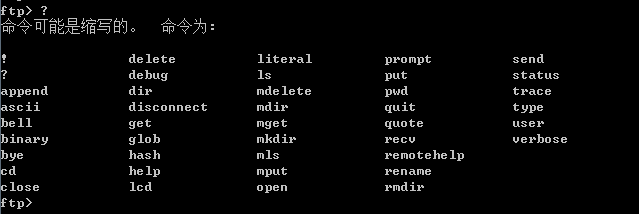
第三个问题是怎么实现ftp操作----怎么实现ftp操作这个问题有点麻烦,我们平时使用ftp命令登录后就可以输入下图中的命令进行ftp操作,对于其中少数一些命令ftplib确实支持通过sendcmd方法将命令传过去然后服务端就执行然后返回执行结果,但对于大多数命令ftplib都是通过一个方法去实现的(比如cd命令对应cwd()方法,mkdir命令对应mkd()方法等,参见1.2)
第四个问题是怎么实现文件的上传下载----文件上传下载其实也是ftp操作的一部份,如上面所说ftplib基本是每个命令都使用一个方法去实现,而对于上传的put命令对应的就是storbinary方法,对于下载的get命令对应的就是retrbinary方法。具体参数和用法可参看下边程序源代码
1.2 常用ftp命令与函数对应关系
全部方法及方法参数解析可参看官方文档
| ftp命令 | 对应的FTP对象方法 | 备注 |
| ls | nlst([pathname]) | Return a list of file names as returned by the NLST command. |
| dir | dir([pathname]) | Produce a directory listing as returned by the LIST command, printing it to standard output. |
| rename | rename(fromname, toname) | Rename file fromname on the server to toname. |
| delete | delete(filename) | Remove the file named filename from the server. |
| cd | cwd(pathname) | Set the current directory on the server. |
| mkdir | mkd(pathname) | Create a new directory on the server. |
| pwd | pwd() | Return the pathname of the current directory on the server. |
| rmdir | rmd(dirname) | Remove the directory named dirname on the server. |
| size(filename) | Request the size of the file named filename on the server. | |
| quit | quit() | Send a QUIT command to the server and close the connection. |
| close | close() | Close the connection unilaterally. |
| put | storbinary(cmd, fp, blocksize=8192, callback=None, rest=None) | Store a file in binary transfer mode. |
| get | retrbinary(cmd, callback, blocksize=8192, rest=None) | Retrieve a file in binary transfer mode. |
1.3 程序截图
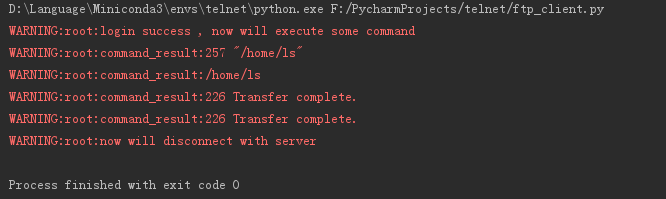
程序执行结果截图:
二、程序源代码
import logging

from ftplib import FTP

class MyFtp():

    def __init__(self):

        self.ftp_client = FTP()

    # 些函数实现ftp登录

    def ftp_login(self,host_ip,username,password):

        try:

            self.ftp_client.connect(host_ip,port=21,timeout=10)

        except :

            logging.warning('network connect time out')

            return 1001

        try:

            self.ftp_client.login(user=username, passwd=password)

        except:

            logging.warning('username or password error')

            return 1002

        return 1000

    # 此函数执行ftp命令,并打印命令执行结果

    def execute_some_command(self):

        # 通运sendcmd方法形式执行pwd命令,为使用形式统一起见不推荐使用此种形式,而且其实大多数命令都是支持这种形式的

        command_result = self.ftp_client.sendcmd('pwd')

        logging.warning('command_result:%s'% command_result)

        # 通过直接使用pwd方法执行pwd命令,推荐统一使用此种形式

        command_result = self.ftp_client.pwd()

        logging.warning('command_result:%s' % command_result)

        # 上传文件;'stor ftp_client.py'告诉服务端将上传的文件保存为ftp_client.py,open()是以二进制读方式打开本地要上传的文件

        command_result = self.ftp_client.storbinary('stor ftp_client.py',open("ftp_client.py",'rb'))

        logging.warning('command_result:%s' % command_result)

        # 下载文件;'retr .bash_profile'告诉服务端要下载服务端当前目录下的.bash_profile文件,open()是以二进制写方式打开本地要存成的文件

        command_result = self.ftp_client.retrbinary('retr .bash_profile', open('local_bash_profile', 'wb').write)

        logging.warning('command_result:%s' % command_result)

    # 此函数实现退出ftp会话

    def ftp_logout(self):

        logging.warning('now will disconnect with server')

        self.ftp_client.close()

if __name__ == '__main__':

    # 要连接的主机ip

    host_ip = '192.68.220.128'

    # 用户名

    username = 'ls'

    # 密码

    password = 'abcd1234'

    # 实例化

    my_ftp = MyFtp()

    # 如果登录成功则执行命令,然后退出

    if my_ftp.ftp_login(host_ip,username,password) == 1000:

        logging.warning('login success , now will execute some command')

        my_ftp.execute_some_command()

        my_ftp.ftp_logout()
参考:
https://docs.python.org/3/library/ftplib.html
pwd()
python3+ftplib实现ftp客户端的更多相关文章
- Python的网络编程[1] -> FTP 协议[2] -> 使用 ftplib 建立 FTP 客户端
使用 ftplib 建立 FTP 客户端 用于建立FTP Client,与 pyftplib 建立的 Server 进行通信. 快速导航 1. 模块信息 2. 建立 FTP 客户端 1. 模块信息 1 ...
- CentOS7 安装Python3,开发SocketIO 客户端
CentOS7安装Python3,开发SocketIO 客户端 参考:https://blog.csdn.net/lovefengruoqing/article/details/79284573 步骤 ...
- 【转载】HTTP/FTP客户端开发库:libwww、libcurl、libfetch
网页抓取和ftp访问是目前很常见的一个应用需要,无论是搜索引擎的爬虫,分析程序,资源获取程序,WebService等等都是需 要的,自己开发抓取库当然是最好了,不过开发需要时间和周期,使用现有的Ope ...
- 【python】FTP客户端
Python中默认安装的ftplib模块定义了FTP类,其中函数有限,可用来实现简单的ftp客户端,用于上传或下载文件,函数列举如下 ftp登陆连接 from ftplib import FTP #加 ...
- 【HTTP/FTP客户端库】
[HTTP/FTP客户端库]资料来源:http://curl.haxx.se/libcurl/competitors.html Free Software and Open Source projec ...
- 使用 Socket 通信实现 FTP 客户端程序(来自IBM)
FTP 客户端如 FlashFXP,File Zilla 被广泛应用,原理上都是用底层的 Socket 来实现.FTP 客户端与服务器端进行数据交换必须建立两个套接字,一个作为命令通道,一个作为数据通 ...
- Socket网络编程--FTP客户端
Socket网络编程--FTP客户端(1)(Windows) 已经好久没有写过博客进行分享了.具体原因,在以后说. 这几天在了解FTP协议,准备任务是写一个FTP客户端程序.直接上干货了. 0.了解F ...
- ftp客户端命令使用简记
OS:windows8.1评估版 程序和功能 tftp客户端勾选上 Win+R:运行,键入cmd,键入ftp -help 如下图: 使用ftp客户端可以做的事:将文件传送到运行FTP服务器服务(经常称 ...
- Socket网络编程--FTP客户端(1)(Windows)
已经好久没有写过博客进行分享了.具体原因,在以后说. 这几天在了解FTP协议,准备任务是写一个FTP客户端程序.直接上干货了. 0.了解FTP作用 就是一个提供一个文件的共享协议. 1.了解FTP协议 ...
随机推荐
- 无法获取未定义或 null 引用的属性“contentWindow”
在iframe 中有时候 这样使用contentWindow 会报 无法获取未定义或 null 引用的属性“contentWindow” 这种情况 我是在IE中遇到 其他浏览器一切正常. pa ...
- Python open 读写小栗子
1.样本内容 A.txt 2.上代码: f=open(r'E:\A.txt','r') boyA=[] boyB=[] count = for each_line in f: ]!='======': ...
- 【Ruby】【变量】
知识点[Ruby 中$开头的全局变量.内部变量.隐藏变量介绍] Ruby 中充满了一系列的隐藏变量,我们可以从这些预定义的全局变量中获取一些有意思的信息. 全局进程变量 $$ 表示当前运行的 ruby ...
- Codeforces Round #271 (Div. 2) F. Ant colony 线段树
F. Ant colony time limit per test 1 second memory limit per test 256 megabytes input standard input ...
- sublime3 mac : Package Control There are no packages available for installation
如下问题: 查看控制台:点击 ctrl+`打开控制台 发现是因为http://packagecontrol.io/channel_v3.json 获取失败,手动下载channel_v3.json文件, ...
- python网络编程基础之socket粘包现象
粘包现象两种 登陆 #服务端import json import socket server=socket.socket()#创建socket对象 ip_port=('127.0.0.1',8001) ...
- 对前台传过来的实体是否为空 进行为空校验的N种方法
首先定义一个注解,如下 import java.lang.annotation.ElementType; import java.lang.annotation.Retention; import j ...
- 学习笔记58—3D杯子设计
软件下载:http://www.i3done.com/ 界面如下: 3D杯子设计步骤(参考:http://www.i3done.com/news/video/402.html): 生成杯体 1.点击基 ...
- bitbucket工程改名导致 repository does not exist. fatal: Could not read from remote repository.
在bitbucket上把工程改名了,就忘了. 结果同步时报错. 先在本地查看一下 git remote -v 果然是工程的老名字 origin git@bitbucket.org:XXX/oldnam ...
- JAVA基础知识总结:十二
一.String类 字符串是一种特殊的对象,一旦被初始化就不能被改变了 字符串常量存储于常量池中 二.StringBuffer类 是一个字符串缓冲区,相当于一个容器 特点 a.可以对字符串进行增加和删 ...