
uft调用rfc接口
RFC接口函数调用:
以下代码是封装好的,为了提供给UFT工具调用,使用c#写成dll。
类型项目分成两个:
1.baseConfigModel.cs //sap配置登录信息,属性实体类
using System;

using System.Collections.Generic;

//using System.Linq;

using System.Text;

//using System.Threading.Tasks;

using SAP.Middleware.Connector;

namespace I_RFC_LIB.Model

{

    public class baseConfigModel

    {

        public string Name { get; set; } //系统名字QH5

        public string AppServerHost { get; set; }//系统ip地址

        public string SystemNumber { get; set; } //系统实例

        public string SystemID { get; set; }//系统id

        public string User { get; set; }//用户ATPSUSER

        public string Password { get; set; }//密码

        public string Client { get; set; }//客户端号800

        public string Language { get; set; } //语言zh en

        public string IFUNC { get; set; } //接口函数名

        public RfcDestination sapConfig { get; set; } //sap登录配置

        public RfcRepository rfcRepository { get; set; } //Repository对象

        public string resultConfig { get; set; } //配置结果

    }

}
2.C_RFC.cs //具体实现
using System;

using System.Collections.Generic;

//using System.Linq;

using System.Text;

using System.Reflection;

//using System.Threading.Tasks;

///**************************************************************///

using SAP.Middleware.Connector;

///引用合名空间SAP.Middleware.Connector需要引用sapnco3.0 dll

///需要framework2.0支持

///sapnco.dll

///sapnco_utils

///**************************************************************///

namespace I_RFC_LIB

{

    public class C_RFC

    {

        Model.baseConfigModel   configModel = new Model.baseConfigModel(); //实例类  登录配置属性

        /// <summary>

        /// 调用rfc接口函数

        /// </summary>

        /// <param name="headstr">包含配置信息的头</param>

        /// <param name="itemstr">接口需要参数</param>

        /// <returns></returns>

        public string invoke(string headstr,string itemstr)

        {

            string[] headArr = headstr.Split(new string[] { "@__@" }, StringSplitOptions.RemoveEmptyEntries);

            string[] itemArr = itemstr.Split(new string[] { "@__@" }, StringSplitOptions.RemoveEmptyEntries);

            #region //head属性赋值

            //rfc config

            var proValue = configModel.GetType(); //获取属性实例

            for (var i = ; i < headArr.Length; i++)

            {

                var tmpVal = headArr[i].Split(new string[] { "@_@" }, StringSplitOptions.None);

                foreach (PropertyInfo py in proValue.GetProperties())

                {

                    if (py.Name.ToUpper() == tmpVal[].ToUpper())

                    {

                        proValue.GetProperty(py.Name).SetValue(configModel, tmpVal[], null);

                    }

                }

            }

            #endregion

            if (rfc_config()) //执行配置,获取对象

            {

                IRfcFunction rfc_invoke = configModel.rfcRepository.CreateFunction(configModel.IFUNC); //调用"ZFUC_APWZ_AP_PREVIEW"

                rfc_invoke.Invoke(configModel.sapConfig); //执行函数

                #region //item传参

                for (var i = ; i < itemArr.Length; i++)

                {

                    var tmpitVal = itemArr[i].Split(new string[] { "@_@" }, StringSplitOptions.RemoveEmptyEntries);

                    rfc_invoke.SetValue(tmpitVal[], tmpitVal[]); //设置参数 (参数名,参数值)

                }

                #endregion

                //rfc_invoke.SetValue("PSPID", ""); //设置参数 项目编号

                IRfcTable rfcTable = rfc_invoke.GetTable("RETURN"); //获取内表

                string message = rfcTable.GetValue("MESSAGE").ToString();

                return message;

            }

            else

            {

                return "配置登录时出现问题,请查检配置!"+configModel.resultConfig;

            }

        }

        /// <summary>

        /// 登录配置

        /// </summary>

        /// <returns>bool</returns>

        public bool rfc_config()

        {

            try

            {

                //rfc配置

                RfcConfigParameters argsP = new RfcConfigParameters();

                argsP.Add(RfcConfigParameters.Name, configModel.Name);

                argsP.Add(RfcConfigParameters.AppServerHost, configModel.AppServerHost);

                argsP.Add(RfcConfigParameters.SystemNumber, configModel.SystemNumber);

                argsP.Add(RfcConfigParameters.SystemID, configModel.SystemID);

                argsP.Add(RfcConfigParameters.User, configModel.User);

                argsP.Add(RfcConfigParameters.Password, configModel.Password);

                argsP.Add(RfcConfigParameters.Client, configModel.Client);

                argsP.Add(RfcConfigParameters.Language, configModel.Language);

                argsP.Add(RfcConfigParameters.PoolSize, "");

                argsP.Add(RfcConfigParameters.MaxPoolSize, "");

                argsP.Add(RfcConfigParameters.IdleTimeout, "");

                //获取rfc配置

                configModel.sapConfig = RfcDestinationManager.GetDestination(argsP);

                configModel.rfcRepository = configModel.sapConfig.Repository;

            }

            catch (RfcBaseException ex)

            {

                configModel.resultConfig = ex.Message;

                return false;

            }

            return true;

        }

    }

}
3.uft调用
需要设置,程序集com可见

4、uft调用方法:
set rfc = dotnetfactory.CreateInstance("I_RFC_LIB.C_RFC","d:\\rfc.dll")
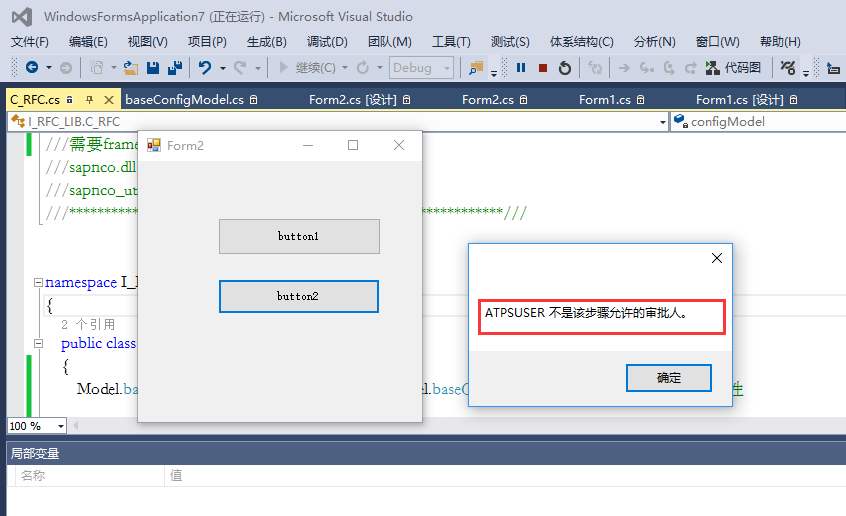
5、c#类库调用结果。接口返回“ATPSUSER不是该步骤允许的审批人”
uft调用rfc接口的更多相关文章
- SAP ABAP RFC接口通用日志工具:abap fm logger
很早之前就想写个能记录函数模块日志的通用工具,最早尝试时,没有想清楚插入代码的体积问题.在一些群友的提醒下,了解到可以用宏来处理这一问题.不过当时比较忙,就没有动笔.最近又想起这件事,花了2天完成了一 ...
- WebApi接口 - 如何在应用中调用webapi接口
很高兴能再次和大家分享webapi接口的相关文章,本篇将要讲解的是如何在应用中调用webapi接口:对于大部分做内部管理系统及类似系统的朋友来说很少会去调用别人的接口,因此可能在这方面存在一些困惑,希 ...
- C#动态调用WCF接口,两种方式任你选。
写在前面 接触WCF还是它在最初诞生之处,一个分布式应用的巨作. 从开始接触到现在断断续续,真正使用的项目少之又少,更谈不上深入WCF内部实现机制和原理去研究,最近自己做一个项目时用到了WCF. 从这 ...
- python调用zabbix接口实现Action配置
要写这篇博客其实我的内心是纠结的,老实说,我对zabbix的了解实在不多.但新公司的需求不容置疑,当我顶着有两个头大的脑袋懵懵转入运维领域时,面前摆着两百多组.上千台机器等着写入zabbix监控的需求 ...
- HttpClient Get/Post方式调用Http接口
本节摘要:本节主要分别介绍如何用get方式.post方式向http接口发送数据. preparation 1. 项目环境如下: myeclipse6.5 .tomcat5.0.system:xp.JD ...
- Atitit 通过调用gui接口杀掉360杀毒 360卫士 qq保镖等难以结束的进程(javac# php )
Atitit 通过调用gui接口杀掉360杀毒 360卫士 qq保镖等难以结束的进程(javac# php ) 1.1. 这些流氓软件使用操作系统os提供的普通api根本就杀不掉啊1 1.2. 使用 ...
- Java调用webservice接口方法
java调用webservice接口 webservice的 发布一般都是使用WSDL(web service descriptive langu ...
- php中创建和调用webservice接口示例
php中创建和调用webservice接口示例 这篇文章主要介绍了php中创建和调用webservice接口示例,包括webservice基本知识.webservice服务端例子.webservi ...
- 调用c++接口类
调用c++接口类 public class CarDeviceDll { /*对dll库进行一些初始化*/ [DllImport("IDI.dll")] public static ...
随机推荐
- 牛客多校10 D Rikka with Prefix Sum 不是数据结构
https://www.nowcoder.com/acm/contest/148/D 题意: 1e5个数,1e5个操作,操作分为: 1.区间加. 2.整个数列替换为前缀和. 3.区间查询. 查询数小于 ...
- 使用hive分析nginx访问日志方法
以下案例是使用hive分析nginx的访问日志案例,其中字段分隔通过正则表达式匹配,具体步骤如下: 日志格式: 192.168.5.139 - - [08/Jun/2017:17:09:12 +080 ...
- CSS:元素类型
元素分类 在CSS中,html中的标签元素大体分为三种不同的类型:块状元素.内联元素(又叫行内元素)和内联块状元素. 块状元素 <div>.<p>.<h1>...& ...
- qs.parse()、qs.stringify()使用方法
qs是一个npm仓库所管理的包,可通过npm install qs命令进行安装. 1. qs.parse()将URL解析成对象的形式 const Qs = require('qs'); let url ...
- RabbitMQ 内存控制 硬盘控制
RabbitMQ服务器在启动时以及abbitmqctl set_vm_memory_high_watermark fraction 执行时,会检查计算机的RAM总大小. 默认情况下下, 当 Rabbi ...
- Elastic数据迁移方法及注意事项
需求 ES集群Cluster_A里的数据(某个索引或某几个索引),需要迁移到另外一个ES集群Cluster_B中. 环境 Linux:Centos7 / Centos6.5/ Centos6.4Ela ...
- TFA(Trace File Analyzer)的安装与使用(ORACLE版本12C)
TFA是Oracle从11.2版本开始推出的一种类似diagcollection的一个oracle 集群日志收集器,而且TFA比diagcollection集中和自动化的诊断信息收集能力更强大.TFA ...
- LeetCode 884 Uncommon Words from Two Sentences 解题报告
题目要求 We are given two sentences A and B. (A sentence is a string of space separated words. Each wo ...
- Excel--数据对比方法
1.函数对比: 适用于两列数据对比 =IF(EXACT(A2,B2)=TRUE,"相同","不同") 2.快捷键对比: 适用于少数数据对比 选中对比两列数据,快 ...
- js判断开始时间不能小于结束时间
function validTime(startTime,endTime){ var arr1 = startTime.split("-"); var arr2 = e ...