
android -------- ConstraintLayout 宽高比和偏移量比(三)
前面的文章
此博文主要讲解:
app:layout_constraintHorizontal_bias
app:layout_constraintDimensionRatio
1:app:layout_constraintDimensionRatio(宽高比/百分比布局)
这个属性感觉非常实用,按照比例来分配布局
案例:
<?xml version="1.0" encoding="utf-8"?>

<android.support.constraint.ConstraintLayout xmlns:android="http://schemas.android.com/apk/res/android"

    android:layout_width="match_parent"

    android:layout_height="match_parent"

    xmlns:app="http://schemas.android.com/apk/res-auto">

    <!--

    layout_constraintDimensionRatio(宽高比)

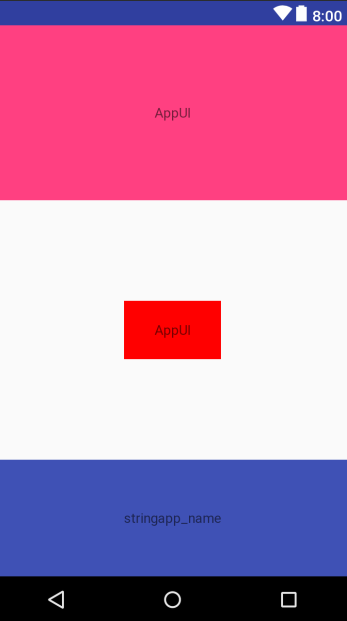
    如果想实现一个固定宽高比的顶部标题栏的话,可以将宽和高设置为 0dp,

    然后为其设置 app:layout_constraintDimensionRatio 属性,设定宽高比为16:7-->

    <TextView

        android:id="@+id/tv1"

        android:layout_width="0dp"

        android:layout_height="0dp"

        android:background="@color/colorAccent"

        app:layout_constraintDimensionRatio="h,16:8"

        android:gravity="center"

        android:text="@string/app_name"

        app:layout_constraintLeft_toLeftOf="parent"

        app:layout_constraintRight_toRightOf="parent"

        app:layout_constraintTop_toTopOf="parent"

        />

    <!--底部  app:layout_constraintDimensionRatio="w,1:3"-->

    <TextView

        android:id="@+id/tv2"

        android:layout_width="0dp"

        android:layout_height="0dp"

        android:background="@color/colorPrimary"

        app:layout_constraintDimensionRatio="w,1:3"

        android:gravity="center"

        android:text="stringapp_name"

        app:layout_constraintLeft_toLeftOf="parent"

        app:layout_constraintRight_toRightOf="parent"

        app:layout_constraintBottom_toBottomOf="parent"

        />

    <!--剩余布局居中-->

    <TextView

        android:layout_width="100dp"

        android:layout_height="0dp"

        android:gravity="center"

        android:text="@string/app_name"

        android:background="#ff0000"

        app:layout_constraintDimensionRatio="w,15:25"

        app:layout_constraintBottom_toBottomOf="parent"

        app:layout_constraintRight_toRightOf="parent"

        app:layout_constraintLeft_toLeftOf="parent"

        app:layout_constraintTop_toBottomOf="@+id/tv1"

        app:layout_constraintBottom_toTopOf="@+id/tv2"

        />

</android.support.constraint.ConstraintLayout>
app:layout_constraintDimensionRatio="h,16:8" 按照宽高的比例,也可以
app:layout_constraintDimensionRatio="w,1:3"   按照高宽的比例

效果图:
2:app:layout_constraintHorizontal_bias(偏移量比)
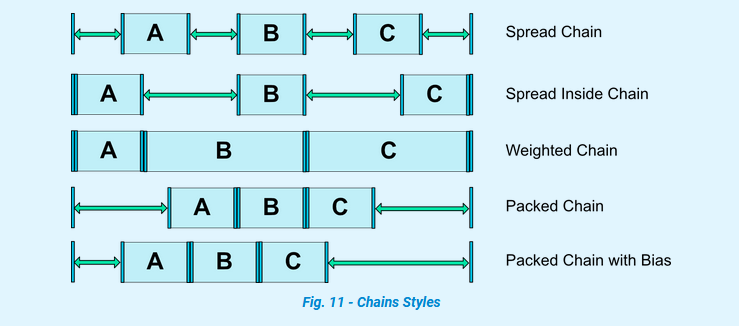
链条分为水平链条和竖直链条两种,分别用 layout_constraintHorizontal_chainStyle 和 layout_constraintVertical_chainStyle 两个属性来设置
属性值有以下三种:
- spread
- spread_inside
- packed
默认值为 spread
可以通过下图来理解各个参数值的含义
<?xml version="1.0" encoding="utf-8"?>

<android.support.constraint.ConstraintLayout xmlns:android="http://schemas.android.com/apk/res/android"

    android:layout_width="match_parent"

    android:layout_height="match_parent"

    xmlns:app="http://schemas.android.com/apk/res-auto">

    <!--

    layout_constraintHorizontal_chainStyle

    app:layout_constraintHorizontal_bias(偏移量比)等

    -->

    <!--

         https://www.jianshu.com/p/b884b8c46584

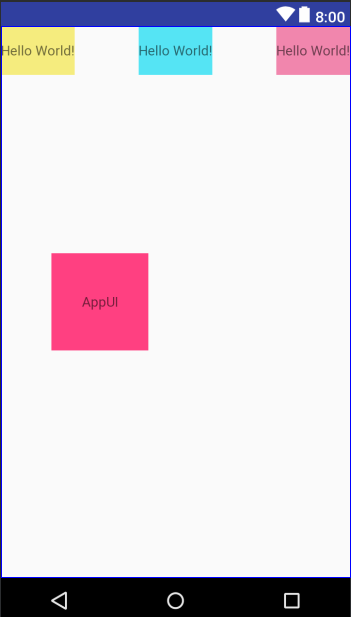
        spread:中间居中,且包含一段空格,平均间隔,4个空格

        packed:中间居中,全部挨在一起

        spread_inside: 左右贴边缘,中间居中,中间两个平分间隔

        -->

    <TextView

        android:id="@+id/tv1"

        android:layout_width="wrap_content"

        android:layout_height="50dp"

        android:background="#f5ec7e"

        android:text="Hello World!"

        android:gravity="center"

        app:layout_constraintLeft_toLeftOf="parent"

        app:layout_constraintTop_toTopOf="parent"

        app:layout_constraintHorizontal_chainStyle="spread_inside"

        app:layout_constraintHorizontal_weight="2"

        app:layout_constraintRight_toLeftOf="@+id/tv2"

        />

    <TextView

        android:id="@+id/tv2"

        android:layout_width="wrap_content"

        android:layout_height="50dp"

        android:background="#55e4f4"

        android:gravity="center"

        android:text="Hello World!"

        app:layout_constraintHorizontal_chainStyle="spread_inside"

        app:layout_constraintHorizontal_weight="1"

        app:layout_constraintLeft_toRightOf="@+id/tv1"

        app:layout_constraintRight_toLeftOf="@+id/tv3"

        app:layout_constraintTop_toTopOf="parent" />

    <TextView

        android:id="@+id/tv3"

        android:layout_width="wrap_content"

        android:layout_height="50dp"

        android:background="#f186ad"

        android:gravity="center"

        android:text="Hello World!"

        app:layout_constraintHorizontal_chainStyle="spread_inside"

        app:layout_constraintHorizontal_weight="1"

        app:layout_constraintLeft_toRightOf="@+id/tv2"

        app:layout_constraintRight_toRightOf="parent"

        app:layout_constraintTop_toTopOf="parent" />

    <!--layout_constraintHorizontal_bias  不设置就居中

        设置了则向水平偏移

        app:layout_constraintVertical_bias="0.5" 垂直中间

    -->

    <TextView

        android:layout_width="100dp"

        android:layout_height="100dp"

        android:text="@string/app_name"

        android:background="@color/colorAccent"

        app:layout_constraintLeft_toLeftOf="parent"

        app:layout_constraintRight_toRightOf="parent"

        app:layout_constraintBottom_toBottomOf="parent"

        app:layout_constraintTop_toTopOf="parent"

        app:layout_constraintHorizontal_bias="0.2"

        android:gravity="center"

        />

</android.support.constraint.ConstraintLayout>
效果图:
垂直的:
<?xml version="1.0" encoding="utf-8"?>

<android.support.constraint.ConstraintLayout xmlns:android="http://schemas.android.com/apk/res/android"

    xmlns:app="http://schemas.android.com/apk/res-auto"

    android:layout_width="match_parent"

    android:layout_height="match_parent">

    <!--垂直的比例布局 layout_constraintVertical_chainStyle-->

    <TextView

        android:id="@+id/tv1"

        android:layout_width="100dp"

        android:layout_height="0dp"

        android:background="#f5ec7e"

        android:gravity="center"

        android:text="@string/app_name"

        app:layout_constraintBottom_toTopOf="@+id/tv2"

        app:layout_constraintLeft_toLeftOf="parent"

        app:layout_constraintTop_toTopOf="parent"

        app:layout_constraintVertical_chainStyle="spread_inside"

        app:layout_constraintVertical_weight="2" />

    <TextView

        android:id="@+id/tv2"

        android:layout_width="100dp"

        android:layout_height="0dp"

        android:background="#55e4f4"

        android:gravity="center"

        android:text="Hello World!"

        app:layout_constraintBottom_toTopOf="@+id/tv3"

        app:layout_constraintLeft_toLeftOf="parent"

        app:layout_constraintTop_toBottomOf="@+id/tv1"

        app:layout_constraintVertical_chainStyle="spread_inside"

        app:layout_constraintVertical_weight="1" />

    <TextView

        android:id="@+id/tv3"

        android:layout_width="100dp"

        android:layout_height="0dp"

        android:background="#f186ad"

        android:gravity="center"

        android:text="Hello World!"

        app:layout_constraintBottom_toBottomOf="parent"

        app:layout_constraintLeft_toLeftOf="parent"

        app:layout_constraintTop_toBottomOf="@+id/tv2"

        app:layout_constraintVertical_chainStyle="spread_inside"

        app:layout_constraintVertical_weight="1" />

</android.support.constraint.ConstraintLayout>
效果图:

参考文档:
https://developer.android.google.cn/reference/android/support/constraint/ConstraintLayout#Chains
https://constraintlayout.com/basics/create_chains.html
https://www.jianshu.com/p/b884b8c46584
android -------- ConstraintLayout 宽高比和偏移量比(三)的更多相关文章
- android -------- ConstraintLayout Group和goneMargin(五)
前面的文章 ConstraintLayout 介绍 (一) ConstraintLayout约束属性 (二) ConstraintLayout 宽高比和偏移量比(三) ConstraintLayout ...
- android -------- ConstraintLayout Guideline和Barrier(四)
前面的文章 ConstraintLayout 介绍 (一) ConstraintLayout约束属性 (二) ConstraintLayout 宽高比和偏移量比(三) 此博文主要讲解:Guidelin ...
- Android OpenGL ES(四)----调整屏幕的宽高比
1.宽高比问题 我们如今相当熟悉这样一个事实,在OpenGL里,我们要渲染的一切物体都要映射到X轴和Y轴上[-1,1]的范围内,对于Z轴也一样.这个范围内的坐标被称为归一化设备坐标,其独立于屏幕实际尺 ...
- android ConstraintLayout布局
解析ConstraintLayout的性能优势 Android新特性介绍,ConstraintLayout完全解析 1.子控件的位置约束属性: layout_constraintRight_toLef ...
- Android ConstraintLayout详解(from jianshu)
Android ConstraintLayout详解 https://www.jianshu.com/p/a8b49ff64cd3 1. 概述 在本篇文章中,你会学习到有关Constraint ...
- c# winform DirectX播放器 可以任意设置宽高比 屏幕拉伸
第一步:dll引用 Microsoft.DirectX.dll Microsoft.DirectX.AudioVideoPlayback.dll 如果没有的话,可能需要安装微软的DRECTX JDK ...
- 加载的过程中图片变形了? --教你自定义自动适配图片宽高比的RatioLayout
很多同行在开发中可能会遇到这样的问题,就是在加载图片的时候会出现图片变形的问题.其实这很可能就是你的图片宽高比和图片所在容器的宽高比不匹配造成的.比如说图片的宽为200,高为100.宽高比就是2,那么 ...
- Android 之窗口小部件详解(三) 部分转载
原文地址:http://blog.csdn.net/iefreer/article/details/4626274. (一) 应用程序窗口小部件App Widgets 应用程序窗口小部件(Widget ...
- CSS实现自适应下保持宽高比
在项目中,我们可能经常使得自己设计的网页能自适应.特别是网站中的图片,经常要求在网页放大(或缩小)时,宽高同时放大(或缩小),而且不变形(即保持正常的长宽比).为了不变形,常用的方法就是设置width ...
随机推荐
- Eclipse中一个项目调用另一个项目的资源
如果一个项目A想要引用另一个项目B的资源的话,按照一下步骤进行设置: 右键点击项目A---->>>Build Path--->>>Configure Build P ...
- topcoder srm 550 div1
problem1 link 因为数据比较小,直接开一个二维数组记录哪些格子已经遍历,哪些还没有.进行模拟即可. problem2 link 模拟一些小数据,可以发现,AB的形状以及要求的区间是下面的样 ...
- Python 数据分析 - 索引和选择数据
loc,iloc,ix三者间的区别和联系 loc .loc is primarily label based, but may also be used with a boolean array. 就 ...
- Visual Studio Code 的 launch.json 解析
{ "version": "0.2.0", "configurations": [ { "name": "(g ...
- C# 中2个问号的作用。C#的??代表是什么意思
https://www.cnblogs.com/gggg/p/5867412.html 变量定义中含有一个问号,意思是这个数据类型是NullAble类型的.(NullAble意思是可以为空) 变量定义 ...
- [LightOJ 1341] Aladdin and the Flying Carpet (算数基本定理(唯一分解定理))
题目链接: https://vjudge.net/problem/LightOJ-1341 题目描述: 问有几种边长为整数的矩形面积等于a,且矩形的短边不小于b 算数基本定理的知识点:https:// ...
- .net core 问题:413 Request Entity Too Large nginx
https://stackoverflow.com/questions/38698350/increase-upload-file-size-in-asp-net-core The other ans ...
- PTA 7-2 符号配对(20 分)
7-2 符号配对(20 分) 请编写程序检查C语言源程序中下列符号是否配对:/*与*/.(与).[与].{与}. 输入格式: 输入为一个C语言源程序.当读到某一行中只有一个句点.和一个回车的时候,标志 ...
- Perl关联数组用法集锦
本文和大家重点讨论一下Perl关联数组的概念,创建Perl关联数组,从数组变量复制到Perl关联数组,元素的增删,用Perl关联数组循环等内容,相信通过本文的学习你对Perl关联数组的用法一定会有深刻 ...
- IIS上部署MVC网站,打开后ExtensionlessUrlHandler-4.0
IIS上部署MVC网站,打开后ExtensionlessUrlHandler-Integrated-4.0解决方法IIS上部署MVC网站,打开后500错误 IS上部署MVC网站,打开后Extensio ...