
gitlab8.2->8.16->8.17->9.0升级
注:不要跨过8.16升级至8.17,这样做升级过程会报错
###################################8.2升级至8.16###########################
一,停止服务:
service gitlab stop
二,备份
cd /home/git/gitlab
sudo -u git -H bundle exec rake gitlab:backup:create RAILS_ENV=production
三,更新ruby
mkdir /tmp/ruby && cd /tmp/ruby
curl --remote-name --progress https://cache.ruby-lang.org/pub/ruby/2.3/ruby-2.3.3.tar.gz
echo '1014ee699071aa2ddd501907d18cbe15399c997d ruby-2.3.3.tar.gz' | shasum -c - && tar xzf ruby-2.3.3.tar.gz
cd ruby-2.3.3
./configure --disable-install-rdoc
make
sudo make install
sudo gem install bundler --no-ri --no-rdoc
//四,更新&安装node
五,获取最新代码
cd /home/git/gitlab
sudo -u git -H git fetch --all
sudo -u git -H git checkout -- db/schema.rb
sudo -u git -H git checkout 8-16-stable
六,更新数据库等
登陆MySQL修改权限:
GRANT REFERENCES ON `gitlabhq_production`.* TO 'git'@'localhost';
cd /home/git/gitlab
sudo -u git -H bundle install --without postgres development test --deployment
sudo -u git -H bundle clean
sudo -u git -H bundle exec rake db:migrate RAILS_ENV=production
sudo -u git -H bundle exec rake assets:clean assets:precompile cache:clear RAILS_ENV=production
七,更新workhorse
cd /home/git/gitlab
sudo -u git -H bundle exec rake "gitlab:workhorse:install[/home/git/gitlab-workhorse]" RAILS_ENV=production
八,更新gitlab-shell
cd /home/git/gitlab-shell
sudo -u git -H git fetch --all --tags
sudo -u git -H git checkout v4.1.1
九,更新配置文件
cp config/gitlab.yml.example config/gitlab.yml
vim config/gitlab.yml
sudo -u git -H git config --global repack.writeBitmaps true
十,更新nginx文件
vim lib/support/nginx/gitlab-ssl
vim lib/support/nginx/gitlab
cp lib/support/nginx/gitlab /etc/nginx/conf.d/gitlab.conf
十一,SMTP配置
vim config/initializers/smtp_settings.rb ===>ActionMailer::Base.delivery_method = :smtp
十二,更新启动脚本
sudo cp lib/support/init.d/gitlab /etc/init.d/gitlab
十三,启动服务&检查
sudo service gitlab start
sudo service nginx restart
sudo -u git -H bundle exec rake gitlab:env:info RAILS_ENV=production
sudo -u git -H bundle exec rake gitlab:check RAILS_ENV=production
##################################################8.16升级至8.17##############################
一,停止服务
service gitlab stop
二,备份
三,更新ruby
ruby > 2.3 ===========》使用2.3.3
npm 2.14.12
node 4.3.0
/////////gcc 6.3.0====》不升级,会导致后续升级问题
四,获取最新代码
cd /home/git/gitlab
sudo -u git -H git fetch --all
sudo -u git -H git checkout -- db/schema.rb
sudo -u git -H git checkout 8-17-stable
五,更新lib等
sudo -u git -H bundle install --without postgres development test --deployment
sudo -u git -H bundle clean
sudo -u git -H bundle exec rake db:migrate RAILS_ENV=production
npm install --production
sudo -u git -H bundle exec rake gitlab:assets:clean gitlab:assets:compile cache:clear RAILS_ENV=production
六,更新workhorse
sudo -u git -H bundle exec rake "gitlab:workhorse:install[/home/git/gitlab-workhorse]" RAILS_ENV=production
七,更新gitlab-shell
cd /home/git/gitlab-shell
sudo -u git -H git fetch --all --tags
sudo -u git -H git checkout v4.1.1
八,更新配置文件
cd /home/git/gitlab
cd config
cp gitlab.yml.example gitlab.yml
vim gitlab.yml
九,git设置
sudo -u git -H git config --global repack.writeBitmaps true
十,nginx配置
cp lib/support/nginx/gitlab /etc/nginx/conf.d/gitlab_8.17
vim /etc/nginx/nginx.conf
十一,更新启动脚本
cd /home/git/gitlab
sudo cp lib/support/init.d/gitlab /etc/init.d/gitlab
十二,启动服务&检查运行
sudo service gitlab start
sudo service nginx restart
sudo -u git -H bundle exec rake gitlab:env:info RAILS_ENV=production
sudo -u git -H bundle exec rake gitlab:check RAILS_ENV=production
#######################################8.17升级至9.0############################
一,停止服务
service gitlab stop
二,更新ruby/node&安装yarn
ruby 更新=======》跳过 =====》见上次升级 or 上上次
更新node =====>跳过
安装yarn: ===(1.12.3)
curl --silent --location https://dl.yarnpkg.com/rpm/yarn.repo | sudo tee /etc/yum.repos.d/yarn.repo
sudo yum install yarn
三,获取新代码
cd /home/git/gitlab
sudo -u git -H git fetch --all
sudo -u git -H git checkout -- db/schema.rb
sudo -u git -H git checkout 9-0-stable
四,更新gitlab-shell
cd /home/git/gitlab-shell
sudo -u git -H git fetch --all --tags
sudo -u git -H git checkout v$(</home/git/gitlab/GITLAB_SHELL_VERSION)
五,更新workhorse
cd /home/git/gitlab-workhorse
sudo -u git -H git fetch --all --tags
sudo -u git -H git checkout v$(</home/git/gitlab/GITLAB_WORKHORSE_VERSION)
sudo -u git -H make
六,更新配置文件
cd /home/git/gitlab
cp config/gitlab.yml.example config/gitlab.yml
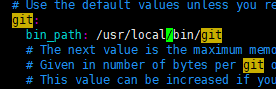

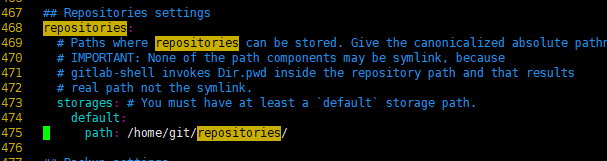
七,git配置
sudo -u git -H git config --global repack.writeBitmaps true
八,nginx配置
cp lib/support/nginx/gitlab /etc/nginx/conf.d/gitlab9.conf
vim /etc/nginx/conf.d/gitlab9.conf
vim /etc/nginx/nginx.conf
九,更新启动脚本
sudo cp lib/support/init.d/gitlab /etc/init.d/gitlab
十,更新lib等
yum install re2-devel
sudo -u git -H bundle install --without postgres development test --deployment
sudo -u git -H bundle clean
sudo -u git -H bundle exec rake db:migrate RAILS_ENV=production
mkdir -p /home/git/gitlab/node_modules/compression-webpack-plugin/node_modules
chown -R git:git /home/git/gitlab/node_modules/compression-webpack-plugin/node_modules
su - git
cd /home/git/gitlab
bundle exec rake yarn:install gitlab:assets:clean gitlab:assets:compile RAILS_ENV=production NODE_ENV=production ===>成功后回到root用户
安装gitly======>暂时跳过
十一,启动服务&监控变化
service gitlab start
service nginx restart
sudo -u git -H bundle exec rake gitlab:env:info RAILS_ENV=production
sudo -u git -H bundle exec rake gitlab:check RAILS_ENV=production
gitlab8.2->8.16->8.17->9.0升级的更多相关文章
- tensorflow 1.8, ubuntu 16.04, cuda 9.0, nvidia-390,安装踩坑指南。
被tensorflow 1.8, ubuntu 16.04, cuda 9.0, nvidia-390折磨了5天,终于上坑,留下指南,造福后人. 1.先把依赖搞清楚: tensorflow 1.8依赖 ...
- Ubuntu 16.04安装Vim8.0
Ubuntu 16.04安装Vim8.0 https://www.aliyun.com/jiaocheng/131859.html sudo add-apt-repository ppa:jonath ...
- 从CentOS 7.0升级到7.7版本
我平时都在VirtualBox上装虚拟机,方法是导入ova镜像文件,比如导入从网上下载的CentOS7-base.ova,该ova为CentOS 7.0版本,而现在最新版本为7.7,为此进入系统后第一 ...
- Caffe使用: Ubuntu 14.04(x64) 从cuda 7.0 升级到 cuda8.0
由于之前已经在Ubuntu 14.04 x64上面安装cuda7.0+caffe, 并且已经配置好,caffe也已经跑通. 但是最近需要使用Torch,而Torch对cuda的要求是8.0,因此决定对 ...
- oracle 11.2.0.1.0 升级 11.2.0.4.0 并 patch 到11.2.0.4.7
升级步骤: (1) 备份数据库 (2) 运行patchset,升级oracle 软件 (3) 准备新的ORACLE_HOME (4) 运行dbua 或者脚本升级实例 (5) ...
- Dolphin Scheduler 1.1.0升级1.2.0避坑指南
本文章经授权转载 组件介绍 Apache Dolphin Scheduler是一个分布式易扩展的可视化DAG工作流任务调度系统.致力于解决数据处理流程中错综复杂的依赖关系,使调度系统在数据处理流程中开 ...
- jackson2.5.0升级到2.7.0
开发环境:spring-mvc4.1.7.jackson2.7.0 问题描述:项目中将原来的jackson2.5.0升级到2.7.0,导致服务调用出错. mvc相关的配置文件如下: <?xml ...
- 系统补丁更新导致MVC3.0.0升级到3.0.1的问题解决
在更新了系统补丁之后,会不知觉的将MVC3.0.0升级到MVC3.0.1的问题,解决的思路如下: 1.全部MVC引用使用NuGet进行包的管理. 2.单独把MVC库抽离出来,然后放在单独的项目文件夹, ...
- 李洪强iOS开发之-环信02.1_环信 SDK 2.x到3.0升级文档
李洪强iOS开发之-环信02.1_环信 SDK 2.x到3.0升级文档 SDK 2.x 至 3.0 升级指南 环信 SDK 3.0 升级文档 3.0 中的核心类为 EMClient 类,通过 EMCl ...
- UiAutomator2.0升级填坑记
UiAutomator2.0升级填坑记 SkySeraph May. 28th 2017 Email:skyseraph00@163.com 更多精彩请直接访问SkySeraph个人站点:www.sk ...
随机推荐
- Mysql 常用调优命令总结
在工作中,经常会碰到Mysql性能问题,本文记录了调优时会用到的一些命令: 1. show full processlist\G: 显示Mysql服务器正在执行的线程.有root权限的用户可以显示所有 ...
- XDCTF网络安全大赛——Web100
打开网址 http://game1.xdctf.com:8083/f16c3b1ed800fc78e605/index.php 网页中显示了一张图片,图片名为hackkey.png: 还有一段文字: ...
- A Method for the Construction of Minimum-Redundancy Codes
A Method for the Construction of Minimum-Redundancy Codes http://compression.ru/download/articles/hu ...
- 被监测teamviewer被检测出用于商业用途
一.下载teamviewer的破解程序 下载链接 这个要付几块钱,本人付过,个人下载过,可以免费传给你们,可以留下邮箱,但是不一定及时回复. 二. 解压后将.exe放到对应的软件安装目录,运行,点击f ...
- 20165336 2017-2018-2 《Java程序设计》第4周学习总结
20165336 2017-2018-2 <Java程序设计>第4周学习总结 教材学习内容总结 第五章 使用extends来定义一个子类. Object类是所有类的祖先类. 当子类和父类不 ...
- Python开发【笔记】:从海量文件的目录中获取文件名--方法性能对比
Python获取文件名的方法性能对比 前言:平常在python中从文件夹中获取文件名的简单方法 os.system('ll /data/') 但是当文件夹中含有巨量文件时,这种方式完全是行不通 ...
- linux配置IP访问权限
允许访问vi /etc/hosts.allow添加(可以添加多行,其中“:allow”可以省率)sshd:192.168.81.*:allow #表示192.1 ...
- python time模块总结
常用函数: import time --------------------------------------------------time.time() ...
- GDB常用命令系列
本文由霸气的菠萝原创,转载请注明出处:http://www.cnblogs.com/xsln/p/gdb_instructions.html 本文为索引,请点击以下链接进行阅读: GDB调试原理——p ...
- Log4j rootLogger配置
Log4j 根配置语法 log4j.rootLogger = [ level ] , appenderName, appenderName, … 指代 把指定级别的日志信息输出到指定的一个或者多个位置 ...