
(七)CXF添加拦截器
今天开始讲下拦截器,前面大家学过servlet,struts2 都有拦截器概念,主要作用是做一些权限过滤,编码处理等;
webservice也可以加上拦截器,我们可以给webservice请求加权限判断功能;
webservice分服务端和客户端,服务端和客户端都是可以加拦截器的,无论是服务端还是客户端,都分进,出(In,Out)拦截器;
我们先来改下服务端的Server类:
package com.wishwzp.webservice;

import javax.xml.ws.Endpoint;

import org.apache.cxf.interceptor.LoggingInInterceptor;

import org.apache.cxf.interceptor.LoggingOutInterceptor;

import org.apache.cxf.jaxws.JaxWsServerFactoryBean;

import com.wishwzp.webservice.impl.HelloWorldImpl;

public class Server {

    public static void main(String[] args) {

        System.out.println("web service start");

        HelloWorld implementor = new HelloWorldImpl();

        String address = "http://192.168.0.110/helloWorld";

        //Endpoint.publish(address, implementor);  // JDK实现   暴露webservice接口

        JaxWsServerFactoryBean factoryBean = new JaxWsServerFactoryBean();

        factoryBean.setAddress(address); // 设置暴露地址

        factoryBean.setServiceClass(HelloWorld.class); // 接口类

        factoryBean.setServiceBean(implementor); // 设置实现类

        factoryBean.getInInterceptors().add(new LoggingInInterceptor()); // 添加in拦截器 日志拦截器

        factoryBean.getOutInterceptors().add(new LoggingOutInterceptor()); // 添加out拦截器

        factoryBean.create();

        System.out.println("web service started");

    }

}
这里的话,我们通过factoryBean对象可以获取拦截器组,添加进或者出拦截器,这里有个经典的拦截器,我们开发的时候经常用,就是日志拦截器,
我们可以把客户端的请求,以及服务端返回的信息打印出来,可以打印控制台,也可以打印到执行文件;这里为了演示方便,直接搞无参的拦截器,
打印到控制台;
无论是自定义的拦截器,还是CXF自带的拦截器,都必须实现Interceptor接口。
我们执行下Server类:
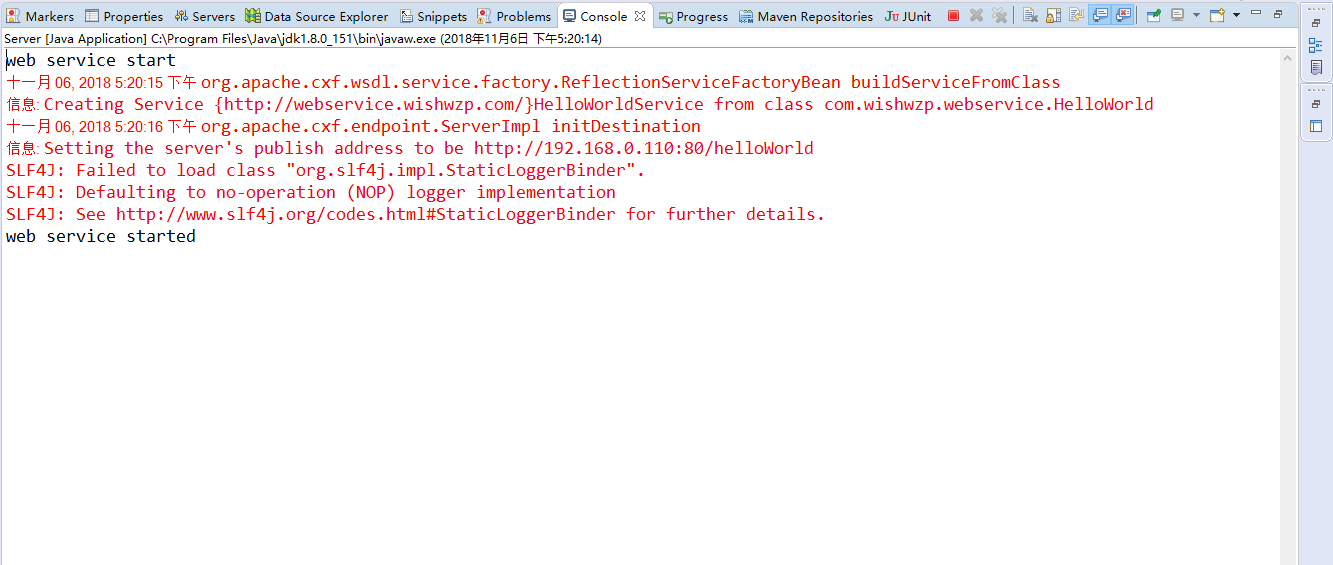
然后我们再来执行下客户端的Client类,结果:

然后我们仔细观察Server端的控制台:
web service start

十一月 06, 2018 5:20:15 下午 org.apache.cxf.wsdl.service.factory.ReflectionServiceFactoryBean buildServiceFromClass

信息: Creating Service {http://webservice.wishwzp.com/}HelloWorldService from class com.wishwzp.webservice.HelloWorld

十一月 06, 2018 5:20:16 下午 org.apache.cxf.endpoint.ServerImpl initDestination

信息: Setting the server's publish address to be http://192.168.0.110:80/helloWorld

SLF4J: Failed to load class "org.slf4j.impl.StaticLoggerBinder".

SLF4J: Defaulting to no-operation (NOP) logger implementation

SLF4J: See http://www.slf4j.org/codes.html#StaticLoggerBinder for further details.

web service started

十一月 06, 2018 5:20:50 下午 org.apache.cxf.services.HelloWorldService.HelloWorldPort.HelloWorld

信息: Inbound Message

----------------------------

ID: 1

Address: http://192.168.0.110/helloWorld?wsdl

Http-Method: GET

Content-Type:

Headers: {Accept=[text/html, image/gif, image/jpeg, *; q=.2, */*; q=.2], connection=[keep-alive], Content-Type=[null], Host=[192.168.0.110], User-Agent=[Java/1.8.0_151]}

--------------------------------------

十一月 06, 2018 5:20:51 下午 org.apache.cxf.services.HelloWorldService.HelloWorldPort.HelloWorld

信息: Inbound Message

----------------------------

ID: 2

Address: http://192.168.0.110/helloWorld

Encoding: UTF-8

Http-Method: POST

Content-Type: text/xml; charset=UTF-8

Headers: {Accept=[text/xml, multipart/related], connection=[keep-alive], Content-Length=[188], content-type=[text/xml; charset=UTF-8], Host=[192.168.0.110], SOAPAction=[""], User-Agent=[JAX-WS RI 2.2.9-b130926.1035 svn-revision#5f6196f2b90e9460065a4c2f4e30e065b245e51e]}

Payload: <?xml version="1.0" ?><S:Envelope xmlns:S="http://schemas.xmlsoap.org/soap/envelope/"><S:Body><ns2:getRoles xmlns:ns2="http://webservice.wishwzp.com/"></ns2:getRoles></S:Body></S:Envelope>

--------------------------------------

十一月 06, 2018 5:20:51 下午 org.apache.cxf.services.HelloWorldService.HelloWorldPort.HelloWorld

信息: Outbound Message

---------------------------

ID: 2

Response-Code: 200

Encoding: UTF-8

Content-Type: text/xml

Headers: {}

Payload: <soap:Envelope xmlns:soap="http://schemas.xmlsoap.org/soap/envelope/"><soap:Body><ns2:getRolesResponse xmlns:ns2="http://webservice.wishwzp.com/"><return><item><key>wishwzp</key><value><id>1</id><roleName>技术总监</roleName></value><value><id>2</id><roleName>架构师</roleName></value></item><item><key>jack</key><value><id>1</id><roleName>程序员</roleName></value></item></return></ns2:getRolesResponse></soap:Body></soap:Envelope>

--------------------------------------
这里的打印出来的就是日志信息:Inbound 进信息 Outbound 是出信息,进的时候,大家会看到有个Headers SOAP消息。后面我们可以在里面加我们的数据;
在Outbound Message里,Payload消息里我们可以找到webservice返回的数据 SOAP消息;
同理,我们在客户端也可以加进出拦截器,修改Client代码:
package com.wishwzp.webservice;

import java.util.List;

import org.apache.cxf.frontend.ClientProxy;

import org.apache.cxf.interceptor.LoggingInInterceptor;

import org.apache.cxf.interceptor.LoggingOutInterceptor;

public class Client {

    public static void main(String[] args) {

        HelloWorldService service=new HelloWorldService();

        HelloWorld helloWorld=service.getHelloWorldPort();

        org.apache.cxf.endpoint.Client client=ClientProxy.getClient(helloWorld);

        client.getInInterceptors().add(new LoggingInInterceptor()); // 添加in拦截器 日志拦截器

        client.getOutInterceptors().add(new LoggingOutInterceptor()); // 添加out拦截器

        //System.out.println(helloWorld.say("wishwzp测试"));

//        User user=new User();

//        user.setUserName("jack");

//        user.setPassword("123456");

//        List<Role> roleList=helloWorld.getRoleByUser(user);

//        for(Role role:roleList){

//            System.out.println(role.getId()+","+role.getRoleName());

//        }

        MyRoleArray array=helloWorld.getRoles();

        List<MyRole> roleList=array.item;

        for(int i=0;i<roleList.size();i++){

            MyRole my=roleList.get(i);

            System.out.print(my.key+":");

            for(Role r:my.value){

                System.out.print(r.getId()+","+r.getRoleName()+" ");

            }

            System.out.println();

        }

    }

}
这里的话,我们用到了ClientProxy,客户端代理。所以也是需要导入对应cxfjar包的,这里我直接将pox.xml的复制到client项目中
  <dependencies>

      <dependency>

        <groupId>org.apache.cxf</groupId>

        <artifactId>cxf-core</artifactId>

        <version>3.1.5</version>

    </dependency>

      <dependency>

        <groupId>org.apache.cxf</groupId>

        <artifactId>cxf-rt-frontend-jaxws</artifactId>

        <version>3.1.5</version>

    </dependency>

    <dependency>

        <groupId>org.apache.cxf</groupId>

        <artifactId>cxf-rt-transports-http-jetty</artifactId>

        <version>3.1.5</version>

    </dependency>

  </dependencies>
我们请求的时候,可以看到控制台的日志信息:
十一月 06, 2018 5:28:44 下午 org.apache.cxf.wsdl.service.factory.ReflectionServiceFactoryBean buildServiceFromWSDL

信息: Creating Service {http://webservice.wishwzp.com/}HelloWorldService from WSDL: http://192.168.0.110/helloWorld?wsdl

十一月 06, 2018 5:28:46 下午 org.apache.cxf.services.HelloWorldService.HelloWorldPort.HelloWorld

信息: Outbound Message

---------------------------

ID: 1

Address: http://192.168.0.110/helloWorld

Encoding: UTF-8

Http-Method: POST

Content-Type: text/xml

Headers: {Accept=[*/*], SOAPAction=[""]}

Payload: <soap:Envelope xmlns:soap="http://schemas.xmlsoap.org/soap/envelope/"><soap:Body><ns2:getRoles xmlns:ns2="http://webservice.wishwzp.com/"/></soap:Body></soap:Envelope>

--------------------------------------

十一月 06, 2018 5:28:46 下午 org.apache.cxf.services.HelloWorldService.HelloWorldPort.HelloWorld

信息: Inbound Message

----------------------------

ID: 1

Response-Code: 200

Encoding: UTF-8

Content-Type: text/xml; charset=UTF-8

Headers: {content-type=[text/xml; charset=UTF-8], Date=[Tue, 06 Nov 2018 09:28:46 GMT], Server=[Jetty(9.2.11.v20150529)], transfer-encoding=[chunked]}

Payload: <soap:Envelope xmlns:soap="http://schemas.xmlsoap.org/soap/envelope/"><soap:Body><ns2:getRolesResponse xmlns:ns2="http://webservice.wishwzp.com/"><return><item><key>wishwzp</key><value><id>1</id><roleName>技术总监</roleName></value><value><id>2</id><roleName>架构师</roleName></value></item><item><key>jack</key><value><id>1</id><roleName>程序员</roleName></value></item></return></ns2:getRolesResponse></soap:Body></soap:Envelope>

--------------------------------------

wishwzp:1,技术总监 2,架构师

jack:1,程序员
这里也是出进的日志信息,和上面那个类似;
OK到这里的话,添加拦截器已经讲完了;
(七)CXF添加拦截器的更多相关文章
- CXF添加拦截器和自定义拦截器
前面讲了如何采用CXF开发webservice,现在来讲如何添加拦截器和自定义拦截器. 服务端代码: HelloWorld implementor=new HelloWorldImpl(); Stri ...
- 使用CXF为webservice添加拦截器
拦截器分为Service端和Client端 拦截器是在发送soap消息包的某一个时机拦截soap消息包,对soap消息包的数据进行分析或处理.分为CXF自带的拦截器和自定义的拦截器 1.Servi ...
- (八)CXF之用spring添加拦截器
一.案例 本章案例是基于CXF之自定义拦截器基础之上改造的,目的是在服务端中用spring添加拦截器 配置web.xml <?xml version="1.0" encodi ...
- (五)CXF之添加拦截器
一.需求分析 webService中的拦截器类似于servlet的Filter过滤器.一般用于调用服务前后先调用拦截器的方法. 二.案例 本章案例是基于上一章节的基础上添加拦截器的 2.1 服务端添加 ...
- CXF之五 拦截器Interceptor
拦截器(Interceptor)是CXF功能最主要的扩展点,可以在不对核心模块进行修改的情况下,动态添加很多功能.拦截器和JAX-WS Handler.Filter的功能类似,当服务被调用时,就会创建 ...
- 【WebService】WebService之CXF的拦截器(五)
CXF拦截器介绍 CXF拦截器是功能的主要实现单元,也是主要的扩展点,可以在不对核心模块进行修改的情况下,动态添加功能.当服务被调用时,会经过多个拦截器链(Interceptor Chain)处理,拦 ...
- WebService学习总结(五)--CXF的拦截器
拦截器是Cxf的基础,Cxf中很多的功能都是由内置的拦截器来实现的,拦截器在Cxf中由Interceptor表示.拦截器的作用类似axis2中handle.Cxf的拦截器包括入拦截器和出拦截器,所有的 ...
- spring boot 添加拦截器
构建一个spring boot项目. 添加拦截器需要添加一个configuration @Configuration @ComponentScan(basePackageClasses = Appli ...
- javaweb添加拦截器
js请求后台代码添加拦截器: package com.ctzj.biz.isale.deploy.controller; import java.io.IOException; import java ...
随机推荐
- Kubernetes Ingress管理
目录 Ingress介绍 1.Pod漂移问题 2.端口管理问题 3.域名分配及动态更新问题 Nginx Ingress配置 1.部署默认后端 2.部署Ingress Controller 3.部署In ...
- es6小记
let, const, class, extends, super, arrow functions, template string, destructuring, default, rest ar ...
- Hadoop集群-HDFS集群中大数据运维常用的命令总结
Hadoop集群-HDFS集群中大数据运维常用的命令总结 作者:尹正杰 版权声明:原创作品,谢绝转载!否则将追究法律责任. 本篇博客会简单涉及到滚动编辑,融合镜像文件,目录的空间配额等运维操作简介.话 ...
- shell中使用>/dev/null 2>&1 丢弃信息
在一些Shell脚本中,特别是Crontab的脚本中,经常会看到 >/dev/null 2>&1这样的写法. 其实这个很好理解.我们分两部分解释. 1. >/dev/nul ...
- Python基础【day03】:字典(一)
本节内容 简述 语法 字典的使用 字典内置方法 一.简述 字典是Python中的又一种数据结构,它是通过key-value的数据类型,跟我们小时候用的新华字典差不多,通过key去访问value 二.语 ...
- Codeforces 590D Top Secret Task
D. Top Secret Task time limit per test 3 seconds memory limit per test 256 megabytes input standard ...
- Spring 学习04
一.上节内容回顾 1 基于aspectj的注解aop操作 2 spring的jdbcTemplate操作 (1)实现crud操作 - 添加.修改.删除update方法 - 查询 -- 查询某个值 qu ...
- 简易selenium自动化测试框架(Python)
最近空闲时间在探索Selenium的自动化测试,简单的写了一个小框架来测试公司的一个web产品.该框架包括以下模块: 1. Test case编写模式(page模式,参考之前的博文http://www ...
- MIPS指令学习二
1.MIPS寻址方式 MIPS架构的寻址模式有寄存器寻址.立即数寻址.寄存器相对寻址和PC相对寻址4种,其中寄存器相对寻址.PC相对寻址介绍如下: 1.1.寄存器相对寻址 这种寻址模式主要被加载/存储 ...
- Linux - DDOS检测
netstat netstat -na #显示所有连接到服务器的活跃的网络连接 netstat -an | grep : | sort # 只显示连接到80段口的活跃的网络连接,80是http端口, ...