
buntu14.04和16.04官方默认更新源sources.list和第三方源推荐(干货!)转
配置完成后:
sudo apt-get update
安装和删除软件:
sudo apt-get install
sudo apt-get remove
buntu14.04和16.04官方默认更新源sources.list和第三方源推荐(干货!)
写在前面:笔者由于还在学校学习,学校没有开发给Linux用的上网客户端,所以只能用在windows系统中通过安装虚拟机运行linux比较方便,但没有外网,只有学校的教育网,所以我需要将ubuntu的默认源修改为教育网中的资源才可以完美运行ubuntu,当然这个教程也适用于修改为非教育源。
- 第一步,备份官方的默认源
避免自己手贱操作失误,重装系统太费时间
cp /etc/apt/sources.list /etc/apt/sources.list.bak 此命令是备份该官方源文件
Ubuntu 14.04.4官方默认更新源sources.list

# deb cdrom:[Ubuntu 14.04.4 LTS _Trusty Tahr_ - Release amd64 (20160217.1)]/ trusty main restricted

# See http://help.ubuntu.com/community/UpgradeNotes for how to upgrade to

# newer versions of the distribution.

deb http://cn.archive.ubuntu.com/ubuntu/ trusty main restricted

deb-src http://cn.archive.ubuntu.com/ubuntu/ trusty main restricted

## Major bug fix updates produced after the final release of the

## distribution.

deb http://cn.archive.ubuntu.com/ubuntu/ trusty-updates main restricted

deb-src http://cn.archive.ubuntu.com/ubuntu/ trusty-updates main restricted

## N.B. software from this repository is ENTIRELY UNSUPPORTED by the Ubuntu

## team. Also, please note that software in universe WILL NOT receive any

## review or updates from the Ubuntu security team.

deb http://cn.archive.ubuntu.com/ubuntu/ trusty universe

deb-src http://cn.archive.ubuntu.com/ubuntu/ trusty universe

deb http://cn.archive.ubuntu.com/ubuntu/ trusty-updates universe

deb-src http://cn.archive.ubuntu.com/ubuntu/ trusty-updates universe

## N.B. software from this repository is ENTIRELY UNSUPPORTED by the Ubuntu

## team, and may not be under a free licence. Please satisfy yourself as to

## your rights to use the software. Also, please note that software in

## multiverse WILL NOT receive any review or updates from the Ubuntu

## security team.

deb http://cn.archive.ubuntu.com/ubuntu/ trusty multiverse

deb-src http://cn.archive.ubuntu.com/ubuntu/ trusty multiverse

deb http://cn.archive.ubuntu.com/ubuntu/ trusty-updates multiverse

deb-src http://cn.archive.ubuntu.com/ubuntu/ trusty-updates multiverse

## N.B. software from this repository may not have been tested as

## extensively as that contained in the main release, although it includes

## newer versions of some applications which may provide useful features.

## Also, please note that software in backports WILL NOT receive any review

## or updates from the Ubuntu security team.

deb http://cn.archive.ubuntu.com/ubuntu/ trusty-backports main restricted universe multiverse

deb-src http://cn.archive.ubuntu.com/ubuntu/ trusty-backports main restricted universe multiverse

deb http://security.ubuntu.com/ubuntu trusty-security main restricted

deb-src http://security.ubuntu.com/ubuntu trusty-security main restricted

deb http://security.ubuntu.com/ubuntu trusty-security universe

deb-src http://security.ubuntu.com/ubuntu trusty-security universe

deb http://security.ubuntu.com/ubuntu trusty-security multiverse

deb-src http://security.ubuntu.com/ubuntu trusty-security multiverse

## Uncomment the following two lines to add software from Canonical's

## 'partner' repository.

## This software is not part of Ubuntu, but is offered by Canonical and the

## respective vendors as a service to Ubuntu users.

# deb http://archive.canonical.com/ubuntu trusty partner

# deb-src http://archive.canonical.com/ubuntu trusty partner

## This software is not part of Ubuntu, but is offered by third-party

## developers who want to ship their latest software.

deb http://extras.ubuntu.com/ubuntu trusty main

deb-src http://extras.ubuntu.com/ubuntu trusty main
Ubuntu 16.04官方默认更新源sources.list
#deb cdrom:[Ubuntu 16.04.1 LTS _Xenial Xerus_ - Release amd64 (20160719)]/ xenial main restricted

# See http://help.ubuntu.com/community/UpgradeNotes for how to upgrade to

# newer versions of the distribution.

deb http://cn.archive.ubuntu.com/ubuntu/ xenial main restricted

# deb-src http://cn.archive.ubuntu.com/ubuntu/ xenial main restricted

## Major bug fix updates produced after the final release of the

## distribution.

deb http://cn.archive.ubuntu.com/ubuntu/ xenial-updates main restricted

# deb-src http://cn.archive.ubuntu.com/ubuntu/ xenial-updates main restricted

## N.B. software from this repository is ENTIRELY UNSUPPORTED by the Ubuntu

## team, and may not be under a free licence. Please satisfy yourself as to

## your rights to use the software. Also, please note that software in

## universe WILL NOT receive any review or updates from the Ubuntu security

## team.

deb http://cn.archive.ubuntu.com/ubuntu/ xenial universe

# deb-src http://cn.archive.ubuntu.com/ubuntu/ xenial universe

deb http://cn.archive.ubuntu.com/ubuntu/ xenial-updates universe

# deb-src http://cn.archive.ubuntu.com/ubuntu/ xenial-updates universe
- 第二步,修改官方源为第三方源
sudo vim /etc/apt/sources.list 申请root权限修改该文件(sudo)
附赠网上多数人推荐的第三方源:
清华源ubuntu清华源

- 中科大源:
deb http://mirrors.ustc.edu.cn/ubuntu/ precise-updates main restricted

deb-src http://mirrors.ustc.edu.cn/ubuntu/ precise-updates main restricted

deb http://mirrors.ustc.edu.cn/ubuntu/ precise universe

deb-src http://mirrors.ustc.edu.cn/ubuntu/ precise universe

deb http://mirrors.ustc.edu.cn/ubuntu/ precise-updates universe

deb-src http://mirrors.ustc.edu.cn/ubuntu/ precise-updates universe

deb http://mirrors.ustc.edu.cn/ubuntu/ precise multiverse

deb-src http://mirrors.ustc.edu.cn/ubuntu/ precise multiverse

deb http://mirrors.ustc.edu.cn/ubuntu/ precise-updates multiverse

deb-src http://mirrors.ustc.edu.cn/ubuntu/ precise-updates multiverse

deb http://mirrors.ustc.edu.cn/ubuntu/ precise-backports main restricted universe multiverse

deb-src http://mirrors.ustc.edu.cn/ubuntu/ precise-backports main restricted universe multiverse

deb http://security.ubuntu.com/ubuntu precise-security main restricted

deb-src http://security.ubuntu.com/ubuntu precise-security main restricted

deb http://security.ubuntu.com/ubuntu precise-security universe

deb-src http://security.ubuntu.com/ubuntu precise-security universe

deb http://security.ubuntu.com/ubuntu precise-security multiverse

deb-src http://security.ubuntu.com/ubuntu precise-security multiverse
- 搜狐源
deb http://mirrors.sohu.com/ubuntu/ precise-updates main restricted

deb-src http://mirrors.sohu.com/ubuntu/ precise-updates main restricted

deb http://mirrors.sohu.com/ubuntu/ precise universe

deb-src http://mirrors.sohu.com/ubuntu/ precise universe

deb http://mirrors.sohu.com/ubuntu/ precise-updates universe

deb-src http://mirrors.sohu.com/ubuntu/ precise-updates universe

deb http://mirrors.sohu.com/ubuntu/ precise multiverse

deb-src http://mirrors.sohu.com/ubuntu/ precise multiverse

deb http://mirrors.sohu.com/ubuntu/ precise-updates multiverse

deb-src http://mirrors.sohu.com/ubuntu/ precise-updates multiverse

deb http://mirrors.sohu.com/ubuntu/ precise-backports main restricted universe multiverse

deb-src http://mirrors.sohu.com/ubuntu/ precise-backports main restricted universe multiverse
- 网易源
deb http://mirrors.163.com/ubuntu/ precise-updates main restricted

deb-src http://mirrors.163.com/ubuntu/ precise-updates main restricted

deb http://mirrors.163.com/ubuntu/ precise universe

deb-src http://mirrors.163.com/ubuntu/ precise universe

deb http://mirrors.163.com/ubuntu/ precise-updates universe

deb-src http://mirrors.163.com/ubuntu/ precise-updates universe

deb http://mirrors.163.com/ubuntu/ precise multiverse

deb-src http://mirrors.163.com/ubuntu/ precise multiverse

deb http://mirrors.163.com/ubuntu/ precise-updates multiverse

deb-src http://mirrors.163.com/ubuntu/ precise-updates multiverse

deb http://mirrors.163.com/ubuntu/ precise-backports main restricted universe multiverse

deb-src http://mirrors.163.com/ubuntu/ precise-backports main restricted universe multiverse
阿里云
# deb cdrom:[Ubuntu 16.04 LTS _Xenial Xerus_ - Release amd64 (20160420.1)]/ xenial main restricted

deb-src http://archive.ubuntu.com/ubuntu xenial main restricted #Added by software-properties

deb http://mirrors.aliyun.com/ubuntu/ xenial main restricted

deb-src http://mirrors.aliyun.com/ubuntu/ xenial main restricted multiverse universe #Added by software-properties

deb http://mirrors.aliyun.com/ubuntu/ xenial-updates main restricted

deb-src http://mirrors.aliyun.com/ubuntu/ xenial-updates main restricted multiverse universe #Added by software-properties

deb http://mirrors.aliyun.com/ubuntu/ xenial universe

deb http://mirrors.aliyun.com/ubuntu/ xenial-updates universe

deb http://mirrors.aliyun.com/ubuntu/ xenial multiverse

deb http://mirrors.aliyun.com/ubuntu/ xenial-updates multiverse

deb http://mirrors.aliyun.com/ubuntu/ xenial-backports main restricted universe multiverse

deb-src http://mirrors.aliyun.com/ubuntu/ xenial-backports main restricted universe multiverse #Added by software-properties

deb http://archive.canonical.com/ubuntu xenial partner

deb-src http://archive.canonical.com/ubuntu xenial partner

deb http://mirrors.aliyun.com/ubuntu/ xenial-security main restricted

deb-src http://mirrors.aliyun.com/ubuntu/ xenial-security main restricted multiverse universe #Added by software-properties

deb http://mirrors.aliyun.com/ubuntu/ xenial-security universe

deb http://mirrors.aliyun.com/ubuntu/ xenial-security multiverse
大家,有时候,需要把http改成https
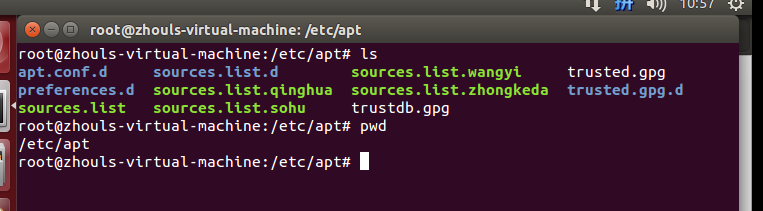
然后,大家可以像我这样,来做好备份,有时候,会因为网络问题,需要用到不同的源,好切换!
/etc/apt/sources.list (比如,这是官方的源)
/etc/apt/sources.list.qinghua (比如,这是清华的源)
/etc/apt/sources.list.zhongkeda (比如,这是中科大的源)
/etc/apt/sources.list.sohu (比如,这是搜狐的源)
/etc/apt/sources.list.wangyi (比如,这是网易的源)
然后,需要用到哪个了,在比如,我需要用到清华源,则,
mv sources.list.qinghua sources.list
然后,把官方的源,暂时改为
mv sources.list sources.list.bak
buntu14.04和16.04官方默认更新源sources.list和第三方源推荐(干货!)转的更多相关文章
- Ubuntu14.04和16.04官方默认更新源sources.list和第三方源推荐(干货!)
不多说,直接上干货! 写在前面:笔者由于还在学校学习,学校没有开发给Linux用的上网客户端,所以只能用在windows系统中通过安装虚拟机运行linux比较方便,但没有外网,只有学校的教育网,所以我 ...
- Ubuntu 14.04.4官方默认更新源sources.list
Ubuntu 14.04.4官方默认更新源sources.list # deb cdrom:[Ubuntu LTS _Trusty Tahr_ - Release amd64 (20160217.1) ...
- Ubuntu18.04更换官方默认更新源sources.list
⒈备份官方默认更新源文件 cp /etc/apt/sources.list /etc/apt/sources.list.bak 备份官方更新源文件 ⒉编辑 1.打开 vi /etc/apt/sourc ...
- Change default network name (ens33) to old “eth0” on Ubuntu 18.04 / Ubuntu 16.04
Change default network name (ens33) to old “eth0” on Ubuntu 18.04 / Ubuntu 16.04 By Raj Last updated ...
- linux: ubuntu 14.04 和16.04 快速下载
由于官网服务器在国外,下载速度奇慢,所以我们可以利用阿里云镜像下载ubuntuubuntu 14.04:http://mirrors.aliyun.com/ubuntu-releases/14.04/ ...
- 阿里云,腾讯云,等等的云 Ubuntu14.04升级16.04
16.04有很多好处.在此不说了 这几天来回折腾了各种的云,然后发现国内的都没有16.04 但是ubuntu可以直接在线升级 在此记下来升级的过程 不管是腾讯云也好 阿里云也好,或者别的什么云,只要是 ...
- Ubuntu14.04或16.04下安装JDK1.8+Scala+Hadoop2.7.3+Spark2.0.2
为了将Hadoop和Spark的安装简单化,今日写下此帖. 首先,要看手头有多少机器,要安装伪分布式的Hadoop+Spark还是完全分布式的,这里分别记录. 1. 伪分布式安装 伪分布式的Hadoo ...
- Upgrade Bash on Ubuntu from 14.04 to 16.04
过程 1 sudo -S apt-mark hold sudo sudo -S apt-mark hold procps sudo -S apt-mark hold strace 2 sudo do- ...
- Ubuntu14.04或16.04下普通用户的root权限获得
Ubuntu系统默认不允许使用root登录,因此初始root帐户是不能使用的,需要在普通账户下利用sudo权限修改root密码.然后以root帐户进行相关操作. 具体操作: 1.打开系统,用普通帐户登 ...
随机推荐
- mysql Mac终端操作
1.启动mysql :brew services start mysql 2.登陆mysql : mysql -u root -p mysql 命令. -u 后面接用户名 root超级管理 ...
- python(nmap模块、多线程模块)
http://xael.org/pages/python-nmap-en.html nmap模块 http://www.tutorialspoint.com/python/python_m ...
- Oracle——存储过程简单入门实例
1.连接plsql developer,打开一个SQL Window 2.SQL Window中创建表user_info -- Create table create table USER_INFO ...
- [C++]数组指针与指针数组
//声明: 1.&----取地址运算符 eg: int m = 1; int *p = &m;//(*p) == m的地址 == &m; 2.*----间接访问运算符 eg: ...
- hashMap之jdk1.7和jdk1.8
参考链接: http://allenwu.itscoder.com/hashmap-analyse https://tech.meituan.com/java-hashmap.html
- 2018-2019-2 网络对抗技术 20165320 Exp1 PC平台逆向破解
学到的新知识总结 管道:符号为| 前一个进程的输出直接作为后一个进程的输入 输出重定向:符号为> 将内容定向输入到文件中 perl:一门解释性语言,不需要预编译,直接在命令行中使用.常与输出重定 ...
- 发送http请求的方法
在http/1.1 协议中,定义了8种发送http请求的方法 get post options head put delete trace connect patch. 根据http协议的设计初衷,不 ...
- 配置使用OpenCV静态链接库
配置opencv静态链接库需要用到:staticlib 在配置链接器->附加库目录时应该为staticlib的路径.同理若是利用动态链接库则只需要lib的路径: 动态链接库则使用lib,然而在使 ...
- kset学习demo以及Oops反汇编objdump调试例子【原创】
写一个main.c gcc -c -g main.c objdump -S main.o > b.txt arm-none-linux-gnueabi-gcc -c -g a.c arm-non ...
- exp自动备份在bat中不执行
在命令行前加cd c:\users\...... 先定位进入可以exp的目录下,再执行exp