
Ubuntu14.04和16.04官方默认更新源sources.list和第三方源推荐(干货!)
不多说,直接上干货!
写在前面:笔者由于还在学校学习,学校没有开发给Linux用的上网客户端,所以只能用在windows系统中通过安装虚拟机运行linux比较方便,但没有外网,只有学校的教育网,所以我需要将ubuntu的默认源修改为教育网中的资源才可以完美运行ubuntu,当然这个教程也适用于修改为非教育源。
- 第一步,备份官方的默认源
避免自己手贱操作失误,重装系统太费时间
cp /etc/apt/sources.list /etc/apt/sources.list.bak 此命令是备份该官方源文件
Ubuntu 14.04.4官方默认更新源sources.list
# deb cdrom:[Ubuntu 14.04. LTS _Trusty Tahr_ - Release amd64 (20160217.1)]/ trusty main restricted

# See http://help.ubuntu.com/community/UpgradeNotes for how to upgrade to

# newer versions of the distribution.

deb http://cn.archive.ubuntu.com/ubuntu/ trusty main restricted

deb-src http://cn.archive.ubuntu.com/ubuntu/ trusty main restricted

## Major bug fix updates produced after the final release of the

## distribution.

deb http://cn.archive.ubuntu.com/ubuntu/ trusty-updates main restricted

deb-src http://cn.archive.ubuntu.com/ubuntu/ trusty-updates main restricted

## N.B. software from this repository is ENTIRELY UNSUPPORTED by the Ubuntu

## team. Also, please note that software in universe WILL NOT receive any

## review or updates from the Ubuntu security team.

deb http://cn.archive.ubuntu.com/ubuntu/ trusty universe

deb-src http://cn.archive.ubuntu.com/ubuntu/ trusty universe

deb http://cn.archive.ubuntu.com/ubuntu/ trusty-updates universe

deb-src http://cn.archive.ubuntu.com/ubuntu/ trusty-updates universe

## N.B. software from this repository is ENTIRELY UNSUPPORTED by the Ubuntu

## team, and may not be under a free licence. Please satisfy yourself as to

## your rights to use the software. Also, please note that software in

## multiverse WILL NOT receive any review or updates from the Ubuntu

## security team.

deb http://cn.archive.ubuntu.com/ubuntu/ trusty multiverse

deb-src http://cn.archive.ubuntu.com/ubuntu/ trusty multiverse

deb http://cn.archive.ubuntu.com/ubuntu/ trusty-updates multiverse

deb-src http://cn.archive.ubuntu.com/ubuntu/ trusty-updates multiverse

## N.B. software from this repository may not have been tested as

## extensively as that contained in the main release, although it includes

## newer versions of some applications which may provide useful features.

## Also, please note that software in backports WILL NOT receive any review

## or updates from the Ubuntu security team.

deb http://cn.archive.ubuntu.com/ubuntu/ trusty-backports main restricted universe multiverse

deb-src http://cn.archive.ubuntu.com/ubuntu/ trusty-backports main restricted universe multiverse

deb http://security.ubuntu.com/ubuntu trusty-security main restricted

deb-src http://security.ubuntu.com/ubuntu trusty-security main restricted

deb http://security.ubuntu.com/ubuntu trusty-security universe

deb-src http://security.ubuntu.com/ubuntu trusty-security universe

deb http://security.ubuntu.com/ubuntu trusty-security multiverse

deb-src http://security.ubuntu.com/ubuntu trusty-security multiverse

## Uncomment the following two lines to add software from Canonical's

## 'partner' repository.

## This software is not part of Ubuntu, but is offered by Canonical and the

## respective vendors as a service to Ubuntu users.

# deb http://archive.canonical.com/ubuntu trusty partner

# deb-src http://archive.canonical.com/ubuntu trusty partner

## This software is not part of Ubuntu, but is offered by third-party

## developers who want to ship their latest software.

deb http://extras.ubuntu.com/ubuntu trusty main

deb-src http://extras.ubuntu.com/ubuntu trusty main
Ubuntu 16.04官方默认更新源sources.list
#deb cdrom:[Ubuntu 16.04. LTS _Xenial Xerus_ - Release amd64 ()]/ xenial main restricted

# See http://help.ubuntu.com/community/UpgradeNotes for how to upgrade to

# newer versions of the distribution.

deb http://cn.archive.ubuntu.com/ubuntu/ xenial main restricted

# deb-src http://cn.archive.ubuntu.com/ubuntu/ xenial main restricted

## Major bug fix updates produced after the final release of the

## distribution.

deb http://cn.archive.ubuntu.com/ubuntu/ xenial-updates main restricted

# deb-src http://cn.archive.ubuntu.com/ubuntu/ xenial-updates main restricted

## N.B. software from this repository is ENTIRELY UNSUPPORTED by the Ubuntu

## team, and may not be under a free licence. Please satisfy yourself as to

## your rights to use the software. Also, please note that software in

## universe WILL NOT receive any review or updates from the Ubuntu security

## team.

deb http://cn.archive.ubuntu.com/ubuntu/ xenial universe

# deb-src http://cn.archive.ubuntu.com/ubuntu/ xenial universe

deb http://cn.archive.ubuntu.com/ubuntu/ xenial-updates universe

# deb-src http://cn.archive.ubuntu.com/ubuntu/ xenial-updates universe
- 第二步,修改官方源为第三方源
sudo vim /etc/apt/sources.list 申请root权限修改该文件(sudo)
附赠网上多数人推荐的第三方源:
清华源ubuntu清华源

- 中科大源:
deb http://mirrors.ustc.edu.cn/ubuntu/ precise-updates main restricted

deb-src http://mirrors.ustc.edu.cn/ubuntu/ precise-updates main restricted

deb http://mirrors.ustc.edu.cn/ubuntu/ precise universe

deb-src http://mirrors.ustc.edu.cn/ubuntu/ precise universe

deb http://mirrors.ustc.edu.cn/ubuntu/ precise-updates universe

deb-src http://mirrors.ustc.edu.cn/ubuntu/ precise-updates universe

deb http://mirrors.ustc.edu.cn/ubuntu/ precise multiverse

deb-src http://mirrors.ustc.edu.cn/ubuntu/ precise multiverse

deb http://mirrors.ustc.edu.cn/ubuntu/ precise-updates multiverse

deb-src http://mirrors.ustc.edu.cn/ubuntu/ precise-updates multiverse

deb http://mirrors.ustc.edu.cn/ubuntu/ precise-backports main restricted universe multiverse

deb-src http://mirrors.ustc.edu.cn/ubuntu/ precise-backports main restricted universe multiverse

deb http://security.ubuntu.com/ubuntu precise-security main restricted

deb-src http://security.ubuntu.com/ubuntu precise-security main restricted

deb http://security.ubuntu.com/ubuntu precise-security universe

deb-src http://security.ubuntu.com/ubuntu precise-security universe

deb http://security.ubuntu.com/ubuntu precise-security multiverse

deb-src http://security.ubuntu.com/ubuntu precise-security multiverse
- 搜狐源
deb http://mirrors.sohu.com/ubuntu/ precise-updates main restricted

deb-src http://mirrors.sohu.com/ubuntu/ precise-updates main restricted

deb http://mirrors.sohu.com/ubuntu/ precise universe

deb-src http://mirrors.sohu.com/ubuntu/ precise universe

deb http://mirrors.sohu.com/ubuntu/ precise-updates universe

deb-src http://mirrors.sohu.com/ubuntu/ precise-updates universe

deb http://mirrors.sohu.com/ubuntu/ precise multiverse

deb-src http://mirrors.sohu.com/ubuntu/ precise multiverse

deb http://mirrors.sohu.com/ubuntu/ precise-updates multiverse

deb-src http://mirrors.sohu.com/ubuntu/ precise-updates multiverse

deb http://mirrors.sohu.com/ubuntu/ precise-backports main restricted universe multiverse

deb-src http://mirrors.sohu.com/ubuntu/ precise-backports main restricted universe multiverse
- 网易源
deb http://mirrors.163.com/ubuntu/ precise-updates main restricted

deb-src http://mirrors.163.com/ubuntu/ precise-updates main restricted

deb http://mirrors.163.com/ubuntu/ precise universe

deb-src http://mirrors.163.com/ubuntu/ precise universe

deb http://mirrors.163.com/ubuntu/ precise-updates universe

deb-src http://mirrors.163.com/ubuntu/ precise-updates universe

deb http://mirrors.163.com/ubuntu/ precise multiverse

deb-src http://mirrors.163.com/ubuntu/ precise multiverse

deb http://mirrors.163.com/ubuntu/ precise-updates multiverse

deb-src http://mirrors.163.com/ubuntu/ precise-updates multiverse

deb http://mirrors.163.com/ubuntu/ precise-backports main restricted universe multiverse

deb-src http://mirrors.163.com/ubuntu/ precise-backports main restricted universe multiverse
阿里云
# deb cdrom:[Ubuntu 16.04 LTS _Xenial Xerus_ - Release amd64 (20160420.1)]/ xenial main restricted

deb-src http://archive.ubuntu.com/ubuntu xenial main restricted #Added by software-properties

deb http://mirrors.aliyun.com/ubuntu/ xenial main restricted

deb-src http://mirrors.aliyun.com/ubuntu/ xenial main restricted multiverse universe #Added by software-properties

deb http://mirrors.aliyun.com/ubuntu/ xenial-updates main restricted

deb-src http://mirrors.aliyun.com/ubuntu/ xenial-updates main restricted multiverse universe #Added by software-properties

deb http://mirrors.aliyun.com/ubuntu/ xenial universe

deb http://mirrors.aliyun.com/ubuntu/ xenial-updates universe

deb http://mirrors.aliyun.com/ubuntu/ xenial multiverse

deb http://mirrors.aliyun.com/ubuntu/ xenial-updates multiverse

deb http://mirrors.aliyun.com/ubuntu/ xenial-backports main restricted universe multiverse

deb-src http://mirrors.aliyun.com/ubuntu/ xenial-backports main restricted universe multiverse #Added by software-properties

deb http://archive.canonical.com/ubuntu xenial partner

deb-src http://archive.canonical.com/ubuntu xenial partner

deb http://mirrors.aliyun.com/ubuntu/ xenial-security main restricted

deb-src http://mirrors.aliyun.com/ubuntu/ xenial-security main restricted multiverse universe #Added by software-properties

deb http://mirrors.aliyun.com/ubuntu/ xenial-security universe

deb http://mirrors.aliyun.com/ubuntu/ xenial-security multiverse
大家,有时候,需要把http改成https
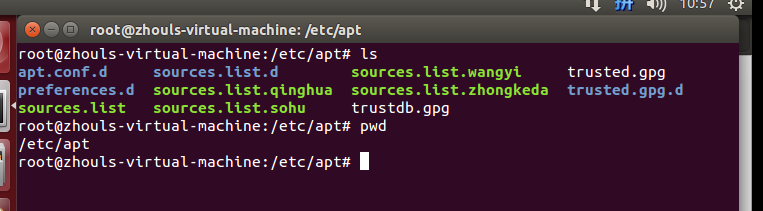
然后,大家可以像我这样,来做好备份,有时候,会因为网络问题,需要用到不同的源,好切换!
/etc/apt/sources.list (比如,这是官方的源)
/etc/apt/sources.list.qinghua (比如,这是清华的源)
/etc/apt/sources.list.zhongkeda (比如,这是中科大的源)
/etc/apt/sources.list.sohu (比如,这是搜狐的源)
/etc/apt/sources.list.wangyi (比如,这是网易的源)
然后,需要用到哪个了,在比如,我需要用到清华源,则,
mv sources.list.qinghua sources.list
然后,把官方的源,暂时改为
mv sources.list sources.list.bak
扩展学习
现在没有可用的软件包 *** ,但是它被其它的软件包引用了 和 E: 无法定位软件包 ***问题解决(思路清晰干货)
同时,大家可以关注我的个人博客:
http://www.cnblogs.com/zlslch/ 和 http://www.cnblogs.com/lchzls/ http://www.cnblogs.com/sunnyDream/
详情请见:http://www.cnblogs.com/zlslch/p/7473861.html
人生苦短,我愿分享。本公众号将秉持活到老学到老学习无休止的交流分享开源精神,汇聚于互联网和个人学习工作的精华干货知识,一切来于互联网,反馈回互联网。
目前研究领域:大数据、机器学习、深度学习、人工智能、数据挖掘、数据分析。 语言涉及:Java、Scala、Python、Shell、Linux等 。同时还涉及平常所使用的手机、电脑和互联网上的使用技巧、问题和实用软件。 只要你一直关注和呆在群里,每天必须有收获
对应本平台的讨论和答疑QQ群:大数据和人工智能躺过的坑(总群)(161156071)



Ubuntu14.04和16.04官方默认更新源sources.list和第三方源推荐(干货!)的更多相关文章
- buntu14.04和16.04官方默认更新源sources.list和第三方源推荐(干货!)转
配置完成后: sudo apt-get update 安装和删除软件: sudo apt-get install sudo apt-get remove buntu14.04和16.04官方默认更新源 ...
- Ubuntu 14.04.4官方默认更新源sources.list
Ubuntu 14.04.4官方默认更新源sources.list # deb cdrom:[Ubuntu LTS _Trusty Tahr_ - Release amd64 (20160217.1) ...
- Ubuntu18.04更换官方默认更新源sources.list
⒈备份官方默认更新源文件 cp /etc/apt/sources.list /etc/apt/sources.list.bak 备份官方更新源文件 ⒉编辑 1.打开 vi /etc/apt/sourc ...
- Change default network name (ens33) to old “eth0” on Ubuntu 18.04 / Ubuntu 16.04
Change default network name (ens33) to old “eth0” on Ubuntu 18.04 / Ubuntu 16.04 By Raj Last updated ...
- linux: ubuntu 14.04 和16.04 快速下载
由于官网服务器在国外,下载速度奇慢,所以我们可以利用阿里云镜像下载ubuntuubuntu 14.04:http://mirrors.aliyun.com/ubuntu-releases/14.04/ ...
- 阿里云,腾讯云,等等的云 Ubuntu14.04升级16.04
16.04有很多好处.在此不说了 这几天来回折腾了各种的云,然后发现国内的都没有16.04 但是ubuntu可以直接在线升级 在此记下来升级的过程 不管是腾讯云也好 阿里云也好,或者别的什么云,只要是 ...
- Ubuntu14.04或16.04下安装JDK1.8+Scala+Hadoop2.7.3+Spark2.0.2
为了将Hadoop和Spark的安装简单化,今日写下此帖. 首先,要看手头有多少机器,要安装伪分布式的Hadoop+Spark还是完全分布式的,这里分别记录. 1. 伪分布式安装 伪分布式的Hadoo ...
- Ubuntu14.04或16.04下普通用户的root权限获得
Ubuntu系统默认不允许使用root登录,因此初始root帐户是不能使用的,需要在普通账户下利用sudo权限修改root密码.然后以root帐户进行相关操作. 具体操作: 1.打开系统,用普通帐户登 ...
- Ubuntu14.04或16.04下Hadoop及Spark的开发配置
对于Hadoop和Spark的开发,最常用的还是Eclipse以及Intellij IDEA. 其中,Eclipse是免费开源的,基于Eclipse集成更多框架配置的还有MyEclipse.Intel ...
随机推荐
- <Android基础> (四) Fragment Part 2
4.3 Fragment的生命周期 4.3.1 Fragment的状态和回调 1.运行状态 当一个Fragment是可见的,并且它关联的活动正处于运行状态是,该Fragment也处于运行状态 2.暂停 ...
- 【系统架构】软件核心复杂性应对之道-领域驱动DDD(Domain-Driven Design)
前言 领域驱动设计是一个开放的设计方法体系,目的是对软件所涉及到的领域进行建模,以应对系统规模过大时引起的软件复杂性的问题,本文将介绍领域驱动的相关概念. 一.软件复杂度的根源 1.业务复杂度(软件的 ...
- poj 2955 Brackets (区间dp 括号匹配)
Description We give the following inductive definition of a “regular brackets” sequence: the empty s ...
- MySQL安装-二进制软件包安装
MySQL 双版本安装 安装mysql AB (RPM) -mysql官方的RPM包 安装MySQL 5.6.19版本 安装之前需要将系统自带的关于mysql软件全部卸载掉 rpm -e (加 ...
- Tomcat 服务器
1 相关概念 1 软件的架构 1 c/s 客服端/服务端 2 b/s 浏览器/服务器 2 资源的分类 1 静态资源 所有用户访问后 得到的资源是一样的 称为静态资源 html css js 静态资源可 ...
- 一条sql执行过长的时间,你如何优化,从哪些方面?
1.查看sql是否涉及多表的联表或者子查询,如果有,看是否能进行业务拆分,相关字段冗余或者合并成临时表(业务和算法的优化) 2.涉及链表的查询,是否能进行分表查询,单表查询之后的结果进行字段整合 3. ...
- 面试:atoi() 与 itoa()函数的内部实现(转)
原 面试:atoi() 与 itoa()函数的内部实现 2013年04月19日 12:05:56 王世晖 阅读数:918 #include <stdio.h> #include < ...
- 第三节:总结.Net下后端的几种请求方式(WebClient、WebRequest、HttpClient)
一. 前言 前端调用有Form表单提交,ajax提交,ajax一般是用Jquery的简化写法,在这里不再过多介绍: 后端调用大约有这些:WebCient.WebRequest.Httpclient.W ...
- Element ui select同时获取value和label的值
代码如下: <el-form-item v-if="isMD" label="业务员名称"> <el-select v-model=" ...
- css Modules 使用
我目前常用的也就是引用类名,以及在需要修改某个ui组件原有的样式比较麻烦时,会使用 :global className{ color: red;}这样来修改... 更多请参考阮老师博客: http:/ ...