
ELK Packetbeat 部署指南(15th)
原文链接:http://www.ttlsa.com/elk/elk-packetbeat-deployment-guide/
Packetbeat 是一个实时网络数据包分析工具,与elasticsearch一体来提供应用程序的监控和分析系统。
Packetbeat通过嗅探应用服务器之间的网络通讯,来解码应用层协议类型如HTTP、MySQL、redis等等,关联请求与响应,并记录每个事务有意义的字段。
Packetbeat可以帮助我们快速发现后端应用程序的问题,如bug或性能问题等等,修复排除故障也很快捷。
Packetbeat目前支持的协议有:
Packetbeat可以将相关事务直接插入到elasticsearch或redis(不推荐)或logstash。
Packetbeat可以运行在应用服务器上或者独自的服务器。当运行在独自服务器上时,需要从交换机的镜像端口或者窃听设备上获取网络流量。
对第七层信息解码后,Packetbeat关联与请求相关的响应,称之为事务。每个事务,Packetbeat插入一个json格式文档到elasticsearch。然后可通过kibana进行分析展示。
安装
先配置beats yum 源,参见前文。
|
1
|
# yum install packetbeat
|
配置
选择要从哪个网卡嗅探网络通讯,默认是所有的网络接口。
|
1
2
3
4
|
interfaces:
# Select on which network interfaces to sniff. You can use the "any"
# keyword to sniff on all connected interfaces.
device: any
|
在协议部分,配置端口以便Packetbeat找到每个端口对应的协议。如果使用非标准端口,需要添加上。多个端口以逗号分隔。
|
1
2
3
4
5
6
7
8
9
10
11
12
13
14
15
16
17
18
19
20
21
|
protocols:
# Configure which protocols to monitor and on which ports are they
# running. You can disable a given protocol by commenting out its
# configuration.
http:
ports: [80, 8080, 8081, 5000, 8002]
memcache:
ports: [11211]
mysql:
ports: [3306]
redis:
ports: [6379]
pgsql:
ports: [5432]
thrift:
ports: [9090]
|
定义elasticsearch服务
|
1
2
3
4
5
6
7
8
9
10
11
12
13
14
15
|
output:
elasticsearch:
# Uncomment out this option if you want to output to Elasticsearch. The
# default is false.
enabled: true
# Set the host and port where to find Elasticsearch.
host: 192.168.1.42
port: 9200
# Uncomment this option and set it to true if you want to store the topology in
# Elasticsearch. Default behavior if this setting is left out of the
# config file is equivalent to setting "save_topology" to "false"
#save_topology: false
|
加载elasticsearch索引模板
加载索引模板,以便elasticsearch知道哪些字段该以何种方式进行分析。
|
1
|
# curl -XPUT 'http://10.1.19.18:9200/_template/packetbeat' -d@/etc/packetbeat/packetbeat.template.json
|
启动服务
|
1
|
# /etc/init.d/packetbeat start
|
查看数据
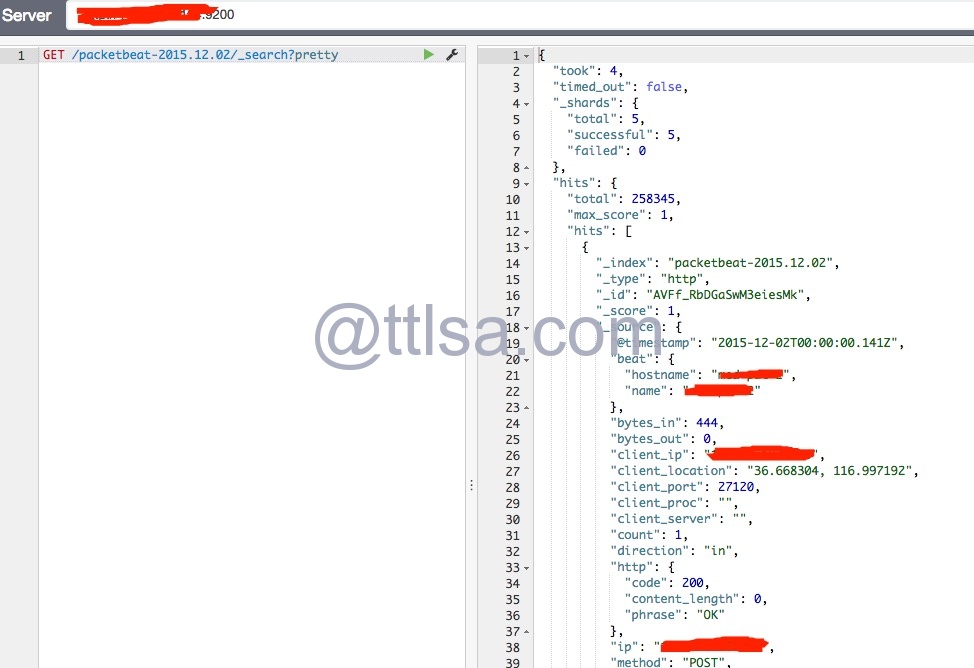
加载kibana Packetbeat的仪表盘
这个在前面的文章中,有加载过。这里不再重复加载。
配置选项
beats公用的配置选前文有说的。下面说说Packetbeat自有的配置项:Interfaces、Protocols、Processes(可选)。
interfaces
interfaces 部分配置嗅探器
|
1
2
3
4
5
6
7
8
9
10
11
12
13
14
|
# Select the network interfaces to sniff the data. You can use the "any"
# keyword to sniff on all connected interfaces.
interfaces:
# On which device to sniff
device: any
# The maximum capture size of a single packet.
snaplen: 1514
# The type of the sniffer to use
type: af_packet
# The size of the sniffing buffer
buffer_size_mb: 100
|
device
从哪个网络接口捕获通讯。指定的设备自动设置为混杂模式,这意味着Packetbeat可以从同一个LAN捕获其它主机的流量。
|
1
2
|
interfaces:
device: eth0
|
在Linux上,可以指定任何的设备。当指定为any时,接口不会设置成混杂模式。
查看可用设备,可以使用下面的命令:
|
1
2
3
4
5
6
|
# packetbeat -devices
0: eth0 (No description available)
1: eth1 (No description available)
2: usbmon1 (USB bus number 1)
3: any (Pseudo-device that captures on all interfaces)
4: lo (No description available)
|
device可以指定为上述返回列表的索引,如
|
1
2
|
interfaces:
device: 0
|
表示是eth0。这对于设备名称很长的情况下非常有用咯。
snaplen
捕获包的最大大小。默认65535。足够应付所有网络和接口类型。如果嗅探物理网络接口,该值设置为MTU大小。对于虚拟接口,还是最好使用默认值。
|
1
2
3
|
interfaces:
device: eth0
snaplen: 1514
|
type
Packetbeat 支持下面的嗅探器类型:
pcap, 使用libpcap 库,可工作在大多数平台上,但是不是最快的选项。af_packet, 使用 memory-mapped 嗅探。比 libpcap 快且不需要kernel模块,Linux特定的。pf_ring, 使用 ntop.org 项目。此设置提供了最好的嗅探速度,但是需要一个kernel模块,Linux特定的。
默认的嗅探器类型是pcap。
|
1
2
3
|
interfaces:
device: eth0
type: af_packet
|
在Linux上,如果想优化Packetbeat耗CPU占用率,建议使用 af_packet 和 pf_ring 选项。
如果使用 af_packet, 可以通过下面选项调整行为:
buffer_size_mb
内核和用户空间之间使用的最大共享内存缓冲区大小。默认30MB。缓冲区越大,CPU使用率越低,但是会消耗更多内存。只对af_packet 有效。
|
1
2
3
4
|
interfaces:
device: eth0
type: af_packet
buffer_size_mb: 100
|
with_vlans
Packetbeat 自动生成一个BPF来捕获已知协议的端口流量。 例如,配置HTTP 80 和 MySQL 3306, Packetbeat 生成 BPF 过滤器如下: "port 80 or port 3306"。
然而,如果通讯包含VLAN标记,Packetbeat生成的过滤器将是无效的,因为offset通过四个字节移动的。为了解决这个问题,启用 with_vlans 选项,生成的 BPF 过滤器是这样的: "port 80 or port 3306 or (vlan and (port 80 or port 3306))"。
bpf_filter
Packetbeat 自动生成一个BPF来捕获已知协议的端口流量。 例如,配置HTTP 80 和 MySQL 3306, Packetbeat 生成 BPF 过滤器如下: "port 80 or port 3306"。
可以使用 bpf_filter 覆盖生成的BPF 过滤器,如:
|
1
2
3
|
interfaces:
device: eth0
bpf_filter: "net 192.168.238.0/0 and port 80 and port 3306"
|
此设置是禁用自动生成的BPF过滤器。如果使用此设置,你需要保持BPF过滤器与协议部分定义的端口同步。
Protocols和Processes配置项,下文再说了。
ELK Packetbeat 部署指南(15th)的更多相关文章
- ELK Packetbeat 部署指南
http://www.ttlsa.com/elk/elk-packetbeat-deployment-guide/
- Docker环境 ELK 快速部署
Docker环境 ELK快速部署 环境 Centos 7.4 , Docker version 17.12 Docker至少3GB内存: #内核配置 echo ' vm.max_map_count = ...
- 首发福利!全球第一开源ERP Odoo系统架构部署指南 电子书分享
引言 Odoo,以前叫OpenERP,是比利时Odoo S.A.公司开发的一个企业应用软件套件,开源套件包括一个企业应用快速开发平台,以及几千个Odoo及第三方开发的企业应用模块.Odoo适用于各种规 ...
- [转]Nginx反向代理和负载均衡部署指南
Nginx反向代理和负载均衡部署指南 1. 安装 1) 从Nginx官网下载页面(http://nginx.org/en/download.html)下载Nginx最 ...
- ELK 安装部署实战 (最新6.4.0版本)
一.实战背景 根据公司平台的发展速度,对于ELK日志分析日益迫切.主要的需求有: 1.用户行为分析 2.运营活动点击率分析 作为上述2点需求,安装最新版本6.4.0是非常有必要的,大家可根据本人之前博 ...
- Istio 1.4 部署指南
原文链接:Istio 1.4 部署指南 Istio 一直处于快速迭代更新的过程中,它的部署方法也在不断更新,之前我在 1.0 版本中介绍的安装方法,对于最新的 1.4 版本已经不适用了.以后主流的部署 ...
- 精讲 使用ELK堆栈部署Kafka
使用ELK堆栈部署Kafka 通过优锐课的java架构学习分享,在本文中,我将展示如何使用ELK Stack和Kafka部署建立弹性数据管道所需的所有组件. 在发生生产事件后,恰恰在你最需要它们时,日 ...
- NTP 集群简略部署指南
NTP 集群简略部署指南 by 无若 1. NTP 简介 网络时间协议(英语:Network Time Protocol,简称NTP)是在数据网络潜伏时间可变的计算机系统之间通过分组交换进行时钟同步的 ...
- Web项目部署指南
Web项目部署指南 本文记录了部署Vue项目到阿里云服务器上的过程,其中云服务器的操作系统是CentOS 7,Web服务器用的是nginx.因为项目涉及发送异步请求,而由Flask编写的后端应用监听的 ...
随机推荐
- 修正constructor的指向
function Aaa(){ } //Aaa.prototype.constructor = Aaa; //每一个函数都会有的,都是自动生成的 Aaa.prototype.name = '小明' ...
- php练习——打印半金字塔、金字塔、空心金字塔、菱形、空心菱形
半金字塔 金字塔 空心金字塔 菱形 空心菱形
- 怎样制作PHP验证码?
<?php /** *制作验证码 *1.启动session *2.设定标头 *3.创建画布 *4.创建颜色 *5.创建随机数并放到画布上 *6.将得到的若干随机数放入session中 *7.添加 ...
- JS禁止横竖屏切换,强制横竖屏显示
js判断屏幕横竖屏: function orient() { //alert('gete'); if (window.orientation == 0 || window.orientation == ...
- Day15 HTML补充、初识JavaScript
一.上节回顾 上节回顾: HTML 头部信息:编码.title.style.link(导入css文件) 身体: 内联 块级 --->inline-block(既有内联效果又有块级效果) a标签: ...
- Python核心编程2第五章课后练习
5-1 整型,讲讲python普通整型与长整型区别 python整形一共有三种:布尔型,长整型和标准整型.普通整型与长整型的区别在于标准整形的取值范围是-2^31到2^31-1,长整型所能表达的数值与 ...
- VisualSVN Server 从此告别SVN记事本配置
http://www.visualsvn.com/downloads/ 注意下载的是Server版本,他还会提供一个visual Studio的插件: 安装完毕后,可以在管理界面进行角色添加,创建 ...
- JAVA面试题相关基础知识
1.面向对象的特征有哪些方面 ①抽象: 抽象就是忽略一个主题中与当前目标无关的那些方面,以便更充分地注意与当前目标有关的方面.抽象并不打算了解全部问题,而只是选择其中的一部分,暂时不用部分细节 ...
- 静态代理VS动态代理
代理Proxy: Proxy代理模式是一种结构型设计模式,主要解决的问题是:在直接访问对象时带来的问题 代理是一种常用的设计模式,其目的就是为其他对象提供一个代理以控制对某个对象的访问.代理类负责为委 ...
- 【poi】解决java导出excel 海量数据内存溢出问题
转自百度经验:http://jingyan.baidu.com/article/4853e1e5202c331909f72627.html 那里排版忒恶心,转来这里. 由于项目中有导出海量数据的需求, ...