
android 每个块半径不同的扇形图,自定义view
1.首先看效果图
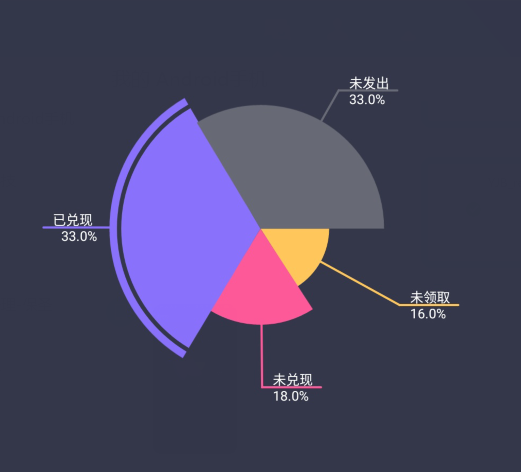
2.自定义PieChartView,继承自View,下边为PieChartView代码
package com.yingjinbao.im.peach.customview;

import android.content.Context;
import android.graphics.Canvas;
import android.graphics.Color;
import android.graphics.Paint;
import android.graphics.Rect;
import android.graphics.RectF;
import android.util.AttributeSet;
import android.view.View;

/**
 * Created by wanger on 07/19/2018.
 */

public class PieChartView extends View {

    private int mHeight, mWidth;//宽高
    private Paint mPaint;//扇形的画笔
    private Paint mTextPaint;//画文字的画笔

    private int centerX, centerY;//中心坐标

    private int maxNum = 4;//扇形图的最大块数,超出部分自动合并到最后一块上去

    double total;//数据的总和
    double[] datas;//数据集
    String[] texts;//每个数据对应的文字集

    //颜色 默认的颜色
    private int[] mColors = {
            Color.parseColor("#FFC65B"), Color.parseColor("#FD5998"),
            Color.parseColor("#8971FB"), Color.parseColor("#676974")
    };

    private int mTextSize;//文字大小

    private int radius = 1000;//半径

    public PieChartView(Context context) {
        super(context);
    }

    public PieChartView(Context context, AttributeSet attrs) {
        super(context, attrs);
        init();
    }

    //初始化
    private void init() {
        mTextSize = 25;

        mPaint = new Paint();
        //当画笔样式为STROKE或FILL_OR_STROKE时,设置笔刷的图形样式, 如圆形样Cap.ROUND,或方形样式Cap.SQUARE
        mPaint.setStrokeCap(Paint.Cap.ROUND);
        //设置是否使用抗锯齿功能,会消耗较大资源,绘制图形速度会变慢。
        mPaint.setAntiAlias(true);

        mTextPaint = new Paint();
        //设置绘制文字的字号大小
        mTextPaint.setTextSize(mTextSize);
        //当画笔样式为STROKE或FILL_OR_STROKE时,设置笔刷的粗细度
        mTextPaint.setStrokeWidth(3);
        //设置是否使用抗锯齿功能,会消耗较大资源,绘制图形速度会变慢。
        mTextPaint.setAntiAlias(true);
        //设置绘制的颜色,使用颜色值来表示,该颜色值包括透明度和RGB颜色。
        mTextPaint.setColor(Color.WHITE);
    }

    @Override
    protected void onMeasure(int widthMeasureSpec, int heightMeasureSpec) {
        super.onMeasure(widthMeasureSpec, heightMeasureSpec);
        //获取宽高 不要设置wrap_content
        mHeight = MeasureSpec.getSize(heightMeasureSpec);
        mWidth = MeasureSpec.getSize(widthMeasureSpec);
    }

    @Override
    protected void onDraw(Canvas canvas) {
        super.onDraw(canvas);
        //无数据
        if (datas == null || datas.length == 0) return;

        centerX = (getRight() - getLeft()) / 2;
        centerY = (getBottom() - getTop()) / 2;
        int min = mHeight > mWidth ? mWidth : mHeight;
        if (radius > min / 2) {
            radius = (int) ((min - getPaddingTop() - getPaddingBottom()) / 3.5);
        }

        //画扇形
        canvas.save();
        drawCircle(canvas);
        canvas.restore();

        //线与文字
        canvas.save();
        drawLineAndText(canvas);
        canvas.restore();

    }

    //画线与文字
    private void drawLineAndText(Canvas canvas) {
        int start = 0;
        canvas.translate(centerX, centerY);//平移画布到中心
        mPaint.setStrokeWidth(4);
        for (int i = 0; i < (maxNum < datas.length ? maxNum : datas.length); i++) {

            if (i == (maxNum < datas.length ? maxNum : datas.length) - 1){
                drawLine(canvas, start, 360 - start, texts[i], mColors[i % mColors.length],i);
            }else {
                float angles = (float) ((datas[i] * 1.0f / total) * 360);
                drawLine(canvas, start, angles, texts[i], mColors[i % mColors.length],i);
                start += angles;
            }
        }
    }

    private void drawLine(Canvas canvas, int start, float angles, String text, int color,int position) {
        mPaint.setColor(color);
        //mTextPaint.setColor(color);
        float stopX, stopY;
        stopX = (float) ((radius + 40) * Math.cos((2 * start + angles) / 2 * Math.PI / 180));
        stopY = (float) ((radius + 40) * Math.sin((2 * start + angles) / 2 * Math.PI / 180));

        switch (position){
            case 0:
                canvas.drawLine((float) ((radius * 0.5) * Math.cos((2 * start + angles) / 2 * Math.PI / 180)),
                        (float) ((radius * 0.5) * Math.sin((2 * start + angles) / 2 * Math.PI / 180)),
                        stopX, stopY, mPaint);
                break;
            case 1:
                canvas.drawLine((float) ((radius * 0.7) * Math.cos((2 * start + angles) / 2 * Math.PI / 180)),
                        (float) ((radius * 0.7) * Math.sin((2 * start + angles) / 2 * Math.PI / 180)),
                        stopX, stopY, mPaint);
                break;
            case 2:
                canvas.drawLine((float) ((radius * 1.1) * Math.cos((2 * start + angles) / 2 * Math.PI / 180)),
                        (float) ((radius * 1.1) * Math.sin((2 * start + angles) / 2 * Math.PI / 180)),
                        stopX, stopY, mPaint);
                break;
            case 3:
                canvas.drawLine((float) ((radius * 0.9) * Math.cos((2 * start + angles) / 2 * Math.PI / 180)),
                        (float) ((radius * 0.9) * Math.sin((2 * start + angles) / 2 * Math.PI / 180)),
                        stopX, stopY, mPaint);
                break;
            default:
                canvas.drawLine((float) (radius * Math.cos((2 * start + angles) / 2 * Math.PI / 180)),
                        (float) (radius * Math.sin((2 * start + angles) / 2 * Math.PI / 180)),
                        stopX, stopY, mPaint);
                break;
        }
        //canvas.drawLine(0, 0, stopX, stopY, mPaint);
        //画横线
        int dx;//判断横线是画在左边还是右边
        int endX;
        if (stopX > 0) {
            endX = (int) (stopX + 110);
        } else {
            endX = (int) (stopX - 110);
        }
        //画横线
        canvas.drawLine(stopX, stopY,
                endX, stopY, mPaint
        );
        dx = (int) (endX - stopX);

        //测量文字大小
        Rect rect = new Rect();
        mTextPaint.getTextBounds(text, 0, text.length(), rect);
        int w = rect.width();
        int h = rect.height();
        int offset = 20;//文字在横线的偏移量
        //画文字
        canvas.drawText(text, 0, text.length(), dx > 0 ? stopX + offset : stopX - w - offset, stopY - 5, mTextPaint);

        //测量百分比大小
        String percentage = (datas[position] / total) * 100 + "";
        percentage = percentage.substring(0, percentage.length() > 4 ? 4 : percentage.length()) + "%";
        mTextPaint.getTextBounds(percentage, 0, percentage.length(), rect);
        w = rect.width() - 10;
        //画百分比
        canvas.drawText(percentage, 0, percentage.length(), dx > 0 ? stopX + offset : stopX - w - offset, stopY + h, mTextPaint);

    }

    //画扇形
    private void drawCircle(Canvas canvas) {
        RectF rect = null;
        int start = 0;
        for (int i = 0; i < (maxNum < datas.length ? maxNum : datas.length); i++) {
            if (i == 0){
                rect = new RectF((float) (centerX - radius * 0.5), (float) (centerY - radius * 0.5),
                        (float) (centerX + radius * 0.5), (float) (centerY + radius * 0.5));
            }else if (i == 1){
                rect = new RectF((float) (centerX - radius * 0.7), (float) (centerY - radius * 0.7),
                        (float) (centerX + radius * 0.7), (float) (centerY + radius * 0.7));
            }else if (i == 2){
                rect = new RectF((float) (centerX - radius * 1.1), (float) (centerY - radius * 1.1),
                        (float) (centerX + radius * 1.1), (float) (centerY + radius * 1.1));
            }else if (i == 3){
                rect = new RectF((float) (centerX - radius * 0.9), (float) (centerY - radius * 0.9),
                        (float) (centerX + radius * 0.9), (float) (centerY + radius * 0.9));
            }else {
                rect = new RectF((float) (centerX - radius * 1), (float) (centerY - radius * 1),
                        (float) (centerX + radius * 1), (float) (centerY + radius * 1));
            }

            if (i == (maxNum < datas.length ? maxNum : datas.length) - 1){
                float angles = 360 - start;
                mPaint.setColor(mColors[i % mColors.length]);

                if (i == 2){
                    canvas.drawArc(rect, start, angles, true, mPaint);

                    mPaint.setColor(Color.parseColor("#34374A"));
                    mPaint.setStyle(Paint.Style.STROKE);
                    mPaint.setStrokeWidth(8);
                    rect = new RectF((float) (centerX - radius * 1.03), (float) (centerY - radius * 1.03),
                            (float) (centerX + radius * 1.03), (float) (centerY + radius * 1.03));

                    canvas.drawArc(rect, start, angles, false, mPaint);
                    init();
                }else {
                    canvas.drawArc(rect, start, angles, true, mPaint);
                }

                start += angles;
            }else {
                float angles = (float) ((datas[i] * 1.0f / total) * 360);
                mPaint.setColor(mColors[i % mColors.length]);

                if (i == 2){
                    canvas.drawArc(rect, start, angles, true, mPaint);

                    mPaint.setColor(Color.parseColor("#34374A"));
                    mPaint.setStyle(Paint.Style.STROKE);
                    mPaint.setStrokeWidth(8);
                    rect = new RectF((float) (centerX - radius * 1.03), (float) (centerY - radius * 1.03),
                            (float) (centerX + radius * 1.03), (float) (centerY + radius * 1.03));

                    canvas.drawArc(rect, start, angles, false, mPaint);
                    init();
                }else {
                    canvas.drawArc(rect, start, angles, true, mPaint);
                }

                start += angles;
            }
        }
    }

    //setter
    public void setColors(int[] mColors) {
        this.mColors = mColors;
        invalidate();
    }

    public void setTextSize(int mTextSize) {
        this.mTextSize = mTextSize;
        mTextPaint.setTextSize(mTextSize);
        invalidate();
    }

    public void setRadius(int radius) {
        this.radius = radius;
        invalidate();
    }

    public void setMaxNum(int maxNum) {
        this.maxNum = maxNum;
        invalidate();
    }

    public void setDatas(double[] datas) {
        this.datas = datas;
        total = 0;
        for (int i = 0;i < datas.length;i++){
            total += datas[i];
        }
    }

    public void setTexts(String[] texts) {
        this.texts = texts;
    }

}
3.使用,首先在XML文件中调用

之后,在activity中,只需找到组件,传入数据,调用 invalidate() 进行重绘即可。

android 每个块半径不同的扇形图,自定义view的更多相关文章
- Android零基础入门第24节:自定义View简单使用
原文:Android零基础入门第24节:自定义View简单使用 当我们开发中遇到Android原生的组件无法满足需求时,这时候就应该自定义View来满足这些特殊的组件需求. 一.概述 很多初入Andr ...
- Android UI 绘制过程浅析(五)自定义View
前言 这已经是Android UI 绘制过程浅析系列文章的第五篇了,不出意外的话也是最后一篇.再次声明一下,这一系列文章,是我在拜读了csdn大牛郭霖的博客文章<带你一步步深入了解View> ...
- [转]Android自定义控件三部曲系列完全解析(动画, 绘图, 自定义View)
来源:http://blog.csdn.net/harvic880925/article/details/50995268 一.自定义控件三部曲之动画篇 1.<自定义控件三部曲之动画篇(一)—— ...
- Android开发之漫漫长途 番外篇——自定义View的各种姿势1
该文章是一个系列文章,是本人在Android开发的漫漫长途上的一点感想和记录,我会尽量按照先易后难的顺序进行编写该系列.该系列引用了<Android开发艺术探索>以及<深入理解And ...
- Android开发之漫漫长途 番外篇——自定义View的各种姿势2
该文章是一个系列文章,是本人在Android开发的漫漫长途上的一点感想和记录,我会尽量按照先易后难的顺序进行编写该系列.该系列引用了<Android开发艺术探索>以及<深入理解And ...
- Android简易实战教程--第二十七话《自定义View入门案例之开关按钮详细分析》
转载此博客请注明出处点击打开链接 http://blog.csdn.net/qq_32059827/article/details/52444145 对于自定义view,可能是一个比较大的 ...
- Android 麦克风录音带音量大小动态显示的圆形自定义View
1.所谓无图无真相,先上效果图.我们要实现的就是中间那个录音的按钮,周边会显示一圈音量大小的波形 2.VolumCircleBar继承自View,我们进行了自定义,代码如下 package com.r ...
- Android零基础入门第52节:自定义酷炫进度条
原文:Android零基础入门第52节:自定义酷炫进度条 Android系统默认的ProgressBar往往都不能满足实际开发需要,一般都会开发者自定义ProgressBar. 在Android开发中 ...
- 【朝花夕拾】Android自定义View篇之(八)多点触控(上)MotionEvent简介
前言 在前面的文章中,介绍了不少触摸相关的知识,但都是基于单点触控的,即一次只用一根手指.但是在实际使用App中,常常是多根手指同时操作,这就需要用到多点触控相关的知识了.多点触控是在Android2 ...
随机推荐
- h5移动端聊天室|仿微信界面聊天室|h5多人聊天室
今年的FIFA世界杯甚是精彩,最近兴致高涨就利用HTML5开发了一个手机端仿微信界面聊天室,该h5聊天室采用750px全新伸缩flex布局,以及使用rem响应式配合fontsize.js,页面弹窗则是 ...
- H02-启动hdfs时可能遇到的几个问题
启动hdfs时,有时候可能会遇到这样几种情况: 1)在主节点上执行start-dfs.sh命令启动hdfs,无法启动datanode. 2)在主节点上行启动hdfs,启动成功了,在各个节点上使用jps ...
- (转)PLSQL Developer 12.0.7连接Oracle12c数据库
版权声明:本文为博主原创文章,未经博主允许不得转载. https://blog.csdn.net/sl1992/article/details/80489413 1.下载安装PL/SQL Develo ...
- Zookeeper在Centos7上搭建单节点应用
(默认机器上已经安装并配置好了jdk) 1.下载zookeeper并解压 $ tar -zxvf zookeeper-3.4.6.tar.gz 2.将解压后的文件夹移动到 /usr/local/ 目录 ...
- 2013-12-LINUX 常用命令
查看iptables状态: service iptables status 查询LINUX开机时间多久 1. cat /proc/uptime输出: 105040.44 105024.75 秒 2. ...
- 补间动画Tweened Animations
本例子简单讲一下怎么用补间动画 1.在xml中定义好动画的资源文件,如下(注意把不同的效果放在一起可以一起用,同时起效果) <?xml version="1.0" encod ...
- 业务ID 生成策略
业务ID 生成策略,从技术上说,基本要借助一个集中式的引擎来帮忙实现. 为了扩大业务ID生成策略的并发问题,还有更为技巧性的提升. 先来介绍普遍的分布式ID生成策略: 1. 利用DB的自增主键 这里又 ...
- Formtastic: Forms Made Crazy Easy for Rails Developers
Formtastic is a Rails plugin by Justin French that aims to take the headaches out of building forms ...
- (技术分享) 解决 Firefox 显示“已阻止载入混合活动内容”的问题
(摘自http://blog.aizhet.com/Windows/18415.html) 从 Firefox 18 开始,如果 HTTPS 页面中包含非加密的 HTTP 内容,浏览器会在控制台输出警 ...
- Behave 基础
在你使用behave或其他BDD框架之前, 你应该选择一个断言库. python有很多这方面的第三方库.例如: hamcrest,nose.tools, should-dsl, sure, comp ...