
EF6 CodeFirst代码迁移笔记
迁移
- Add-Migration 将基于您已经对模型所做的更改构建下一次迁移的框架。
- Update-Database 将所有挂起的更改应用到数据库。


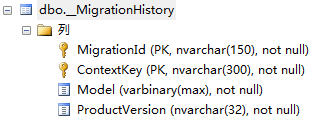

删除数据库
回溯数据库
命令异常:
关于迁移到MYSql的问题
此操作要求连接到“master”数据库。无法创建与“master”数据库之间的连接,这是因为已打开原始数据库连接,并且已从连接字符串中删除凭据。请提供未打开的连接。
The underlying provider does not support the type 'nvarchar(max)'.
这个也是项目的配置或dll有问题,排查一遍配置,然后清理,迁移
System.IO.FileLoadException: 未能加载文件或程序集“MySql.Data, Version=6.8.3.0, Culture=neutral, PublicKeyToken=c5687fc88969c44d”或它的某一个依赖项。
这个是mysql.entity依赖项目MySql.Data类型不匹配,当初我手贱把MySql.data升级到最新版6.9就会这样,但实际上他的依赖项目不支持。但是显示的时候,nuget依赖项只会要求最低版本限制而没有最高版本限制,所以生成没问题,运行的时候报错,解决方案:
Install-Package MySql.Data -Version 6.8.3
未找到用于反序列化“MySql.Data.Types.MySqlConversionException”类型的对象的构造函数。
Allow Zero Datetime=true
第二种我没试过.还有,我列举的这种异常出现的原因具有特殊性,不具有代表性.
更改表主键的时候,提示表不存在
支持“XXXX”上下文的模型已在数据库创建后发生更改
这是因为刚才我们没有迁移成功.这时候,把刚才迁移的那个DbMigration类的up和down方法全注释掉,然后Update-Database –Verbose 就可以了.verbose可免.
参考链接:
Entity Framework 6 中 Code First 的好处
Code First Migrations: Making __MigrationHistory not a system table
如何让EF在创建数据库时不生成__MigrationHistory表
解决C#获取SQL的timestamp类型到程序中为byte[]类型的问题
附录:nuget关于code first 迁移命令的帮助
|
名称 |
Enable-Migrations
|
|
摘要 |
Enables Code First Migrations in a project.
|
|
语法 |
Enable-Migrations [-ContextTypeName <String>] [-EnableAutomaticMigrations] [-MigrationsDirectory <String>] [-ProjectName <String>] [-StartUpProjectName <String>] [-ContextProjectName <String>] [-ConnectionStringName <String>] [-Force] [-ContextA
ssemblyName <String>] [-AppDomainBaseDirectory <String>] [<CommonParameters>] Enable-Migrations [-ContextTypeName <String>] [-EnableAutomaticMigrations] [-MigrationsDirectory <String>] [-ProjectName <String>] [-StartUpProjectName <String>] [-ContextProjectName <String>] -ConnectionString <String> -ConnectionProviderName < |
|
说明 |
Enables Migrations by scaffolding a migrations configuration class in the project. If the
target database was created by an initializer, an initial migration will be created (unless automatic migrations are enabled via the EnableAutomaticMigrations parameter). |
|
参数 |
-ContextTypeName <String>
Specifies the context to use. If omitted, migrations will attempt to locate a single context type in the target project. 是否必需? False -EnableAutomaticMigrations [<SwitchParameter>] 是否必需? False -MigrationsDirectory <String> 是否必需? False -ProjectName <String> 是否必需? False -StartUpProjectName <String> 是否必需? False -ContextProjectName <String> 是否必需? False -ConnectionStringName <String> 是否必需? False -ConnectionString <String> 是否必需? True -ConnectionProviderName <String> 是否必需? True -Force [<SwitchParameter>] 是否必需? False -ContextAssemblyName <String> 是否必需? False -AppDomainBaseDirectory <String> 是否必需? False <CommonParameters> |
|
示例 1 |
C:\PS>Enable-Migrations
# Scaffold a migrations configuration in a project with only one context |
|
示例 2 |
C:\PS>Enable-Migrations -Auto
# Scaffold a migrations configuration with automatic migrations enabled for a project |
|
示例 3 |
C:\PS>Enable-Migrations -ContextTypeName MyContext -MigrationsDirectory DirectoryName
# Scaffold a migrations configuration for a project with multiple contexts |
|
备注 |
备注
若要查看示例,请键入: "get-help Enable-Migrations -examples". 有关详细信息,请键入: "get-help Enable-Migrations -detailed". 若要获取技术信息,请键入: "get-help Enable-Migrations -full". |
|
名称 |
Add-Migration
|
|
摘要 |
Scaffolds a migration script for any pending model changes.
|
|
语法 |
Add-Migration [-Name] <String> [-Force] [-ProjectName <String>] [-StartUpProjectName <String>] [-ConfigurationTypeName <String>] [-ConnectionStringName <String>] [-IgnoreChanges] [-AppDomainBaseDirectory <String>] [<CommonParameters>]
Add-Migration [-Name] <String> [-Force] [-ProjectName <String>] [-StartUpProjectName <String>] [-ConfigurationTypeName <String>] -ConnectionString <String> -ConnectionProviderName <String> [-IgnoreChanges] [-AppDomainBaseDirectory <String>] [<CommonParamet |
|
说明 |
Scaffolds a new migration script and adds it to the project.
|
|
参数 |
-Name <String> Specifies the name of the custom script. 是否必需? True -Force [<SwitchParameter>] 是否必需? False -ProjectName <String> 是否必需? False -StartUpProjectName <String> 是否必需? False -ConfigurationTypeName <String> 是否必需? False -ConnectionStringName <String> 是否必需? False -ConnectionString <String> 是否必需? True -ConnectionProviderName <String> 是否必需? True -IgnoreChanges [<SwitchParameter>] 是否必需? False -AppDomainBaseDirectory <String> 是否必需? False <CommonParameters> |
|
示例 1 |
C:\PS>Add-Migration First
# Scaffold a new migration named "First"
|
|
示例 2 |
C:\PS>Add-Migration First -IgnoreChanges
# Scaffold an empty migration ignoring any pending changes detected in the current model.
# This can be used to create an initial, empty migration to enable Migrations for an existing
# database. N.B. Doing this assumes that the target database schema is compatible with the
# current model.
|
|
示例 3 |
|
|
备注 |
若要查看示例,请键入: "get-help Add-Migration -examples".
有关详细信息,请键入: "get-help Add-Migration -detailed".
若要获取技术信息,请键入: "get-help Add-Migration -full".
|
|
名称 |
Update-Database
|
|
摘要 |
Applies any pending migrations to the database.
|
|
语法 |
Update-Database [-SourceMigration <String>] [-TargetMigration <String>] [-Script] [-Force] [-ProjectName <String>] [-StartUpProjectName <String>] [-ConfigurationTypeName <String>] [-ConnectionStringName <String>] [-AppDomainBaseDirectory <String>] [<Common
Parameters>]
Update-Database [-SourceMigration <String>] [-TargetMigration <String>] [-Script] [-Force] [-ProjectName <String>] [-StartUpProjectName <String>] [-ConfigurationTypeName <String>] -ConnectionString <String> -ConnectionProviderName <String> [-AppDomainBaseD
irectory <String>] [<CommonParameters>]
|
|
说明 |
Updates the database to the current model by applying pending migrations.
|
|
参数 |
-SourceMigration <String> Only valid with -Script. Specifies the name of a particular migration to use as the update's starting point. If omitted, the last applied migration in the database will be used. 是否必需? False -TargetMigration <String> 是否必需? False -Script [<SwitchParameter>] 是否必需? False -Force [<SwitchParameter>] 是否必需? False -ProjectName <String> 是否必需? False -StartUpProjectName <String> 是否必需? False -ConfigurationTypeName <String> 是否必需? False -ConnectionStringName <String> 是否必需? False -ConnectionString <String> 是否必需? True -ConnectionProviderName <String> 是否必需? True -AppDomainBaseDirectory <String> 是否必需? False <CommonParameters> |
|
示例 1 |
C:\PS>Update-Database
# Update the database to the latest migration
|
|
示例 2 |
C:\PS>Update-Database -TargetMigration Second
# Update database to a migration named "Second"
# This will apply migrations if the target hasn't been applied or roll back migrations
# if it has
|
|
示例 3 |
C:\PS>Update-Database -Script
# Generate a script to update the database from it's current state to the latest migration
|
|
示例4 |
C:\PS>Update-Database -Script -SourceMigration Second -TargetMigration First
# Generate a script to migrate the database from a specified start migration
# named "Second" to a specified target migration named "First"
|
|
示例5 |
C:\PS>Update-Database -Script -SourceMigration $InitialDatabase
# Generate a script that can upgrade a database currently at any version to the latest version.
# The generated script includes logic to check the __MigrationsHistory table and only apply changes
# that haven't been previously applied.
|
|
示例6 |
C:\PS>Update-Database -TargetMigration $InitialDatabase
# Runs the Down method to roll-back any migrations that have been applied to the database
|
|
备注 |
若要查看示例,请键入: "get-help Update-Database -examples".
有关详细信息,请键入: "get-help Update-Database -detailed".
若要获取技术信息,请键入: "get-help Update-Database -full".
|
|
名称 |
Get-Migrations
|
|
摘要 |
Displays the migrations that have been applied to the target database.
|
|
语法 |
Get-Migrations [-ProjectName <String>] [-StartUpProjectName <String>] [-ConfigurationTypeName <String>] [-ConnectionStringName <String>] [-AppDomainBaseDirectory <String>] [<CommonParameters>]
Get-Migrations [-ProjectName <String>] [-StartUpProjectName <String>] [-ConfigurationTypeName <String>] -ConnectionString <String> -ConnectionProviderName <String> [-AppDomainBaseDirectory <String>] [<CommonParameters>]
|
|
说明 |
Displays the migrations that have been applied to the target database.
|
|
参数 |
-ProjectName <String>
Specifies the project that contains the migration configuration type to be used. If omitted, the default project selected in package manager console is used. 是否必需? False -StartUpProjectName <String> 是否必需? False -ConfigurationTypeName <String> 是否必需? False -ConnectionStringName <String> 是否必需? False -ConnectionString <String> 是否必需? True -ConnectionProviderName <String> 是否必需? True -AppDomainBaseDirectory <String> 是否必需? False <CommonParameters> |
|
示例 1 |
|
|
示例 2 |
|
|
示例 3 |
|
|
备注 |
若要查看示例,请键入: "get-help Get-Migrations -examples".
有关详细信息,请键入: "get-help Get-Migrations -detailed".
若要获取技术信息,请键入: "get-help Get-Migrations -full".
|
EF6 CodeFirst代码迁移笔记的更多相关文章
- EF6 CodeFirst 实践系列文章列表
2015 Jul.16 EF6 CodeFirst+Repository+Ninject+MVC4+EasyUI实践(一) 来自:wangweimutou 本系列源自对EF6 CodeFirst的探索 ...
- EF6 CodeFirst+Repository+Ninject+MVC4+EasyUI实践(一)
前言 本系列源自对EF6 CodeFirst的探索,但后来发现在自己项目中构建的时候遇到了一些问题以及一些解决方法,因此想作为一个系列写下来. 本系列并不是教你怎么做架构设计,但可以参照一下里面的方法 ...
- EF CodeFirs 代码迁移、数据迁移
最近悟出来一个道理,在这儿分享给大家:学历代表你的过去,能力代表你的现在,学习代表你的将来. 十年河东十年河西,莫欺少年穷 学无止境,精益求精 标题叫EF CodeFirs 代码迁移.数据迁移. ...
- Entity Framework CodeFirst数据迁移
前言 紧接着前面一篇博文Entity Framework CodeFirst尝试. 我们知道无论是“Database First”还是“Model First”当模型发生改变了都可以通过Visual ...
- 在ASP.NET MVC5 及 Visual Studio 2013 中为Identity账户系统配置数据库链接及Code-First数据库迁移
在ASP.NET MVC5 及 Visual Studio 2013 中为Identity账户系统配置数据库链接及Code-First数据库迁移 最近发布的ASP.NET MVC 5 及Visual ...
- EF-关于类库中EntityFramework之CodeFirst(代码优先)的操作浅析
前有ADO.NET,后有ORM模式的EntityFramework.这两种技术都实现了对数据库的访问操作.如果要说哪种技术好,就看项目架构的大小,使用者的熟练程度等等,毕竟萝卜白菜,各有所爱. 今天要 ...
- EF Code-First数据迁移
Code-First数据迁移 首先要通过NuGet将EF升级至最新版本. 新建MVC 4项目MvcMigrationDemo 添加数据模型 Person 和 Department,定义如下: usi ...
- 【EF】EF Code-First数据迁移
Code-First数据迁移 首先要通过NuGet将EF升级至最新版本. 新建MVC 4项目MvcMigrationDemo 添加数据模型 Person 和 Department,定义如下: usi ...
- EF6 CodeFirst+Repository+Ninject+MVC4+EasyUI实践(完)
前言 这一篇是本系列的最后一篇,虽然示例讲到这里就停止呢,但对于这些技术的学习远不能停止.虽然本示例讲的比较基础,但是正如我第一篇说到的,这个系列的目的不是说一些高端的架构设计,而是作为一个入门级,对 ...
随机推荐
- [LeetCode] Minimum Number of K Consecutive Bit Flips 连续K位翻转的最小次数
In an array A containing only 0s and 1s, a K-bit flip consists of choosing a (contiguous) subarray o ...
- hdoj1045 Fire Net(二分图最大匹配)
题意:给出一个图,其中有 . 和 X 两种,. 为通路,X表示墙,在其中放炸弹,然后炸弹不能穿过墙,问你最多在图中可以放多少个炸弹? 这个题建图有点复杂orz. 建图,首先把每一行中的可以放一个炸弹的 ...
- maven项目报错--Cannot change version of project facet Dynamic Web Module to 3.0 Error in Eclipse
错误原因: 使用ecplise构建的maven骨架默认支持的是web2.3的版本,当使用这个创建3.0版本的web项目时则会报这样的错误: Cannot change version of proje ...
- 【BZOJ1502】【NOI2005】月下柠檬树 simpson 积分
特别提醒:eps至少要5e-6 首先我们来研究下平行光对投影的影响. 一个二维的图形,若它与光屏平行,那么不论平行光与光屏的夹角为多少,所得图形与原图形全等的(只是位置会有影响) 通过这么一分析,我们 ...
- eclip 重写从父类继承的方法的快捷操作
转载自http://blog.sina.com.cn/s/blog_53d599430101phlo.html 一.在代码中单击鼠标右键,在弹出的快捷菜单中选择“源代码(Source)”-&g ...
- 解决ajax跨域问题的一种方法
解决ajax跨域问题的一种方法 前后端分离经常用json来传输数据,比较常见的问题就有ajax跨域请求的错误问题,这里是我的一种解决方法: 在java中加入如下的注解类: import org.spr ...
- inline-block各浏览器兼容以及水平间隙问题解决方案
inline-block属性 This value causes an element to generate a block box, which itself is flowed as a sin ...
- Spark编程环境搭建(基于Intellij IDEA的Ultimate版本)(包含Java和Scala版的WordCount)(博主强烈推荐)
福利 => 每天都推送 欢迎大家,关注微信扫码并加入我的4个微信公众号: 大数据躺过的坑 Java从入门到架构师 人工智能躺过的坑 Java全栈大联盟 ...
- 用sinopia搭建内部npm服务
sinopia搭建 这里默认你已经有node环境了,执行下面命令,全局安装 sinopia npm install -g sinopia 安装好后,执行下面命令启动 sinopia sinopia 你 ...
- 接口文档管理神器RAP2安装和部署
目录 一 RAP2 二 RAP2 安装需要的环境 2. 1 Node.js 安装: 2. 2 Mysql 5.7+ 安装 2 .3 Redis 安装见文章 2. 4 后端 rap2-delos 安装 ...