
自定义MVC视图引擎ViewEngine 创建Model的专属视图
MVC内置的视图引擎有WebForm view engine和Razor view engine,当然也可以自定义视图引擎ViewEngine。本文想针对某个Model,自定义该Model的专属视图。
□ 思路
1、控制器方法返回ActionResult是一个抽象类
2、ActionResult的其中一个子类ViewResult,正是她使用IView实例最终渲染出视图
3、需要自定义IView
4、IViewEngine管理着IView,同时也需要自定义IViewEngine
5、自定义IViewEngine是需要全局注册的
□ IView接口
public interface IView
{
void Render(System.Web.Mvc.ViewContext viewContext, System.IO.TextWriter writer)
}
第一个参数ViewContext包含了需要被渲染的信息,被传递到前台的强类型Model也包含在其中。
第二个参数TextWriter可以帮助我们写出想要的html格式。
□ IViewEngine接口
public interface IViewEngine
{
System.Web.Mvc.ViewEngineResult FindPartialView(System.Web.Mvc.ControllerContext controllerContext, string partialViewName, bool useCache);
System.Web.Mvc.ViewEngineResult FindView(System.Web.Mvc.ControllerContext controllerContext, string viewName, string masterName, bool useCache);
void ReleaseView(System.Web.Mvc.ControllerContext controllerContext, System.Web.Mvc.IView view);
}
FindPartialView:在当前控制器上下文ControllerContext中找到部分视图。
FindView:在当前控制器上下文ControllerContext中找到视图。
ReleaseView:释放当前控制器上下文ControllerContext中的视图。
模拟一个Model和数据服务类
public class Student
{
public int Id { get; set; }
public string Name { get; set; }
public int Score { get; set; }
}
public class DataAccess
{
List<Student> students = new List<Student>();
public DataAccess()
{
for (int i = 0; i < 10; i++)
{
students.Add(new Student
{
Id = i + 1,
Name = "Name" + Convert.ToString(i+1),
Score = i + 80
});
}
}
public List<Student> GetStudents()
{
return students;
}
}
实现IView接口,自定义输出html格式
using System.Collections.Generic;
using System.Web.Mvc;
using CustomViewEngine.Models;
namespace CustomViewEngine.Extension
{
public class StudentView : IView
{
public void Render(ViewContext viewContext, System.IO.TextWriter writer)
{
//从视图上下文ViewContext中拿到model
var model = viewContext.ViewData.Model;
var students = model as List<Student>;
//自定义输出视图的html格式
writer.Write("<table border=1><tr><th>编号</th><th>名称</th><th>分数</th></tr>");
foreach (Student stu in students)
{
writer.Write("<tr><td>" + stu.Id + "</td><td>" + stu.Name + "</td><td>" + stu.Score + "</td></tr>");
}
writer.Write("</table>");
}
}
}
实现IViewEngine,返回自定义IView
using System;
using System.Web.Mvc;
namespace CustomViewEngine.Extension
{
public class StudentViewEngine : IViewEngine
{
public ViewEngineResult FindPartialView(ControllerContext controllerContext, string partialViewName, bool useCache)
{
throw new System.NotImplementedException();
}
public ViewEngineResult FindView(ControllerContext controllerContext, string viewName, string masterName, bool useCache)
{
if (viewName == "StudentView")
{
return new ViewEngineResult(new StudentView(), this);
}
else
{
return new ViewEngineResult(new String[]{"针对Student的视图还没创建!"});
}
}
public void ReleaseView(ControllerContext controllerContext, IView view)
{
}
}
}
HomeController
using System.Web.Mvc;
using CustomViewEngine.Models;
namespace CustomViewEngine.Controllers
{
public class HomeController : Controller
{
public ActionResult Index()
{
var students = new DataAccess().GetStudents();
ViewData.Model = students;
return View("StudentView");
}
}
}
全局注册
public class MvcApplication : System.Web.HttpApplication
{
protected void Application_Start()
{
AreaRegistration.RegisterAllAreas();
WebApiConfig.Register(GlobalConfiguration.Configuration);
FilterConfig.RegisterGlobalFilters(GlobalFilters.Filters);
RouteConfig.RegisterRoutes(RouteTable.Routes);
BundleConfig.RegisterBundles(BundleTable.Bundles);
ViewEngines.Engines.Add(new StudentViewEngine());
}
}
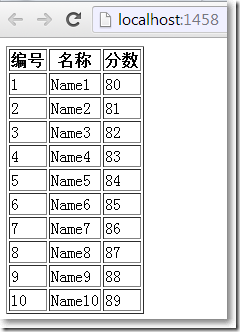
浏览/Home/Index效果:
自定义MVC视图引擎ViewEngine 创建Model的专属视图的更多相关文章
- ASP.NET MVC自定义视图引擎ViewEngine 创建Model的专属视图
MVC内置的视图引擎有WebForm view engine和Razor view engine,当然也可以自定义视图引擎ViewEngine. 本文想针对某个Model,自定义该Model的专属视图 ...
- (翻译)为你的MVC应用程序创建自定义视图引擎
Creating your own MVC View Engine For MVC Application 原文链接:http://www.codeproject.com/Articles/29429 ...
- MVC ViewEngine视图引擎解读及autofac的IOC运用实践
MVC 三大特色 Model.View.Control ,这次咱们讲视图引擎ViewEngine 1.首先看看IViewEngine接口的定义 namespace System.Web.Mvc { ...
- 自定义视图引擎,实现MVC主题快速切换
一个网站的主题包括布局,色调,内容展示等,每种主题在某些方面应该或多或少不一样的,否则就不能称之为不同的主题了.每一个网站至少都有一个主题,我这里称之为默认主题,也就是我们平常开发设计网站时的一个固定 ...
- MVC 【Razor 视图引擎】基础操作 --页面跳转,传值,表单提交
ASPX 与 Razor 仅仅是视图不一样. 新建项目----ASP.NET MVC 4 Web 应用程序------选择模板(空).视图引擎(Razor ) 1.视图中 c# 代码 与 HT ...
- 返璞归真 asp.net mvc (4) - View/ViewEngine
原文:返璞归真 asp.net mvc (4) - View/ViewEngine [索引页] [源码下载] 返璞归真 asp.net mvc (4) - View/ViewEngine 作者:web ...
- Razor视图引擎 语法学习(一)
ASP.NET MVC是一种构建web应用程序的框架,它将一般的MVC(Model-View-Controller)模式应用于ASP.NET框架: ASP.NET约定优于配置:基本分为模型(对实体数据 ...
- 移除apsx视图引擎,及View目录下的web.config的作用
<> 使用Rezor视图引擎的时候移除apsx视图引擎 Global.asax文件 using System; using System.Collections.Generic; usin ...
- (005)每日SQL学习:关于物化视图的一系列创建等语句
--给用户授权 GRANT CREATE MATERIALIZED VIEW TO CDR; --创建物化视图的表日志(具体到某个表,物化视图中用到几个表就需要建立几个日志):当用FAST选项创建物化 ...
随机推荐
- Codeforces 807C - Success Rate(二分枚举)
题目链接:http://codeforces.com/problemset/problem/807/C 题目大意:给你T组数据,每组有x,y,p,q四个数,x/y是你当前提交正确率,让你求出最少需要再 ...
- 【UOJ】#37. 【清华集训2014】主旋律
题解 一道,神奇的题= = 我们考虑正难则反,我们求去掉这些边后有多少图不是强连通的 怎么求呢,不是强连通的图缩点后一定是一个DAG,并且这个DAG里面有两个点 我们想一下,如果我们把1当成入度为0的 ...
- 【LOJ】 #2545. 「JXOI2018」守卫
题解 只会蠢蠢的\(n^3\)--菜啊-- 我们发现最右的端点一定会选,看到的点一定是当前能看到的斜率最小的点变得更小一点,记录下这个点,在我们遇到一个看不到的点的时候,然后只用考虑R到它斜率最小的这 ...
- NET生成缩略图
1.添加一个html <!DOCTYPE html> <html xmlns="http://www.w3.org/1999/xhtml"> <hea ...
- Ionic Js十四:浮动框
$ionicPopover $ionicPopover 是一个可以浮在app内容上的一个视图框. 实例 HTML 代码 <p> <button ng-click="open ...
- js javascript 实现多线程
在讲之前,大家都知道js是基于单线程的,而这个线程就是浏览器的js引擎. 首先来看一下大家用的浏览器都具有那些线程吧. 假如我们要执行一些耗时的操作,比如加载一张很大的图片,我们可能需要一个进度条来让 ...
- 异步任务 -- FutureTask
任务提交 之前在分析线程池的时候,提到过 AbstractExecutorService 的实现: public Future<?> submit(Runnable task) { if ...
- Python并发编程系列之多线程
1 引言 上一篇博文详细总结了Python进程的用法,这一篇博文来所以说Python中线程的用法.实际上,程序的运行都是以线程为基本单位的,每一个进程中都至少有一个线程(主线程),线程又可以创建子线程 ...
- c/c++--strlen()小问题
int x = 2; char * str = "abcd"; int y = (x - strlen(str)) / 3; printf("%d\n", y) ...
- tkinter-clock实例
模仿着前辈的脚步,画了个临时的时钟显示: 代码如下: # coding:utf-8 from tkinter import * import math,time global List global ...