
Mininet 系列实验(四)
实验内容
本次实验拓扑图:
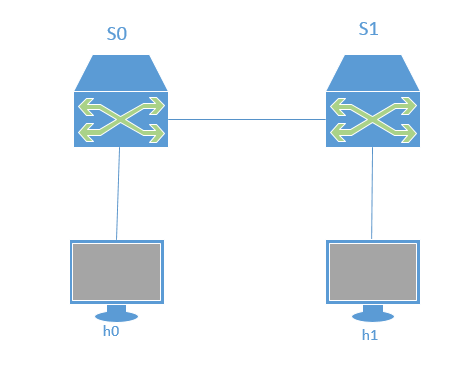
在该环境下,h0 向 h1 发送数据包,由于在 mininet 脚本中设置了连接损耗率,在传输过程中会丢失一些包,本次实验的目的是展示如何通过控制器计算路径损耗速率(h0-s0-s1-h1)。这里假设控制器预先知道网络拓扑,所以没有显示发现网络的代码以及其他相关代码。控制器将向 s0 和 s1 发送 flow_stats_request,当控制器接收到来自 s0 的 response 时,将特定流的数据包数保存在 input_pkts 中,当控制器接收到来自 s1 的 response 时,将接收到特定流的数据包数保存在 output_pkts 中,差值就是丢失的数据包数量。
参考
实验环境
虚拟机: Oracle VM VirtualBox Ubuntu16.04LTS
本次实验需要安装 POX、支持 OpenFlow1.3 协议的 Mininet
安装 POX 的命令:
# git clone http://github.com/noxrepo/pox
如果 Mininet 不支持OpenFlow1.3 我能想到方法就只有卸载重装。具体方法见:Mininet 系列实验(三)
实验步骤
1. 编写 Mininet 脚本
# touch mymininet.py

# vim mymininet.py
然后编辑文件 mymininet.py,内容如下:
#!/usr/bin/python

from mininet.net import Mininet

from mininet.node import Node

from mininet.link import TCLink

from mininet.log import  setLogLevel, info

from threading import Timer

from mininet.util import quietRun

from time import sleep

def myNet(cname='controller', cargs='-v ptcp:'):

    "Create network from scratch using Open vSwitch."

    info( "*** Creating nodes\n" )

    controller = Node( 'c0', inNamespace=False )

    switch = Node( 's0', inNamespace=False )

    switch1 = Node( 's1', inNamespace=False )

    h0 = Node( 'h0' )

    h1 = Node( 'h1' )

    info( "*** Creating links\n" )

    linkopts0=dict(bw=100, delay='1ms', loss=0)

    linkopts1=dict(bw=100, delay='1ms', loss=10)

    link0=TCLink( h0, switch, **linkopts0)

    link1 = TCLink( switch, switch1, **linkopts1)

    link2 = TCLink( h1, switch1, **linkopts0)

    #print link0.intf1, link0.intf2

    link0.intf2.setMAC("0:0:0:0:0:1")

    link1.intf1.setMAC("0:0:0:0:0:2")

    link1.intf2.setMAC("0:1:0:0:0:1")

    link2.intf2.setMAC("0:1:0:0:0:2")

    info( "*** Configuring hosts\n" )

    h0.setIP( '192.168.123.1/24' )

    h1.setIP( '192.168.123.2/24' )

    info( "*** Starting network using Open vSwitch\n" )

    switch.cmd( 'ovs-vsctl del-br dp0' )

    switch.cmd( 'ovs-vsctl add-br dp0' )

    switch1.cmd( 'ovs-vsctl del-br dp1' )

    switch1.cmd( 'ovs-vsctl add-br dp1' )

    controller.cmd( cname + ' ' + cargs + '&' )

    for intf in switch.intfs.values():

        print intf

        print switch.cmd( 'ovs-vsctl add-port dp0 %s' % intf )

    for intf in switch1.intfs.values():

        print intf

        print switch1.cmd( 'ovs-vsctl add-port dp1 %s' % intf )

    # Note: controller and switch are in root namespace, and we

    # can connect via loopback interface

    switch.cmd( 'ovs-vsctl set-controller dp0 tcp:10.0.0.13:6633' )

    //这里改为自己的 IP 地址,例如我的是 10.0.2.15,端口号6633不变

    switch1.cmd( 'ovs-vsctl set-controller dp1 tcp:10.0.0.13:6633')

    //这里改为自己的 IP 地址,例如我的是 10.0.2.15,端口号6633不变

    info( '*** Waiting for switch to connect to controller' )

    while 'is_connected' not in quietRun( 'ovs-vsctl show' ):

        sleep( 1 )

        info( '.' )

    info( '\n' )

    #info( "*** Running test\n" )

    h0.cmdPrint( 'ping -Q 0x64 -c 20 ' + h1.IP() )

    sleep( 1 )

    info( "*** Stopping network\n" )

    controller.cmd( 'kill %' + cname )

    switch.cmd( 'ovs-vsctl del-br dp0' )

    switch.deleteIntfs()

    switch1.cmd( 'ovs-vsctl del-br dp1' )

    switch1.deleteIntfs()

    info( '\n' )

if __name__ == '__main__':

    setLogLevel( 'info' )

    info( '*** Scratch network demo (kernel datapath)\n' )

    Mininet.init()

    myNet()
2. 编写 POX 脚本
# cd pox

# touch flow_stats.py

# vim flow_stats.py
同样编辑文件 flow_stats.py,内容如下:
#!/usr/bin/python

# Copyright 2012 William Yu

# wyu@ateneo.edu

#

# This file is part of POX.

#

# POX is free software: you can redistribute it and/or modify

# it under the terms of the GNU General Public License as published by

# the Free Software Foundation, either version 3 of the License, or

# (at your option) any later version.

#

# POX is distributed in the hope that it will be useful,

# but WITHOUT ANY WARRANTY; without even the implied warranty of

# MERCHANTABILITY or FITNESS FOR A PARTICULAR PURPOSE. See the

# GNU General Public License for more details.

#

# You should have received a copy of the GNU General Public License

# along with POX. If not, see <http://www.gnu.org/licenses/>.

#

"""

This is a demonstration file created to show how to obtain flow

and port statistics from OpenFlow 1.0-enabled switches. The flow

statistics handler contains a summary of web-only traffic.

"""

# standard includes

from pox.core import core

from pox.lib.util import dpidToStr

import pox.openflow.libopenflow_01 as of

from pox.lib.addresses import IPAddr, EthAddr

# include as part of the betta branch

from pox.openflow.of_json import *

from pox.lib.recoco import Timer

import time

log = core.getLogger()

src_dpid = 0

dst_dpid = 0

input_pkts = 0

output_pkts = 0

def getTheTime():  #fuction to create a timestamp

  flock = time.localtime()

  then = "[%s-%s-%s" %(str(flock.tm_year),str(flock.tm_mon),str(flock.tm_mday))

  if int(flock.tm_hour)<10:

    hrs = "0%s" % (str(flock.tm_hour))

  else:

    hrs = str(flock.tm_hour)

  if int(flock.tm_min)<10:

    mins = "0%s" % (str(flock.tm_min))

  else:

    mins = str(flock.tm_min)

  if int(flock.tm_sec)<10:

    secs = "0%s" % (str(flock.tm_sec))

  else:

    secs = str(flock.tm_sec)

  then +="]%s.%s.%s" % (hrs,mins,secs)

  return then

# handler for timer function that sends the requests to all the

# switches connected to the controller.

def _timer_func ():

  for connection in core.openflow._connections.values():

    connection.send(of.ofp_stats_request(body=of.ofp_flow_stats_request()))

    connection.send(of.ofp_stats_request(body=of.ofp_port_stats_request()))

  log.debug("Sent %i flow/port stats request(s)", len(core.openflow._connections))

# handler to display flow statistics received in JSON format

# structure of event.stats is defined by ofp_flow_stats()

def _handle_flowstats_received (event):

   #stats = flow_stats_to_list(event.stats)

   #log.debug("FlowStatsReceived from %s: %s", dpidToStr(event.connection.dpid), stats)

   global src_dpid, dst_dpid, input_pkts, output_pkts

   #print "src_dpid=", dpidToStr(src_dpid), "dst_dpid=", dpidToStr(dst_dpid)

   for f in event.stats:

     if f.match.dl_type==0x0800 and f.match.nw_dst==IPAddr("192.168.123.2") and f.match.nw_tos==0x64 and event.connection.dpid==src_dpid:

       #print "input: ", f.byte_count, f.packet_count

       input_pkts = f.packet_count

     if f.match.dl_type==0x0800 and f.match.nw_dst==IPAddr("192.168.123.2") and f.match.nw_tos==0x64 and event.connection.dpid==dst_dpid:

       #print "output: ", f.byte_count, f.packet_count

       output_pkts = f.packet_count

       if input_pkts !=0:

         print getTheTime(), "Path Loss Rate =", (input_pkts-output_pkts)*1.0/input_pkts*100, "%"

# handler to display port statistics received in JSON format

def _handle_portstats_received (event):

   #print "\n<<<STATS-REPLY: Return PORT stats for Switch", event.connection.dpid,"at ",getTheTime()

   #for f in event.stats:

      #if int(f.port_no)<65534:

        #print "   PortNo:", f.port_no, " Fwd's Pkts:", f.tx_packets, " Fwd's Bytes:", f.tx_bytes, " Rc'd Pkts:", f.rx_packets, " Rc's Bytes:", f.rx_bytes

        #print "   PortNo:", f.port_no,  " TxDrop:", f.tx_dropped, " RxDrop:", f.rx_dropped, " TxErr:", f.tx_errors, " RxErr:", f.rx_errors, " CRC:", f.rx_crc_err, " Coll:", f.collisions

  stats = flow_stats_to_list(event.stats)

  log.debug("PortStatsReceived from %s: %s", dpidToStr(event.connection.dpid), stats)

def _handle_ConnectionUp (event):

  global src_dpid, dst_dpid

  print "ConnectionUp: ", dpidToStr(event.connection.dpid)

  for m in event.connection.features.ports:

    if m.name == "s0-eth0":

      src_dpid = event.connection.dpid

    elif m.name == "s1-eth0":

      dst_dpid = event.connection.dpid

  msg = of.ofp_flow_mod()

  msg.priority =1

  msg.idle_timeout = 0

  msg.match.in_port =1

  msg.actions.append(of.ofp_action_output(port = of.OFPP_ALL))

  event.connection.send(msg)

  msg = of.ofp_flow_mod()

  msg.priority =1

  msg.idle_timeout = 0

  msg.match.in_port =2

  msg.actions.append(of.ofp_action_output(port = of.OFPP_ALL))

  event.connection.send(msg)

  msg = of.ofp_flow_mod()

  msg.priority =10

  msg.idle_timeout = 0

  msg.hard_timeout = 0

  msg.match.dl_type = 0x0800

  msg.match.nw_tos = 0x64

  msg.match.in_port=1

  msg.match.nw_dst = "192.168.123.2"

  msg.actions.append(of.ofp_action_output(port = 2))

  event.connection.send(msg)

  msg = of.ofp_flow_mod()

  msg.priority =10

  msg.idle_timeout = 0

  msg.hard_timeout = 0

  msg.match.dl_type = 0x0800

  msg.match.nw_tos = 0x64

  msg.match.nw_dst = "192.168.123.1"

  msg.actions.append(of.ofp_action_output(port = 1))

  event.connection.send(msg)

# main functiont to launch the module

def launch ():

  # attach handsers to listners

  core.openflow.addListenerByName("FlowStatsReceived",

    _handle_flowstats_received)

  core.openflow.addListenerByName("PortStatsReceived",

    _handle_portstats_received)

  core.openflow.addListenerByName("ConnectionUp", _handle_ConnectionUp)

  # timer set to execute every five seconds

  Timer(1, _timer_func, recurring=True)
3. 运行 flow_stats.py
# ./pox.py flow_stats
4. 运行 myminiet.py
在打开一个终端,执行以下命令
# chmod +x mymininet.py

# ./mymininet.py
或者
# python mymininet.py

结果发现,交换机无法与 POX 控制器连接上。结果十分不理想。
总结
1. 实验过程中遇到的问题
- 最大的问题就是 Python 没有掌握,基本看不懂脚本。
- 对 POX 没有了解,不知道用法也不知道如何配置。
- 没有达到预期的实验结果,分析之后,个人认为主要还是上面两个问题没有解决,这个坑就先留在这里,等学有所成再回过头来解决
Mininet 系列实验(四)的更多相关文章
- Mininet 系列实验(六)
写在前面 这次实验遇到了非常多问题,非常非常多,花了很多时间去解决,还是有一些小问题没有解决,但是基本上能完成实验.建议先看完全文再开始做实验. 实验内容 先看一下本次实验的拓扑图: 在该环境下,假设 ...
- Mininet 系列实验(三)
实验内容 基础 Mininet 可视化界面进行自定义拓扑及拓扑设备自定义设置,实现自定义脚本应用. 参考 Mininet可视化应用 实验环境 虚拟机: Oracle VM VirtualBox Ubu ...
- Mininet 系列实验(一)
关于SDN的第一个实验,似乎实验室里的前辈们也都是从这里开始的. 实验内容 使用源码安装Mininet 参考 Mininet使用源码安装 实验环境 虚拟机:Oracle VM VirtualBox U ...
- Mininet系列实验(四):基于Mininet测量路径的损耗率
1 实验目的 熟悉Mininet自定义拓扑脚本的编写与损耗率的设定: 熟悉编写POX脚本,测量路径损耗速率 2 实验原理 在SDN环境中,控制器可以通过对交换机下发流表操作来控制交换机的转发行为,此外 ...
- Mininet 系列实验(五)
实验内容 实现一个单个交换机的拓扑,添加一个交换机,和N个主机到网络中.交换机和主机之间的每个链路能够设置带宽.延迟时间.以及丢包率.创建一个包含一个交换机和四个主机的网络,使用iperf测试主机之间 ...
- Mininet 系列实验(二)
实验内容 分别通过命令行创建.Python脚本编写以及交互式界面创建来熟悉Mininet的基本功能. 参考 Mininet命令延伸实验扩展 实验环境 虚拟机:Oracle VM VirtualBox ...
- Mininet系列实验(五):Mininet设置带宽之简单性能测试
1.实验目的 该实验通过Mininet学习python自定义拓扑实现,可在python脚本文件中设计任意想要的拓扑,简单方便,并通过设置交换机和主机之间链路的带宽.延迟及丢包率,测试主机之间的性能.在 ...
- Mininet系列实验(三):Mininet命令延伸实验扩展
1 实验目的 熟悉Mininet自定义拓扑三种实现方式:命令行创建.Python脚本编写.交互式界面创建. 2 实验原理 Mininet 是一个轻量级软件定义网络和测试平台:它采用轻量级的虚拟化技术使 ...
- Mininet 系列实验(七)
实验内容 本实验在基于 Mininet 脚本的不同拓扑环境下使用 OpenDaylight 控制交换机行为.任务一:一台交换机两台主机,从1端口进入的数据流转发到 2 端口,从 2 端口进入的数据流转 ...
随机推荐
- Android Dalvik虚拟机初识
摘自:http://blog.csdn.net/andyxm/article/details/6126907 首先,让我们来思考下面几个问题: 什么是Dalvik虚拟机? Dalvik VM与JVM有 ...
- 树莓派操控SG90舵机
目录 舵机接线 PWM介绍 使用PWM控制舵机 这里使用树莓派来操作sg90的舵机.先看一下这个舵机的样子: 这就是传说中的SG90舵机啦,转角是0-180. SG90舵机接线: SG90舵机有三条线 ...
- java IO流 对文件操作的代码集合
Io流 按照分类 有两种分类 流向方向: 有输入流和输出流 按照操作类型有:字节流和字符流 按照流向方向 字节流的一些操作 //读文件 FileInputStream fis = new FileIn ...
- java抽象类与接口区别
java抽象类与接口区别: abstract class和interface是Java语言中对于抽象类定义进行支持的两种机制,正是由于这两种机制的存在,才赋予了Java强大的面向对象能力. abstr ...
- 【Kubernetes】基于角色的权限控制:RBAC
Kubernetes中所有的API对象,都保存在Etcd里,对这些API对象的操作,一定都是通过访问kube-apiserver实现的,原因是需要APIServer来做授权工作. 在Kubernete ...
- 利用saltstack一键部署多台zookeeper
以上是saltstack上面sls文件存放zookeeper的路径和文件 以上是入口文件把文件夹做成包 重要安装配置在zoo.sls,以下是该sls的内容 zookeeper: file.manage ...
- Python 自动爬取B站视频
文件名自定义(文件格式为.py),脚本内容: #!/usr/bin/env python #-*-coding:utf-8-*- import requests import random impor ...
- 前端_html
目录 HTML介绍 标签说明 常用标签 <!DOCTYPE>标签 <head>内常用标签 <body>内常用标签 特殊字符 其他:各种各样的标签 HTML的规范 H ...
- mac 上面安装 tree 命令
相信很多使用过Linux的用户都用过tree命令,它可以像windows的文件管理器一样清楚明了的显示目录结构. 但是mac下默认是没有 tree命令的. 1.我们可以使用find命令模拟出tree命 ...
- java.time 时间和简单任务
java.time是jdk1.8才用的 时间管理 package com.test.time; import java.time.*; /** * Created by MY on 2017/8/7. ...
- Mininet 系列实验(六)