
virtualbox+vagrant学习-3-Vagrant Share-4-Vagrant Connect
Vagrant Connect
vagrant可以共享到vagrant环境的任何或每个端口,而不仅仅是SSH和HTTP。“vagrant connect”命令为连接人员提供一个静态IP,他们可以使用该IP与共享的vagrant环境通信。发送到此IP的任何TCP流量都被发送到共享的vagrant环境。
1.Usage
即调用vagrant share --full命令
这将自动为远程连接共享尽可能多的端口。更多信息请查看 the Vagrant share security page页面。
注意在调用vagrant share --full命令末尾的共享名字,并将其提供给希望连接到你的机器的人。他们只需要简单地调用vagrant connect NAME命令即可(和上一篇ssh的连接方法一样)。这将给他们一个静态IP,他们可以使用它来访问你的vagrant环境。
userdeMacBook-Pro:~ user$ vagrant share --full --http

Vagrant Share now defaults to using the `ngrok` driver.

The `classic` driver has been deprecated.

For more information about the `ngrok` driver, please

refer to the documentation:

  https://www.vagrantup.com/docs/share/

==> default: Detecting network information for machine...

    default: Local machine address: 127.0.0.1

    default:

    default: Note: With the local address (127.0.0.1), Vagrant Share can only

    default: share any ports you have forwarded. Assign an IP or address to your

    default: machine to expose all TCP ports. Consult the documentation

    default: for your provider ('virtualbox') for more information.

    default:

    default: Local HTTP port:

    default: Local HTTPS port: disabled

    default: Port:

==> default: Creating Vagrant Share session...

    share: Importing base box 'hashicorp/vagrant-share'...

    share: Matching MAC address for NAT networking...

    share: Setting the name of the VM: share-fe65ef45-f050-4cc9-98ba-bd19ec32d8e0

    share: Fixed port collision for  => . Now on port .

    share: Vagrant has detected a configuration issue which exposes a

    share: vulnerability with the installed version of VirtualBox. The

    share: current guest is configured to use an E1000 NIC type for a

    share: network adapter which is vulnerable in this version of VirtualBox.

    share: Ensure the guest is trusted to use this configuration or update

    share: the NIC type using one of the methods below:

    share:

    share:   https://www.vagrantup.com/docs/virtualbox/configuration.html#default-nic-type

    share:   https://www.vagrantup.com/docs/virtualbox/networking.html#virtualbox-nic-type

    share: Clearing any previously set network interfaces...

    share: Preparing network interfaces based on configuration...

    share: Adapter : nat

    share: Forwarding ports...

    share:  (guest) =>  (host) (adapter )

    share:  (guest) =>  (host) (adapter )

    share: Running 'pre-boot' VM customizations...

    share: Booting VM...

    share: Waiting for machine to boot. This may take a few minutes...

    share: SSH address: 127.0.0.1:

    share: SSH username: tc

    share: SSH auth method: password

    share:

    share: Inserting generated public key within guest...

    share: Removing insecure key from the guest if it's present...

    share: Key inserted! Disconnecting and reconnecting using new SSH key...

    share: Machine booted and ready!

==> share:

==> share: Your Vagrant Share is running! Name: budget_hello:agenda_design

==> share:

==> share: You're sharing full access to your Vagrant machine. This means that

==> share: another user can have access to your Vagrant machine by running:

==> share:

==> share:   vagrant connect budget_hello:agenda_design

==> share:

==> share: HTTP URL: http://5fd8f0d7.ngrok.io

==> share:

==> share:

==> share: Your Vagrant Share is running! Name: budget_hello:agenda_design

==> share:

==> share: You're sharing full access to your Vagrant machine. This means that

==> share: another user can have access to your Vagrant machine by running:

==> share:

==> share:   vagrant connect budget_hello:agenda_design

==> share:

==> share: HTTP URL: http://5fd8f0d7.ngrok.io

==> share:
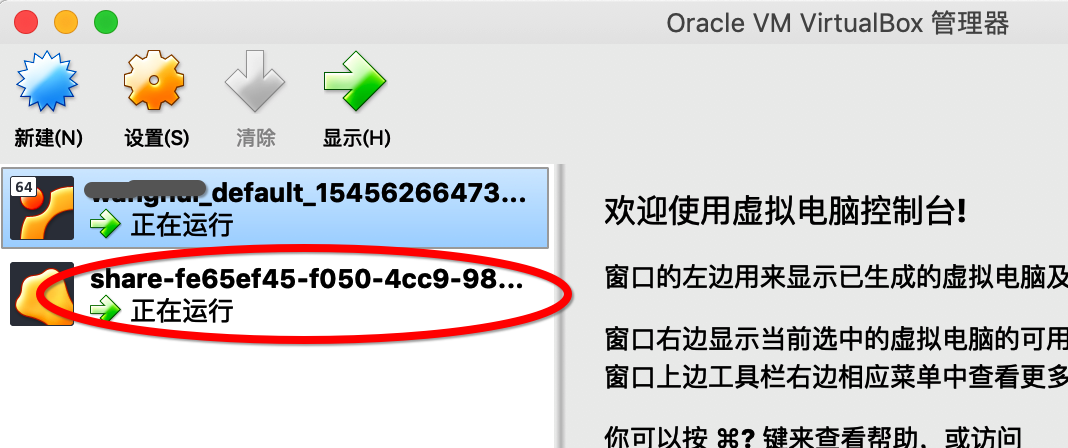
相应虚拟机也已经打开:
2.How does it work?
vagrant connect的运行是通过做vagrant最擅长的事情:管理虚拟机来实现的。vagrant connect使用VirtualBox或VMware(更多的提供者支持即将到来)创建了一个只占用20 MB内存的小型虚拟机。
然后,发送到这个小型虚拟机的任何流量都被代理到共享的vagrant环境,就好像它被定向到这个环境一样。
$vagrant connect budget_hello:agenda_design
3.Beware: Vagrant Insecure Key
如果你正在使用的vagrant环境或box是受到vagrant不安全密钥对(大多数公共box都是)的保护,那么连接到SSH的任何人都可以轻松地使用SSH。
虽然你希望与你信任的人共享,但在某些环境中,你可能与类或conference共享,并且不希望它们能够SSH进入。
在这种情况下,我们建议从vagrant计算机中更改或删除不安全的密钥。
最后,我们要注意,我们正在努力使之在使用vagrant share时,除非显式允许,否则vagrant私钥将被主动拒绝。但是,这个特性还没有完成。
virtualbox+vagrant学习-3-Vagrant Share-4-Vagrant Connect的更多相关文章
- virtualbox+vagrant学习-2(command cli)-26-vagrant share命令
Share share命令初始化了一个vagrant share会话,允许你与世界上任何一个人共享vagrant环境,允许在几乎任何网络环境中直接在vagrant环境中进行协作. 你可以在本博客的vi ...
- virtualbox+vagrant学习-1-环境安装及vagrantfile的简单配置-Mac系统
在学习docker-machine时,发现需要使用到虚拟化平台,所以选择了使用virtualBox. 然后后面发现需要使用vagrant来在mac系统中作为虚拟机管理软件,所以下面将会简述我自己学习使 ...
- virtualbox+vagrant学习-3-Vagrant Share-2-HTTP Sharing
HTTP Sharing Vagrant Share可以创建一个可公开访问的URL端点来访问在Vagrant环境中运行的HTTP服务器.这被称为“HTTP共享”,在使用Vagrant Share时默认 ...
- virtualbox+vagrant学习-3-Vagrant Share-3-SSH Sharing
SSH Sharing vagrant share通过向vagrant share提供--SSH标志,使远程SSH访问vagrant环境变得非常容易. 如果你想让同事访问你的SSH,以便对ops问题进 ...
- virtualbox+vagrant学习-3-Vagrant Share-1-简介
Vagrant Share 通过 ngrok 内网穿透功能实现让全世界人可以访问虚拟机的服务 Vagrant Share允许你与世界上的任何人共享您的Vagrant环境,几乎支持你在任何网络环境中使用 ...
- virtualbox+vagrant学习-2(command cli)-7-vagrant login命令
Login ⚠️该命令已经弃用了,别名为vagrant cloud auth login.看本博客的 格式: vagrant cloud auth login [options] 登录命令用于使用Ha ...
- virtualbox+vagrant学习-2(command cli)-24-Aliases别名
Aliases 别名的部分灵感来自Git自身的别名功能,它允许你创建自己的定制vagrant命令,从而使你的vagrant体验更简单.更容易.更熟悉. 别名可以在VAGRANT_HOME/ alias ...
- virtualbox+vagrant学习-5-Boxes-1-简介
Boxes boxes是vagrant环境的包格式.在vagrant支持的任何平台上,任何人都可以使用一个box来创建一个相同的工作环境.vagrant box实用程序提供了管理boxes的所有功能. ...
- virtualbox+vagrant学习-2(command cli)-1-vagrant box命令
vagrant box 这是用于管理(添加.删除等)boxes的命令. box 是一个打包好的操作系统,是一个后缀名为 .box 的文件,其实是一个压缩包,里面包含了 Vagrant 的配置信息和 V ...
随机推荐
- javaMail 邮件发送和接收示例,支持正文图片、html、附件(转)
转自:https://blog.csdn.net/star_fly4/article/details/52037587 一.RFC882文档简单说明 RFC882文档规定了如何编写一封简单的邮件(纯文 ...
- python 软件管理规范
一.背景 软件开发是一个系统工程,当然编码实现是其中尤其重要的一个环节,关乎到功能需求的实现好坏.这个环节中除了编码这一硬功之外,与之相关的编码风格这一柔道,虽然没有直接决定功能的实现与否,但却在很大 ...
- 在vue-cli中使用layer中的layData日期组件
有朋友问我怎么在vue-cli项目中使用layui中的layData组件,有时间从网上查了下写下篇文章. 1.首先去layData官网把文件包下载下来,解压出来的laydate文件夹整个放在vue-c ...
- CSS之换行
在项目中,常常遇到一些问题,可以通过CSS来快速解决,比如受到布局影响会导致内容溢出,这个时候就可以使用CSS换行解决 自动换行: { word-wrap:break-word; } 强制不换行: { ...
- 【Python】Java程序员学习Python(九)— 集合(list、tuple、range)和映射(dict)
集合是一门语言最重要的一个特性,对集合支持的程度越好,使用起来越方便 一.表现形式 1.1 list list的基本用法: 使用中括号包裹,[1,2,3] 元素类型可以是任意类型,同样可以是list ...
- [转]How do you build a database?
非常简短的文字,却异常明了的说明了一个数据库管理系统的核心原理,原文来自原文. Its a great question, and deserves a long answer. Most datab ...
- [TSQL|SQLSERVER|MSSQL数据库] 将数据库文件与日志附加到数据库引擎,以及转移数据库文件位置
附加: USE [master] GO CREATE DATABASE [database_name] ON ( FILENAME = N'C:\Data\<database name>. ...
- iOS设计模式 - 责任链
iOS设计模式 - 责任链 原理图 说明 在责任链模式里,很多对象由每一个对象对其下家的引用而连接起来形成一条链.请求在这个链上传递,直到链上的某一个对象决定处理此请求.发出这个请求的客户端并不知道链 ...
- [翻译] AFSoundManager
AFSoundManager iOS audio playing (both local and streaming) and recording made easy through a comple ...
- Codewars, Leetcode, Hackerrank. Online Judges Reviews
http://jasonjl.me/blog/2015/03/30/practical-programming-practice-services/ Codewars, Leetcode, Hacke ...