
POI导出复杂Excel,合并单元格(2)


/**

     *  导出excel (HSSFWorkbook)

     */

    @GetMapping("/testExport")

    public void testExport1(HttpServletResponse response)

    {

        /** 第一步,创建一个Workbook,对应一个Excel文件  */

        HSSFWorkbook wb = new HSSFWorkbook();

        /** 第二步,在Workbook中添加一个sheet,对应Excel文件中的sheet  */

        HSSFSheet sheet = wb.createSheet("excel导出标题");

        /** 第三步,设置样式以及字体样式*/

        HSSFCellStyle titleStyle = createTitleCellStyle(wb);

        HSSFCellStyle headerStyle = createHeadCellStyle(wb);

        HSSFCellStyle contentStyle = createContentCellStyle(wb);

        /** 第四步,创建标题 ,合并标题单元格 */

        // 行号

        int rowNum = 0;

        // 创建第一页的第一行,索引从0开始

        HSSFRow row0 = sheet.createRow(rowNum++);

        row0.setHeight((short) 800);// 设置行高

        String title = "excel导出标题";

        HSSFCell c00 = row0.createCell(0);

        c00.setCellValue(title);

        c00.setCellStyle(titleStyle);

        // 合并单元格,参数依次为起始行,结束行,起始列,结束列 (索引0开始)

        sheet.addMergedRegion(new CellRangeAddress(0, 0, 0, 6));//标题合并单元格操作,6为总列数

        // 第二行

        HSSFRow row1 = sheet.createRow(rowNum++);

        row1.setHeight((short) 500);

        String[] row_first = {"填表单位:", "", "", "", "", " 2019年第2季度 ", ""};

        for (int i = 0; i < row_first.length; i++) {

            HSSFCell tempCell = row1.createCell(i);

            tempCell.setCellStyle(headerStyle);

            if (i == 0) {

                tempCell.setCellValue(row_first[i] + "测试单位");

            } else if (i == 5) {

                tempCell.setCellStyle(headerStyle);

                tempCell.setCellValue(row_first[i]);

            } else {

                tempCell.setCellValue(row_first[i]);

            }

        }

        // 合并

        sheet.addMergedRegion(new CellRangeAddress(1, 1, 0, 4));

        sheet.addMergedRegion(new CellRangeAddress(1, 1, 5, 6));

        //第三行

        HSSFRow row2 = sheet.createRow(rowNum++);

        row2.setHeight((short) 700);

        String[] row_second = {"名称", "采集情况", "", "", "登记情况", "", "备注"};

        for (int i = 0; i < row_second.length; i++) {

            HSSFCell tempCell = row2.createCell(i);

            tempCell.setCellValue(row_second[i]);

            tempCell.setCellStyle(headerStyle);

        }

        // 合并

        sheet.addMergedRegion(new CellRangeAddress(2, 3, 0, 0));//名称

        sheet.addMergedRegion(new CellRangeAddress(2, 2, 1, 3));//采集情况

        sheet.addMergedRegion(new CellRangeAddress(2, 2, 4, 5));//登记情况

        sheet.addMergedRegion(new CellRangeAddress(2, 3, 6, 6));//备注

        //第四行

        HSSFRow row3 = sheet.createRow(rowNum++);

        row3.setHeight((short) 700);

        String[] row_third = {"", "登记数(人)", "办证总数(人)", "办证率(%)", "登记户数(户)", "签订数(份)", ""};

        for (int i = 0; i < row_third.length; i++) {

            HSSFCell tempCell = row3.createCell(i);

            tempCell.setCellValue(row_third[i]);

            tempCell.setCellStyle(headerStyle);

        }

        //循环每一行数据

        List<Map<String, Object>> dataList = new ArrayList<Map<String, Object>>(); //查询出来的数据

        Map<String,Object> map = new HashMap<String,Object>();

        map.put("name", "测试名称1");

        map.put("r1", "111");

        map.put("r2", "222");

        map.put("r3", "333");

        map.put("r4", "444");

        map.put("r5", "555");

        map.put("r6", "666");

        dataList.add(map);

        dataList.add(map);//加多一条list

        for (Map<String, Object> excelData : dataList) {

            HSSFRow tempRow = sheet.createRow(rowNum++);

            tempRow.setHeight((short) 500);

            // 循环单元格填入数据

            for (int j = 0; j < 7; j++) {

                HSSFCell tempCell = tempRow.createCell(j);

                tempCell.setCellStyle(contentStyle);

                String tempValue;

                if (j == 0) {

                    // 乡镇、街道名称

                    tempValue = excelData.get("name").toString();

                } else if (j == 1) {

                    // 登记数(人)

                    tempValue = excelData.get("r1").toString();

                } else if (j == 2) {

                    // 办证总数(人)

                    tempValue = excelData.get("r2").toString();

                } else if (j == 3) {

                    // 办证率(%)

                    tempValue = excelData.get("r3").toString();

                } else if (j == 4) {

                    // 登记户数(户)

                    tempValue = excelData.get("r4").toString();

                } else if (j == 5) {

                    // 签订数(份)

                    tempValue = excelData.get("r5").toString();

                } else {

                    // 备注

                    tempValue = excelData.get("r6").toString();

                }

                tempCell.setCellValue(tempValue);

            }

        }

        // 注释行

        HSSFRow remark = sheet.createRow(rowNum++);

        remark.setHeight((short) 500);

        String[] row_remark = {"注:表中的“办证率=办证总数÷登记数×100%”", "", "", "", "", "", ""};

        for (int i = 0; i < row_remark.length; i++) {

            HSSFCell tempCell = remark.createCell(i);

            if (i == 0) {

                tempCell.setCellStyle(headerStyle);

            } else {

                tempCell.setCellStyle(contentStyle);

            }

            tempCell.setCellValue(row_remark[i]);

        }

        int remarkRowNum = dataList.size() + 4;

        sheet.addMergedRegion(new CellRangeAddress(remarkRowNum, remarkRowNum, 0, 6));//注释行合并单元格

        // 尾行

        HSSFRow foot = sheet.createRow(rowNum++);

        foot.setHeight((short) 500);

        String[] row_foot = {"审核人:", "", "填表人:", "", "填表时间:", "", ""};

        for (int i = 0; i < row_foot.length; i++) {

            HSSFCell tempCell = foot.createCell(i);

            tempCell.setCellStyle(contentStyle);

            if (i == 0) {

                tempCell.setCellValue(row_foot[i] + "张三");

            } else if (i == 2) {

                tempCell.setCellValue(row_foot[i] + "李四");

            } else if (i == 4) {

                tempCell.setCellValue(row_foot[i] + "xxxx");

            } else {

                tempCell.setCellValue(row_foot[i]);

            }

        }

        int footRowNum = dataList.size() + 5;

        // 注

        sheet.addMergedRegion(new CellRangeAddress(footRowNum, footRowNum, 0, 1));

        sheet.addMergedRegion(new CellRangeAddress(footRowNum, footRowNum, 2, 3));

        sheet.addMergedRegion(new CellRangeAddress(footRowNum, footRowNum, 4, 6));

        //导出

        // HttpServletResponse response = this.getResponse();

        String fileName = "报表名称.xls";

        try {

            response.setCharacterEncoding("UTF-8");

            response.setHeader("content-Type", "application/vnd.ms-excel");

            response.setHeader("Content-Disposition", "attachment;filename=" + URLEncoder.encode(fileName, "UTF-8"));

            OutputStream stream = response.getOutputStream();

            if (null != wb && null != stream) {

                wb.write(stream);// 将数据写出去

                wb.close();

                stream.close();

            }

        } catch (Exception e) {

            e.printStackTrace();

        }

    }
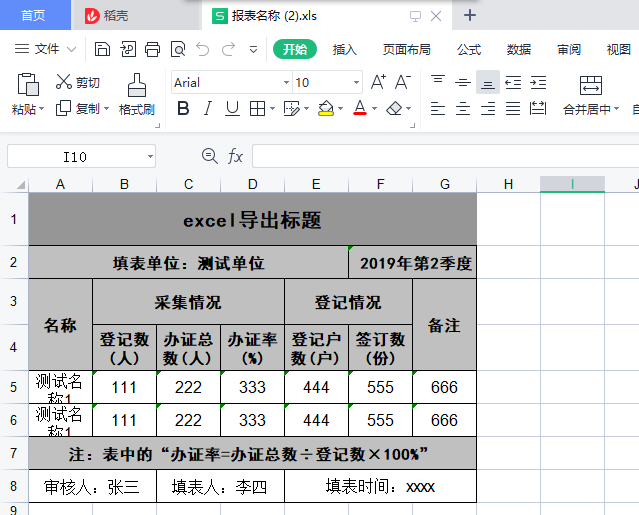
导出结果如图
POI导出复杂Excel,合并单元格(2)的更多相关文章
- Java poi导出设置 Excel某些单元格不可编辑
小白的总结,大神勿喷:需要转载请说明出处,如果有什么问题,欢迎留言 一.需求: 1.某一列 .某一行或某些单元格不可编辑,其他列可以编辑 二.期间遇到的问题 1.无法设置成不可编辑 2.设置为不可编辑 ...
- asp.net C#取Excel 合并单元格内容
asp教程.net c#取excel 合并单元格内容读取excel数据,填充dataset// 连接字符串 string xlspath = server.mappath("~/www.11 ...
- 使用POI创建word表格合并单元格兼容wps
poi创建word表格合并单元格代码如下: /** * @Description: 跨列合并 */ public void mergeCellsHorizontal(XWPFTable table, ...
- java poi导出Excel合并单元格并设置边框
import org.apache.poi.hssf.usermodel.HSSFCell; import org.apache.poi.hssf.usermodel.HSSFCellStyle; i ...
- poi导出excel合并单元格(包括列合并、行合并)
1 工程所需jar包如下:commons-codec-1.5.jarcommons-logging-1.1.jarlog4j-1.2.13.jarjunit-3.8.1.jarpoi-3.9-2012 ...
- poi excel 合并单元格
结论:final CellRangeAddress cra = new CellRangeAddress(rowId, rowId + rowSkip, colId, colId + c ...
- 前端Excel表格导入导出,包括合并单元格,表格自定义样式等
表格数据导入 读取导入Excel表格数据这里采用的是 xlsx 插件 npm i xlsx 读取excel需要通过 XLSX.read(data, {type: type}) 方法来实现,返回一个叫W ...
- npoi导出excel合并单元格
需要引用NPOI.dll程序集和Ionic.Zip.dll程序集 string[] headerRowName = { "序号", "地市", "镇街 ...
- NPOI之Excel——合并单元格、设置样式、输入公式、设置筛选等
首先建立一个空白的工作簿用作测试,并在其中建立空白工作表,在表中建立空白行,在行中建立单元格,并填入内容: //建立空白工作簿 IWorkbook workbook = new HSSFWorkboo ...
- NPOI之Excel——合并单元格、设置样式、输入公式
首先建立一个空白的工作簿用作测试,并在其中建立空白工作表,在表中建立空白行,在行中建立单元格,并填入内容: //建立空白工作簿 IWorkbook workbook = new HSSFWorkboo ...
随机推荐
- 算法基础⑦搜索与图论--BFS(宽度优先搜索)
宽度优先搜索(BFS) #include<cstdio> #include<cstring> #include<iostream> #include<algo ...
- ArcGIS使用技巧(三)——关于投影
新手,若有错误还请指正! 简单记录一下自己所理解的ArcGIS中的有关投影的知识点. 在数据处理过程中,基本都是需要将相关数据放在同一投影坐标系下,需要用到投影转换工具,但若有的数据没有坐标信息,则首 ...
- 2022.02.20 SA
2022.02.20 SA 如果我还能看见明天黎明,如果我还能再爬起来,我仍会走我的路,哪怕这条路已经荒废许久,也许我们无法拥有感情,我们甚至无法像个正常人一样接受太阳的洗礼,但是我依然会执行我的条约 ...
- JDK内置锁深入探究
一.序言 本文讲述仅针对 JVM 层次的内置锁,不涉及分布式锁. 锁有多种分类形式,比如公平锁与非公平锁.可重入锁与非重入锁.独享锁与共享锁.乐观锁与悲观锁.互斥锁与读写锁.自旋锁.分段锁和偏向锁/轻 ...
- IDEA SpringBoot-Mybatis-plus 实现增删改查(CRUD)
上一篇: IDEA SpringBoot-Mybatis实现增删改查(CRUD) 下一篇:Intellij IDEA 高效使用教程 (插件,实用技巧) 最好用的idea插件大全 一.前言 Mybati ...
- 杭电2091空心三角形Java(AC)
题目:http://acm.hdu.edu.cn/showproblem.php?pid=2091 把三角形写入二维数组里,然后输出出来 注意事项: 1.三角形后面没有空格(每一层的后面) 2.三角形 ...
- Es5 - 11 详解
一.ES简介 ECMAScript,欧洲计算机制造商协会 ES是一种标准,而JS是ES的一种实现 每年的ES版本中都会引入新特性 二.NRM的安装与使用 NRM是切换源的工具 ES6 2.1安装 wi ...
- Jackson通用工具类
compile group: 'com.fasterxml.jackson.core', name: 'jackson-core', version: '2.11.1' compile group: ...
- GET 与 POST 其实没有什么区别
GET 与 POST 其实没有什么区别 本文写于 2020 年 12 月 30 日 GET 与 POST 是两种 HTTP 方法,并且是最常用的两种. 今天在使用 Postman 测试 api 的时候 ...
- C语言函数调用栈
C语言函数调用栈 栈溢出(stack overflow)是最常见的二进制漏洞,在介绍栈溢出之前,我们首先需要了解函数调用栈. 函数调用栈是一块连续的用来保存函数运行状态的内存区域,调用函数(calle ...