
使用容器运行的minio配置https(TLS)访问
使用certgen生成证书
下载地址:https://github.com/minio/certgen/releases/tag/v0.0.2
下载地址:https://files.cnblogs.com/files/sanduzxcvbnm/0.0.2.zip
注意: 只能使用0.0.2版本的certgen,高版本的certgen没有-ca参数了
# 0.0.2版本的参数

# ./certgen-linux-amd64 --help

Usage of ./certgen-linux-amd64:

  -ca

        whether this cert should be its own Certificate Authority

  -duration duration

        Duration that certificate is valid for (default 8760h0m0s)

  -ecdsa-curve string

        ECDSA curve to use to generate a key. Valid values are P224, P256 (recommended), P384, P521

  -ed25519

        Generate an Ed25519 key

  -host string

        Comma-separated hostnames and IPs to generate a certificate for

  -org-name string

        Organization name used when generating the certs (default "Acme Co")

  -rsa-bits int

        Size of RSA key to generate. Ignored if --ecdsa-curve is set (default 2048)

  -start-date string

        Creation date formatted as Jan 1 15:04:05 2011

# 大于0.0.2版本的参数

# ./certgen-linux-amd64 --help

Usage of ./certgen-linux-amd64:

  -duration duration

        Duration that certificate is valid for (default 8760h0m0s)

  -ecdsa-curve string

        ECDSA curve to use to generate a key. Valid values are P224, P256 (recommended), P384, P521

  -ed25519

        Generate an Ed25519 key (default true)

  -host string

        Comma-separated hostnames and IPs to generate a certificate for

  -no-ca

        whether this cert should not be its own Certificate Authority

  -org-name string

        Organization name used when generating the certs (default "Acme Co")

  -start-date string

        Creation date formatted as Jan 1 15:04:05 2011

# certgen -ca -host "主机IP,minio容器运行IP"

# 如果缺容器IP Post "https://172.17.0.2:9000/": x509: certificate is valid for 192.168.20.102, not 172.17.0.2 错误

# 如果缺主机IP Post "https://172.17.0.2:9000/": x509: certificate signed by unknown authority (possibly because of "crypto/rsa: verification error" while trying to verify candidate authority certificate "Acme Co") 错误

# 实际执行的生成证书的命令

# ./certgen-linux-amd64 -ca -host "192.168.20.102,172.17.0.2"

2022/03/09 14:10:58 wrote public.crt

2022/03/09 14:10:58 wrote private.key
使用容器运行minio服务
mkdir -p /mnt/{data,config}

docker run -d -p 9000:9000 -p 9001:9001 --name minio1 \

  -e "MINIO_ACCESS_KEY=admin" \

  -e "MINIO_SECRET_KEY=12345678" \

  -v /mnt/data:/data \

  -v /mnt/config:/root/.minio \

  minio/minio server /data --console-address ":9001"
复制生成的证书到/mnt/config/certs路径下
cp p* /mnt/config/certs

docker restart minio1
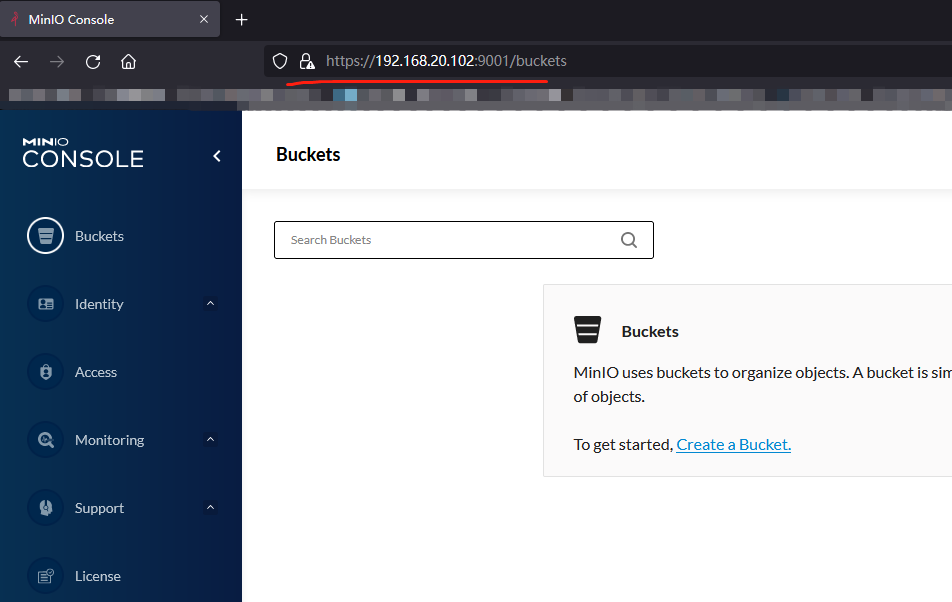
使用https://192.168.20.102:9000访问登录即可
certgen扩展
Example (server)
certgen -ca -host "10.10.0.3,10.10.0.4,10.10.0.5"

2020/11/21 10:16:18 wrote public.crt

2020/11/21 10:16:18 wrote private.key
Example (client)
certgen -client -host "localhost"

2022/02/28 16:55:37 wrote client.crt

2022/02/28 16:55:37 wrote client.key
使用容器运行的minio配置https(TLS)访问的更多相关文章
- 单机部署minio,设置Nginx代理,配置https(TLS)访问
安装 下载地址:https://dl.min.io/ # 创建目录 mkdir -p /usr/local/minio/{data,bin,etc} # 下载minio wget https://dl ...
- Tomcat8配置Https协议,Tomcat配置Https安全访问,Tomcat Https配置
Tomcat8配置Https协议,Tomcat配置Https安全访问,Tomcat Https配置 ============================== ©Copyright 蕃薯耀 2017 ...
- 【转】Linux下nginx配置https协议访问的方法
一.配置nginx支持https协议访问,需要在编译安装nginx的时候添加相应的模块--with-http_ssl_module 查看nginx编译参数:/usr/local/nginx/sbin/ ...
- Tomcat配置https协议访问
Tomcat9配置https协议访问: https://blog.csdn.net/weixin_42273374/article/details/81010203 配置Tomcat使用https协议 ...
- Linux服务之nginx服务篇四(配置https协议访问)
一.配置nginx支持https协议访问 编译安装nginx的时候需要添加相应的模块--with-http_ssl_module和--with-http_gzip_static_module(可通过/ ...
- 在容器服务kubernetes上配置https
当前容器服务Kubernetes集群支持多种应用访问的形式,最常见形式如SLB:Port,NodeIP:NodePort和域名访问等.但是Kubernetes集群默认不支持HTTPS访问,如果用户希望 ...
- lnmp之Nginx配置https加密访问
配置lnmp之Nginx网站支持https加密访问 注: 1. 这里拿购买的(pxsnx.pxjy.com)证书来做样例 证书文件共有三个---> (pxsnxg.pxjy.com_ca.crt ...
- IIS7配置HTTPS+默认访问https路径
一.下载证书(这里我使用的是阿里云免费的证书) 文件说明: 1. 1532858285913.key(证书私钥文件).1532858285913.pem(证书文件).1532858285913.pfx ...
- tomcat7 配置 https安全访问
在apache-tomcat-7.0.33-windows-x64.zip配置https,结果在配置SSL时遇到一些问题 1.用JDK自带的keytool来生成私有密钥和自签发的证书,如下: keyt ...
随机推荐
- 字节输入流_InputStream类&FileInputStream类介绍和字节输入流读取字节数据
java.io.InputStream:字节输入流 此抽象类是表示字节输入流的所有类的超类 定义了所有子类共性的方法: int read()从输入流中读取数据的下一个字节 int read(byte[ ...
- SpringMVC pom
<?xml version="1.0" encoding="UTF-8"?> <project xmlns="http://mave ...
- Webpack干货系列 | Webpack5 怎么处理字体图标、图片资源
程序员优雅哥(youyacoder)简介:十年程序员,呆过央企外企私企,做过前端后端架构.分享vue.Java等前后端技术和架构. 本文摘要:主要讲解在不需要引入额外的loader的条件下运用Webp ...
- HTTP协议之Expect爬坑
前言 今天,在对接一个第三方平台开放接口时遇到一个很棘手的问题,根据接口文档组装好报文,使用HttpClient发起POST请求时一直超时,对方服务器一直不给任何响应. 发起请求的代码如下: usin ...
- jdbc 07: 解决sql注入
jdbc连接mysql,解决sql注入问题 package com.examples.jdbc.o7_解决sql注入; import java.sql.*; import java.util.Hash ...
- 在 macOS 上搭建 Flutter 开发环境
下载 Flutter SDK flutter官网下载:https://flutter.io/sdk-archive/#macos 若上述链接无法访问,可通过GitHub下载 https://githu ...
- 记vs2019 The view 'xxx' was not found.
版本:Visual Studio 2019 16.8.2/16.8.4.net core 3.1 1.检测是否是拼写错误2.检查.csproj为文件中是否包含有下面的content remove(这种 ...
- 我和Apache DolphinScheduler的这一年
Apache DolphinScheduler,为Apache开源项目, 简称"DS", 中文名 "小海豚调度"(海豚聪明.人性化,又左右脑可互相换班,终生不用 ...
- Luogu3594 [POI2015]WIL-Wilcze doły (双端队列)
单调性显然,双端队列队列维护严格单调递减手写双端队列真的可恶. #include <iostream> #include <cstdio> #include <cstri ...
- Redis 15 主从复制
参考源 https://www.bilibili.com/video/BV1S54y1R7SB?spm_id_from=333.999.0.0 版本 本文章基于 Redis 6.2.6 概述 主从复制 ...