
【Unity学习笔记】掌握MoneBehavior中的重要属性、方法
一、重要属性
1-1.获取自己依附的GameObject
using System.Collections;

using System.Collections.Generic;

using UnityEngine;

public class Lesson3 : MonoBehaviour

{

private void Start()

{

//Mono里已经封装好了属性gameObject

//可以通过gameObject属性来获取

//(this.是可以省略的,为了便于理解 在前面加上this)

//打印出它的名字

print(this.gameObject.name);

}

}

1-2.获取自己依附的GameObject的位置信息
using System.Collections;

using System.Collections.Generic;

using UnityEngine;

public class Lesson3 : MonoBehaviour

{

private void Start()

{

//使用transform.出来

//(this.是可以省略的,为了便于理解 在前面加上this)

//获取坐标

print(this.transform.position);

//获取角度(欧拉角)

print(this.transform.eulerAngles);

//获取缩放

print(this.transform.lossyScale);

//这种写法和上面是一样的

print(this.gameObject.transform);

}

}

1-3.设置脚本的 激活 与 失活
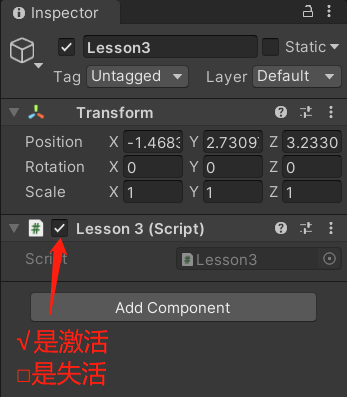
using System.Collections;

using System.Collections.Generic;

using UnityEngine;

public class Lesson3 : MonoBehaviour

{

private void Start()

{

//(this.是可以省略的,为了便于理解 在前面加上this)

//激活

this.enabled = true;

//失活

this.enabled = false;

}

}
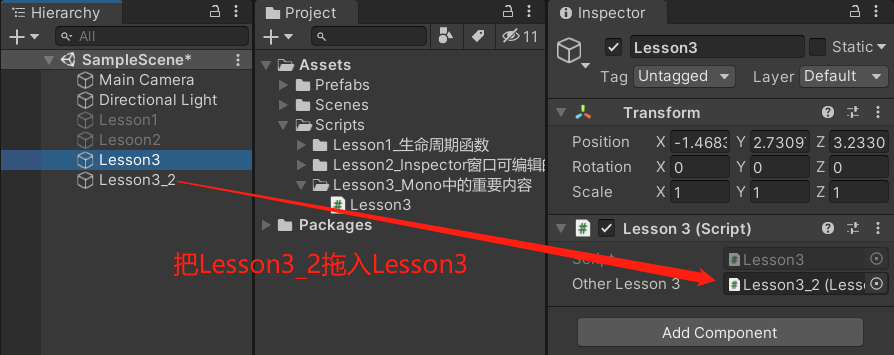
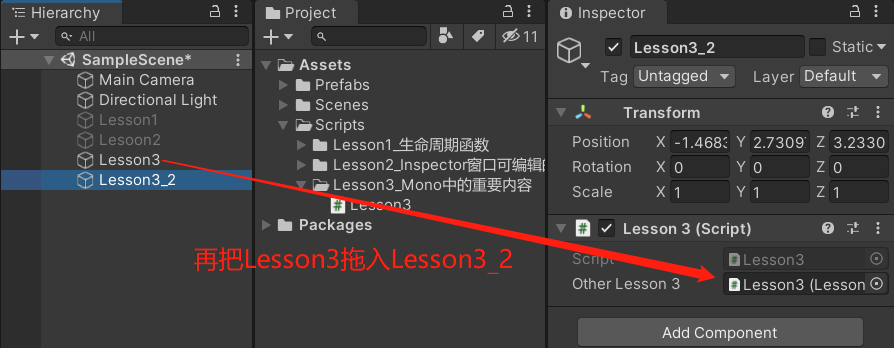
1-4.获取别的游戏对象的gameObject和transform
using System.Collections;

using System.Collections.Generic;

using UnityEngine;

public class Lesson3 : MonoBehaviour

{

//因为两个物体挂的都是Lesson3脚本

//所以声明一个Lesson3类型的变量

public Lesson3 otherLesson3;

private void Start()

{

//获取别的脚本对象依附的gameobject和transform信息

//(this.是可以省略的,为了便于理解 在前面加上this)

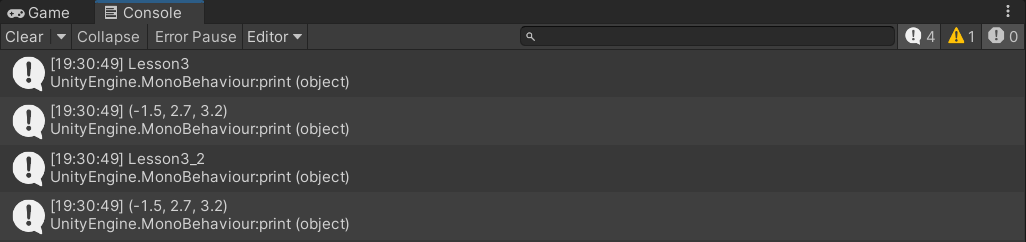
print(otherLesson3.gameObject.name);

print(otherLesson3.transform.position);

}

}
打印结果:
二、重要方法
主要内容:得到依附游戏对象上挂载的其它脚本
只要得到了场景中游戏物体 或 它身上依附的脚本,那么 就可以得到它的一切信息
2-1.得到和自己依附在同一游戏物体上的另一个脚本(很少用)
现有一个Lesson3物体,上面挂载了两个脚本
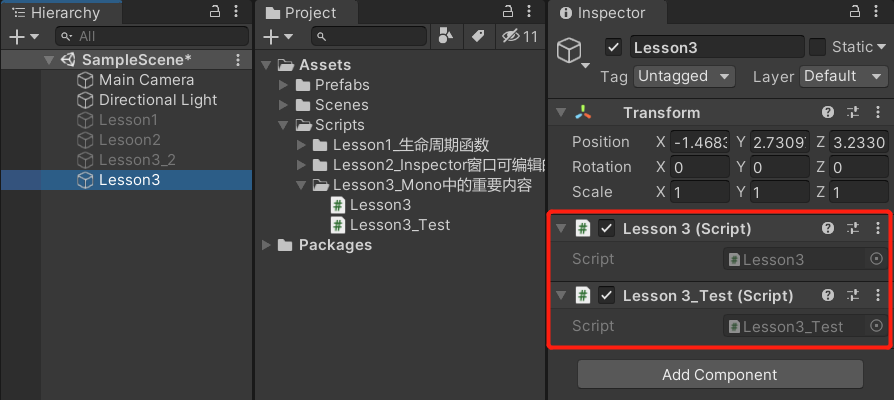
脚本Lesson3代码:
using System.Collections;

using System.Collections.Generic;

using UnityEngine;

public class Lesson3 : MonoBehaviour

{

private void Start()

{

//因为我们知道要获取的脚本是Lesson3_Test,所以直接使用Lesson3_Test类型的变量去接收它的返回值

Lesson3_Test t = null;

//得到和自己依附在同一游戏物体上的另一个脚本

//1.根据脚本名获取(很少用)

// 需要用里氏替换原则把返回值 as 成Lesson3_Test

// 如果没找到""里的那个脚本,就默认返回null

t = this.GetComponent("Lesson3_Test") as Lesson3_Test;

print(t);

//2.根据Type获取(反射的知识)

// 需要用里氏替换原则把返回值 as 成Lesson3_Test

t = this.GetComponent(typeof(Lesson3_Test)) as Lesson3_Test;

print(t);

//3.通过泛型获取(用的最多,因为不用as了)

// 默认就返回Lesson3_Test类型,不需要as转换了

t = this.GetComponent<Lesson3_Test>();

print(t);

}

}
运行:

2-2.得到自己挂载的多个脚本
现有一个Lesson3物体,上面挂载了两个脚本
Lesson3脚本的代码:
using System.Collections;

using System.Collections.Generic;

using UnityEngine;

public class Lesson3 : MonoBehaviour

{

private void Start()

{

//1.用数组得到Lesson3上挂载的所有脚本

//需要用一个Lesson3类型的数组去接收返回值

Lesson3[] array = this.GetComponents<Lesson3>();

print(array.Length);

//2.用List得到Lesson3上挂载的所有脚本

//声明一个Lesson3类型的List

List<Lesson3> list = new List<Lesson3>();

//用这个List去存获取的结果

this.GetComponents<Lesson3>(list);

print(list.Count);

}

}
运行:

------------恢复内容开始------------
# 一、重要属性
1-1.获取自己依附的GameObject
using System.Collections;

using System.Collections.Generic;

using UnityEngine;

public class Lesson3 : MonoBehaviour

{

private void Start()

{

//Mono里已经封装好了属性gameObject

//可以通过gameObject属性来获取

//(this.是可以省略的,为了便于理解 在前面加上this)

//打印出它的名字

print(this.gameObject.name);

}

}
1-2.获取自己依附的GameObject的位置信息
using System.Collections;

using System.Collections.Generic;

using UnityEngine;

public class Lesson3 : MonoBehaviour

{

private void Start()

{

//使用transform.出来

//(this.是可以省略的,为了便于理解 在前面加上this)

//获取坐标

print(this.transform.position);

//获取角度(欧拉角)

print(this.transform.eulerAngles);

//获取缩放

print(this.transform.lossyScale);

//这种写法和上面是一样的

print(this.gameObject.transform);

}

}
1-3.设置脚本的 激活 与 失活
using System.Collections;

using System.Collections.Generic;

using UnityEngine;

public class Lesson3 : MonoBehaviour

{

private void Start()

{

//(this.是可以省略的,为了便于理解 在前面加上this)

//激活

this.enabled = true;

//失活

this.enabled = false;

}

}
1-4.获取别的游戏对象的gameObject和transform
using System.Collections;

using System.Collections.Generic;

using UnityEngine;

public class Lesson3 : MonoBehaviour

{

//因为两个物体挂的都是Lesson3脚本

//所以声明一个Lesson3类型的变量

public Lesson3 otherLesson3;

private void Start()

{

//获取别的脚本对象依附的gameobject和transform信息

//(this.是可以省略的,为了便于理解 在前面加上this)

print(otherLesson3.gameObject.name);

print(otherLesson3.transform.position);

}

}
打印结果:
二、重要方法
主要内容:得到依附游戏对象上挂载的其它脚本
只要得到了场景中游戏物体 或 它身上依附的脚本,那么 就可以得到它的一切信息
2-1.得到和自己依附在同一游戏物体上的另一个脚本(很少用)
现有一个Lesson3物体,上面挂载了两个脚本
脚本Lesson3代码:
using System.Collections;

using System.Collections.Generic;

using UnityEngine;

public class Lesson3 : MonoBehaviour

{

private void Start()

{

//因为我们知道要获取的脚本是Lesson3_Test,所以直接使用Lesson3_Test类型的变量去接收它的返回值

Lesson3_Test t = null;

//得到和自己依附在同一游戏物体上的另一个脚本

//1.根据脚本名获取(很少用)

// 需要用里氏替换原则把返回值 as 成Lesson3_Test

// 如果没找到""里的那个脚本,就默认返回null

t = this.GetComponent("Lesson3_Test") as Lesson3_Test;

print(t);

//2.根据Type获取(反射的知识)

// 需要用里氏替换原则把返回值 as 成Lesson3_Test

t = this.GetComponent(typeof(Lesson3_Test)) as Lesson3_Test;

print(t);

//3.通过泛型获取(用的最多,因为不用as了)

// 默认就返回Lesson3_Test类型,不需要as转换了

t = this.GetComponent<Lesson3_Test>();

print(t);

}

}
运行:
2-2.得到自己挂载的多个脚本
现有一个Lesson3物体,上面挂载了两个脚本
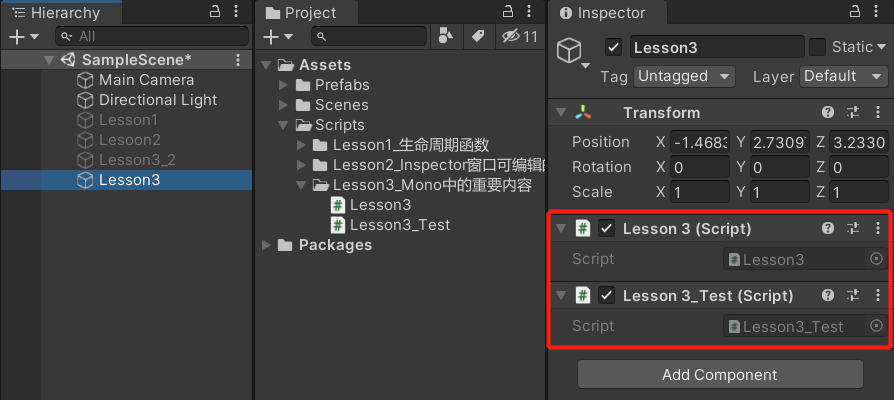
Lesson3脚本的代码:
using System.Collections;

using System.Collections.Generic;

using UnityEngine;

public class Lesson3 : MonoBehaviour

{

private void Start()

{

//1.用数组得到Lesson3上挂载的所有脚本

//需要用一个Lesson3类型的数组去接收返回值

Lesson3[] array = this.GetComponents<Lesson3>();

print(array.Length);

//2.用List得到Lesson3上挂载的所有脚本

//声明一个Lesson3类型的List

List<Lesson3> list = new List<Lesson3>();

//用这个List去存获取的结果

this.GetComponents<Lesson3>(list);

print(list.Count);

}

}
运行:
2-3.得到子对象挂载的脚本
(它默认也会找自己身上是否挂载了该脚本)
(儿子的儿子也会去找)
现有:
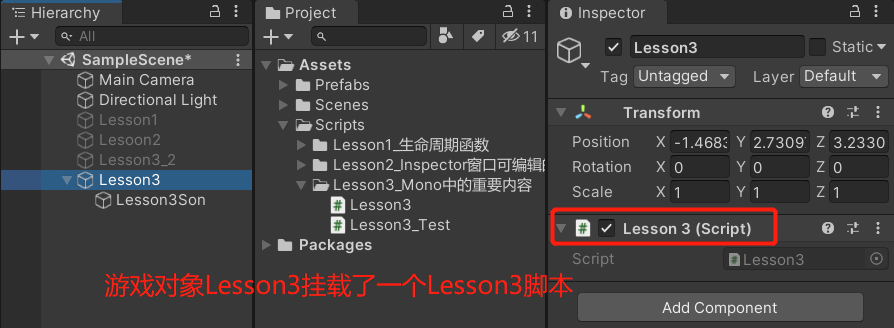
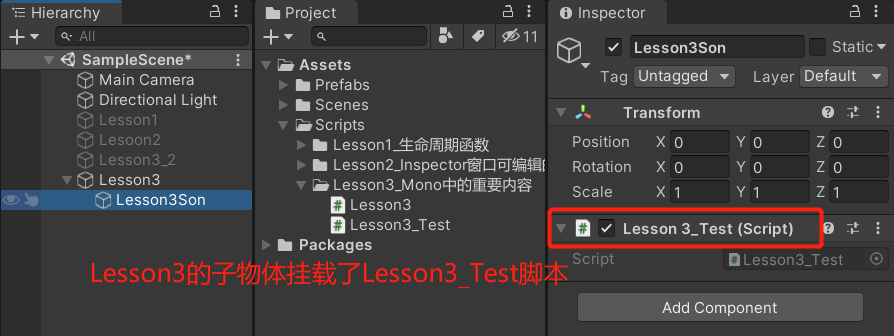
Lesson3脚本代码:
using System.Collections;

using System.Collections.Generic;

using UnityEngine;

public class Lesson3 : MonoBehaviour

{

    private void Start()

    {

        //因为我们知道要获取的脚本是Lesson3_Test,所以直接使用Lesson3_Test类型的变量去接收它的返回值

        Lesson3_Test t = null;

        //得到单个

        //使用GetComponentInChildren<>来获取子对象挂载的某个脚本

        //()中的参数:是否检测失活的,不填默认false

        t = this.GetComponentInChildren<Lesson3_Test>(true);

        print(t);

        //得到多个

        //使用GetComponentsInChildren<>来获取子对象挂载的多个脚本

        //方法一:用数组

        //用一个Lesson3_Test类型的数组去接收返回值

        Lesson3_Test[] array = this.GetComponentsInChildren<Lesson3_Test>(true);

        print(array.Length);

        //方法二:用List得到Lesson3的子对象上挂载的所有脚本

        //声明一个Lesson3类型的List

        List<Lesson3_Test> list = new List<Lesson3_Test>();

        //把获取到的子对象的脚本装入list

        this.GetComponentsInChildren<Lesson3_Test>(true,list);

        print(list.Count);

    }

}
运行:
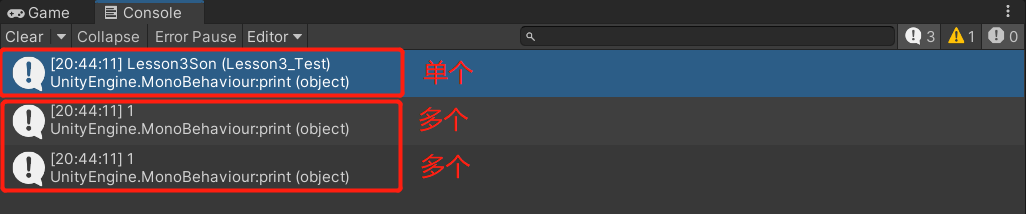
2-4.得到父对象挂载的脚本
(它默认也会找自己身上是否挂载了该脚本)
(父亲的父亲也会去找)
现有:
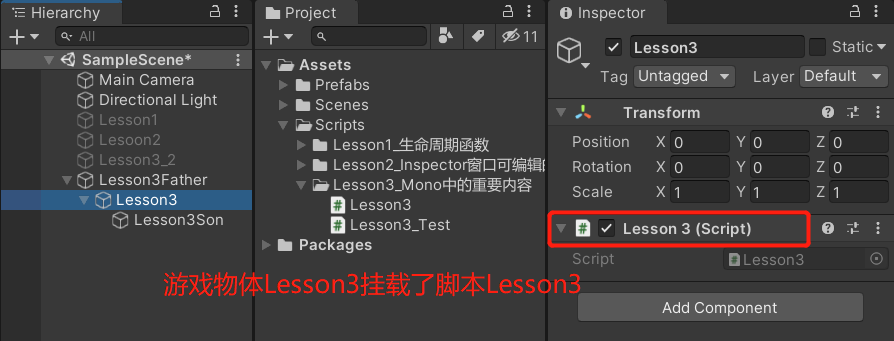
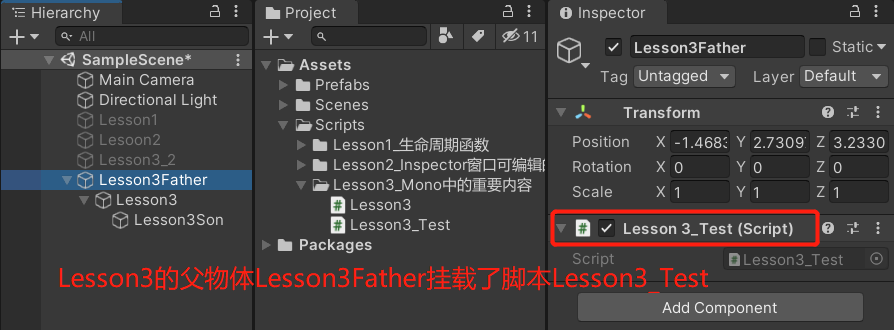
Lesson3脚本的代码:
using System.Collections;

using System.Collections.Generic;

using UnityEngine;

public class Lesson3 : MonoBehaviour

{

    private void Start()

    {

        //因为我们知道要获取的脚本是Lesson3_Test,所以直接使用Lesson3_Test类型的变量去接收它的返回值

        Lesson3_Test t = null;

        //得到单个

        //使用GetComponentInParent<>来获取父对象挂载的某个脚本

        t = this.GetComponentInParent<Lesson3_Test>();

        print(t);

        //得到多个

        //使用GGetComponentsInParent<>来获取父对象挂载的多个脚本

        //方法一:用数组

        //用一个Lesson3_Test类型的数组去接收返回值

        Lesson3_Test[] array = this.GetComponentsInParent<Lesson3_Test>();

        print(array.Length);

        //方法二:用List存Lesson3的父对象上挂载的所有脚本

        //声明一个Lesson3类型的List

        List<Lesson3_Test> list = new List<Lesson3_Test>();

        //把获取到的父对象的脚本装入list

        this.GetComponentsInParent<Lesson3_Test>(true,list);

        print(list.Count);

    }

}
运行:

2-5.尝试获取脚本
之前在得单个脚本的时候,有可能没得到 为null
为了保险起见,往往得到脚本后会先判断它不为空 再进行逻辑处理
所以提供了一个更加安全的方法this.TryGetComponent<>
using System.Collections;

using System.Collections.Generic;

using UnityEngine;

public class Lesson3 : MonoBehaviour

{

    private void Start()

    {

        //因为我们知道要获取的脚本是Lesson3_Test,所以直接使用Lesson3_Test类型的变量去接收它的返回值

        Lesson3_Test t = null;

        //this.TryGetComponent<>会有一个bool型的返回值

        //通过out把得到的脚本装进t

        if (this.TryGetComponent<Lesson3_Test>(out t))

        {

            print("成功获取了");

        }

    }

}
【Unity学习笔记】掌握MoneBehavior中的重要属性、方法的更多相关文章
- python学习笔记013——模块中的私有属性
1 私有属性的使用方式 在python中,没有类似private之类的关键字来声明私有方法或属性.若要声明其私有属性,语法规则为: 属性前加双下划线,属性后不加(双)下划线,如将属性name私有化,则 ...
- C语言学习笔记--C语言中变量的属性关键字
变量属性关键字的使用语法:property type var_name; 1.auto 关键字 auto关键字是C语言中局部变量的默认的关键字,C编译器默认所有的局部变量都是auto的,它表明了被修饰 ...
- [学习笔记]node.js中的path.extname方法
path.extname 返回path路径文件扩展名,如果path以 ‘.' 为结尾,将返回 ‘.',如果无扩展名 又 不以'.'结尾,将返回空值. path.extname('index.html' ...
- VBA学习笔记(1)----VBA对象属性方法
'VBA对象 'VBA中的对象其实就是我们操作的具有方法.属性的excel中支持的对象 'Excel中的几个常用对象表示方法 '1.工作簿 ' Workbooks 代表工作簿集合,所有的工作簿,Wor ...
- 并发编程学习笔记(4)----jdk5中提供的原子类及Lock使用及原理
(1)jdk中原子类的使用: jdk5中提供了很多原子类,它会使变量的操作变成原子性的. 原子性:原子性指的是一个操作是不可中断的,即使是在多个线程一起操作的情况下,一个操作一旦开始,就不会被其他线程 ...
- [学习笔记] 在Eclipse中导入项目
参考前文:[学习笔记] 在Eclips 中导出项目 选择已经导出的文件: 导入之后,项目结构如下: 至此,完成.
- CockroachDB学习笔记——[译]CockroachDB中的SQL:映射表中数据到键值存储
CockroachDB学习笔记--[译]CockroachDB中的SQL:映射表中数据到键值存储 原文标题:SQL in CockroachDB: Mapping Table Data to Key- ...
- [学习笔记] 在Eclipse中导出可以直接运行的jar,依赖的jar中的类解压后放在运行jar中
前文: [学习笔记] 在Eclipse中导出可以直接运行的jar,依赖的jar打在jar包中 使用7z打开压缩包,查看所有依赖的jar都被解压以包名及class的方式存储在了运行jar中,此时jar的 ...
- [学习笔记] 在Eclipse中导出可以直接运行的jar,依赖的jar打在jar包中
本文需要参考前文: [学习笔记] 在Eclipse中导出可以直接运行的jar,依赖的jar在子目录中 上文是导出的运行的依赖jar被放在了子目录中,本文是将依赖jar放在可运行jar的本身,这样发布的 ...
- [学习笔记] 在Eclipse中导出可以直接运行的jar,依赖的jar在子目录中
工程创建可参考前文: [学习笔记] 在Eclipse中使用Hibernate,并创建第一个工程,数据库为Oracle XE 在工程上鼠标右键: 找到java 选择 Runable JAR file N ...
随机推荐
- 关闭BottomSheetDialogFragment从后台返回后的动画
问题 显示BottomSheetDialogFragment后.将当前应用放于后台,切换到其他APP,然后再返回当前应用.此时会看到BottomSheetDialogFragment从下而上的动画再次 ...
- Python图像处理:如何获取图像属性、兴趣ROI区域及通道处理
摘要:本篇文章主要讲解Python调用OpenCV获取图像属性,截取感兴趣ROI区域,处理图像通道. 本文分享自华为云社区<[Python图像处理] 三.获取图像属性.兴趣ROI区域及通道处理 ...
- js通用对象数组冒泡排序
数组对象通用 function sort(data, sortFiled, orderby) { var result = data, temp; for (var i = 0; i < res ...
- 虚拟机:ESX
VMware ESXi 与ESX 产品之比较 VMware vSphere 5.0 以后版本,所有底层虚拟化产品都改为ESXi产品,本文主要比较了ESXi与ESX的各自特点,以便对大家是否要把现有 ...
- 安装Speedtest到CentOS(YUM)
Speedtest是一个由Python语言编写的一个网络测速脚本,提供多个外网的测试站点,我们可以使用它测试网络的IO速度. 如果由于网络问题导致无法下载软件包,则可以通过安装模块到Python的方式 ...
- 【SpringCloud原理】万字剖析OpenFeign之FeignClient动态代理生成源码
年前的时候我发布两篇关于nacos源码的文章,一篇是聊一聊nacos是如何进行服务注册的,另一篇是一文带你看懂nacos是如何整合springcloud -- 注册中心篇.今天就继续接着剖析Sprin ...
- ApeForms | WinForm窗体UI美化库(Metro扁平风格)演示与安装
ApeForms系列① 快速上手 @ 目录 ApeForms系列① 快速上手 前言 演示视频 快速上手 安装及使用 Demo下载 联系开发者 加入我们 建议与咨询 前言 ApeForms是一套基于Wi ...
- 13. L1,L2范数
讲的言简意赅,本人懒,顺手转载过来:https://www.cnblogs.com/lhfhaifeng/p/10671349.html
- 前端工作中用到的openlayers相关的公共方法
/** * 获取地图上的图层对象 * @param map 地图对象 * @param layerName 实例化图层时的name * @return {null}*/ getLayerByLayer ...
- 深度学习与计算机视觉教程(15) | 视觉模型可视化与可解释性(CV通关指南·完结)
作者:韩信子@ShowMeAI 教程地址:http://www.showmeai.tech/tutorials/37 本文地址:http://www.showmeai.tech/article-det ...