
How to setup a Chia Harvester on Ubuntu
How to setup a Chia Harvester on Ubuntu
A Chia Harvest is a computer that farms Chia and connects back to a Master Node. You can almost think of it like the Master Node being a Pool and the harvesters as nodes on that “pool”. In this post we’ll talk about setting up a Chia Harvester on Ubuntu. Shouldn’t matter which version of Ubuntu. LTS or the latest should work fine.
Do note that we do not need the gui installed for this to work. Refer to this post to install Chia
Note: In the following commands we are assuming that the Chia directory is in your home “~/” directory on the harvester. Change the path if different.
Before we start you will need the ca directory from your Main/Master node uploaded or accessible to your Ubuntu harvester. You can get the CA directory from the following locations on Windows and Linux.
On Linux
~/.chia/mainnet/config/ssl/caOn Windows
C:\User\username\.chia\mainnet\config\ssl\ca
You should be able to copy and paste the following path into Explorer to get to the correct directory.
%homepath%\.chia\mainnet\config\ssl\ca
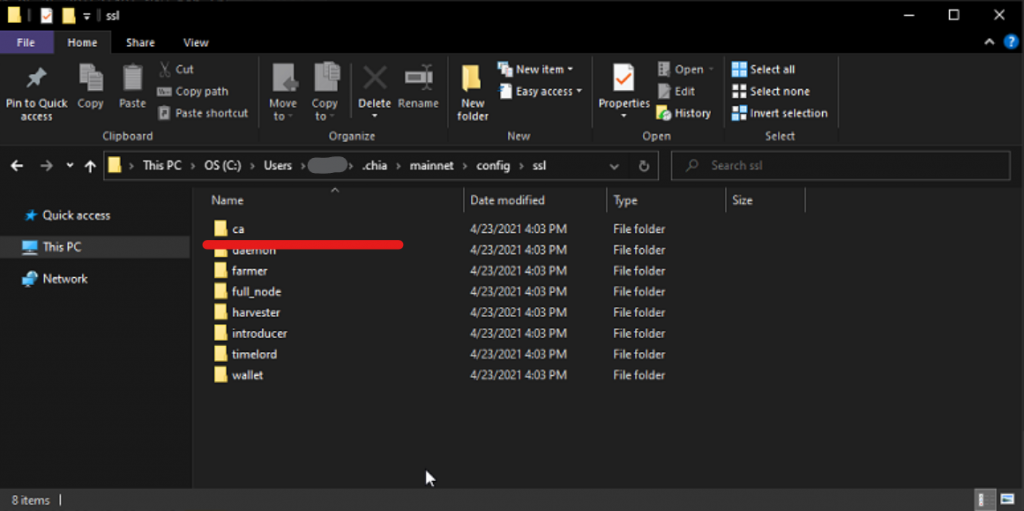 Copy Chia ca directory
Copy this folder onto your Desktop, thumbdrive, network share, just some place you can access it.
Upload ca folder
You can use scp to upload the ca folder of the Harvester. In the following example we put the ca directory on our Windows desktop and we are uploading to our harvesters home directory.
scp -r Desktop\ca user@192.168.1.5:~/
Activate Chia
The rest of the commands are run on the harvester. You can either ssh or physically log into it. If Chia was installed in a different directory, then you will need to change the path.
cd chia-blockchain
. ./activate
Configure Harvester
You should be able to copy and paste all the following commands in, change the parts in bold as needed.
The –set-farmer-peer option is your main node’s ip address.
chia init -c ~/ca

chia stop all

chia configure --set-farmer-peer 192.168.1.4:8447

chia configure --enable-upnp false

chia plots add -d /media/user/plotdrive/

chia start harvester -r
Should be all set. You can check the Main Node to verify that the harvester is connecting.
Important Notes:
UPNP needs to be turned off. It can cause problems if there are multiple wallets running on a local network that both have upnp on.
Add your plot drive locations. We need something to harvest :)
Verify that the Linux user can write to the Chia Plot drives
The following command will give the ubuntu user write access to the drive. Change the path to your drive.
sudo chmod ugo+wx /media/username/your_driveCreating Plots
Create plots by specifying the Farmer Public Key and the Pool Public Key. You can get these from the Main Node. Plan on adding info on how to retrieve that info soon.
chia plots create -t /media/user/plotdrivetmp -d /media/user/plotdrive -f biglongublicfarmerkeyag934gh3bh3h4 -p biglongpoolpublickey129gmc2390243t-gg49The following link has more information.
https://github.com/Chia-Network/chia-blockchain/wiki/Farming-on-many-machines
This entry was posted in Chia, Crypto Currency and tagged blockchain, chia, crypto, farming, harvesters, mining by admin. Bookmark the permalink.
Leave a Reply
You must be logged in to post a comment.
How to setup a Chia Harvester on Ubuntu的更多相关文章
- 解决Ubuntu下vbox的(rc=-1908)
在Ubuntu下用虚拟机VBOX的时候总是遇到 Kernel driver not installed (rc=-1908) The VirtualBox Linux kernel driver (v ...
- ubuntu下openGL的配置方法
This is a simple tutorial to show a new linux user (such as myself) how to setup freeglut and OpenGl ...
- Virtualbox报错------> '/etc/init.d/vboxdrv setup'
Ubuntu下VirtualBox本来可以很好地用的,今天早上一来就报错了,--提示如下内容: ---------------------------------------------------- ...
- shell及脚本1——变量
一.shell shell是操作系统与用户之间的沟通的渠道,可以接收并执行用户的命令,有很多shell程序,目前linux默认使用bash shell程序. bash shell有很多实用功能,例如: ...
- CentOS VirtualBox启动虚拟及报错:VirtualBox error: Kernel driver not installed (rc=1908)
VirtualBox error: Kernel driver not installed (rc=1908) Hi all, Let me first say that this is my fin ...
- 配置Windows 2008 R2 64位 Odoo 8.0 源码PyCharm开发调试环境
安装过程中,需要互联网连接下载python依赖库: 1.安装: Windows Server 2008 R2 x64标准版 2.安装: Python 2.7.10 amd64 到C:\Python27 ...
- 配置Windows 2008 R2 64位 Odoo 8.0/9.0 源码开发调试环境
安装过程中,需要互联网连接下载python依赖库: 1.安装: Windows Server 2008 R2 x64标准版 2.安装: Python 2.7.10 amd64 到C:\Python27 ...
- Fedora安装VirtualBox时出现错误Kernel driver not installed (rc=-1908)的解决办法
新建虚拟机后启动时出现如下错误: Kernel driver not installed (rc=-1908) The VirtualBox Linux kernel driver (vboxdrv) ...
- Linux网络基础配置
这是看itercast视频的笔记 Linux网络基础配置 以太网连接 在Linux中,以太网接口被命令为:eth0, eth1等, 0,1代表网卡编号 通过lspci命令可以查看网上硬件信息(如果是u ...
- VirtualBox,Kernel driver not installed (rc=-1908)
http://hi.baidu.com/spt_form/item/316d6207b47b8ee03499020a VirtualBox,Kernel driver not installed (r ...
随机推荐
- Centos7搭建hadoop3.3.4分布式集群
目录 1.背景 2.集群规划 2.1 hdfs集群规划 2.2 yarn集群规划 3.集群搭建步骤 3.1 安装JDK 3.2 修改主机名和host映射 3.3 配置时间同步 3.4 关闭防火墙 3. ...
- RabbitMQ 延迟消息实战
RabbitMQ 延迟消息实战 现实生活中有一些场景需要延迟或在特定时间发送消息,例如智能热水器需要 30 分钟后打开,未支付的订单或发送短信.电子邮件和推送通知下午 2:00 开始的促销活动. Ra ...
- Spring依赖注入问题
记录一下最近复习的Spirng依赖注入问题 主要介绍两个注入方式 也是用的最多的 1.构造方法注入 2.Setter注入. 参考文档:https://blog.csdn.net/weixin_5541 ...
- 常规诊疗条件下比较依那西普生物类似药(益赛普)与阿达木、英夫利西对RA的疗效[EULAR2015_SAT0360]
常规诊疗条件下比较依那西普生物类似药(益赛普)与阿达木单抗.英夫利西单抗治疗RA的临床疗效 SAT0360 ETANAR - A ETANERCEPT BIOSIMILAR IS AS EFFEC ...
- obj对象数据归类整理
两个字段根据id对应整理 <!doctype html> <html lang="en"> <head> <meta charse ...
- Express 项目发送 Cookie
在使用 Cookie 之前,需要安装 Express 中间件--cookie-parser: npm i cookie-parser import express from "express ...
- Vue scoped样式
scoped样式: 作用:让样式在局部生效,防止冲突 写法:<style scoped>
- ThreadLocal及常用场景
ThreadLocal ThreadLocal是Java中的为解决多线程间数据隔离的解决方案,其底层依赖于Java的内存模型,依赖于当前执行线程的内存来完成对数据的存取操作. 一般在使用时,在对象中创 ...
- 00.IDEA的使用
1.IDEA的必备常用快捷键 复制本行到下一行:ctrl D 删除一行代码:ctrl Y 替换文本:ctrl R 根据光标放的位置提供快速修复选择:Alt + Enter 生成返回值:ctrl alt ...
- 1405. 最长快乐字符串 (Medium)
问题描述 1405. 最长快乐字符串 (Medium) 如果字符串中不含有任何 'aaa', 'bbb' 或 'ccc' 这样的字符串作为子串,那么该字符串就是一个「快乐字符串」. 给你三个整数 a, ...