
mybatis之generator生成代码
首先在pom文件中引入以下代码
<plugin>
    <groupId>org.mybatis.generator</groupId>
    <artifactId>mybatis-generator-maven-plugin</artifactId>
    <version>1.3.2</version>
    <configuration>
    <verbose>true</verbose>
    <overwrite>true</overwrite>
    </configuration>
</plugin>
在resource目录下放generatorConfig.xml,具体配置如下:
<?xml version="1.0" encoding="UTF-8"?>
<!DOCTYPE generatorConfiguration
        PUBLIC "-//mybatis.org//DTD MyBatis Generator Configuration 1.0//EN"
        "http://mybatis.org/dtd/mybatis-generator-config_1_0.dtd">

<generatorConfiguration>
    <!--导入属性配置-->
    <properties resource="datasource.properties"></properties>

    <!--指定特定数据库的jdbc驱动jar包的位置-->
    <classPathEntry location="./src/main/resources/mysql-connector-java-5.1.6-bin.jar"/>

    <context id="default" targetRuntime="MyBatis3">

        <!-- optional,旨在创建class时,对注释进行控制 -->
        <commentGenerator>
            <property name="suppressDate" value="true"/>
            <property name="suppressAllComments" value="true"/>
        </commentGenerator>

        <!--jdbc的数据库连接 -->
        <jdbcConnection
                driverClass="${db.driverClassName}"
                connectionURL="${db.url}"
                userId="${db.username}"
                password="${db.password}">
        </jdbcConnection>

        <!-- 非必需,类型处理器,在数据库类型和java类型之间的转换控制-->
        <javaTypeResolver>
            <property name="forceBigDecimals" value="false"/>
        </javaTypeResolver>

        <!-- Model模型生成器,用来生成含有主键key的类,记录类 以及查询Example类
            targetPackage     指定生成的model生成所在的包名
            targetProject     指定在该项目下所在的路径
        -->
        <!--<javaModelGenerator targetPackage="com.mmall.pojo" targetProject=".\src\main\java">-->
        <javaModelGenerator targetPackage="com.mmall.pojo" targetProject="./src/main/java">
            <!-- 是否允许子包,即targetPackage.schemaName.tableName -->
            <property name="enableSubPackages" value="false"/>
            <!-- 是否对model添加 构造函数 -->
            <property name="constructorBased" value="true"/>
            <!-- 是否对类CHAR类型的列的数据进行trim操作 -->
            <property name="trimStrings" value="true"/>
            <!-- 建立的Model对象是否 不可改变  即生成的Model对象不会有 setter方法,只有构造方法 -->
            <property name="immutable" value="false"/>
        </javaModelGenerator>

        <!--mapper映射文件生成所在的目录 为每一个数据库的表生成对应的SqlMap文件 -->
        <!--<sqlMapGenerator targetPackage="mappers" targetProject=".\src\main\resources">-->
        <sqlMapGenerator targetPackage="mappers" targetProject="./src/main/resources">
            <property name="enableSubPackages" value="false"/>
        </sqlMapGenerator>

        <!-- 客户端代码,生成易于使用的针对Model对象和XML配置文件 的代码
                type="ANNOTATEDMAPPER",生成Java Model 和基于注解的Mapper对象
                type="MIXEDMAPPER",生成基于注解的Java Model 和相应的Mapper对象
                type="XMLMAPPER",生成SQLMap XML文件和独立的Mapper接口
        -->

        <!-- targetPackage:mapper接口dao生成的位置 -->
        <!--<javaClientGenerator type="XMLMAPPER" targetPackage="com.mmall.dao" targetProject=".\src\main\java">-->
        <javaClientGenerator type="XMLMAPPER" targetPackage="com.mmall.dao" targetProject="./src/main/java">
            <!-- enableSubPackages:是否让schema作为包的后缀 -->
            <property name="enableSubPackages" value="false" />
        </javaClientGenerator>

        <table tableName="mmall_shipping" domainObjectName="Shipping" enableCountByExample="false" enableUpdateByExample="false" enableDeleteByExample="false" enableSelectByExample="false" selectByExampleQueryId="false"></table>
        <table tableName="mmall_cart" domainObjectName="Cart" enableCountByExample="false" enableUpdateByExample="false" enableDeleteByExample="false" enableSelectByExample="false" selectByExampleQueryId="false"></table>
        <table tableName="mmall_cart_item" domainObjectName="CartItem" enableCountByExample="false" enableUpdateByExample="false" enableDeleteByExample="false" enableSelectByExample="false" selectByExampleQueryId="false"></table>
        <table tableName="mmall_category" domainObjectName="Category" enableCountByExample="false" enableUpdateByExample="false" enableDeleteByExample="false" enableSelectByExample="false" selectByExampleQueryId="false"></table>
        <table tableName="mmall_order" domainObjectName="Order" enableCountByExample="false" enableUpdateByExample="false" enableDeleteByExample="false" enableSelectByExample="false" selectByExampleQueryId="false"></table>
        <table tableName="mmall_order_item" domainObjectName="OrderItem" enableCountByExample="false" enableUpdateByExample="false" enableDeleteByExample="false" enableSelectByExample="false" selectByExampleQueryId="false"></table>
        <table tableName="mmall_pay_info" domainObjectName="PayInfo" enableCountByExample="false" enableUpdateByExample="false" enableDeleteByExample="false" enableSelectByExample="false" selectByExampleQueryId="false"></table>
        <table tableName="mmall_product" domainObjectName="Product" enableCountByExample="false" enableUpdateByExample="false" enableDeleteByExample="false" enableSelectByExample="false" selectByExampleQueryId="false">
            <columnOverride column="detail" jdbcType="VARCHAR" />
            <columnOverride column="sub_images" jdbcType="VARCHAR" />
        </table>
        <table tableName="mmall_user" domainObjectName="User" enableCountByExample="false" enableUpdateByExample="false" enableDeleteByExample="false" enableSelectByExample="false" selectByExampleQueryId="false"></table>

        <!-- geelynote mybatis插件的搭建 -->
    </context>
</generatorConfiguration>
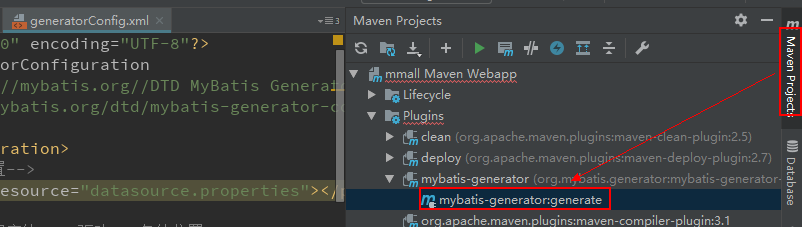
双击插件自动生成代码
mybatis之generator生成代码的更多相关文章
- Mybatis自己主动生成代码
在mybatis自己主动生成代码有两种方式: 方式一:是通过使用eclipse作为开发工具.採用maven来构建项目生成的.以下的演示是通过第一种方式. 今天来记录下mybatis-generator ...
- (转)MyBatis框架的学习(七)——MyBatis逆向工程自动生成代码
http://blog.csdn.net/yerenyuan_pku/article/details/71909325 什么是逆向工程 MyBatis的一个主要的特点就是需要程序员自己编写sql,那么 ...
- MyBatis框架之mybatis逆向工程自动生成代码
http://www.jb51.net/article/82062.htm Mybatis属于半自动ORM,在使用这个框架中,工作量最大的就是书写Mapping的映射文件,由于手动书写很容易出错,我们 ...
- mybatis Generator生成代码及使用方式
本文原创,转载请注明:http://www.cnblogs.com/fengzheng/p/5889312.html 为什么要有mybatis mybatis 是一个 Java 的 ORM 框架,OR ...
- Mybatis逆向工程自动生成代码(Ubuntu18.04-idea环境)
最近在学习taotao商城项目,有一节是关于mybatis逆向工程的,参考了这个博文,https://blog.csdn.net/yerenyuan_pku/article/details/71909 ...
- 回顾一下MyBatis逆向工程——自动生成代码
前言 最近做的项目(SSM+Shiro)的数据库表已经创建完成,一共有15张表,如果我们一个个去写pojo/bean的代码以及各种sql语句的话未免太过麻烦而且很容易出错,这个时候我们就需要MyBat ...
- 【MyBatis学习15】MyBatis的逆向工程生成代码
1. 什么是逆向工程 mybatis的一个主要的特点就是需要程序员自己编写sql,那么如果表太多的话,难免会很麻烦,所以mybatis官方提供了一个逆向工程,可以针对单表自动生成mybatis执行所需 ...
- SpringBoot+Mybatis+MySql 自动生成代码 自动分页
一.配置文件 <!-- 通用mapper --> <dependency> <groupId>tk.mybatis</groupId> <arti ...
- 使用mybatis插件自动生成代码以及问题处理
1.pom.xml中加入依赖插件 <!-- mybatis generator 自动生成代码插件 --> <plugin> <groupId>org.mybatis ...
随机推荐
- 一个简单的Java Web项目搭建流程
今天试图在服务器上搭建一个web服务器,顺便回顾了java web项目的入门,使用Servlet处理HTTP请求,并记录日志等操作.当很久没有做过web项目时,有些东西还是很容易忘记的. Maven配 ...
- python学习 (三十三) Modules
1: 方法一: 导入整个模块 import math class ModulesDemo(): def builtin_modules(self): print(math.sqrt()) m = Mo ...
- “,”、“natural join”、“natural left outer join”、“natural right outer join”的用法总结
“,”:代表笛卡尔积: “natural join”:代表自然连接,即同名列等值连接: “natural left outer join”:表示左外连接: “natural right outer j ...
- XStream使用笔记
XStream是一个可以将JavaBean生成XML的工具,很方便的帮助我们在后台服务器将数据序列化为XML,接下来就可以将XML数据响应给前台进行数据交互 XStream需要的jar包 * 核心JA ...
- 浅谈PHP面向对象编程(七、抽象类与接口)
7.0 抽象类与接口 当定义一个类时,常常需要定义一些方法来描述该类的行为特征.但有时这些方法的实现方式是无法确定的,此时就可以使用抽象类和接口. 抽象类和接口用于提高程序的灵活性.抽象类是一种特殊的 ...
- 快速安装laravel和依赖
http://pkg.phpcomposer.com CMD敲命令: composer config -g repositories.packagist composer http://packagi ...
- python学习笔记(七):面向对象编程、类
一.面向对象编程 面向对象--Object Oriented Programming,简称oop,是一种程序设计思想.在说面向对象之前,先说一下什么是编程范式,编程范式你按照什么方式来去编程,去实现一 ...
- Python - 第一个 Django 项目
Django 的安装: pip3 install django==1.11.11 pip3 install -i https://pypi.tuna.tsinghua.edu.cn/simple/ d ...
- R语言可视化学习笔记之添加p-value和显著性标记
R语言可视化学习笔记之添加p-value和显著性标记 http://www.jianshu.com/p/b7274afff14f?from=timeline 上篇文章中提了一下如何通过ggpubr ...
- keil5破解
没有破解之前的keil只能编译限制大小的代码,72K好像我忘了?太长的话会报错. 注册机网址:http://bbs.armfly.com/read.php?tid=2346 1.在keil5左上角的F ...